 5326ffe77e
* feat(tokenizer): Introduce TokenizerProcessor for text tokenization

- Added TokenizerProcessor class to handle tokenization of task strings using Hugging Face's AutoTokenizer.
- Supports both string and list inputs, with customizable parameters for task key, output key, and tokenization settings.
- Implemented comprehensive unit tests to validate functionality, including handling of various input scenarios and integration with RobotProcessor.
- Updated types.py to include LANGUAGE feature type and modified __init__.py to register the new processor.

* feat(language): Enhance language processing in TokenizerProcessor

- Added OBS_LANGUAGE constant to define the observation language key.
- Updated TokenizerProcessor to store tokenized task data in the observation dictionary, ensuring compatibility with the new language feature.
- Introduced Pi0NewLineProcessor to append newlines to tasks for proper tokenization.
- Modified tests to validate the integration of language tokens and attention masks in the observation structure.

* feat(tokenizer): Add padding configuration to TokenizerProcessor

- Introduced `padding_side` parameter to the TokenizerProcessor for customizable padding direction.
- Updated the `make_pi0_processor` function to include the new padding configuration.
- Enhanced unit tests to validate the functionality of the `padding_side` parameter in various scenarios.

* feat(processor): Add state management methods to Pi0NewLineProcessor

* feat(normalization): Track normalization and unnormalization info in complementary data

- Updated NormalizerProcessor and UnnormalizerProcessor to accept additional parameters for tracking normalization modes.
- Enhanced the __call__ methods to store normalization and unnormalization information in the complementary data of transitions.
- Added unit tests to verify the correct tracking of normalization info, including scenarios with missing stats and selective normalization keys.

* feat(factory): Add preprocessor and postprocessor overrides to ProcessorConfigKwargs

- Updated ProcessorConfigKwargs to include optional overrides for preprocessor and postprocessor configurations.
- Enhanced the make_processor function to utilize the new overrides, allowing for more flexible processor initialization.

* feat(processors): Integrate RenameProcessor into various processor configurations

- Added RenameProcessor to the input steps of multiple processor functions, including make_act_processor, make_diffusion_processor, make_pi0_processor, make_sac_processor, make_tdmpc_processor, make_vqbet_processor, and make_smolvla_processor.
- Consolidated normalization features from input and output into a single NormalizerProcessor for improved efficiency.
- Updated the input steps to ensure compatibility with the new RenameProcessor integration.

* feat(smolvla): Refactor language processing and introduce new line processor (#1658)

- Removed the prepare_language method and directly accessed language tokens and masks from the batch using the OBS_LANGUAGE constant.
- Added SmolVLANewLineProcessor to ensure tasks end with a newline, enhancing tokenization compatibility.
- Updated the make_smolvla_processor function to include the new line processor and tokenizer processor for improved input handling.

* feture(policies): add device processor (#1659)

* feat(processors): Integrate DeviceProcessor into multiple processor configurations

- Added DeviceProcessor to the input and output steps of various processor functions, including make_act_processor, make_diffusion_processor, make_pi0_processor, make_pi0fast_processor, make_sac_processor, make_tdmpc_processor, make_vqbet_processor, and make_smolvla_processor.
- Enhanced the DeviceProcessor class with state management methods and ensured compatibility with existing processor pipelines.
- Introduced unit tests for DeviceProcessor to validate functionality across different scenarios, including CPU and CUDA operations.

* [pre-commit.ci] auto fixes from pre-commit.com hooks

for more information, see https://pre-commit.ci

* refactor(pipeline): Remove to() method for device management

- Eliminated the to() method from RobotProcessor, which was responsible for moving tensor states to specified devices.
- Removed associated unit tests that validated the functionality of the to() method across various scenarios.
- Streamlined the pipeline code by focusing on other device management strategies.

* feat(processor): Enhance DeviceProcessor with float dtype conversion

- Added support for optional float dtype conversion in DeviceProcessor, allowing tensors to be converted to specified floating-point types while preserving non-float types.
- Implemented validation for float dtype input and updated the processor's configuration methods to include float dtype.
- Refactored tensor processing logic to streamline device movement and dtype conversion.
- Introduced comprehensive unit tests to validate the new float dtype functionality across various scenarios.

* feat(policies): Add new line processors and update module exports

* feat(processor): Enhance batch and device processors to handle index and task_index fields

- Added logic to ToBatchProcessor for unsqueezing 0D tensors for index and task_index fields, ensuring they are processed as 1D tensors.
- Updated DeviceProcessor to process index and task_index fields in complementary data, preserving their tensor types and ensuring non-tensor fields remain unchanged.
- Enhanced unit tests to validate the correct handling of index and task_index fields across various scenarios, including device compatibility and dtype preservation.








Meet HopeJR – A humanoid robot arm and hand for dexterous manipulation!
Control it with exoskeletons and gloves for precise hand movements.
Perfect for advanced manipulation tasks! 🤖
 |
 |
Meet the updated SO100, the SO-101 – Just €114 per arm!
Train it in minutes with a few simple moves on your laptop.
Then sit back and watch your creation act autonomously! 🤯
See the full SO-101 tutorial here.
Want to take it to the next level? Make your SO-101 mobile by building LeKiwi!
Check out the LeKiwi tutorial and bring your robot to life on wheels.

LeRobot: State-of-the-art AI for real-world robotics
🤗 LeRobot aims to provide models, datasets, and tools for real-world robotics in PyTorch. The goal is to lower the barrier to entry to robotics so that everyone can contribute and benefit from sharing datasets and pretrained models.
🤗 LeRobot contains state-of-the-art approaches that have been shown to transfer to the real-world with a focus on imitation learning and reinforcement learning.
🤗 LeRobot already provides a set of pretrained models, datasets with human collected demonstrations, and simulation environments to get started without assembling a robot. In the coming weeks, the plan is to add more and more support for real-world robotics on the most affordable and capable robots out there.
🤗 LeRobot hosts pretrained models and datasets on this Hugging Face community page: huggingface.co/lerobot
Examples of pretrained models on simulation environments
 |
 |
 |
| ACT policy on ALOHA env | TDMPC policy on SimXArm env | Diffusion policy on PushT env |
Installation
LeRobot works with Python 3.10+ and PyTorch 2.2+.
Environment Setup
Create a virtual environment with Python 3.10 and activate it, e.g. with miniconda:
conda create -y -n lerobot python=3.10
conda activate lerobot
When using miniconda, install ffmpeg in your environment:
conda install ffmpeg -c conda-forge
NOTE: This usually installs
ffmpeg 7.Xfor your platform compiled with thelibsvtav1encoder. Iflibsvtav1is not supported (check supported encoders withffmpeg -encoders), you can:
- [On any platform] Explicitly install
ffmpeg 7.Xusing:conda install ffmpeg=7.1.1 -c conda-forge
- [On Linux only] Install ffmpeg build dependencies and compile ffmpeg from source with libsvtav1, and make sure you use the corresponding ffmpeg binary to your install with
which ffmpeg.
Install LeRobot 🤗
From Source
First, clone the repository and navigate into the directory:
git clone https://github.com/huggingface/lerobot.git
cd lerobot
Then, install the library in editable mode. This is useful if you plan to contribute to the code.
pip install -e .
NOTE: If you encounter build errors, you may need to install additional dependencies (
cmake,build-essential, andffmpeg libs). On Linux, run:sudo apt-get install cmake build-essential python3-dev pkg-config libavformat-dev libavcodec-dev libavdevice-dev libavutil-dev libswscale-dev libswresample-dev libavfilter-dev. For other systems, see: Compiling PyAV
For simulations, 🤗 LeRobot comes with gymnasium environments that can be installed as extras:
For instance, to install 🤗 LeRobot with aloha and pusht, use:
pip install -e ".[aloha, pusht]"
Installation from PyPI
Core Library: Install the base package with:
pip install lerobot
This installs only the default dependencies.
Extra Features: To install additional functionality, use one of the following:
pip install 'lerobot[all]'          # All available features
pip install 'lerobot[aloha,pusht]'  # Specific features (Aloha & Pusht)
pip install 'lerobot[feetech]'      # Feetech motor support
Replace [...] with your desired features.
Available Tags: For a full list of optional dependencies, see: https://pypi.org/project/lerobot/
Weights & Biases
To use Weights and Biases for experiment tracking, log in with
wandb login
(note: you will also need to enable WandB in the configuration. See below.)
Visualize datasets
Check out example 1 that illustrates how to use our dataset class which automatically downloads data from the Hugging Face hub.
You can also locally visualize episodes from a dataset on the hub by executing our script from the command line:
python -m lerobot.scripts.visualize_dataset \
    --repo-id lerobot/pusht \
    --episode-index 0
or from a dataset in a local folder with the root option and the --local-files-only (in the following case the dataset will be searched for in ./my_local_data_dir/lerobot/pusht)
python -m lerobot.scripts.visualize_dataset \
    --repo-id lerobot/pusht \
    --root ./my_local_data_dir \
    --local-files-only 1 \
    --episode-index 0
It will open rerun.io and display the camera streams, robot states and actions, like this:
Our script can also visualize datasets stored on a distant server. See python -m lerobot.scripts.visualize_dataset --help for more instructions.
The LeRobotDataset format
A dataset in LeRobotDataset format is very simple to use. It can be loaded from a repository on the Hugging Face hub or a local folder simply with e.g. dataset = LeRobotDataset("lerobot/aloha_static_coffee") and can be indexed into like any Hugging Face and PyTorch dataset. For instance dataset[0] will retrieve a single temporal frame from the dataset containing observation(s) and an action as PyTorch tensors ready to be fed to a model.
A specificity of LeRobotDataset is that, rather than retrieving a single frame by its index, we can retrieve several frames based on their temporal relationship with the indexed frame, by setting delta_timestamps to a list of relative times with respect to the indexed frame. For example, with delta_timestamps = {"observation.image": [-1, -0.5, -0.2, 0]} one can retrieve, for a given index, 4 frames: 3 "previous" frames 1 second, 0.5 seconds, and 0.2 seconds before the indexed frame, and the indexed frame itself (corresponding to the 0 entry). See example 1_load_lerobot_dataset.py for more details on delta_timestamps.
Under the hood, the LeRobotDataset format makes use of several ways to serialize data which can be useful to understand if you plan to work more closely with this format. We tried to make a flexible yet simple dataset format that would cover most type of features and specificities present in reinforcement learning and robotics, in simulation and in real-world, with a focus on cameras and robot states but easily extended to other types of sensory inputs as long as they can be represented by a tensor.
Here are the important details and internal structure organization of a typical LeRobotDataset instantiated with dataset = LeRobotDataset("lerobot/aloha_static_coffee"). The exact features will change from dataset to dataset but not the main aspects:
dataset attributes:
  ├ hf_dataset: a Hugging Face dataset (backed by Arrow/parquet). Typical features example:
  │  ├ observation.images.cam_high (VideoFrame):
  │  │   VideoFrame = {'path': path to a mp4 video, 'timestamp' (float32): timestamp in the video}
  │  ├ observation.state (list of float32): position of an arm joints (for instance)
  │  ... (more observations)
  │  ├ action (list of float32): goal position of an arm joints (for instance)
  │  ├ episode_index (int64): index of the episode for this sample
  │  ├ frame_index (int64): index of the frame for this sample in the episode ; starts at 0 for each episode
  │  ├ timestamp (float32): timestamp in the episode
  │  ├ next.done (bool): indicates the end of an episode ; True for the last frame in each episode
  │  └ index (int64): general index in the whole dataset
  ├ episode_data_index: contains 2 tensors with the start and end indices of each episode
  │  ├ from (1D int64 tensor): first frame index for each episode — shape (num episodes,) starts with 0
  │  └ to: (1D int64 tensor): last frame index for each episode — shape (num episodes,)
  ├ stats: a dictionary of statistics (max, mean, min, std) for each feature in the dataset, for instance
  │  ├ observation.images.cam_high: {'max': tensor with same number of dimensions (e.g. `(c, 1, 1)` for images, `(c,)` for states), etc.}
  │  ...
  ├ info: a dictionary of metadata on the dataset
  │  ├ codebase_version (str): this is to keep track of the codebase version the dataset was created with
  │  ├ fps (float): frame per second the dataset is recorded/synchronized to
  │  ├ video (bool): indicates if frames are encoded in mp4 video files to save space or stored as png files
  │  └ encoding (dict): if video, this documents the main options that were used with ffmpeg to encode the videos
  ├ videos_dir (Path): where the mp4 videos or png images are stored/accessed
  └ camera_keys (list of string): the keys to access camera features in the item returned by the dataset (e.g. `["observation.images.cam_high", ...]`)
A LeRobotDataset is serialised using several widespread file formats for each of its parts, namely:
- hf_dataset stored using Hugging Face datasets library serialization to parquet
- videos are stored in mp4 format to save space
- metadata are stored in plain json/jsonl files
Dataset can be uploaded/downloaded from the HuggingFace hub seamlessly. To work on a local dataset, you can specify its location with the root argument if it's not in the default ~/.cache/huggingface/lerobot location.
Evaluate a pretrained policy
Check out example 2 that illustrates how to download a pretrained policy from Hugging Face hub, and run an evaluation on its corresponding environment.
We also provide a more capable script to parallelize the evaluation over multiple environments during the same rollout. Here is an example with a pretrained model hosted on lerobot/diffusion_pusht:
python -m lerobot.scripts.eval \
    --policy.path=lerobot/diffusion_pusht \
    --env.type=pusht \
    --eval.batch_size=10 \
    --eval.n_episodes=10 \
    --policy.use_amp=false \
    --policy.device=cuda
Note: After training your own policy, you can re-evaluate the checkpoints with:
python -m lerobot.scripts.eval --policy.path={OUTPUT_DIR}/checkpoints/last/pretrained_model
See python -m lerobot.scripts.eval --help for more instructions.
Train your own policy
Check out example 3 that illustrates how to train a model using our core library in python, and example 4 that shows how to use our training script from command line.
To use wandb for logging training and evaluation curves, make sure you've run wandb login as a one-time setup step. Then, when running the training command above, enable WandB in the configuration by adding --wandb.enable=true.
A link to the wandb logs for the run will also show up in yellow in your terminal. Here is an example of what they look like in your browser. Please also check here for the explanation of some commonly used metrics in logs.
<img src="https://raw.githubusercontent.com/huggingface/lerobot/main/media/wandb.png" alt="WandB logs example">
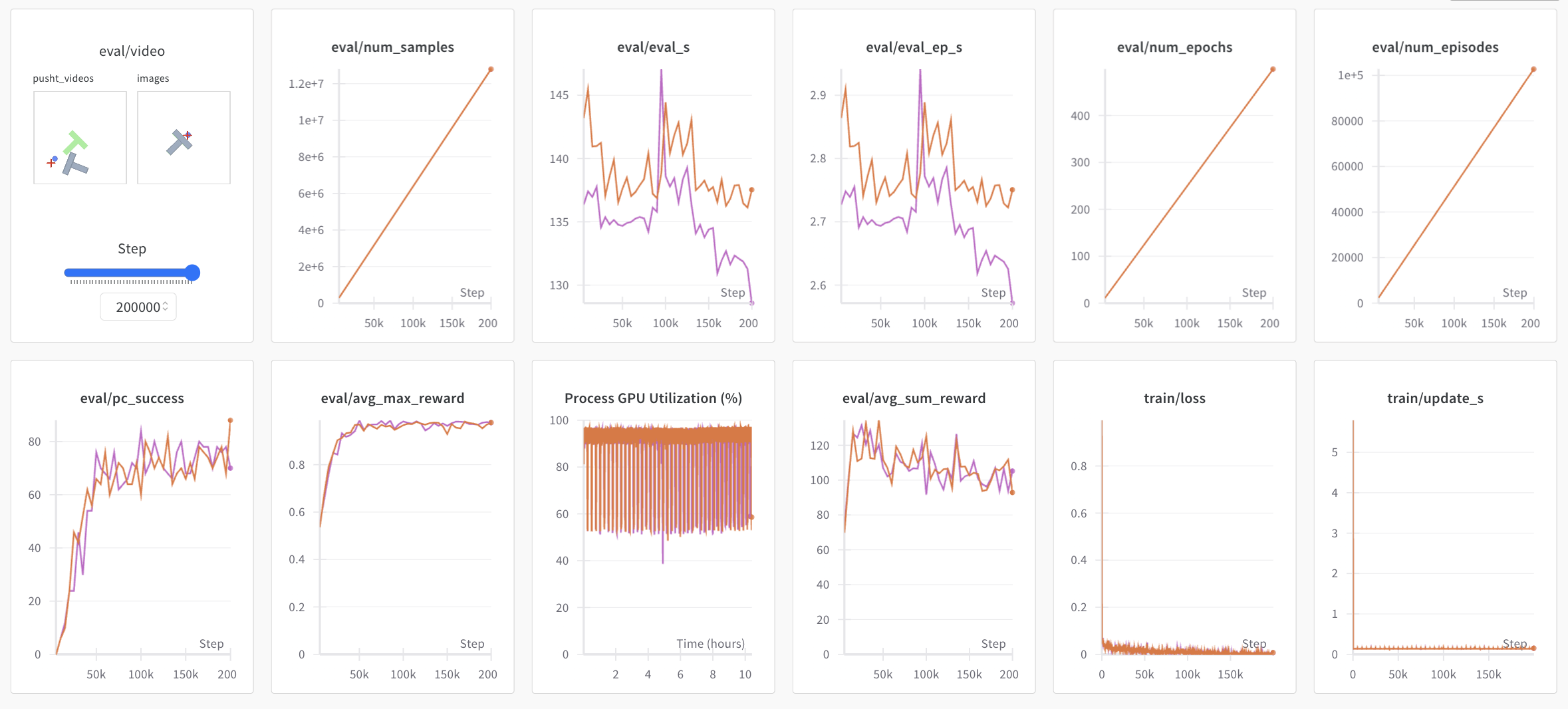
Note: For efficiency, during training every checkpoint is evaluated on a low number of episodes. You may use --eval.n_episodes=500 to evaluate on more episodes than the default. Or, after training, you may want to re-evaluate your best checkpoints on more episodes or change the evaluation settings. See python -m lerobot.scripts.eval --help for more instructions.
Reproduce state-of-the-art (SOTA)
We provide some pretrained policies on our hub page that can achieve state-of-the-art performances. You can reproduce their training by loading the config from their run. Simply running:
python -m lerobot.scripts.train --config_path=lerobot/diffusion_pusht
reproduces SOTA results for Diffusion Policy on the PushT task.
Contribute
If you would like to contribute to 🤗 LeRobot, please check out our contribution guide.
Add a pretrained policy
Once you have trained a policy you may upload it to the Hugging Face hub using a hub id that looks like ${hf_user}/${repo_name} (e.g. lerobot/diffusion_pusht).
You first need to find the checkpoint folder located inside your experiment directory (e.g. outputs/train/2024-05-05/20-21-12_aloha_act_default/checkpoints/002500). Within that there is a pretrained_model directory which should contain:
config.json: A serialized version of the policy configuration (following the policy's dataclass config).model.safetensors: A set oftorch.nn.Moduleparameters, saved in Hugging Face Safetensors format.train_config.json: A consolidated configuration containing all parameters used for training. The policy configuration should matchconfig.jsonexactly. This is useful for anyone who wants to evaluate your policy or for reproducibility.
To upload these to the hub, run the following:
huggingface-cli upload ${hf_user}/${repo_name} path/to/pretrained_model
See eval.py for an example of how other people may use your policy.
Acknowledgment
- The LeRobot team 🤗 for building SmolVLA Paper, Blog.
- Thanks to Tony Zhao, Zipeng Fu and colleagues for open sourcing ACT policy, ALOHA environments and datasets. Ours are adapted from ALOHA and Mobile ALOHA.
- Thanks to Cheng Chi, Zhenjia Xu and colleagues for open sourcing Diffusion policy, Pusht environment and datasets, as well as UMI datasets. Ours are adapted from Diffusion Policy and UMI Gripper.
- Thanks to Nicklas Hansen, Yunhai Feng and colleagues for open sourcing TDMPC policy, Simxarm environments and datasets. Ours are adapted from TDMPC and FOWM.
- Thanks to Antonio Loquercio and Ashish Kumar for their early support.
- Thanks to Seungjae (Jay) Lee, Mahi Shafiullah and colleagues for open sourcing VQ-BeT policy and helping us adapt the codebase to our repository. The policy is adapted from VQ-BeT repo.
Citation
If you want, you can cite this work with:
@misc{cadene2024lerobot,
    author = {Cadene, Remi and Alibert, Simon and Soare, Alexander and Gallouedec, Quentin and Zouitine, Adil and Palma, Steven and Kooijmans, Pepijn and Aractingi, Michel and Shukor, Mustafa and Aubakirova, Dana and Russi, Martino and Capuano, Francesco and Pascal, Caroline and Choghari, Jade and Moss, Jess and Wolf, Thomas},
    title = {LeRobot: State-of-the-art Machine Learning for Real-World Robotics in Pytorch},
    howpublished = "\url{https://github.com/huggingface/lerobot}",
    year = {2024}
}