mirror of
https://github.com/huggingface/lerobot.git
synced 2026-05-31 02:41:24 +00:00
Compare commits
270 Commits
smolvla-de
...
test/robot
| Author | SHA1 | Date | |
|---|---|---|---|

|
9adbd245e5 | ||
|
|
859a369b29 | ||
|
|
cca647307b | ||
|
|
dae5f7c74d | ||
|
|
d6d8f29b5c | ||
|
|
27bb7c4d71 | ||
|
|
2d86812b97 | ||
|
|
57c2181ed2 | ||
|
|
81c49cecd0 | ||
|
|
4675b3cd02 | ||
|
|
dbce247ec1 | ||
|
|
904bc618ee | ||
|
|
ddd8fd325b | ||
|
|
7f34e1af9c | ||
|
|
3416036e34 | ||
|
|
2af8edcf74 | ||
|
|
b089c6db3a | ||
|
|
15b5d28f45 | ||
|
|
35c4b01752 | ||
|
|
6348f0f418 | ||
|
|
720a6374ba | ||
|
|
3297c7e802 | ||
|
|
0b5b438f50 | ||
|
|
8a6412b0db | ||
|
|
b0592d9bc8 | ||
|
|
363fe64ff9 | ||
|
|
bbcb12e919 | ||
|
|
3e87b09d34 | ||
|
|
81de27dc9a | ||
|
|
eb94a5f03f | ||
|
|
742708942c | ||
|
|
5a2f9b6589 | ||
|
|
06f0c579b7 | ||
|
|
7890767d34 | ||
|
|
d322cb0220 | ||
|
|
f011173ff6 | ||
|
|
20129cd4c2 | ||
|
|
307823bc8d | ||
|
|
64303781c2 | ||
|
|
dd3e305164 | ||
|
|
cb9cac6a1b | ||
|
|
95f9b45418 | ||
|
|
f9db727647 | ||
|
|
230c7fdfab | ||
|
|
320f7e8450 | ||
|
|
08fbbb318f | ||
|
|
8b98399206 | ||
|
|
237b14a6ec | ||
|
|
2e705ff554 | ||
|
|
d72a3f9c32 | ||
|
|
73ac4f38b2 | ||
|
|
a0e69dd708 | ||
|
|
b207babd9e | ||
|
|
293870d0f6 | ||
|
|
87a8cb6d89 | ||
|
|
69dc3f5c9c | ||
|
|
e4d4754600 | ||
|
|
2e528a8b12 | ||
|
|
b7a9b0689a | ||
|
|
b6b9635be6 | ||
|
|
21b1026872 | ||
|
|
8c3eab32b0 | ||
|
|
29633865c7 | ||
|
|
702749b7d3 | ||
|
|
bf1c737858 | ||
|
|
d07c7347f8 | ||
|
|
57e5e4cc07 | ||
|
|
2743c29a96 | ||
|
|
2bb73ac431 | ||
|
|
9afc4b771c | ||
|
|
f71e224023 | ||
|
|
889de7c415 | ||
|
|
3539251b18 | ||
|
|
1f210bc8a3 | ||
|
|
d70bc4bde9 | ||
|
|
bdbca09cb2 | ||
|
|
e0b292ab51 | ||
|
|
f960f4d8d4 | ||
|
|
9e57ec7837 | ||
|
|
0a7f51f0da | ||
|
|
4ca92a28e9 | ||
|
|
0464dc91b3 | ||
|
|
d32daebf75 | ||
|
|
27cb0c40bd | ||
|
|
12abc9ca86 | ||
|
|
4005065223 | ||
|
|
443fed216c | ||
|
|
42a87e7211 | ||
|
|
034171a89a | ||
|
|
782dff1163 | ||
|
|
8924ccbbab | ||
|
|
792c3d961d | ||
|
|
e998dddcfa | ||
|
|
99c0938b42 | ||
|
|
716029b1e3 | ||
|
|
3848a8f9aa | ||
|
|
f7672e14c7 | ||
|
|
e393af2d88 | ||
|
|
0dcb2caba8 | ||
|
|
4679725957 | ||
|
|
57319062aa | ||
|
|
078f59bfd1 | ||
|
|
36fcea2002 | ||
|
|
2971bdfed5 | ||
|
|
28cd3a6f3a | ||
|
|
c0570b3003 | ||
|
|
eeb8490016 | ||
|
|
854b78975a | ||
|
|
e55d2ffe50 | ||
|
|
1ebd81552c | ||
|
|
65569ba90e | ||
|
|
79293800f1 | ||
|
|
bc765f9e95 | ||
|
|
201311503f | ||
|
|
8cc0232e73 | ||
|
|
6bfcc18e73 | ||
|
|
e096754d14 | ||
|
|
02803f545d | ||
|
|
8503e8e166 | ||
|
|
d6007c6e7d | ||
|
|
50963fcf13 | ||
|
|
051a52a4ce | ||
|
|
2292b514aa | ||
|
|
1f1a01a798 | ||
|
|
faa476f0d2 | ||
|
|
5130b69ece | ||
|
|
aed85241b7 | ||
|
|
21c3ac42ee | ||
|
|
2d3a5fb2be | ||
|
|
a631e4c11c | ||
|
|
222d6f104e | ||
|
|
7a3b424cd3 | ||
|
|
af295fadb5 | ||
|
|
9644e2b086 | ||
|
|
6ccf083127 | ||
|
|
bb774e7acd | ||
|
|
dcbbeab80b | ||
|
|
b71ac34214 | ||
|
|
c237d1379e | ||
|
|
cf963eb1b0 | ||
|
|
4293b6a4fb | ||
|
|
7a75bb9f61 | ||
|
|
0c1d4cb323 | ||
|
|
c6212d585d | ||
|
|
7c8ab8e2d6 | ||
|
|
1de75c46c0 | ||
|
|
4ad109cff8 | ||
|
|
8994252019 | ||
|
|
9832daf08d | ||
|
|
39d8f45810 | ||
|
|
30fcd3d417 | ||
|
|
039b437ef0 | ||
|
|
7582a0a2b0 | ||
|
|
25388d0947 | ||
|
|
7152bc8aa7 | ||
|
|
5b46dc0b6a | ||
|
|
4273f1f384 | ||
|
|
97194bf7f3 | ||
|
|
0ac026b521 | ||
|
|
ff7cfdaf40 | ||
|
|
57c97762e1 | ||
|
|
a38bb15e79 | ||
|
|
3ceaee999d | ||
|
|
d485dc1313 | ||
|
|
329d103453 | ||
|
|
9f46a3d8f9 | ||
|
|
c9ca9e4316 | ||
|
|
5a57e6f4a7 | ||
|
|
a2f5c34625 | ||
|
|
1f1e1bcfe8 | ||
|
|
e047074825 | ||
|
|
c2e761437d | ||
|
|
fedac994c3 | ||
|
|
7d558d058e | ||
|
|
1d3e1cbdbd | ||
|
|
0ccc957d5c | ||
|
|
a4d487bc1d | ||
|
|
8ca03a7255 | ||
|
|
f2ed2bfb2f | ||
|
|
40675ec76c | ||
|
|
9e34c1d731 | ||
|
|
857f335be9 | ||
|
|
fc4a95f187 | ||
|
|
4fe1880887 | ||
|
|
6fa859fa19 | ||
|
|
2abfa5838d | ||
|
|
3d119c0ccb | ||
|
|
a32081757d | ||
|
|
56c04ffc53 | ||
|
|
715d4557af | ||
|
|
6541982dff | ||
|
|
43bc9404bb | ||
|
|
375499c323 | ||
|
|
17a4447cef | ||
|
|
287dc13d96 | ||
|
|
02a1cf6a4e | ||
|
|
34cd1e47bf | ||
|
|
74d56834af | ||
|
|
dd80dbb4cd | ||
|
|
bc020ee0a4 | ||
|
|
a15767aff1 | ||
|
|
9af0a9bf37 | ||
|
|
e2c8bc6948 | ||
|
|
2c68c6ca40 | ||
|
|
dd1f33e5ed | ||
|
|
2c1bb766ff | ||
|
|
c1c71fb994 | ||
|
|
2d56f35071 | ||
|
|
64ce2669ca | ||
|
|
f527adf7a9 | ||
|
|
6a77189f50 | ||
|
|
e4a6d035f9 | ||
|
|
794f6e00fc | ||
|
|
97494c6a39 | ||
|
|
9358d334c7 | ||
|
|
c85a9253e7 | ||
|
|
8d659a6aa9 | ||
|
|
f6a2396484 | ||
|
|
7a7af82e35 | ||
|
|
7f23972f3f | ||
|
|
3362b665e6 | ||
|
|
eeeccdba53 | ||
|
|
bd5b181dfd | ||
|
|
858678786a | ||
|
|
0f972661e1 | ||
|
|
2e9b144c56 | ||
|
|
fa8ba9e4e2 | ||
|
|
2037cc0219 | ||
|
|
5006da72ff | ||
|
|
ad0bacbfe4 | ||
|
|
e33ca2c980 | ||
|
|
f0505e81cc | ||
|
|
1f7ddc1d76 | ||
|
|
ce63cfdb25 | ||
|
|
d6f1359e69 | ||
|
|
2357d4aceb | ||
|
|
d6ccdc222c | ||
|
|
9bd0788131 | ||
|
|
1ae62c28f7 | ||
|
|
baf6e66c3d | ||
|
|
a065bd61ae | ||
|
|
5dc3c74e64 | ||
|
|
4214b01703 | ||
|
|
b974e5541f | ||
|
|
fd64dc84ae | ||
|
|
06988b2135 | ||
|
|
7ed7570b17 | ||
|
|
e2d13ba7e4 | ||
|
|
f6c1049474 | ||
|
|
2b24feb604 | ||
|
|
a13e49073c | ||
|
|
2c7e0f17b6 | ||
|
|
418866007e | ||
|
|
5ab418dbeb | ||
|
|
95f61ee9d4 | ||
|
|
ac89c8d226 | ||
|
|
d75d904e43 | ||
|
|
ea4d8d990c | ||
|
|
c93cbb8311 | ||
|
|
c0137e89b9 | ||
|
|
3111ba78ad | ||
|
|
3d3a176940 | ||
|
|
212c6095a2 | ||
|
|
48469ec674 | ||
|
|
c7dfd32b43 | ||
|
|
731fb6ebaf | ||
|
|
13e124302f | ||
|
|
59bdd29106 | ||
|
|
124829104b | ||
|
|
21cd2940a9 |
68
.cache/calibration/aloha_default/left_follower.json
Normal file
68
.cache/calibration/aloha_default/left_follower.json
Normal file
@@ -0,0 +1,68 @@
|
||||
{
|
||||
"homing_offset": [
|
||||
2048,
|
||||
3072,
|
||||
3072,
|
||||
-1024,
|
||||
-1024,
|
||||
2048,
|
||||
-2048,
|
||||
2048,
|
||||
-2048
|
||||
],
|
||||
"drive_mode": [
|
||||
1,
|
||||
1,
|
||||
1,
|
||||
0,
|
||||
0,
|
||||
1,
|
||||
0,
|
||||
1,
|
||||
0
|
||||
],
|
||||
"start_pos": [
|
||||
2015,
|
||||
3058,
|
||||
3061,
|
||||
1071,
|
||||
1071,
|
||||
2035,
|
||||
2152,
|
||||
2029,
|
||||
2499
|
||||
],
|
||||
"end_pos": [
|
||||
-1008,
|
||||
-1963,
|
||||
-1966,
|
||||
2141,
|
||||
2143,
|
||||
-971,
|
||||
3043,
|
||||
-1077,
|
||||
3144
|
||||
],
|
||||
"calib_mode": [
|
||||
"DEGREE",
|
||||
"DEGREE",
|
||||
"DEGREE",
|
||||
"DEGREE",
|
||||
"DEGREE",
|
||||
"DEGREE",
|
||||
"DEGREE",
|
||||
"DEGREE",
|
||||
"LINEAR"
|
||||
],
|
||||
"motor_names": [
|
||||
"waist",
|
||||
"shoulder",
|
||||
"shoulder_shadow",
|
||||
"elbow",
|
||||
"elbow_shadow",
|
||||
"forearm_roll",
|
||||
"wrist_angle",
|
||||
"wrist_rotate",
|
||||
"gripper"
|
||||
]
|
||||
}
|
||||
68
.cache/calibration/aloha_default/left_leader.json
Normal file
68
.cache/calibration/aloha_default/left_leader.json
Normal file
@@ -0,0 +1,68 @@
|
||||
{
|
||||
"homing_offset": [
|
||||
2048,
|
||||
3072,
|
||||
3072,
|
||||
-1024,
|
||||
-1024,
|
||||
2048,
|
||||
-2048,
|
||||
2048,
|
||||
-1024
|
||||
],
|
||||
"drive_mode": [
|
||||
1,
|
||||
1,
|
||||
1,
|
||||
0,
|
||||
0,
|
||||
1,
|
||||
0,
|
||||
1,
|
||||
0
|
||||
],
|
||||
"start_pos": [
|
||||
2035,
|
||||
3024,
|
||||
3019,
|
||||
979,
|
||||
981,
|
||||
1982,
|
||||
2166,
|
||||
2124,
|
||||
1968
|
||||
],
|
||||
"end_pos": [
|
||||
-990,
|
||||
-2017,
|
||||
-2015,
|
||||
2078,
|
||||
2076,
|
||||
-1030,
|
||||
3117,
|
||||
-1016,
|
||||
2556
|
||||
],
|
||||
"calib_mode": [
|
||||
"DEGREE",
|
||||
"DEGREE",
|
||||
"DEGREE",
|
||||
"DEGREE",
|
||||
"DEGREE",
|
||||
"DEGREE",
|
||||
"DEGREE",
|
||||
"DEGREE",
|
||||
"LINEAR"
|
||||
],
|
||||
"motor_names": [
|
||||
"waist",
|
||||
"shoulder",
|
||||
"shoulder_shadow",
|
||||
"elbow",
|
||||
"elbow_shadow",
|
||||
"forearm_roll",
|
||||
"wrist_angle",
|
||||
"wrist_rotate",
|
||||
"gripper"
|
||||
]
|
||||
}
|
||||
68
.cache/calibration/aloha_default/right_follower.json
Normal file
68
.cache/calibration/aloha_default/right_follower.json
Normal file
@@ -0,0 +1,68 @@
|
||||
{
|
||||
"homing_offset": [
|
||||
2048,
|
||||
3072,
|
||||
3072,
|
||||
-1024,
|
||||
-1024,
|
||||
2048,
|
||||
-2048,
|
||||
2048,
|
||||
-2048
|
||||
],
|
||||
"drive_mode": [
|
||||
1,
|
||||
1,
|
||||
1,
|
||||
0,
|
||||
0,
|
||||
1,
|
||||
0,
|
||||
1,
|
||||
0
|
||||
],
|
||||
"start_pos": [
|
||||
2056,
|
||||
2895,
|
||||
2896,
|
||||
1191,
|
||||
1190,
|
||||
2018,
|
||||
2051,
|
||||
2056,
|
||||
2509
|
||||
],
|
||||
"end_pos": [
|
||||
-1040,
|
||||
-2004,
|
||||
-2006,
|
||||
2126,
|
||||
2127,
|
||||
-1010,
|
||||
3050,
|
||||
-1117,
|
||||
3143
|
||||
],
|
||||
"calib_mode": [
|
||||
"DEGREE",
|
||||
"DEGREE",
|
||||
"DEGREE",
|
||||
"DEGREE",
|
||||
"DEGREE",
|
||||
"DEGREE",
|
||||
"DEGREE",
|
||||
"DEGREE",
|
||||
"LINEAR"
|
||||
],
|
||||
"motor_names": [
|
||||
"waist",
|
||||
"shoulder",
|
||||
"shoulder_shadow",
|
||||
"elbow",
|
||||
"elbow_shadow",
|
||||
"forearm_roll",
|
||||
"wrist_angle",
|
||||
"wrist_rotate",
|
||||
"gripper"
|
||||
]
|
||||
}
|
||||
68
.cache/calibration/aloha_default/right_leader.json
Normal file
68
.cache/calibration/aloha_default/right_leader.json
Normal file
@@ -0,0 +1,68 @@
|
||||
{
|
||||
"homing_offset": [
|
||||
2048,
|
||||
3072,
|
||||
3072,
|
||||
-1024,
|
||||
-1024,
|
||||
2048,
|
||||
-2048,
|
||||
2048,
|
||||
-2048
|
||||
],
|
||||
"drive_mode": [
|
||||
1,
|
||||
1,
|
||||
1,
|
||||
0,
|
||||
0,
|
||||
1,
|
||||
0,
|
||||
1,
|
||||
0
|
||||
],
|
||||
"start_pos": [
|
||||
2068,
|
||||
3034,
|
||||
3030,
|
||||
1038,
|
||||
1041,
|
||||
1991,
|
||||
1948,
|
||||
2090,
|
||||
1985
|
||||
],
|
||||
"end_pos": [
|
||||
-1025,
|
||||
-2014,
|
||||
-2015,
|
||||
2058,
|
||||
2060,
|
||||
-955,
|
||||
3091,
|
||||
-940,
|
||||
2576
|
||||
],
|
||||
"calib_mode": [
|
||||
"DEGREE",
|
||||
"DEGREE",
|
||||
"DEGREE",
|
||||
"DEGREE",
|
||||
"DEGREE",
|
||||
"DEGREE",
|
||||
"DEGREE",
|
||||
"DEGREE",
|
||||
"LINEAR"
|
||||
],
|
||||
"motor_names": [
|
||||
"waist",
|
||||
"shoulder",
|
||||
"shoulder_shadow",
|
||||
"elbow",
|
||||
"elbow_shadow",
|
||||
"forearm_roll",
|
||||
"wrist_angle",
|
||||
"wrist_rotate",
|
||||
"gripper"
|
||||
]
|
||||
}
|
||||
2
.gitattributes
vendored
2
.gitattributes
vendored
@@ -18,4 +18,4 @@
|
||||
*.arrow filter=lfs diff=lfs merge=lfs -text
|
||||
*.json !text !filter !merge !diff
|
||||
tests/artifacts/cameras/*.png filter=lfs diff=lfs merge=lfs -text
|
||||
*.bag filter=lfs diff=lfs merge=lfs -text
|
||||
tests/artifacts/cameras/*.bag filter=lfs diff=lfs merge=lfs -text
|
||||
|
||||
2
.github/PULL_REQUEST_TEMPLATE.md
vendored
2
.github/PULL_REQUEST_TEMPLATE.md
vendored
@@ -24,7 +24,7 @@ Examples:
|
||||
pytest -sx tests/test_stuff.py::test_something
|
||||
```
|
||||
```bash
|
||||
python -m lerobot.scripts.train --some.option=true
|
||||
python lerobot/scripts/train.py --some.option=true
|
||||
```
|
||||
|
||||
## SECTION TO REMOVE BEFORE SUBMITTING YOUR PR
|
||||
|
||||
24
.github/workflows/build-docker-images.yml
vendored
24
.github/workflows/build-docker-images.yml
vendored
@@ -40,24 +40,24 @@ jobs:
|
||||
git lfs install
|
||||
|
||||
- name: Set up Docker Buildx
|
||||
uses: docker/setup-buildx-action@b5ca514318bd6ebac0fb2aedd5d36ec1b5c232a2 # v3.10.0
|
||||
uses: docker/setup-buildx-action@v3
|
||||
with:
|
||||
cache-binary: false
|
||||
|
||||
- name: Check out code
|
||||
uses: actions/checkout@11bd71901bbe5b1630ceea73d27597364c9af683 # v4.2.2
|
||||
uses: actions/checkout@v4
|
||||
with:
|
||||
lfs: true
|
||||
persist-credentials: false
|
||||
|
||||
- name: Login to DockerHub
|
||||
uses: docker/login-action@74a5d142397b4f367a81961eba4e8cd7edddf772 # v3.4.0
|
||||
uses: docker/login-action@v3
|
||||
with:
|
||||
username: ${{ secrets.DOCKERHUB_USERNAME }}
|
||||
password: ${{ secrets.DOCKERHUB_PASSWORD }}
|
||||
|
||||
- name: Build and Push CPU
|
||||
uses: docker/build-push-action@ca052bb54ab0790a636c9b5f226502c73d547a25 # v5.4.0
|
||||
uses: docker/build-push-action@v5
|
||||
with:
|
||||
context: .
|
||||
file: ./docker/lerobot-cpu/Dockerfile
|
||||
@@ -78,24 +78,24 @@ jobs:
|
||||
git lfs install
|
||||
|
||||
- name: Set up Docker Buildx
|
||||
uses: docker/setup-buildx-action@b5ca514318bd6ebac0fb2aedd5d36ec1b5c232a2 # v3.10.0
|
||||
uses: docker/setup-buildx-action@v3
|
||||
with:
|
||||
cache-binary: false
|
||||
|
||||
- name: Check out code
|
||||
uses: actions/checkout@11bd71901bbe5b1630ceea73d27597364c9af683 # v4.2.2
|
||||
uses: actions/checkout@v4
|
||||
with:
|
||||
lfs: true
|
||||
persist-credentials: false
|
||||
|
||||
- name: Login to DockerHub
|
||||
uses: docker/login-action@74a5d142397b4f367a81961eba4e8cd7edddf772 # v3.4.0
|
||||
uses: docker/login-action@v3
|
||||
with:
|
||||
username: ${{ secrets.DOCKERHUB_USERNAME }}
|
||||
password: ${{ secrets.DOCKERHUB_PASSWORD }}
|
||||
|
||||
- name: Build and Push GPU
|
||||
uses: docker/build-push-action@ca052bb54ab0790a636c9b5f226502c73d547a25 # v5.4.0
|
||||
uses: docker/build-push-action@v5
|
||||
with:
|
||||
context: .
|
||||
file: ./docker/lerobot-gpu/Dockerfile
|
||||
@@ -110,23 +110,23 @@ jobs:
|
||||
group: aws-general-8-plus
|
||||
steps:
|
||||
- name: Set up Docker Buildx
|
||||
uses: docker/setup-buildx-action@b5ca514318bd6ebac0fb2aedd5d36ec1b5c232a2 # v3.10.0
|
||||
uses: docker/setup-buildx-action@v3
|
||||
with:
|
||||
cache-binary: false
|
||||
|
||||
- name: Check out code
|
||||
uses: actions/checkout@11bd71901bbe5b1630ceea73d27597364c9af683 # v4.2.2
|
||||
uses: actions/checkout@v4
|
||||
with:
|
||||
persist-credentials: false
|
||||
|
||||
- name: Login to DockerHub
|
||||
uses: docker/login-action@74a5d142397b4f367a81961eba4e8cd7edddf772 # v3.4.0
|
||||
uses: docker/login-action@v3
|
||||
with:
|
||||
username: ${{ secrets.DOCKERHUB_USERNAME }}
|
||||
password: ${{ secrets.DOCKERHUB_PASSWORD }}
|
||||
|
||||
- name: Build and Push GPU dev
|
||||
uses: docker/build-push-action@ca052bb54ab0790a636c9b5f226502c73d547a25 # v5.4.0
|
||||
uses: docker/build-push-action@v5
|
||||
with:
|
||||
context: .
|
||||
file: ./docker/lerobot-gpu-dev/Dockerfile
|
||||
|
||||
8
.github/workflows/nightly-tests.yml
vendored
8
.github/workflows/nightly-tests.yml
vendored
@@ -33,7 +33,7 @@ jobs:
|
||||
runs-on:
|
||||
group: aws-general-8-plus
|
||||
container:
|
||||
image: huggingface/lerobot-cpu:latest # zizmor: ignore[unpinned-images]
|
||||
image: huggingface/lerobot-cpu:latest
|
||||
options: --shm-size "16gb"
|
||||
credentials:
|
||||
username: ${{ secrets.DOCKERHUB_USERNAME }}
|
||||
@@ -44,7 +44,7 @@ jobs:
|
||||
working-directory: /lerobot
|
||||
steps:
|
||||
- name: Tests
|
||||
run: pytest -v --cov=./src/lerobot --disable-warnings tests
|
||||
run: pytest -v --cov=./lerobot --disable-warnings tests
|
||||
|
||||
- name: Tests end-to-end
|
||||
run: make test-end-to-end
|
||||
@@ -60,7 +60,7 @@ jobs:
|
||||
CUDA_VISIBLE_DEVICES: "0"
|
||||
TEST_TYPE: "single_gpu"
|
||||
container:
|
||||
image: huggingface/lerobot-gpu:latest # zizmor: ignore[unpinned-images]
|
||||
image: huggingface/lerobot-gpu:latest
|
||||
options: --gpus all --shm-size "16gb"
|
||||
credentials:
|
||||
username: ${{ secrets.DOCKERHUB_USERNAME }}
|
||||
@@ -74,7 +74,7 @@ jobs:
|
||||
run: nvidia-smi
|
||||
|
||||
- name: Test
|
||||
run: pytest -v --cov=./src/lerobot --cov-report=xml --disable-warnings tests
|
||||
run: pytest -v --cov=./lerobot --cov-report=xml --disable-warnings tests
|
||||
# TODO(aliberts): Link with HF Codecov account
|
||||
# - name: Upload coverage reports to Codecov with GitHub Action
|
||||
# uses: codecov/codecov-action@v4
|
||||
|
||||
8
.github/workflows/quality.yml
vendored
8
.github/workflows/quality.yml
vendored
@@ -33,12 +33,12 @@ jobs:
|
||||
runs-on: ubuntu-latest
|
||||
steps:
|
||||
- name: Checkout Repository
|
||||
uses: actions/checkout@11bd71901bbe5b1630ceea73d27597364c9af683 # v4.2.2
|
||||
uses: actions/checkout@v4
|
||||
with:
|
||||
persist-credentials: false
|
||||
|
||||
- name: Set up Python
|
||||
uses: actions/setup-python@7f4fc3e22c37d6ff65e88745f38bd3157c663f7c # v4.9.1
|
||||
uses: actions/setup-python@v4
|
||||
with:
|
||||
python-version: ${{ env.PYTHON_VERSION }}
|
||||
|
||||
@@ -64,9 +64,9 @@ jobs:
|
||||
runs-on: ubuntu-latest
|
||||
steps:
|
||||
- name: Checkout Repository
|
||||
uses: actions/checkout@11bd71901bbe5b1630ceea73d27597364c9af683 # v4.2.2
|
||||
uses: actions/checkout@v4
|
||||
with:
|
||||
persist-credentials: false
|
||||
|
||||
- name: typos-action
|
||||
uses: crate-ci/typos@db35ee91e80fbb447f33b0e5fbddb24d2a1a884f # v1.29.10
|
||||
uses: crate-ci/typos@v1.29.10
|
||||
|
||||
8
.github/workflows/test-docker-build.yml
vendored
8
.github/workflows/test-docker-build.yml
vendored
@@ -35,7 +35,7 @@ jobs:
|
||||
matrix: ${{ steps.set-matrix.outputs.matrix }}
|
||||
steps:
|
||||
- name: Check out code
|
||||
uses: actions/checkout@11bd71901bbe5b1630ceea73d27597364c9af683 # v4.2.2
|
||||
uses: actions/checkout@v4
|
||||
with:
|
||||
persist-credentials: false
|
||||
|
||||
@@ -64,17 +64,17 @@ jobs:
|
||||
docker-file: ${{ fromJson(needs.get_changed_files.outputs.matrix) }}
|
||||
steps:
|
||||
- name: Set up Docker Buildx
|
||||
uses: docker/setup-buildx-action@b5ca514318bd6ebac0fb2aedd5d36ec1b5c232a2 # v3.10.0
|
||||
uses: docker/setup-buildx-action@v3
|
||||
with:
|
||||
cache-binary: false
|
||||
|
||||
- name: Check out code
|
||||
uses: actions/checkout@11bd71901bbe5b1630ceea73d27597364c9af683 # v4.2.2
|
||||
uses: actions/checkout@v4
|
||||
with:
|
||||
persist-credentials: false
|
||||
|
||||
- name: Build Docker image
|
||||
uses: docker/build-push-action@ca052bb54ab0790a636c9b5f226502c73d547a25 # v5.4.0
|
||||
uses: docker/build-push-action@v5
|
||||
with:
|
||||
file: ${{ matrix.docker-file }}
|
||||
context: .
|
||||
|
||||
20
.github/workflows/test.yml
vendored
20
.github/workflows/test.yml
vendored
@@ -17,7 +17,7 @@ name: Tests
|
||||
on:
|
||||
pull_request:
|
||||
paths:
|
||||
- "src/**"
|
||||
- "lerobot/**"
|
||||
- "tests/**"
|
||||
- "examples/**"
|
||||
- ".github/**"
|
||||
@@ -29,7 +29,7 @@ on:
|
||||
branches:
|
||||
- main
|
||||
paths:
|
||||
- "src/**"
|
||||
- "lerobot/**"
|
||||
- "tests/**"
|
||||
- "examples/**"
|
||||
- ".github/**"
|
||||
@@ -50,7 +50,7 @@ jobs:
|
||||
env:
|
||||
MUJOCO_GL: egl
|
||||
steps:
|
||||
- uses: actions/checkout@11bd71901bbe5b1630ceea73d27597364c9af683 # v4.2.2
|
||||
- uses: actions/checkout@v4
|
||||
with:
|
||||
lfs: true # Ensure LFS files are pulled
|
||||
persist-credentials: false
|
||||
@@ -62,7 +62,7 @@ jobs:
|
||||
sudo apt-get install -y libegl1-mesa-dev ffmpeg portaudio19-dev
|
||||
|
||||
- name: Install uv and python
|
||||
uses: astral-sh/setup-uv@d4b2f3b6ecc6e67c4457f6d3e41ec42d3d0fcb86 # v5.4.2
|
||||
uses: astral-sh/setup-uv@v5
|
||||
with:
|
||||
enable-cache: true
|
||||
version: ${{ env.UV_VERSION }}
|
||||
@@ -73,7 +73,7 @@ jobs:
|
||||
|
||||
- name: Test with pytest
|
||||
run: |
|
||||
uv run pytest tests -v --cov=./src/lerobot --durations=0 \
|
||||
uv run pytest tests -v --cov=./lerobot --durations=0 \
|
||||
-W ignore::DeprecationWarning:imageio_ffmpeg._utils:7 \
|
||||
-W ignore::UserWarning:torch.utils.data.dataloader:558 \
|
||||
-W ignore::UserWarning:gymnasium.utils.env_checker:247 \
|
||||
@@ -85,7 +85,7 @@ jobs:
|
||||
env:
|
||||
MUJOCO_GL: egl
|
||||
steps:
|
||||
- uses: actions/checkout@11bd71901bbe5b1630ceea73d27597364c9af683 # v4.2.2
|
||||
- uses: actions/checkout@v4
|
||||
with:
|
||||
lfs: true # Ensure LFS files are pulled
|
||||
persist-credentials: false
|
||||
@@ -94,7 +94,7 @@ jobs:
|
||||
run: sudo apt-get update && sudo apt-get install -y ffmpeg
|
||||
|
||||
- name: Install uv and python
|
||||
uses: astral-sh/setup-uv@d4b2f3b6ecc6e67c4457f6d3e41ec42d3d0fcb86 # v5.4.2
|
||||
uses: astral-sh/setup-uv@v5
|
||||
with:
|
||||
enable-cache: true
|
||||
version: ${{ env.UV_VERSION }}
|
||||
@@ -105,7 +105,7 @@ jobs:
|
||||
|
||||
- name: Test with pytest
|
||||
run: |
|
||||
uv run pytest tests -v --cov=./src/lerobot --durations=0 \
|
||||
uv run pytest tests -v --cov=./lerobot --durations=0 \
|
||||
-W ignore::DeprecationWarning:imageio_ffmpeg._utils:7 \
|
||||
-W ignore::UserWarning:torch.utils.data.dataloader:558 \
|
||||
-W ignore::UserWarning:gymnasium.utils.env_checker:247 \
|
||||
@@ -117,7 +117,7 @@ jobs:
|
||||
env:
|
||||
MUJOCO_GL: egl
|
||||
steps:
|
||||
- uses: actions/checkout@11bd71901bbe5b1630ceea73d27597364c9af683 # v4.2.2
|
||||
- uses: actions/checkout@v4
|
||||
with:
|
||||
lfs: true # Ensure LFS files are pulled
|
||||
persist-credentials: false
|
||||
@@ -129,7 +129,7 @@ jobs:
|
||||
sudo apt-get install -y libegl1-mesa-dev ffmpeg portaudio19-dev
|
||||
|
||||
- name: Install uv and python
|
||||
uses: astral-sh/setup-uv@d4b2f3b6ecc6e67c4457f6d3e41ec42d3d0fcb86 # v5.4.2
|
||||
uses: astral-sh/setup-uv@v5
|
||||
with:
|
||||
enable-cache: true
|
||||
version: ${{ env.UV_VERSION }}
|
||||
|
||||
4
.github/workflows/trufflehog.yml
vendored
4
.github/workflows/trufflehog.yml
vendored
@@ -24,12 +24,12 @@ jobs:
|
||||
runs-on: ubuntu-latest
|
||||
steps:
|
||||
- name: Checkout code
|
||||
uses: actions/checkout@11bd71901bbe5b1630ceea73d27597364c9af683 # v4.2.2
|
||||
uses: actions/checkout@v4
|
||||
with:
|
||||
fetch-depth: 0
|
||||
persist-credentials: false
|
||||
|
||||
- name: Secret Scanning
|
||||
uses: trufflesecurity/trufflehog@90694bf9af66e7536abc5824e7a87246dbf933cb # v3.88.35
|
||||
uses: trufflesecurity/trufflehog@main
|
||||
with:
|
||||
extra_args: --only-verified
|
||||
|
||||
8
.gitignore
vendored
8
.gitignore
vendored
@@ -11,10 +11,7 @@
|
||||
# WITHOUT WARRANTIES OR CONDITIONS OF ANY KIND, either express or implied.
|
||||
# See the License for the specific language governing permissions and
|
||||
# limitations under the License.
|
||||
|
||||
# Dev scripts
|
||||
.dev
|
||||
|
||||
# Logging
|
||||
logs
|
||||
tmp
|
||||
@@ -29,7 +26,6 @@ outputs
|
||||
|
||||
# VS Code
|
||||
.vscode
|
||||
.devcontainer
|
||||
|
||||
# HPC
|
||||
nautilus/*.yaml
|
||||
@@ -95,8 +91,10 @@ coverage.xml
|
||||
.hypothesis/
|
||||
.pytest_cache/
|
||||
|
||||
# Ignore .cache
|
||||
# Ignore .cache except calibration
|
||||
.cache/*
|
||||
!.cache/calibration/
|
||||
!.cache/calibration/**
|
||||
|
||||
# Translations
|
||||
*.mo
|
||||
|
||||
@@ -37,18 +37,18 @@ repos:
|
||||
- id: trailing-whitespace
|
||||
|
||||
- repo: https://github.com/adhtruong/mirrors-typos
|
||||
rev: v1.33.1
|
||||
rev: v1.31.1
|
||||
hooks:
|
||||
- id: typos
|
||||
args: [--force-exclude]
|
||||
|
||||
- repo: https://github.com/asottile/pyupgrade
|
||||
rev: v3.20.0
|
||||
rev: v3.19.1
|
||||
hooks:
|
||||
- id: pyupgrade
|
||||
|
||||
- repo: https://github.com/astral-sh/ruff-pre-commit
|
||||
rev: v0.11.13
|
||||
rev: v0.11.5
|
||||
hooks:
|
||||
- id: ruff
|
||||
args: [--fix]
|
||||
@@ -57,12 +57,12 @@ repos:
|
||||
|
||||
##### Security #####
|
||||
- repo: https://github.com/gitleaks/gitleaks
|
||||
rev: v8.27.2
|
||||
rev: v8.24.3
|
||||
hooks:
|
||||
- id: gitleaks
|
||||
|
||||
- repo: https://github.com/woodruffw/zizmor-pre-commit
|
||||
rev: v1.9.0
|
||||
rev: v1.5.2
|
||||
hooks:
|
||||
- id: zizmor
|
||||
|
||||
|
||||
@@ -67,7 +67,7 @@ post it.
|
||||
|
||||
## Adding new policies, datasets or environments
|
||||
|
||||
Look at our implementations for [datasets](./src/lerobot/datasets/), [policies](./src/lerobot/policies/),
|
||||
Look at our implementations for [datasets](./lerobot/common/datasets/), [policies](./lerobot/common/policies/),
|
||||
environments ([aloha](https://github.com/huggingface/gym-aloha),
|
||||
[xarm](https://github.com/huggingface/gym-xarm),
|
||||
[pusht](https://github.com/huggingface/gym-pusht))
|
||||
@@ -269,6 +269,9 @@ Follow these steps to start contributing:
|
||||
the PR as a draft PR. These are useful to avoid duplicated work, and to differentiate
|
||||
it from PRs ready to be merged;
|
||||
4. Make sure existing tests pass;
|
||||
<!-- 5. Add high-coverage tests. No quality testing = no merge.
|
||||
|
||||
See an example of a good PR here: https://github.com/huggingface/lerobot/pull/ -->
|
||||
|
||||
### Tests
|
||||
|
||||
|
||||
@@ -1,2 +0,0 @@
|
||||
include src/lerobot/templates/lerobot_modelcard_template.md
|
||||
include src/lerobot/datasets/card_template.md
|
||||
52
Makefile
52
Makefile
@@ -40,17 +40,14 @@ test-end-to-end:
|
||||
${MAKE} DEVICE=$(DEVICE) test-diffusion-ete-eval
|
||||
${MAKE} DEVICE=$(DEVICE) test-tdmpc-ete-train
|
||||
${MAKE} DEVICE=$(DEVICE) test-tdmpc-ete-eval
|
||||
${MAKE} DEVICE=$(DEVICE) test-smolvla-ete-train
|
||||
${MAKE} DEVICE=$(DEVICE) test-smolvla-ete-eval
|
||||
|
||||
test-act-ete-train:
|
||||
python -m lerobot.scripts.train \
|
||||
python lerobot/scripts/train.py \
|
||||
--policy.type=act \
|
||||
--policy.dim_model=64 \
|
||||
--policy.n_action_steps=20 \
|
||||
--policy.chunk_size=20 \
|
||||
--policy.device=$(DEVICE) \
|
||||
--policy.push_to_hub=false \
|
||||
--env.type=aloha \
|
||||
--env.episode_length=5 \
|
||||
--dataset.repo_id=lerobot/aloha_sim_transfer_cube_human \
|
||||
@@ -68,12 +65,12 @@ test-act-ete-train:
|
||||
--output_dir=tests/outputs/act/
|
||||
|
||||
test-act-ete-train-resume:
|
||||
python -m lerobot.scripts.train \
|
||||
python lerobot/scripts/train.py \
|
||||
--config_path=tests/outputs/act/checkpoints/000002/pretrained_model/train_config.json \
|
||||
--resume=true
|
||||
|
||||
test-act-ete-eval:
|
||||
python -m lerobot.scripts.eval \
|
||||
python lerobot/scripts/eval.py \
|
||||
--policy.path=tests/outputs/act/checkpoints/000004/pretrained_model \
|
||||
--policy.device=$(DEVICE) \
|
||||
--env.type=aloha \
|
||||
@@ -82,13 +79,12 @@ test-act-ete-eval:
|
||||
--eval.batch_size=1
|
||||
|
||||
test-diffusion-ete-train:
|
||||
python -m lerobot.scripts.train \
|
||||
python lerobot/scripts/train.py \
|
||||
--policy.type=diffusion \
|
||||
--policy.down_dims='[64,128,256]' \
|
||||
--policy.diffusion_step_embed_dim=32 \
|
||||
--policy.num_inference_steps=10 \
|
||||
--policy.device=$(DEVICE) \
|
||||
--policy.push_to_hub=false \
|
||||
--env.type=pusht \
|
||||
--env.episode_length=5 \
|
||||
--dataset.repo_id=lerobot/pusht \
|
||||
@@ -106,7 +102,7 @@ test-diffusion-ete-train:
|
||||
--output_dir=tests/outputs/diffusion/
|
||||
|
||||
test-diffusion-ete-eval:
|
||||
python -m lerobot.scripts.eval \
|
||||
python lerobot/scripts/eval.py \
|
||||
--policy.path=tests/outputs/diffusion/checkpoints/000002/pretrained_model \
|
||||
--policy.device=$(DEVICE) \
|
||||
--env.type=pusht \
|
||||
@@ -115,10 +111,9 @@ test-diffusion-ete-eval:
|
||||
--eval.batch_size=1
|
||||
|
||||
test-tdmpc-ete-train:
|
||||
python -m lerobot.scripts.train \
|
||||
python lerobot/scripts/train.py \
|
||||
--policy.type=tdmpc \
|
||||
--policy.device=$(DEVICE) \
|
||||
--policy.push_to_hub=false \
|
||||
--env.type=xarm \
|
||||
--env.task=XarmLift-v0 \
|
||||
--env.episode_length=5 \
|
||||
@@ -137,7 +132,7 @@ test-tdmpc-ete-train:
|
||||
--output_dir=tests/outputs/tdmpc/
|
||||
|
||||
test-tdmpc-ete-eval:
|
||||
python -m lerobot.scripts.eval \
|
||||
python lerobot/scripts/eval.py \
|
||||
--policy.path=tests/outputs/tdmpc/checkpoints/000002/pretrained_model \
|
||||
--policy.device=$(DEVICE) \
|
||||
--env.type=xarm \
|
||||
@@ -145,36 +140,3 @@ test-tdmpc-ete-eval:
|
||||
--env.task=XarmLift-v0 \
|
||||
--eval.n_episodes=1 \
|
||||
--eval.batch_size=1
|
||||
|
||||
|
||||
test-smolvla-ete-train:
|
||||
python -m lerobot.scripts.train \
|
||||
--policy.type=smolvla \
|
||||
--policy.n_action_steps=20 \
|
||||
--policy.chunk_size=20 \
|
||||
--policy.device=$(DEVICE) \
|
||||
--policy.push_to_hub=false \
|
||||
--env.type=aloha \
|
||||
--env.episode_length=5 \
|
||||
--dataset.repo_id=lerobot/aloha_sim_transfer_cube_human \
|
||||
--dataset.image_transforms.enable=true \
|
||||
--dataset.episodes="[0]" \
|
||||
--batch_size=2 \
|
||||
--steps=4 \
|
||||
--eval_freq=2 \
|
||||
--eval.n_episodes=1 \
|
||||
--eval.batch_size=1 \
|
||||
--save_freq=2 \
|
||||
--save_checkpoint=true \
|
||||
--log_freq=1 \
|
||||
--wandb.enable=false \
|
||||
--output_dir=tests/outputs/smolvla/
|
||||
|
||||
test-smolvla-ete-eval:
|
||||
python -m lerobot.scripts.eval \
|
||||
--policy.path=tests/outputs/smolvla/checkpoints/000004/pretrained_model \
|
||||
--policy.device=$(DEVICE) \
|
||||
--env.type=aloha \
|
||||
--env.episode_length=5 \
|
||||
--eval.n_episodes=1 \
|
||||
--eval.batch_size=1
|
||||
|
||||
75
README.md
75
README.md
@@ -23,7 +23,7 @@
|
||||
</div>
|
||||
|
||||
<h2 align="center">
|
||||
<p><a href="https://huggingface.co/docs/lerobot/so101">
|
||||
<p><a href="https://github.com/huggingface/lerobot/blob/main/examples/12_use_so101.md">
|
||||
Build Your Own SO-101 Robot!</a></p>
|
||||
</h2>
|
||||
|
||||
@@ -48,11 +48,11 @@
|
||||
<p>Train it in minutes with a few simple moves on your laptop.</p>
|
||||
<p>Then sit back and watch your creation act autonomously! 🤯</p>
|
||||
|
||||
<p><a href="https://huggingface.co/docs/lerobot/so101">
|
||||
<p><a href="https://github.com/huggingface/lerobot/blob/main/examples/12_use_so101.md">
|
||||
See the full SO-101 tutorial here.</a></p>
|
||||
|
||||
<p>Want to take it to the next level? Make your SO-101 mobile by building LeKiwi!</p>
|
||||
<p>Check out the <a href="https://huggingface.co/docs/lerobot/lekiwi">LeKiwi tutorial</a> and bring your robot to life on wheels.</p>
|
||||
<p>Check out the <a href="https://github.com/huggingface/lerobot/blob/main/examples/11_use_lekiwi.md">LeKiwi tutorial</a> and bring your robot to life on wheels.</p>
|
||||
|
||||
<img src="media/lekiwi/kiwi.webp?raw=true" alt="LeKiwi mobile robot" title="LeKiwi mobile robot" width="50%">
|
||||
</div>
|
||||
@@ -90,7 +90,6 @@
|
||||
|
||||
### Acknowledgment
|
||||
|
||||
- The LeRobot team 🤗 for building SmolVLA [Paper](https://arxiv.org/abs/2506.01844), [Blog](https://huggingface.co/blog/smolvla).
|
||||
- Thanks to Tony Zhao, Zipeng Fu and colleagues for open sourcing ACT policy, ALOHA environments and datasets. Ours are adapted from [ALOHA](https://tonyzhaozh.github.io/aloha) and [Mobile ALOHA](https://mobile-aloha.github.io).
|
||||
- Thanks to Cheng Chi, Zhenjia Xu and colleagues for open sourcing Diffusion policy, Pusht environment and datasets, as well as UMI datasets. Ours are adapted from [Diffusion Policy](https://diffusion-policy.cs.columbia.edu) and [UMI Gripper](https://umi-gripper.github.io).
|
||||
- Thanks to Nicklas Hansen, Yunhai Feng and colleagues for open sourcing TDMPC policy, Simxarm environments and datasets. Ours are adapted from [TDMPC](https://github.com/nicklashansen/tdmpc) and [FOWM](https://www.yunhaifeng.com/FOWM).
|
||||
@@ -130,7 +129,7 @@ pip install -e .
|
||||
```
|
||||
|
||||
> **NOTE:** If you encounter build errors, you may need to install additional dependencies (`cmake`, `build-essential`, and `ffmpeg libs`). On Linux, run:
|
||||
`sudo apt-get install cmake build-essential python3-dev pkg-config libavformat-dev libavcodec-dev libavdevice-dev libavutil-dev libswscale-dev libswresample-dev libavfilter-dev`. For other systems, see: [Compiling PyAV](https://pyav.org/docs/develop/overview/installation.html#bring-your-own-ffmpeg)
|
||||
`sudo apt-get install cmake build-essential python3-dev pkg-config libavformat-dev libavcodec-dev libavdevice-dev libavutil-dev libswscale-dev libswresample-dev libavfilter-dev pkg-config`. For other systems, see: [Compiling PyAV](https://pyav.org/docs/develop/overview/installation.html#bring-your-own-ffmpeg)
|
||||
|
||||
For simulations, 🤗 LeRobot comes with gymnasium environments that can be installed as extras:
|
||||
- [aloha](https://github.com/huggingface/gym-aloha)
|
||||
@@ -149,20 +148,44 @@ wandb login
|
||||
|
||||
(note: you will also need to enable WandB in the configuration. See below.)
|
||||
|
||||
## Walkthrough
|
||||
|
||||
```
|
||||
.
|
||||
├── examples # contains demonstration examples, start here to learn about LeRobot
|
||||
| └── advanced # contains even more examples for those who have mastered the basics
|
||||
├── lerobot
|
||||
| ├── configs # contains config classes with all options that you can override in the command line
|
||||
| ├── common # contains classes and utilities
|
||||
| | ├── datasets # various datasets of human demonstrations: aloha, pusht, xarm
|
||||
| | ├── envs # various sim environments: aloha, pusht, xarm
|
||||
| | ├── policies # various policies: act, diffusion, tdmpc
|
||||
| | ├── robot_devices # various real devices: dynamixel motors, opencv cameras, koch robots
|
||||
| | └── utils # various utilities
|
||||
| └── scripts # contains functions to execute via command line
|
||||
| ├── eval.py # load policy and evaluate it on an environment
|
||||
| ├── train.py # train a policy via imitation learning and/or reinforcement learning
|
||||
| ├── control_robot.py # teleoperate a real robot, record data, run a policy
|
||||
| ├── push_dataset_to_hub.py # convert your dataset into LeRobot dataset format and upload it to the Hugging Face hub
|
||||
| └── visualize_dataset.py # load a dataset and render its demonstrations
|
||||
├── outputs # contains results of scripts execution: logs, videos, model checkpoints
|
||||
└── tests # contains pytest utilities for continuous integration
|
||||
```
|
||||
|
||||
### Visualize datasets
|
||||
|
||||
Check out [example 1](./examples/1_load_lerobot_dataset.py) that illustrates how to use our dataset class which automatically downloads data from the Hugging Face hub.
|
||||
|
||||
You can also locally visualize episodes from a dataset on the hub by executing our script from the command line:
|
||||
```bash
|
||||
python -m lerobot.scripts.visualize_dataset \
|
||||
python lerobot/scripts/visualize_dataset.py \
|
||||
--repo-id lerobot/pusht \
|
||||
--episode-index 0
|
||||
```
|
||||
|
||||
or from a dataset in a local folder with the `root` option and the `--local-files-only` (in the following case the dataset will be searched for in `./my_local_data_dir/lerobot/pusht`)
|
||||
```bash
|
||||
python -m lerobot.scripts.visualize_dataset \
|
||||
python lerobot/scripts/visualize_dataset.py \
|
||||
--repo-id lerobot/pusht \
|
||||
--root ./my_local_data_dir \
|
||||
--local-files-only 1 \
|
||||
@@ -175,7 +198,7 @@ It will open `rerun.io` and display the camera streams, robot states and actions
|
||||
https://github-production-user-asset-6210df.s3.amazonaws.com/4681518/328035972-fd46b787-b532-47e2-bb6f-fd536a55a7ed.mov?X-Amz-Algorithm=AWS4-HMAC-SHA256&X-Amz-Credential=AKIAVCODYLSA53PQK4ZA%2F20240505%2Fus-east-1%2Fs3%2Faws4_request&X-Amz-Date=20240505T172924Z&X-Amz-Expires=300&X-Amz-Signature=d680b26c532eeaf80740f08af3320d22ad0b8a4e4da1bcc4f33142c15b509eda&X-Amz-SignedHeaders=host&actor_id=24889239&key_id=0&repo_id=748713144
|
||||
|
||||
|
||||
Our script can also visualize datasets stored on a distant server. See `python -m lerobot.scripts.visualize_dataset --help` for more instructions.
|
||||
Our script can also visualize datasets stored on a distant server. See `python lerobot/scripts/visualize_dataset.py --help` for more instructions.
|
||||
|
||||
### The `LeRobotDataset` format
|
||||
|
||||
@@ -228,7 +251,7 @@ Check out [example 2](./examples/2_evaluate_pretrained_policy.py) that illustrat
|
||||
|
||||
We also provide a more capable script to parallelize the evaluation over multiple environments during the same rollout. Here is an example with a pretrained model hosted on [lerobot/diffusion_pusht](https://huggingface.co/lerobot/diffusion_pusht):
|
||||
```bash
|
||||
python -m lerobot.scripts.eval \
|
||||
python lerobot/scripts/eval.py \
|
||||
--policy.path=lerobot/diffusion_pusht \
|
||||
--env.type=pusht \
|
||||
--eval.batch_size=10 \
|
||||
@@ -240,10 +263,10 @@ python -m lerobot.scripts.eval \
|
||||
Note: After training your own policy, you can re-evaluate the checkpoints with:
|
||||
|
||||
```bash
|
||||
python -m lerobot.scripts.eval --policy.path={OUTPUT_DIR}/checkpoints/last/pretrained_model
|
||||
python lerobot/scripts/eval.py --policy.path={OUTPUT_DIR}/checkpoints/last/pretrained_model
|
||||
```
|
||||
|
||||
See `python -m lerobot.scripts.eval --help` for more instructions.
|
||||
See `python lerobot/scripts/eval.py --help` for more instructions.
|
||||
|
||||
### Train your own policy
|
||||
|
||||
@@ -255,14 +278,14 @@ A link to the wandb logs for the run will also show up in yellow in your termina
|
||||
|
||||

|
||||
|
||||
Note: For efficiency, during training every checkpoint is evaluated on a low number of episodes. You may use `--eval.n_episodes=500` to evaluate on more episodes than the default. Or, after training, you may want to re-evaluate your best checkpoints on more episodes or change the evaluation settings. See `python -m lerobot.scripts.eval --help` for more instructions.
|
||||
Note: For efficiency, during training every checkpoint is evaluated on a low number of episodes. You may use `--eval.n_episodes=500` to evaluate on more episodes than the default. Or, after training, you may want to re-evaluate your best checkpoints on more episodes or change the evaluation settings. See `python lerobot/scripts/eval.py --help` for more instructions.
|
||||
|
||||
#### Reproduce state-of-the-art (SOTA)
|
||||
|
||||
We provide some pretrained policies on our [hub page](https://huggingface.co/lerobot) that can achieve state-of-the-art performances.
|
||||
You can reproduce their training by loading the config from their run. Simply running:
|
||||
```bash
|
||||
python -m lerobot.scripts.train --config_path=lerobot/diffusion_pusht
|
||||
python lerobot/scripts/train.py --config_path=lerobot/diffusion_pusht
|
||||
```
|
||||
reproduces SOTA results for Diffusion Policy on the PushT task.
|
||||
|
||||
@@ -288,7 +311,7 @@ python lerobot/scripts/push_dataset_to_hub.py \
|
||||
|
||||
See `python lerobot/scripts/push_dataset_to_hub.py --help` for more instructions.
|
||||
|
||||
If your dataset format is not supported, implement your own in `lerobot/datasets/push_dataset_to_hub/${raw_format}_format.py` by copying examples like [pusht_zarr](https://github.com/huggingface/lerobot/blob/main/lerobot/datasets/push_dataset_to_hub/pusht_zarr_format.py), [umi_zarr](https://github.com/huggingface/lerobot/blob/main/lerobot/datasets/push_dataset_to_hub/umi_zarr_format.py), [aloha_hdf5](https://github.com/huggingface/lerobot/blob/main/lerobot/datasets/push_dataset_to_hub/aloha_hdf5_format.py), or [xarm_pkl](https://github.com/huggingface/lerobot/blob/main/lerobot/datasets/push_dataset_to_hub/xarm_pkl_format.py). -->
|
||||
If your dataset format is not supported, implement your own in `lerobot/common/datasets/push_dataset_to_hub/${raw_format}_format.py` by copying examples like [pusht_zarr](https://github.com/huggingface/lerobot/blob/main/lerobot/common/datasets/push_dataset_to_hub/pusht_zarr_format.py), [umi_zarr](https://github.com/huggingface/lerobot/blob/main/lerobot/common/datasets/push_dataset_to_hub/umi_zarr_format.py), [aloha_hdf5](https://github.com/huggingface/lerobot/blob/main/lerobot/common/datasets/push_dataset_to_hub/aloha_hdf5_format.py), or [xarm_pkl](https://github.com/huggingface/lerobot/blob/main/lerobot/common/datasets/push_dataset_to_hub/xarm_pkl_format.py). -->
|
||||
|
||||
|
||||
### Add a pretrained policy
|
||||
@@ -337,7 +360,7 @@ with profile(
|
||||
If you want, you can cite this work with:
|
||||
```bibtex
|
||||
@misc{cadene2024lerobot,
|
||||
author = {Cadene, Remi and Alibert, Simon and Soare, Alexander and Gallouedec, Quentin and Zouitine, Adil and Palma, Steven and Kooijmans, Pepijn and Aractingi, Michel and Shukor, Mustafa and Aubakirova, Dana and Russi, Martino and Capuano, Francesco and Pascale, Caroline and Choghari, Jade and Moss, Jess and Wolf, Thomas},
|
||||
author = {Cadene, Remi and Alibert, Simon and Soare, Alexander and Gallouedec, Quentin and Zouitine, Adil and Wolf, Thomas},
|
||||
title = {LeRobot: State-of-the-art Machine Learning for Real-World Robotics in Pytorch},
|
||||
howpublished = "\url{https://github.com/huggingface/lerobot}",
|
||||
year = {2024}
|
||||
@@ -345,15 +368,6 @@ If you want, you can cite this work with:
|
||||
```
|
||||
|
||||
Additionally, if you are using any of the particular policy architecture, pretrained models, or datasets, it is recommended to cite the original authors of the work as they appear below:
|
||||
- [SmolVLA](https://arxiv.org/abs/2506.01844)
|
||||
```bibtex
|
||||
@article{shukor2025smolvla,
|
||||
title={SmolVLA: A Vision-Language-Action Model for Affordable and Efficient Robotics},
|
||||
author={Shukor, Mustafa and Aubakirova, Dana and Capuano, Francesco and Kooijmans, Pepijn and Palma, Steven and Zouitine, Adil and Aractingi, Michel and Pascal, Caroline and Russi, Martino and Marafioti, Andres and Alibert, Simon and Cord, Matthieu and Wolf, Thomas and Cadene, Remi},
|
||||
journal={arXiv preprint arXiv:2506.01844},
|
||||
year={2025}
|
||||
}
|
||||
```
|
||||
|
||||
- [Diffusion Policy](https://diffusion-policy.cs.columbia.edu)
|
||||
```bibtex
|
||||
@@ -394,19 +408,6 @@ Additionally, if you are using any of the particular policy architecture, pretra
|
||||
year={2024}
|
||||
}
|
||||
```
|
||||
|
||||
|
||||
- [HIL-SERL](https://hil-serl.github.io/)
|
||||
```bibtex
|
||||
@Article{luo2024hilserl,
|
||||
title={Precise and Dexterous Robotic Manipulation via Human-in-the-Loop Reinforcement Learning},
|
||||
author={Jianlan Luo and Charles Xu and Jeffrey Wu and Sergey Levine},
|
||||
year={2024},
|
||||
eprint={2410.21845},
|
||||
archivePrefix={arXiv},
|
||||
primaryClass={cs.RO}
|
||||
}
|
||||
```
|
||||
## Star History
|
||||
|
||||
[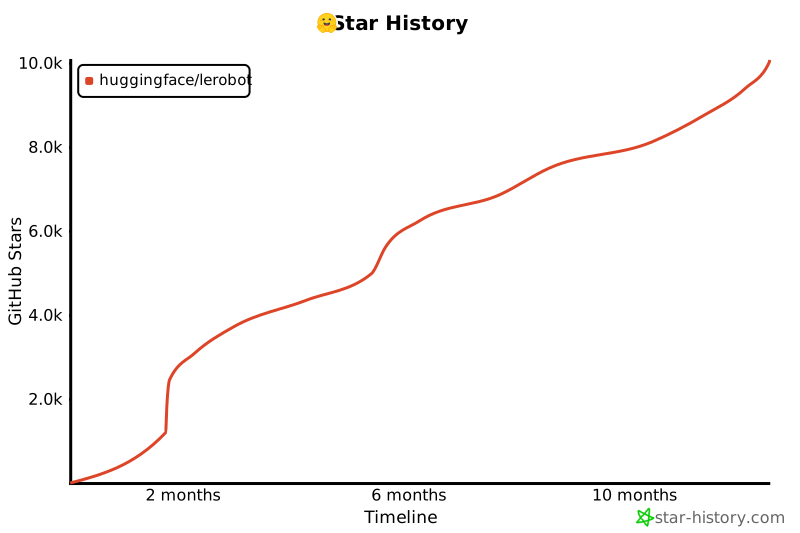](https://star-history.com/#huggingface/lerobot&Timeline)
|
||||
|
||||
2
benchmarks/video/capture_camera_feed.py
Executable file → Normal file
2
benchmarks/video/capture_camera_feed.py
Executable file → Normal file
@@ -55,7 +55,7 @@ def display_and_save_video_stream(output_dir: Path, fps: int, width: int, height
|
||||
if not ret:
|
||||
print("Error: Could not read frame.")
|
||||
break
|
||||
rr.log("video/stream", rr.Image(frame), static=True)
|
||||
rr.log("video/stream", rr.Image(frame.numpy()), static=True)
|
||||
cv2.imwrite(str(capture_dir / f"frame_{frame_index:06d}.png"), frame)
|
||||
frame_index += 1
|
||||
|
||||
|
||||
@@ -35,12 +35,12 @@ import torch
|
||||
from skimage.metrics import mean_squared_error, peak_signal_noise_ratio, structural_similarity
|
||||
from tqdm import tqdm
|
||||
|
||||
from lerobot.datasets.lerobot_dataset import LeRobotDataset
|
||||
from lerobot.datasets.video_utils import (
|
||||
from lerobot.common.datasets.lerobot_dataset import LeRobotDataset
|
||||
from lerobot.common.datasets.video_utils import (
|
||||
decode_video_frames_torchvision,
|
||||
encode_video_frames,
|
||||
)
|
||||
from lerobot.utils.benchmark import TimeBenchmark
|
||||
from lerobot.common.utils.benchmark import TimeBenchmark
|
||||
|
||||
BASE_ENCODING = OrderedDict(
|
||||
[
|
||||
|
||||
@@ -22,7 +22,7 @@ RUN apt-get update && apt-get install -y --no-install-recommends \
|
||||
COPY . /lerobot
|
||||
WORKDIR /lerobot
|
||||
RUN /opt/venv/bin/pip install --upgrade --no-cache-dir pip \
|
||||
&& /opt/venv/bin/pip install --no-cache-dir ".[test, aloha, xarm, pusht, smolvla]" \
|
||||
&& /opt/venv/bin/pip install --no-cache-dir ".[test, aloha, xarm, pusht, dynamixel]" \
|
||||
--extra-index-url https://download.pytorch.org/whl/cpu
|
||||
|
||||
# Execute in bash shell rather than python
|
||||
|
||||
@@ -21,4 +21,4 @@ RUN apt-get update && apt-get install -y --no-install-recommends \
|
||||
COPY . /lerobot
|
||||
WORKDIR /lerobot
|
||||
RUN /opt/venv/bin/pip install --upgrade --no-cache-dir pip \
|
||||
&& /opt/venv/bin/pip install --no-cache-dir ".[test, aloha, xarm, pusht, dynamixel, smolvla]"
|
||||
&& /opt/venv/bin/pip install --no-cache-dir ".[test, aloha, xarm, pusht, dynamixel]"
|
||||
|
||||
@@ -5,40 +5,8 @@
|
||||
title: Installation
|
||||
title: Get started
|
||||
- sections:
|
||||
- local: il_robots
|
||||
title: Imitation Learning for Robots
|
||||
- local: il_sim
|
||||
title: Imitation Learning in Sim
|
||||
- local: cameras
|
||||
title: Cameras
|
||||
- local: integrate_hardware
|
||||
title: Bring Your Own Hardware
|
||||
- local: hilserl
|
||||
title: Train a Robot with RL
|
||||
- local: hilserl_sim
|
||||
title: Train RL in Simulation
|
||||
- local: assemble_so101
|
||||
title: Assemble SO-101
|
||||
- local: getting_started_real_world_robot
|
||||
title: Getting Started with Real-World Robots
|
||||
title: "Tutorials"
|
||||
- sections:
|
||||
- local: smolvla
|
||||
title: Finetune SmolVLA
|
||||
title: "Policies"
|
||||
- sections:
|
||||
- local: so101
|
||||
title: SO-101
|
||||
- local: so100
|
||||
title: SO-100
|
||||
- local: koch
|
||||
title: Koch v1.1
|
||||
- local: lekiwi
|
||||
title: LeKiwi
|
||||
title: "Robots"
|
||||
- sections:
|
||||
- local: notebooks
|
||||
title: Notebooks
|
||||
title: "Resources"
|
||||
- sections:
|
||||
- local: contributing
|
||||
title: Contribute to LeRobot
|
||||
- local: backwardcomp
|
||||
title: Backward compatibility
|
||||
title: "About"
|
||||
|
||||
348
docs/source/assemble_so101.mdx
Normal file
348
docs/source/assemble_so101.mdx
Normal file
@@ -0,0 +1,348 @@
|
||||
# Assemble SO-101
|
||||
|
||||
In the steps below we explain how to assemble our flagship robot, the SO-101.
|
||||
|
||||
## Source the parts
|
||||
|
||||
Follow this [README](https://github.com/TheRobotStudio/SO-ARM100). It contains the bill of materials, with a link to source the parts, as well as the instructions to 3D print the parts,
|
||||
and advice if it's your first time printing or if you don't own a 3D printer.
|
||||
|
||||
Before assembling, you will first need to configure your motors. To this end, we provide a nice script, so let's first install LeRobot. After configuration, we will also guide you through assembly.
|
||||
|
||||
## Install LeRobot
|
||||
|
||||
To install LeRobot follow our [Installation Guide](./installation)
|
||||
|
||||
## Configure motors
|
||||
|
||||
To configure the motors designate one bus servo adapter and 6 motors for your leader arm, and similarly the other bus servo adapter and 6 motors for the follower arm. It's convenient to label them and write on each motor if it's for the follower `F` or for the leader `L` and it's ID from 1 to 6.
|
||||
|
||||
You now should plug the 5V or 12V power supply to the motor bus. 5V for the STS3215 7.4V motors and 12V for the STS3215 12V motors. Note that the leader arm always uses the 7.4V motors, so watch out that you plug in the right power supply if you have 12V and 7.4V motors, otherwise you might burn your motors! Now, connect the motor bus to your computer via USB. Note that the USB doesn't provide any power, and both the power supply and USB have to be plugged in.
|
||||
|
||||
### Find the USB ports associated to each arm
|
||||
|
||||
To find the port for each bus servo adapter, run this script:
|
||||
```bash
|
||||
python lerobot/scripts/find_motors_bus_port.py
|
||||
```
|
||||
##### Example outputs of script
|
||||
|
||||
<hfoptions id="example">
|
||||
<hfoption id="Mac">
|
||||
|
||||
Example output leader arm's port: `/dev/tty.usbmodem575E0031751`
|
||||
|
||||
```bash
|
||||
Finding all available ports for the MotorBus.
|
||||
['/dev/tty.usbmodem575E0032081', '/dev/tty.usbmodem575E0031751']
|
||||
Remove the usb cable from your MotorsBus and press Enter when done.
|
||||
|
||||
[...Disconnect leader arm and press Enter...]
|
||||
|
||||
The port of this MotorsBus is /dev/tty.usbmodem575E0031751
|
||||
Reconnect the usb cable.
|
||||
```
|
||||
|
||||
Example output follower arm port: `/dev/tty.usbmodem575E0032081`
|
||||
|
||||
```
|
||||
Finding all available ports for the MotorBus.
|
||||
['/dev/tty.usbmodem575E0032081', '/dev/tty.usbmodem575E0031751']
|
||||
Remove the usb cable from your MotorsBus and press Enter when done.
|
||||
|
||||
[...Disconnect follower arm and press Enter...]
|
||||
|
||||
The port of this MotorsBus is /dev/tty.usbmodem575E0032081
|
||||
Reconnect the usb cable.
|
||||
```
|
||||
|
||||
</hfoption>
|
||||
<hfoption id="Linux">
|
||||
|
||||
On Linux, you might need to give access to the USB ports by running:
|
||||
```bash
|
||||
sudo chmod 666 /dev/ttyACM0
|
||||
sudo chmod 666 /dev/ttyACM1
|
||||
```
|
||||
|
||||
Example output leader arm port: `/dev/ttyACM0`
|
||||
|
||||
```bash
|
||||
Finding all available ports for the MotorBus.
|
||||
['/dev/ttyACM0', '/dev/ttyACM1']
|
||||
Remove the usb cable from your MotorsBus and press Enter when done.
|
||||
|
||||
[...Disconnect leader arm and press Enter...]
|
||||
|
||||
The port of this MotorsBus is /dev/ttyACM0
|
||||
Reconnect the usb cable.
|
||||
```
|
||||
|
||||
Example output follower arm port: `/dev/ttyACM1`
|
||||
|
||||
```
|
||||
Finding all available ports for the MotorBus.
|
||||
['/dev/ttyACM0', '/dev/ttyACM1']
|
||||
Remove the usb cable from your MotorsBus and press Enter when done.
|
||||
|
||||
[...Disconnect follower arm and press Enter...]
|
||||
|
||||
The port of this MotorsBus is /dev/ttyACM1
|
||||
Reconnect the usb cable.
|
||||
```
|
||||
</hfoption>
|
||||
</hfoptions>
|
||||
|
||||
#### Update config file
|
||||
|
||||
Now that you have your ports, update the **port** default values of [`SO101RobotConfig`](https://github.com/huggingface/lerobot/blob/main/lerobot/common/robot_devices/robots/configs.py).
|
||||
You will find a class called `so101` where you can update the `port` values with your actual motor ports:
|
||||
```diff
|
||||
@RobotConfig.register_subclass("so101")
|
||||
@dataclass
|
||||
class So101RobotConfig(ManipulatorRobotConfig):
|
||||
calibration_dir: str = ".cache/calibration/so101"
|
||||
# `max_relative_target` limits the magnitude of the relative positional target vector for safety purposes.
|
||||
# Set this to a positive scalar to have the same value for all motors, or a list that is the same length as
|
||||
# the number of motors in your follower arms.
|
||||
max_relative_target: int | None = None
|
||||
|
||||
leader_arms: dict[str, MotorsBusConfig] = field(
|
||||
default_factory=lambda: {
|
||||
"main": FeetechMotorsBusConfig(
|
||||
- port="/dev/tty.usbmodem58760431091",
|
||||
+ port="{ADD YOUR LEADER PORT}",
|
||||
motors={
|
||||
# name: (index, model)
|
||||
"shoulder_pan": [1, "sts3215"],
|
||||
"shoulder_lift": [2, "sts3215"],
|
||||
"elbow_flex": [3, "sts3215"],
|
||||
"wrist_flex": [4, "sts3215"],
|
||||
"wrist_roll": [5, "sts3215"],
|
||||
"gripper": [6, "sts3215"],
|
||||
},
|
||||
),
|
||||
}
|
||||
)
|
||||
|
||||
follower_arms: dict[str, MotorsBusConfig] = field(
|
||||
default_factory=lambda: {
|
||||
"main": FeetechMotorsBusConfig(
|
||||
- port="/dev/tty.usbmodem585A0076891",
|
||||
+ port="{ADD YOUR FOLLOWER PORT}",
|
||||
motors={
|
||||
# name: (index, model)
|
||||
"shoulder_pan": [1, "sts3215"],
|
||||
"shoulder_lift": [2, "sts3215"],
|
||||
"elbow_flex": [3, "sts3215"],
|
||||
"wrist_flex": [4, "sts3215"],
|
||||
"wrist_roll": [5, "sts3215"],
|
||||
"gripper": [6, "sts3215"],
|
||||
},
|
||||
),
|
||||
}
|
||||
)
|
||||
```
|
||||
|
||||
Here is a video of the process:
|
||||
<div class="video-container">
|
||||
<video controls width="600">
|
||||
<source src="https://huggingface.co/datasets/huggingface/documentation-images/resolve/main/lerobot/lerobot-find-motorbus.mp4" type="video/mp4" />
|
||||
</video>
|
||||
</div>
|
||||
|
||||
## Step-by-Step Assembly Instructions
|
||||
|
||||
The follower arm uses 6x STS3215 motors with 1/345 gearing. The leader however uses three differently geared motors to make sure it can both sustain its own weight and it can be moved without requiring much force. Which motor is needed for which joint is shown in table below.
|
||||
|
||||
| Leader-Arm Axis | Motor | Gear Ratio |
|
||||
|-----------------|:-------:|:----------:|
|
||||
| Base / Shoulder Yaw | 1 | 1 / 191 |
|
||||
| Shoulder Pitch | 2 | 1 / 345 |
|
||||
| Elbow | 3 | 1 / 191 |
|
||||
| Wrist Roll | 4 | 1 / 147 |
|
||||
| Wrist Pitch | 5 | 1 / 147 |
|
||||
| Gripper | 6 | 1 / 147 |
|
||||
|
||||
### Set motor IDs
|
||||
|
||||
Plug your motor in one of the two ports of the motor bus and run this script to set its ID to 1. Replace the text after --port to the corresponding control board port.
|
||||
```bash
|
||||
python lerobot/scripts/configure_motor.py \
|
||||
--port /dev/tty.usbmodem58760432961 \
|
||||
--brand feetech \
|
||||
--model sts3215 \
|
||||
--baudrate 1000000 \
|
||||
--ID 1
|
||||
```
|
||||
|
||||
Then unplug your motor and plug the second motor and set its ID to 2.
|
||||
```bash
|
||||
python lerobot/scripts/configure_motor.py \
|
||||
--port /dev/tty.usbmodem58760432961 \
|
||||
--brand feetech \
|
||||
--model sts3215 \
|
||||
--baudrate 1000000 \
|
||||
--ID 2
|
||||
```
|
||||
|
||||
Redo this process for all your motors until ID 6. Do the same for the 6 motors of the leader arm, but make sure to change the power supply if you use motors with different voltage and make sure you give the right ID to the right motor according to the table above.
|
||||
|
||||
Here is a video of the process:
|
||||
<div class="video-container">
|
||||
<video controls width="600">
|
||||
<source src="https://huggingface.co/datasets/huggingface/documentation-images/resolve/main/lerobot/lerobot-configure-motor.mp4" type="video/mp4" />
|
||||
</video>
|
||||
</div>
|
||||
|
||||
### Clean Parts
|
||||
Remove all support material from the 3D-printed parts, the easiest way to do this is using a small screwdriver to get underneath the support material.
|
||||
|
||||
### Joint 1
|
||||
|
||||
- Place the first motor into the base.
|
||||
- Fasten the motor with 4 M2x6mm screws (smallest screws). Two from the top and two from bottom.
|
||||
- Slide over the first motor holder and fasten it using two M2x6mm screws (one on each side).
|
||||
- Install both motor horns, securing the top horn with a M3x6mm screw.
|
||||
- Attach the shoulder part.
|
||||
- Tighten the shoulder part with 4 M3x6mm screws on top and 4 M3x6mm screws on the bottom
|
||||
- Add the shoulder motor holder.
|
||||
|
||||
<div class="video-container">
|
||||
<video controls width="600">
|
||||
<source src="https://huggingface.co/datasets/huggingface/documentation-images/resolve/main/lerobot/Joint1_v2.mp4" type="video/mp4" />
|
||||
</video>
|
||||
</div>
|
||||
|
||||
### Joint 2
|
||||
|
||||
- Slide the second motor in from the top.
|
||||
- Fasten the second motor with 4 M2x6mm screws.
|
||||
- Attach both motor horns to motor 2, again use the M3x6mm horn screw.
|
||||
- Attach the upper arm with 4 M3x6mm screws on each side.
|
||||
|
||||
<div class="video-container">
|
||||
<video controls width="600">
|
||||
<source src="https://huggingface.co/datasets/huggingface/documentation-images/resolve/main/lerobot/Joint2_v2.mp4" type="video/mp4" />
|
||||
</video>
|
||||
</div>
|
||||
|
||||
### Joint 3
|
||||
|
||||
- Insert motor 3 and fasten using 4 M2x6mm screws
|
||||
- Attach both motor horns to motor 3 and secure one again with a M3x6mm horn screw.
|
||||
- Connect the forearm to motor 3 using 4 M3x6mm screws on each side.
|
||||
|
||||
<div class="video-container">
|
||||
<video controls width="600">
|
||||
<source src="https://huggingface.co/datasets/huggingface/documentation-images/resolve/main/lerobot/Joint3_v2.mp4" type="video/mp4" />
|
||||
</video>
|
||||
</div>
|
||||
|
||||
### Joint 4
|
||||
|
||||
- Slide over motor holder 4.
|
||||
- Slide in motor 4.
|
||||
- Fasten motor 4 with 4 M2x6mm screws and attach its motor horns, use a M3x6mm horn screw.
|
||||
|
||||
<div class="video-container">
|
||||
<video controls width="600">
|
||||
<source src="https://huggingface.co/datasets/huggingface/documentation-images/resolve/main/lerobot/Joint4_v2.mp4" type="video/mp4" />
|
||||
</video>
|
||||
</div>
|
||||
|
||||
### Joint 5
|
||||
|
||||
- Insert motor 5 into the wrist holder and secure it with 2 M2x6mm front screws.
|
||||
- Install only one motor horn on the wrist motor and secure it with a M3x6mm horn screw.
|
||||
- Secure the wrist to motor 4 using 4 M3x6mm screws on both sides.
|
||||
|
||||
<div class="video-container">
|
||||
<video controls width="600">
|
||||
<source src="https://huggingface.co/datasets/huggingface/documentation-images/resolve/main/lerobot/Joint5_v2.mp4" type="video/mp4" />
|
||||
</video>
|
||||
</div>
|
||||
|
||||
### Gripper / Handle
|
||||
|
||||
<hfoptions id="assembly">
|
||||
<hfoption id="Follower">
|
||||
|
||||
- Attach the gripper to motor 5, attach it to the motor horn on the wrist using 4 M3x6mm screws.
|
||||
- Insert the gripper motor and secure it with 2 M2x6mm screws on each side.
|
||||
- Attach the motor horns and again use a M3x6mm horn screw.
|
||||
- Install the gripper claw and secure it with 4 M3x6mm screws on both sides.
|
||||
|
||||
<div class="video-container">
|
||||
<video controls width="600">
|
||||
<source src="https://huggingface.co/datasets/huggingface/documentation-images/resolve/main/lerobot/Gripper_v2.mp4" type="video/mp4" />
|
||||
</video>
|
||||
</div>
|
||||
|
||||
</hfoption>
|
||||
<hfoption id="Leader">
|
||||
|
||||
- Mount the leader holder onto the wrist and secure it with 4 M3x6mm screws.
|
||||
- Attach the handle to motor 5 using 1 M2x6mm screw.
|
||||
- Insert the gripper motor, secure it with 2 M2x6mm screws on each side, attach a motor horn using a M3x6mm horn screw.
|
||||
- Attach the follower trigger with 4 M3x6mm screws.
|
||||
|
||||
<div class="video-container">
|
||||
<video controls width="600">
|
||||
<source src="https://huggingface.co/datasets/huggingface/documentation-images/resolve/main/lerobot/Leader_v2.mp4" type="video/mp4" />
|
||||
</video>
|
||||
</div>
|
||||
|
||||
</hfoption>
|
||||
</hfoptions>
|
||||
|
||||
##### Wiring
|
||||
|
||||
- Attach the motor controller on the back.
|
||||
- Then insert all wires, use the wire guides everywhere to make sure the wires don't unplug themselves and stay in place.
|
||||
|
||||
<div class="video-container">
|
||||
<video controls width="600">
|
||||
<source src="https://huggingface.co/datasets/huggingface/documentation-images/resolve/main/lerobot/Wiring_v2.mp4" type="video/mp4" />
|
||||
</video>
|
||||
</div>
|
||||
|
||||
## Calibrate
|
||||
|
||||
Next, you'll need to calibrate your SO-101 robot to ensure that the leader and follower arms have the same position values when they are in the same physical position.
|
||||
The calibration process is very important because it allows a neural network trained on one SO-101 robot to work on another.
|
||||
|
||||
#### Manual calibration of follower arm
|
||||
|
||||
You will need to move the follower arm to these positions sequentially, note that the rotated position is on the right side of the robot and you have to open the gripper fully.
|
||||
|
||||
| 1. Middle position | 2. Zero position | 3. Rotated position | 4. Rest position |
|
||||
| ------------ |------------------------------------------------------------------------------------------------------------------------------------------------------ | --------------------------------------------------------------------------------------------------------------------------------------------------------------- | ------------------------------------------------------------------------------------------------------------------------------------------------------ |
|
||||
| <img src="https://huggingface.co/datasets/huggingface/documentation-images/resolve/main/lerobot/follower_middle.webp?raw=true" alt="SO-101 leader arm middle position" title="SO-101 leader arm middle position" style="width:100%;"> | <img src="https://huggingface.co/datasets/huggingface/documentation-images/resolve/main/lerobot/follower_zero.webp?raw=true" alt="SO-101 leader arm zero position" title="SO-101 leader arm zero position" style="width:100%;"> | <img src="https://huggingface.co/datasets/huggingface/documentation-images/resolve/main/lerobot/follower_rotated.webp?raw=true" alt="SO-101 leader arm rotated position" title="SO-101 leader arm rotated position" style="width:100%;"> | <img src="https://huggingface.co/datasets/huggingface/documentation-images/resolve/main/lerobot/follower_rest.webp?raw=true" alt="SO-101 leader arm rest position" title="SO-101 leader arm rest position" style="width:100%;"> |
|
||||
|
||||
Make sure both arms are connected and run this script to launch manual calibration:
|
||||
```bash
|
||||
python lerobot/scripts/control_robot.py \
|
||||
--robot.type=so101 \
|
||||
--robot.cameras='{}' \
|
||||
--control.type=calibrate \
|
||||
--control.arms='["main_follower"]'
|
||||
```
|
||||
|
||||
#### Manual calibration of leader arm
|
||||
You will also need to move the leader arm to these positions sequentially:
|
||||
|
||||
| 1. Middle position | 2. Zero position | 3. Rotated position | 4. Rest position |
|
||||
| ------------ |------------------------------------------------------------------------------------------------------------------------------------------------------ | --------------------------------------------------------------------------------------------------------------------------------------------------------------- | ------------------------------------------------------------------------------------------------------------------------------------------------------ |
|
||||
| <img src="https://huggingface.co/datasets/huggingface/documentation-images/resolve/main/lerobot/leader_middle.webp?raw=true" alt="SO-101 leader arm middle position" title="SO-101 leader arm middle position" style="width:100%;"> | <img src="https://huggingface.co/datasets/huggingface/documentation-images/resolve/main/lerobot/leader_zero.webp?raw=true" alt="SO-101 leader arm zero position" title="SO-101 leader arm zero position" style="width:100%;"> | <img src="https://huggingface.co/datasets/huggingface/documentation-images/resolve/main/lerobot/leader_rotated.webp?raw=true" alt="SO-101 leader arm rotated position" title="SO-101 leader arm rotated position" style="width:100%;"> | <img src="https://huggingface.co/datasets/huggingface/documentation-images/resolve/main/lerobot/leader_rest.webp?raw=true" alt="SO-101 leader arm rest position" title="SO-101 leader arm rest position" style="width:100%;"> |
|
||||
|
||||
Run this script to launch manual calibration:
|
||||
```bash
|
||||
python lerobot/scripts/control_robot.py \
|
||||
--robot.type=so101 \
|
||||
--robot.cameras='{}' \
|
||||
--control.type=calibrate \
|
||||
--control.arms='["main_leader"]'
|
||||
```
|
||||
|
||||
Congrats 🎉, your robot is all set to learn a task on its own. Start training it by following this tutorial: [Getting started with real-world robots](./getting_started_real_world_robot)
|
||||
@@ -1,82 +0,0 @@
|
||||
# Backward compatibility
|
||||
|
||||
## Hardware API redesign
|
||||
|
||||
PR [#777](https://github.com/huggingface/lerobot/pull/777) improves the LeRobot calibration but is **not backward-compatible**. Below is a overview of what changed and how you can continue to work with datasets created before this pull request.
|
||||
|
||||
### What changed?
|
||||
|
||||
| | Before PR #777 | After PR #777 |
|
||||
| --------------------------------- | ------------------------------------------------- | --------------------------------------------------------------------------- |
|
||||
| **Joint range** | Degrees `-180...180°` | **Normalised range** Joints: `–100...100` Gripper: `0...100` |
|
||||
| **Zero position (SO100 / SO101)** | Arm fully extended horizontally | **In middle of the range for each joint** |
|
||||
| **Boundary handling** | Software safeguards to detect ±180 ° wrap-arounds | No wrap-around logic needed due to mid-range zero |
|
||||
|
||||
---
|
||||
|
||||
### Impact on existing datasets
|
||||
|
||||
* Recorded trajectories created **before** PR #777 will replay incorrectly if loaded directly:
|
||||
* Joint angles are offset and incorrectly normalized.
|
||||
* Any models directly finetuned or trained on the old data will need their inputs and outputs converted.
|
||||
|
||||
### Using datasets made with the previous calibration system
|
||||
We provide a migration example script for replaying an episode recorded with the previous calibration here: `examples/backward_compatibility/replay.py`.
|
||||
Below we take you through the modifications that are done in the example script to make the previous calibration datasets work.
|
||||
|
||||
```diff
|
||||
+ key = f"{name.removeprefix('main_')}.pos"
|
||||
action[key] = action_array[i].item()
|
||||
+ action["shoulder_lift.pos"] = -(action["shoulder_lift.pos"] - 90)
|
||||
+ action["elbow_flex.pos"] -= 90
|
||||
```
|
||||
|
||||
Let's break this down.
|
||||
New codebase uses `.pos` suffix for the position observations and we have removed `main_` prefix:
|
||||
```python
|
||||
key = f"{name.removeprefix('main_')}.pos"
|
||||
```
|
||||
|
||||
For `"shoulder_lift"` (id = 2), the 0 position is changed by -90 degrees and the direction is reversed compared to old calibration/code.
|
||||
```python
|
||||
action["shoulder_lift.pos"] = -(action["shoulder_lift.pos"] - 90)
|
||||
```
|
||||
For `"elbow_flex"` (id = 3), the 0 position is changed by -90 degrees compared to old calibration/code.
|
||||
```python
|
||||
action["elbow_flex.pos"] -= 90
|
||||
```
|
||||
|
||||
To use degrees normalization we then set the `--robot.use_degrees` option to `true`.
|
||||
```diff
|
||||
python examples/backward_compatibility/replay.py \
|
||||
--robot.type=so101_follower \
|
||||
--robot.port=/dev/tty.usbmodem5A460814411 \
|
||||
--robot.id=blue \
|
||||
+ --robot.use_degrees=true \
|
||||
--dataset.repo_id=my_dataset_id \
|
||||
--dataset.episode=0
|
||||
```
|
||||
|
||||
### Using policies trained with the previous calibration system
|
||||
|
||||
Policies output actions in the same format as the datasets (`torch.Tensors`). Therefore, the same transformations should be applied.
|
||||
|
||||
To find these transformations, we recommend to first try and and replay an episode of the dataset your policy was trained on using the section above.
|
||||
Then, add these same transformations on your inference script (shown here in the `record.py` script):
|
||||
```diff
|
||||
action_values = predict_action(
|
||||
observation_frame,
|
||||
policy,
|
||||
get_safe_torch_device(policy.config.device),
|
||||
policy.config.use_amp,
|
||||
task=single_task,
|
||||
robot_type=robot.robot_type,
|
||||
)
|
||||
action = {key: action_values[i].item() for i, key in enumerate(robot.action_features)}
|
||||
|
||||
+ action["shoulder_lift.pos"] = -(action["shoulder_lift.pos"] - 90)
|
||||
+ action["elbow_flex.pos"] -= 90
|
||||
robot.send_action(action)
|
||||
```
|
||||
|
||||
If you have questions or run into migration issues, feel free to ask them on [Discord](https://discord.gg/s3KuuzsPFb)
|
||||
@@ -1,173 +0,0 @@
|
||||
# Cameras
|
||||
|
||||
LeRobot offers multiple options for video capture, including phone cameras, built-in laptop cameras, external webcams, and Intel RealSense cameras. To efficiently record frames from most cameras, you can use either the `OpenCVCamera` or `RealSenseCamera` class. For additional compatibility details on the `OpenCVCamera` class, refer to the [Video I/O with OpenCV Overview](https://docs.opencv.org/4.x/d0/da7/videoio_overview.html).
|
||||
|
||||
### Finding your camera
|
||||
|
||||
To instantiate a camera, you need a camera identifier. This identifier might change if you reboot your computer or re-plug your camera, a behavior mostly dependant on your operating system.
|
||||
|
||||
To find the camera indices of the cameras plugged into your system, run the following script:
|
||||
```bash
|
||||
python -m lerobot.find_cameras opencv # or realsense for Intel Realsense cameras
|
||||
```
|
||||
|
||||
The output will look something like this if you have two cameras connected:
|
||||
```
|
||||
--- Detected Cameras ---
|
||||
Camera #0:
|
||||
Name: OpenCV Camera @ 0
|
||||
Type: OpenCV
|
||||
Id: 0
|
||||
Backend api: AVFOUNDATION
|
||||
Default stream profile:
|
||||
Format: 16.0
|
||||
Width: 1920
|
||||
Height: 1080
|
||||
Fps: 15.0
|
||||
--------------------
|
||||
(more cameras ...)
|
||||
```
|
||||
|
||||
> [!WARNING]
|
||||
> When using Intel RealSense cameras in `macOS`, you could get this [error](https://github.com/IntelRealSense/librealsense/issues/12307): `Error finding RealSense cameras: failed to set power state`, this can be solved by running the same command with `sudo` permissions. Note that using RealSense cameras in `macOS` is unstable.
|
||||
|
||||
|
||||
## Use Cameras
|
||||
|
||||
Below are two examples, demonstrating how to work with the API.
|
||||
|
||||
- **Asynchronous frame capture** using an OpenCV-based camera
|
||||
- **Color and depth capture** using an Intel RealSense camera
|
||||
|
||||
|
||||
<hfoptions id="shell_restart">
|
||||
<hfoption id="Open CV Camera">
|
||||
|
||||
```python
|
||||
from lerobot.cameras.opencv.configuration_opencv import OpenCVCameraConfig
|
||||
from lerobot.cameras.opencv.camera_opencv import OpenCVCamera
|
||||
from lerobot.cameras.configs import ColorMode, Cv2Rotation
|
||||
|
||||
# Construct an `OpenCVCameraConfig` with your desired FPS, resolution, color mode, and rotation.
|
||||
config = OpenCVCameraConfig(
|
||||
index_or_path=0,
|
||||
fps=15,
|
||||
width=1920,
|
||||
height=1080,
|
||||
color_mode=ColorMode.RGB,
|
||||
rotation=Cv2Rotation.NO_ROTATION
|
||||
)
|
||||
|
||||
# Instantiate and connect an `OpenCVCamera`, performing a warm-up read (default).
|
||||
camera = OpenCVCamera(config)
|
||||
camera.connect()
|
||||
|
||||
# Read frames asynchronously in a loop via `async_read(timeout_ms)`
|
||||
try:
|
||||
for i in range(10):
|
||||
frame = camera.async_read(timeout_ms=200)
|
||||
print(f"Async frame {i} shape:", frame.shape)
|
||||
finally:
|
||||
camera.disconnect()
|
||||
```
|
||||
|
||||
</hfoption>
|
||||
<hfoption id="Intel Realsense Camera">
|
||||
|
||||
```python
|
||||
from lerobot.cameras.realsense.configuration_realsense import RealSenseCameraConfig
|
||||
from lerobot.cameras.realsense.camera_realsense import RealSenseCamera
|
||||
from lerobot.cameras.configs import ColorMode, Cv2Rotation
|
||||
|
||||
# Create a `RealSenseCameraConfig` specifying your camera’s serial number and enabling depth.
|
||||
config = RealSenseCameraConfig(
|
||||
serial_number_or_name="233522074606",
|
||||
fps=15,
|
||||
width=640,
|
||||
height=480,
|
||||
color_mode=ColorMode.RGB,
|
||||
use_depth=True,
|
||||
rotation=Cv2Rotation.NO_ROTATION
|
||||
)
|
||||
|
||||
# Instantiate and connect a `RealSenseCamera` with warm-up read (default).
|
||||
camera = RealSenseCamera(config)
|
||||
camera.connect()
|
||||
|
||||
# Capture a color frame via `read()` and a depth map via `read_depth()`.
|
||||
try:
|
||||
color_frame = camera.read()
|
||||
depth_map = camera.read_depth()
|
||||
print("Color frame shape:", color_frame.shape)
|
||||
print("Depth map shape:", depth_map.shape)
|
||||
finally:
|
||||
camera.disconnect()
|
||||
```
|
||||
</hfoption>
|
||||
</hfoptions>
|
||||
|
||||
|
||||
## Use your phone
|
||||
<hfoptions id="use phone">
|
||||
<hfoption id="Mac">
|
||||
|
||||
To use your iPhone as a camera on macOS, enable the Continuity Camera feature:
|
||||
- Ensure your Mac is running macOS 13 or later, and your iPhone is on iOS 16 or later.
|
||||
- Sign in both devices with the same Apple ID.
|
||||
- Connect your devices with a USB cable or turn on Wi-Fi and Bluetooth for a wireless connection.
|
||||
|
||||
For more details, visit [Apple support](https://support.apple.com/en-gb/guide/mac-help/mchl77879b8a/mac).
|
||||
|
||||
Your iPhone should be detected automatically when running the camera setup script in the next section.
|
||||
|
||||
</hfoption>
|
||||
<hfoption id="Linux">
|
||||
|
||||
If you want to use your phone as a camera on Linux, follow these steps to set up a virtual camera
|
||||
|
||||
1. *Install `v4l2loopback-dkms` and `v4l-utils`*. Those packages are required to create virtual camera devices (`v4l2loopback`) and verify their settings with the `v4l2-ctl` utility from `v4l-utils`. Install them using:
|
||||
```python
|
||||
sudo apt install v4l2loopback-dkms v4l-utils
|
||||
```
|
||||
2. *Install [DroidCam](https://droidcam.app) on your phone*. This app is available for both iOS and Android.
|
||||
3. *Install [OBS Studio](https://obsproject.com)*. This software will help you manage the camera feed. Install it using [Flatpak](https://flatpak.org):
|
||||
```python
|
||||
flatpak install flathub com.obsproject.Studio
|
||||
```
|
||||
4. *Install the DroidCam OBS plugin*. This plugin integrates DroidCam with OBS Studio. Install it with:
|
||||
```python
|
||||
flatpak install flathub com.obsproject.Studio.Plugin.DroidCam
|
||||
```
|
||||
5. *Start OBS Studio*. Launch with:
|
||||
```python
|
||||
flatpak run com.obsproject.Studio
|
||||
```
|
||||
6. *Add your phone as a source*. Follow the instructions [here](https://droidcam.app/obs/usage). Be sure to set the resolution to `640x480`.
|
||||
7. *Adjust resolution settings*. In OBS Studio, go to `File > Settings > Video`. Change the `Base(Canvas) Resolution` and the `Output(Scaled) Resolution` to `640x480` by manually typing it in.
|
||||
8. *Start virtual camera*. In OBS Studio, follow the instructions [here](https://obsproject.com/kb/virtual-camera-guide).
|
||||
9. *Verify the virtual camera setup*. Use `v4l2-ctl` to list the devices:
|
||||
```python
|
||||
v4l2-ctl --list-devices
|
||||
```
|
||||
You should see an entry like:
|
||||
```
|
||||
VirtualCam (platform:v4l2loopback-000):
|
||||
/dev/video1
|
||||
```
|
||||
10. *Check the camera resolution*. Use `v4l2-ctl` to ensure that the virtual camera output resolution is `640x480`. Change `/dev/video1` to the port of your virtual camera from the output of `v4l2-ctl --list-devices`.
|
||||
```python
|
||||
v4l2-ctl -d /dev/video1 --get-fmt-video
|
||||
```
|
||||
You should see an entry like:
|
||||
```
|
||||
>>> Format Video Capture:
|
||||
>>> Width/Height : 640/480
|
||||
>>> Pixel Format : 'YUYV' (YUYV 4:2:2)
|
||||
```
|
||||
|
||||
Troubleshooting: If the resolution is not correct you will have to delete the Virtual Camera port and try again as it cannot be changed.
|
||||
|
||||
If everything is set up correctly, you can proceed with the rest of the tutorial.
|
||||
|
||||
</hfoption>
|
||||
</hfoptions>
|
||||
@@ -1 +0,0 @@
|
||||
../../CONTRIBUTING.md
|
||||
370
docs/source/getting_started_real_world_robot.mdx
Normal file
370
docs/source/getting_started_real_world_robot.mdx
Normal file
@@ -0,0 +1,370 @@
|
||||
# Getting Started with Real-World Robots
|
||||
|
||||
This tutorial will explain you how to train a neural network to autonomously control a real robot.
|
||||
|
||||
**You'll learn:**
|
||||
1. How to record and visualize your dataset.
|
||||
2. How to train a policy using your data and prepare it for evaluation.
|
||||
3. How to evaluate your policy and visualize the results.
|
||||
|
||||
By following these steps, you'll be able to replicate tasks like picking up a Lego block and placing it in a bin with a high success rate, as demonstrated in [this video](https://x.com/RemiCadene/status/1814680760592572934).
|
||||
|
||||
This tutorial is specifically made for the affordable [SO-101](https://github.com/TheRobotStudio/SO-ARM100) robot, but it contains additional information to be easily adapted to various types of robots like [Aloha bimanual robot](https://aloha-2.github.io) by changing some configurations. The SO-101 consists of a leader arm and a follower arm, each with 6 motors. It can work with one or several cameras to record the scene, which serve as visual sensors for the robot.
|
||||
|
||||
During the data collection phase, you will control the follower arm by moving the leader arm. This process is known as "teleoperation." This technique is used to collect robot trajectories. Afterward, you'll train a neural network to imitate these trajectories and deploy the network to enable your robot to operate autonomously.
|
||||
|
||||
If you encounter any issues at any step of the tutorial, feel free to seek help on [Discord](https://discord.com/invite/s3KuuzsPFb) or don't hesitate to iterate with us on the tutorial by creating issues or pull requests.
|
||||
|
||||
## Setup and Calibrate
|
||||
|
||||
If you haven't yet setup and calibrate the SO-101 follow these steps:
|
||||
1. [Find ports and update config file](./assemble_so101#find-the-usb-ports-associated-to-each-arm)
|
||||
2. [Calibrate](./assemble_so101#calibrate)
|
||||
|
||||
## Teleoperate
|
||||
|
||||
Run this simple script to teleoperate your robot (it won't connect and display the cameras):
|
||||
```bash
|
||||
python lerobot/scripts/control_robot.py \
|
||||
--robot.type=so101 \
|
||||
--robot.cameras='{}' \
|
||||
--control.type=teleoperate
|
||||
```
|
||||
|
||||
The teleoperate command will automatically:
|
||||
1. Identify any missing calibrations and initiate the calibration procedure.
|
||||
2. Connect the robot and start teleoperation.
|
||||
|
||||
## Setup Cameras
|
||||
|
||||
To connect a camera you have three options:
|
||||
1. OpenCVCamera which allows us to use any camera: usb, realsense, laptop webcam
|
||||
2. iPhone camera with MacOS
|
||||
3. Phone camera on Linux
|
||||
|
||||
### Use OpenCVCamera
|
||||
|
||||
The [`OpenCVCamera`](../lerobot/common/robot_devices/cameras/opencv.py) class allows you to efficiently record frames from most cameras using the [`opencv2`](https://docs.opencv.org) library. For more details on compatibility, see [Video I/O with OpenCV Overview](https://docs.opencv.org/4.x/d0/da7/videoio_overview.html).
|
||||
|
||||
To instantiate an [`OpenCVCamera`](../lerobot/common/robot_devices/cameras/opencv.py), you need a camera index (e.g. `OpenCVCamera(camera_index=0)`). When you only have one camera like a webcam of a laptop, the camera index is usually `0` but it might differ, and the camera index might change if you reboot your computer or re-plug your camera. This behavior depends on your operating system.
|
||||
|
||||
To find the camera indices, run the following utility script, which will save a few frames from each detected camera:
|
||||
```bash
|
||||
python lerobot/common/robot_devices/cameras/opencv.py \
|
||||
--images-dir outputs/images_from_opencv_cameras
|
||||
```
|
||||
|
||||
The output will look something like this if you have two cameras connected:
|
||||
```
|
||||
Mac or Windows detected. Finding available camera indices through scanning all indices from 0 to 60
|
||||
[...]
|
||||
Camera found at index 0
|
||||
Camera found at index 1
|
||||
[...]
|
||||
Connecting cameras
|
||||
OpenCVCamera(0, fps=30.0, width=1920.0, height=1080.0, color_mode=rgb)
|
||||
OpenCVCamera(1, fps=24.0, width=1920.0, height=1080.0, color_mode=rgb)
|
||||
Saving images to outputs/images_from_opencv_cameras
|
||||
Frame: 0000 Latency (ms): 39.52
|
||||
[...]
|
||||
Frame: 0046 Latency (ms): 40.07
|
||||
Images have been saved to outputs/images_from_opencv_cameras
|
||||
```
|
||||
|
||||
Check the saved images in `outputs/images_from_opencv_cameras` to identify which camera index corresponds to which physical camera (e.g. `0` for `camera_00` or `1` for `camera_01`):
|
||||
```
|
||||
camera_00_frame_000000.png
|
||||
[...]
|
||||
camera_00_frame_000047.png
|
||||
camera_01_frame_000000.png
|
||||
[...]
|
||||
camera_01_frame_000047.png
|
||||
```
|
||||
|
||||
Note: Some cameras may take a few seconds to warm up, and the first frame might be black or green.
|
||||
|
||||
Now that you have the camera indexes, you should specify the camera's in the config.
|
||||
|
||||
### Use your phone
|
||||
<hfoptions id="use phone">
|
||||
<hfoption id="Mac">
|
||||
|
||||
To use your iPhone as a camera on macOS, enable the Continuity Camera feature:
|
||||
- Ensure your Mac is running macOS 13 or later, and your iPhone is on iOS 16 or later.
|
||||
- Sign in both devices with the same Apple ID.
|
||||
- Connect your devices with a USB cable or turn on Wi-Fi and Bluetooth for a wireless connection.
|
||||
|
||||
For more details, visit [Apple support](https://support.apple.com/en-gb/guide/mac-help/mchl77879b8a/mac).
|
||||
|
||||
Your iPhone should be detected automatically when running the camera setup script in the next section.
|
||||
|
||||
</hfoption>
|
||||
<hfoption id="Linux">
|
||||
|
||||
If you want to use your phone as a camera on Linux, follow these steps to set up a virtual camera
|
||||
|
||||
1. *Install `v4l2loopback-dkms` and `v4l-utils`*. Those packages are required to create virtual camera devices (`v4l2loopback`) and verify their settings with the `v4l2-ctl` utility from `v4l-utils`. Install them using:
|
||||
```python
|
||||
sudo apt install v4l2loopback-dkms v4l-utils
|
||||
```
|
||||
2. *Install [DroidCam](https://droidcam.app) on your phone*. This app is available for both iOS and Android.
|
||||
3. *Install [OBS Studio](https://obsproject.com)*. This software will help you manage the camera feed. Install it using [Flatpak](https://flatpak.org):
|
||||
```python
|
||||
flatpak install flathub com.obsproject.Studio
|
||||
```
|
||||
4. *Install the DroidCam OBS plugin*. This plugin integrates DroidCam with OBS Studio. Install it with:
|
||||
```python
|
||||
flatpak install flathub com.obsproject.Studio.Plugin.DroidCam
|
||||
```
|
||||
5. *Start OBS Studio*. Launch with:
|
||||
```python
|
||||
flatpak run com.obsproject.Studio
|
||||
```
|
||||
6. *Add your phone as a source*. Follow the instructions [here](https://droidcam.app/obs/usage). Be sure to set the resolution to `640x480`.
|
||||
7. *Adjust resolution settings*. In OBS Studio, go to `File > Settings > Video`. Change the `Base(Canvas) Resolution` and the `Output(Scaled) Resolution` to `640x480` by manually typing it in.
|
||||
8. *Start virtual camera*. In OBS Studio, follow the instructions [here](https://obsproject.com/kb/virtual-camera-guide).
|
||||
9. *Verify the virtual camera setup*. Use `v4l2-ctl` to list the devices:
|
||||
```python
|
||||
v4l2-ctl --list-devices
|
||||
```
|
||||
You should see an entry like:
|
||||
```
|
||||
VirtualCam (platform:v4l2loopback-000):
|
||||
/dev/video1
|
||||
```
|
||||
10. *Check the camera resolution*. Use `v4l2-ctl` to ensure that the virtual camera output resolution is `640x480`. Change `/dev/video1` to the port of your virtual camera from the output of `v4l2-ctl --list-devices`.
|
||||
```python
|
||||
v4l2-ctl -d /dev/video1 --get-fmt-video
|
||||
```
|
||||
You should see an entry like:
|
||||
```
|
||||
>>> Format Video Capture:
|
||||
>>> Width/Height : 640/480
|
||||
>>> Pixel Format : 'YUYV' (YUYV 4:2:2)
|
||||
```
|
||||
|
||||
Troubleshooting: If the resolution is not correct you will have to delete the Virtual Camera port and try again as it cannot be changed.
|
||||
|
||||
If everything is set up correctly, you can proceed with the rest of the tutorial.
|
||||
|
||||
</hfoption>
|
||||
</hfoptions>
|
||||
|
||||
## Teleoperate with cameras
|
||||
|
||||
We can now teleoperate again while at the same time visualizing the cameras and joint positions with `rerun`.
|
||||
|
||||
```bash
|
||||
python lerobot/scripts/control_robot.py \
|
||||
--robot.type=so101 \
|
||||
--control.type=teleoperate
|
||||
--control.display_data=true
|
||||
```
|
||||
|
||||
## Record a dataset
|
||||
|
||||
Once you're familiar with teleoperation, you can record your first dataset with SO-101.
|
||||
|
||||
We use the Hugging Face hub features for uploading your dataset. If you haven't previously used the Hub, make sure you can login via the cli using a write-access token, this token can be generated from the [Hugging Face settings](https://huggingface.co/settings/tokens).
|
||||
|
||||
Add your token to the cli by running this command:
|
||||
```bash
|
||||
huggingface-cli login --token ${HUGGINGFACE_TOKEN} --add-to-git-credential
|
||||
```
|
||||
|
||||
Then store your Hugging Face repository name in a variable:
|
||||
```bash
|
||||
HF_USER=$(huggingface-cli whoami | head -n 1)
|
||||
echo $HF_USER
|
||||
```
|
||||
|
||||
Now you can record a dataset, to record 2 episodes and upload your dataset to the hub execute this command:
|
||||
```bash
|
||||
python lerobot/scripts/control_robot.py \
|
||||
--robot.type=so101 \
|
||||
--control.type=record \
|
||||
--control.fps=30 \
|
||||
--control.single_task="Grasp a lego block and put it in the bin." \
|
||||
--control.repo_id=${HF_USER}/so101_test \
|
||||
--control.tags='["so101","tutorial"]' \
|
||||
--control.warmup_time_s=5 \
|
||||
--control.episode_time_s=30 \
|
||||
--control.reset_time_s=30 \
|
||||
--control.num_episodes=2 \
|
||||
--control.push_to_hub=true
|
||||
```
|
||||
|
||||
You will see a lot of lines appearing like this one:
|
||||
```
|
||||
INFO 2024-08-10 15:02:58 ol_robot.py:219 dt:33.34 (30.0hz) dtRlead: 5.06 (197.5hz) dtWfoll: 0.25 (3963.7hz) dtRfoll: 6.22 (160.7hz) dtRlaptop: 32.57 (30.7hz) dtRphone: 33.84 (29.5hz)
|
||||
```
|
||||
|
||||
| Field | Meaning |
|
||||
|:---|:---|
|
||||
| `2024-08-10 15:02:58` | Timestamp when `print` was called. |
|
||||
| `ol_robot.py:219` | Source file and line number of the `print` call (`lerobot/scripts/control_robot.py` at line `219`). |
|
||||
| `dt: 33.34 (30.0 Hz)` | Delta time (ms) between teleop steps (target: 30.0 Hz, `--fps 30`). Yellow if step is too slow. |
|
||||
| `dtRlead: 5.06 (197.5 Hz)` | Delta time (ms) for reading present position from the **leader arm**. |
|
||||
| `dtWfoll: 0.25 (3963.7 Hz)` | Delta time (ms) for writing goal position to the **follower arm** (asynchronous). |
|
||||
| `dtRfoll: 6.22 (160.7 Hz)` | Delta time (ms) for reading present position from the **follower arm**. |
|
||||
| `dtRlaptop: 32.57 (30.7 Hz)` | Delta time (ms) for capturing an image from the **laptop camera** (async thread). |
|
||||
| `dtRphone: 33.84 (29.5 Hz)` | Delta time (ms) for capturing an image from the **phone camera** (async thread). |
|
||||
|
||||
|
||||
#### Dataset upload
|
||||
Locally your dataset is stored in this folder: `~/.cache/huggingface/lerobot/{repo-id}` (e.g. `data/cadene/so101_test`). At the end of data recording, your dataset will be uploaded on your Hugging Face page (e.g. https://huggingface.co/datasets/cadene/so101_test) that you can obtain by running:
|
||||
```bash
|
||||
echo https://huggingface.co/datasets/${HF_USER}/so101_test
|
||||
```
|
||||
Your dataset will be automatically tagged with `LeRobot` for the community to find it easily, and you can also add custom tags (in this case `tutorial` for example).
|
||||
|
||||
You can look for other LeRobot datasets on the hub by searching for `LeRobot` [tags](https://huggingface.co/datasets?other=LeRobot).
|
||||
|
||||
#### Record function
|
||||
|
||||
The `record` function provides a suite of tools for capturing and managing data during robot operation:
|
||||
|
||||
##### 1. Frame Capture and Video Encoding
|
||||
- Frames from cameras are saved to disk during recording.
|
||||
- At the end of each episode, frames are encoded into video files.
|
||||
|
||||
##### 2. Data Storage
|
||||
- Data is stored using the `LeRobotDataset` format.
|
||||
- By default, the dataset is pushed to your Hugging Face page.
|
||||
- To disable uploading, use `--control.push_to_hub=false`.
|
||||
|
||||
##### 3. Checkpointing and Resuming
|
||||
- Checkpoints are automatically created during recording.
|
||||
- If an issue occurs, you can resume by re-running the same command with `--control.resume=true`.
|
||||
- To start recording from scratch, **manually delete** the dataset directory.
|
||||
|
||||
##### 4. Recording Parameters
|
||||
Set the flow of data recording using command-line arguments:
|
||||
- `--control.warmup_time_s=10`
|
||||
Number of seconds before starting data collection (default: **10 seconds**).
|
||||
Allows devices to warm up and synchronize.
|
||||
- `--control.episode_time_s=60`
|
||||
Duration of each data recording episode (default: **60 seconds**).
|
||||
- `--control.reset_time_s=60`
|
||||
Duration for resetting the environment after each episode (default: **60 seconds**).
|
||||
- `--control.num_episodes=50`
|
||||
Total number of episodes to record (default: **50**).
|
||||
|
||||
##### 5. Keyboard Controls During Recording
|
||||
Control the data recording flow using keyboard shortcuts:
|
||||
- Press **Right Arrow (`→`)**: Early stop the current episode or reset time and move to the next.
|
||||
- Press **Left Arrow (`←`)**: Cancel the current episode and re-record it.
|
||||
- Press **Escape (`ESC`)**: Immediately stop the session, encode videos, and upload the dataset.
|
||||
|
||||
#### Tips for gathering data
|
||||
|
||||
Once you're comfortable with data recording, you can create a larger dataset for training. A good starting task is grasping an object at different locations and placing it in a bin. We suggest recording at least 50 episodes, with 10 episodes per location. Keep the cameras fixed and maintain consistent grasping behavior throughout the recordings. Also make sure the object you are manipulating is visible on the camera's. A good rule of thumb is you should be able to do the task yourself by only looking at the camera images.
|
||||
|
||||
In the following sections, you’ll train your neural network. After achieving reliable grasping performance, you can start introducing more variations during data collection, such as additional grasp locations, different grasping techniques, and altering camera positions.
|
||||
|
||||
Avoid adding too much variation too quickly, as it may hinder your results.
|
||||
|
||||
|
||||
#### Troubleshooting:
|
||||
- On Linux, if the left and right arrow keys and escape key don't have any effect during data recording, make sure you've set the `$DISPLAY` environment variable. See [pynput limitations](https://pynput.readthedocs.io/en/latest/limitations.html#linux).
|
||||
|
||||
## Visualize a dataset
|
||||
|
||||
If you uploaded your dataset to the hub with `--control.push_to_hub=true`, you can [visualize your dataset online](https://huggingface.co/spaces/lerobot/visualize_dataset) by copy pasting your repo id given by:
|
||||
```bash
|
||||
echo ${HF_USER}/so101_test
|
||||
```
|
||||
|
||||
If you didn't upload with `--control.push_to_hub=false`, you can visualize it locally with (via a window in the browser `http://127.0.0.1:9090` with the visualization tool):
|
||||
```bash
|
||||
python lerobot/scripts/visualize_dataset_html.py \
|
||||
--repo-id ${HF_USER}/so101_test \
|
||||
--local-files-only 1
|
||||
```
|
||||
|
||||
This will launch a local web server that looks like this:
|
||||
<div style="text-align:center;">
|
||||
<img src="https://huggingface.co/datasets/huggingface/documentation-images/resolve/main/lerobot/visualize_dataset_html.webp?raw=true" alt="Koch v1.1 leader and follower arms" title="Koch v1.1 leader and follower arms" width="100%"></img>
|
||||
</div>
|
||||
|
||||
## Replay an episode
|
||||
|
||||
A useful feature is the `replay` function, which allows to replay on your robot any episode that you've recorded or episodes from any dataset out there. This function helps you test the repeatability of your robot's actions and assess transferability across robots of the same model.
|
||||
|
||||
You can replay the first episode on your robot with:
|
||||
```bash
|
||||
python lerobot/scripts/control_robot.py \
|
||||
--robot.type=so101 \
|
||||
--control.type=replay \
|
||||
--control.fps=30 \
|
||||
--control.repo_id=${HF_USER}/so101_test \
|
||||
--control.episode=0
|
||||
```
|
||||
|
||||
Your robot should replicate movements similar to those you recorded. For example, check out [this video](https://x.com/RemiCadene/status/1793654950905680090) where we use `replay` on a Aloha robot from [Trossen Robotics](https://www.trossenrobotics.com).
|
||||
|
||||
## Train a policy
|
||||
|
||||
To train a policy to control your robot, use the [`python lerobot/scripts/train.py`](../lerobot/scripts/train.py) script. A few arguments are required. Here is an example command:
|
||||
```bash
|
||||
python lerobot/scripts/train.py \
|
||||
--dataset.repo_id=${HF_USER}/so101_test \
|
||||
--policy.type=act \
|
||||
--output_dir=outputs/train/act_so101_test \
|
||||
--job_name=act_so101_test \
|
||||
--policy.device=cuda \
|
||||
--wandb.enable=true
|
||||
```
|
||||
|
||||
Let's explain the command:
|
||||
1. We provided the dataset as argument with `--dataset.repo_id=${HF_USER}/so101_test`.
|
||||
2. We provided the policy with `policy.type=act`. This loads configurations from [`configuration_act.py`](../lerobot/common/policies/act/configuration_act.py). Importantly, this policy will automatically adapt to the number of motor states, motor actions and cameras of your robot (e.g. `laptop` and `phone`) which have been saved in your dataset.
|
||||
4. We provided `policy.device=cuda` since we are training on a Nvidia GPU, but you could use `policy.device=mps` to train on Apple silicon.
|
||||
5. We provided `wandb.enable=true` to use [Weights and Biases](https://docs.wandb.ai/quickstart) for visualizing training plots. This is optional but if you use it, make sure you are logged in by running `wandb login`.
|
||||
|
||||
Training should take several hours. You will find checkpoints in `outputs/train/act_so101_test/checkpoints`.
|
||||
|
||||
To resume training from a checkpoint, below is an example command to resume from `last` checkpoint of the `act_so101_test` policy:
|
||||
```bash
|
||||
python lerobot/scripts/train.py \
|
||||
--config_path=outputs/train/act_so101_test/checkpoints/last/pretrained_model/train_config.json \
|
||||
--resume=true
|
||||
```
|
||||
|
||||
#### Upload policy checkpoints
|
||||
|
||||
Once training is done, upload the latest checkpoint with:
|
||||
```bash
|
||||
huggingface-cli upload ${HF_USER}/act_so101_test \
|
||||
outputs/train/act_so101_test/checkpoints/last/pretrained_model
|
||||
```
|
||||
|
||||
You can also upload intermediate checkpoints with:
|
||||
```bash
|
||||
CKPT=010000
|
||||
huggingface-cli upload ${HF_USER}/act_so101_test${CKPT} \
|
||||
outputs/train/act_so101_test/checkpoints/${CKPT}/pretrained_model
|
||||
```
|
||||
|
||||
## Evaluate your policy
|
||||
|
||||
You can use the `record` function from [`lerobot/scripts/control_robot.py`](../lerobot/scripts/control_robot.py) but with a policy checkpoint as input. For instance, run this command to record 10 evaluation episodes:
|
||||
```bash
|
||||
python lerobot/scripts/control_robot.py \
|
||||
--robot.type=so101 \
|
||||
--control.type=record \
|
||||
--control.fps=30 \
|
||||
--control.single_task="Grasp a lego block and put it in the bin." \
|
||||
--control.repo_id=${HF_USER}/eval_act_so101_test \
|
||||
--control.tags='["tutorial"]' \
|
||||
--control.warmup_time_s=5 \
|
||||
--control.episode_time_s=30 \
|
||||
--control.reset_time_s=30 \
|
||||
--control.num_episodes=10 \
|
||||
--control.push_to_hub=true \
|
||||
--control.policy.path=outputs/train/act_so101_test/checkpoints/last/pretrained_model
|
||||
```
|
||||
|
||||
As you can see, it's almost the same command as previously used to record your training dataset. Two things changed:
|
||||
1. There is an additional `--control.policy.path` argument which indicates the path to your policy checkpoint with (e.g. `outputs/train/eval_act_so101_test/checkpoints/last/pretrained_model`). You can also use the model repository if you uploaded a model checkpoint to the hub (e.g. `${HF_USER}/act_so101_test`).
|
||||
2. The name of dataset begins by `eval` to reflect that you are running inference (e.g. `${HF_USER}/eval_act_so101_test`).
|
||||
@@ -1,548 +0,0 @@
|
||||
# HIL-SERL Real Robot Training Workflow Guide
|
||||
|
||||
In this tutorial you will go through the full Human-in-the-Loop Sample-Efficient Reinforcement Learning (HIL-SERL) workflow using LeRobot. You will master training a policy with RL on a real robot in just a few hours.
|
||||
|
||||
HIL-SERL is a sample-efficient reinforcement learning algorithm that combines human demonstrations with online learning and human interventions. The approach starts from a small set of human demonstrations, uses them to train a reward classifier, and then employs an actor-learner architecture where humans can intervene during policy execution to guide exploration and correct unsafe behaviors. In this tutorial, you'll use a gamepad to provide interventions and control the robot during the learning process.
|
||||
|
||||
It combines three key ingredients:
|
||||
1. **Offline demonstrations & reward classifier:** a handful of human-teleop episodes plus a vision-based success detector give the policy a shaped starting point.
|
||||
2. **On-robot actor / learner loop with human interventions:** a distributed Soft Actor Critic (SAC) learner updates the policy while an actor explores on the physical robot; the human can jump in at any time to correct dangerous or unproductive behaviour.
|
||||
3. **Safety & efficiency tools:** joint/end-effector (EE) bounds, crop region of interest (ROI) preprocessing and WandB monitoring keep the data useful and the hardware safe.
|
||||
|
||||
Together these elements let HIL-SERL reach near-perfect task success and faster cycle times than imitation-only baselines.
|
||||
|
||||
<p align="center">
|
||||
<img src="https://huggingface.co/datasets/huggingface/documentation-images/resolve/main/lerobot/hilserl-main-figure.png" alt="HIL-SERL workflow" title="HIL-SERL workflow" width="100%"></img>
|
||||
</p>
|
||||
|
||||
<p align="center"><i>HIL-SERL workflow, Luo et al. 2024</i></p>
|
||||
|
||||
This guide provides step-by-step instructions for training a robot policy using LeRobot's HilSerl implementation to train on a real robot.
|
||||
|
||||
## What do I need?
|
||||
|
||||
- A gamepad (recommended) or keyboard to control the robot
|
||||
- A Nvidia GPU
|
||||
- A real robot with a follower and leader arm (optional if you use the keyboard or the gamepad)
|
||||
- A URDF file for the robot for the kinematics package (check `lerobot/common/model/kinematics.py`)
|
||||
|
||||
## What kind of tasks can I train?
|
||||
|
||||
One can use HIL-SERL to train on a variety of manipulation tasks. Some recommendations:
|
||||
- Start with a simple task to understand how the system works.
|
||||
- Push cube to a goal region
|
||||
- Pick and lift cube with the gripper
|
||||
- Avoid extremely long horizon tasks. Focus on tasks that can be completed in 5-10 seconds.
|
||||
- Once you have a good idea of how the system works, you can try more complex tasks and longer horizons.
|
||||
- Pick and place cube
|
||||
- Bimanual tasks to pick objects with two arms
|
||||
- Hand-over tasks to transfer objects from one arm to another
|
||||
- Go crazy!
|
||||
|
||||
## Install LeRobot with HIL-SERL
|
||||
|
||||
To install LeRobot with HIL-SERL, you need to install the `hilserl` extra.
|
||||
|
||||
```bash
|
||||
pip install -e ".[hilserl]"
|
||||
```
|
||||
|
||||
## Real Robot Training Workflow
|
||||
|
||||
### Understanding Configuration
|
||||
|
||||
The training process begins with proper configuration for the HILSerl environment. The configuration class of interest is `HILSerlRobotEnvConfig` in `lerobot/envs/configs.py`. Which is defined as:
|
||||
|
||||
```python
|
||||
class HILSerlRobotEnvConfig(EnvConfig):
|
||||
robot: RobotConfig | None = None # Main robot agent (defined in `lerobot/robots`)
|
||||
teleop: TeleoperatorConfig | None = None # Teleoperator agent, e.g., gamepad or leader arm, (defined in `lerobot/teleoperators`)
|
||||
wrapper: EnvTransformConfig | None = None # Environment wrapper settings; check `lerobot/scripts/server/gym_manipulator.py`
|
||||
fps: int = 10 # Control frequency
|
||||
name: str = "real_robot" # Environment name
|
||||
mode: str = None # "record", "replay", or None (for training)
|
||||
repo_id: str | None = None # LeRobot dataset repository ID
|
||||
dataset_root: str | None = None # Local dataset root (optional)
|
||||
task: str = "" # Task identifier
|
||||
num_episodes: int = 10 # Number of episodes for recording
|
||||
episode: int = 0 # episode index for replay
|
||||
device: str = "cuda" # Compute device
|
||||
push_to_hub: bool = True # Whether to push the recorded datasets to Hub
|
||||
pretrained_policy_name_or_path: str | None = None # For policy loading
|
||||
reward_classifier_pretrained_path: str | None = None # For reward model
|
||||
number_of_steps_after_success: int = 0 # For reward classifier, collect more positive examples after a success to train a classifier
|
||||
```
|
||||
|
||||
|
||||
### Finding Robot Workspace Bounds
|
||||
|
||||
Before collecting demonstrations, you need to determine the appropriate operational bounds for your robot.
|
||||
|
||||
This helps simplify the problem of learning on the real robot in two ways: 1) by limiting the robot's operational space to a specific region that solves the task and avoids unnecessary or unsafe exploration, and 2) by allowing training in end-effector space rather than joint space. Empirically, learning in joint space for reinforcement learning in manipulation is often a harder problem - some tasks are nearly impossible to learn in joint space but become learnable when the action space is transformed to end-effector coordinates.
|
||||
|
||||
**Using find_joint_limits.py**
|
||||
|
||||
This script helps you find the safe operational bounds for your robot's end-effector. Given that you have a follower and leader arm, you can use the script to find the bounds for the follower arm that will be applied during training.
|
||||
Bounding the action space will reduce the redundant exploration of the agent and guarantees safety.
|
||||
|
||||
```bash
|
||||
python -m lerobot.scripts.find_joint_limits \
|
||||
--robot.type=so100_follower \
|
||||
--robot.port=/dev/tty.usbmodem58760431541 \
|
||||
--robot.id=black \
|
||||
--teleop.type=so100_leader \
|
||||
--teleop.port=/dev/tty.usbmodem58760431551 \
|
||||
--teleop.id=blue
|
||||
```
|
||||
|
||||
**Workflow**
|
||||
|
||||
1. Run the script and move the robot through the space that solves the task
|
||||
2. The script will record the minimum and maximum end-effector positions and the joint angles and prints them to the console, for example:
|
||||
```
|
||||
Max ee position [0.2417 0.2012 0.1027]
|
||||
Min ee position [0.1663 -0.0823 0.0336]
|
||||
Max joint positions [-20.0, -20.0, -20.0, -20.0, -20.0, -20.0]
|
||||
Min joint positions [50.0, 50.0, 50.0, 50.0, 50.0, 50.0]
|
||||
```
|
||||
3. Use these values in the configuration of your teleoperation device (TeleoperatorConfig) under the `end_effector_bounds` field
|
||||
|
||||
**Example Configuration**
|
||||
|
||||
```json
|
||||
"end_effector_bounds": {
|
||||
"max": [0.24, 0.20, 0.10],
|
||||
"min": [0.16, -0.08, 0.03]
|
||||
}
|
||||
```
|
||||
|
||||
### Collecting Demonstrations
|
||||
|
||||
With the bounds defined, you can safely collect demonstrations for training. Training RL with off-policy algorithm allows us to use offline datasets collected in order to improve the efficiency of the learning process.
|
||||
|
||||
**Setting Up Record Mode**
|
||||
|
||||
Create a configuration file for recording demonstrations (or edit an existing one like [env_config_so100.json](https://huggingface.co/datasets/aractingi/lerobot-example-config-files/blob/main/env_config_so100.json)):
|
||||
|
||||
1. Set `mode` to `"record"`
|
||||
2. Specify a unique `repo_id` for your dataset (e.g., "username/task_name")
|
||||
3. Set `num_episodes` to the number of demonstrations you want to collect
|
||||
4. Set `crop_params_dict` to `null` initially (we'll determine crops later)
|
||||
5. Configure `robot`, `cameras`, and other hardware settings
|
||||
|
||||
Example configuration section:
|
||||
```json
|
||||
"mode": "record",
|
||||
"repo_id": "username/pick_lift_cube",
|
||||
"dataset_root": null,
|
||||
"task": "pick_and_lift",
|
||||
"num_episodes": 15,
|
||||
"episode": 0,
|
||||
"push_to_hub": true
|
||||
```
|
||||
|
||||
### Using a Teleoperation Device
|
||||
|
||||
Along with your robot, you will need a teleoperation device to control it in order to collect datasets of your task and perform interventions during the online training.
|
||||
We support using a gamepad or a keyboard or the leader arm of the robot.
|
||||
|
||||
HIL-Serl learns actions in the end-effector space of the robot. Therefore, the teleoperation will control the end-effector's x,y,z displacements.
|
||||
|
||||
For that we need to define a version of the robot that takes actions in the end-effector space. Check the robot class `SO100FollowerEndEffector` and its configuration `SO100FollowerEndEffectorConfig` for the default parameters related to the end-effector space.
|
||||
|
||||
```python
|
||||
class SO100FollowerEndEffectorConfig(SO100FollowerConfig):
|
||||
"""Configuration for the SO100FollowerEndEffector robot."""
|
||||
|
||||
# Default bounds for the end-effector position (in meters)
|
||||
end_effector_bounds: dict[str, list[float]] = field( # bounds for the end-effector in x,y,z direction
|
||||
default_factory=lambda: {
|
||||
"min": [-1.0, -1.0, -1.0], # min x, y, z
|
||||
"max": [1.0, 1.0, 1.0], # max x, y, z
|
||||
}
|
||||
)
|
||||
|
||||
max_gripper_pos: float = 50 # maximum gripper position that the gripper will be open at
|
||||
|
||||
end_effector_step_sizes: dict[str, float] = field( # maximum step size for the end-effector in x,y,z direction
|
||||
default_factory=lambda: {
|
||||
"x": 0.02,
|
||||
"y": 0.02,
|
||||
"z": 0.02,
|
||||
}
|
||||
)
|
||||
```
|
||||
|
||||
The `Teleoperator` defines the teleoperation device. You can check the list of available teleoperators in `lerobot/teleoperators`.
|
||||
|
||||
**Setting up the Gamepad**
|
||||
|
||||
The gamepad provides a very convenient way to control the robot and the episode state.
|
||||
|
||||
To setup the gamepad, you need to set the `control_mode` to `"gamepad"` and define the `teleop` section in the configuration file.
|
||||
|
||||
```json
|
||||
"teleop": {
|
||||
"type": "gamepad",
|
||||
"use_gripper": true
|
||||
},
|
||||
```
|
||||
|
||||
<p align="center">
|
||||
<img src="https://huggingface.co/datasets/huggingface/documentation-images/resolve/main/lerobot/gamepad_guide.jpg?raw=true" alt="Figure shows the control mappings on a Logitech gamepad." title="Gamepad Control Mapping" width="100%"></img>
|
||||
</p>
|
||||
<p align="center"><i>Gamepad button mapping for robot control and episode management</i></p>
|
||||
|
||||
**Setting up the SO101 leader**
|
||||
|
||||
The SO101 leader arm has reduced gears that allows it to move and track the follower arm during exploration. Therefore, taking over is much smoother than the gearless SO100.
|
||||
|
||||
To setup the SO101 leader, you need to set the `control_mode` to `"leader"` and define the `teleop` section in the configuration file.
|
||||
|
||||
```json
|
||||
"teleop": {
|
||||
"type": "so101_leader",
|
||||
"port": "/dev/tty.usbmodem585A0077921", # check your port number
|
||||
"use_degrees": true
|
||||
},
|
||||
```
|
||||
|
||||
In order to annotate the success/failure of the episode, **you will need** to use a keyboard to press `s` for success, `esc` for failure.
|
||||
During the online training, press `space` to take over the policy and `space` again to give the control back to the policy.
|
||||
|
||||
<details>
|
||||
<summary><strong>Video: SO101 leader teleoperation</strong></summary>
|
||||
|
||||
<div class="video-container">
|
||||
<video controls width="600">
|
||||
<source src="https://huggingface.co/datasets/huggingface/documentation-images/resolve/main/lerobot/so101_leader_tutorial.mp4" type="video/mp4" />
|
||||
</video>
|
||||
</div>
|
||||
|
||||
<p align="center"><i>SO101 leader teleoperation example, the leader tracks the follower, press `space` to intervene</i></p>
|
||||
</details>
|
||||
|
||||
**Recording Demonstrations**
|
||||
|
||||
Start the recording process, an example of the config file can be found [here](https://huggingface.co/datasets/aractingi/lerobot-example-config-files/blob/main/env_config_so100.json):
|
||||
|
||||
```bash
|
||||
python -m lerobot.scripts.rl.gym_manipulator --config_path src/lerobot/configs/env_config_so100.json
|
||||
```
|
||||
|
||||
During recording:
|
||||
1. The robot will reset to the initial position defined in the configuration file `fixed_reset_joint_positions`
|
||||
2. Complete the task successfully
|
||||
3. The episode ends with a reward of 1 when you press the "success" button
|
||||
4. If the time limit is reached, or the fail button is pressed, the episode ends with a reward of 0
|
||||
5. You can rerecord an episode by pressing the "rerecord" button
|
||||
6. The process automatically continues to the next episode
|
||||
7. After recording all episodes, the dataset is pushed to the Hugging Face Hub (optional) and saved locally
|
||||
|
||||
|
||||
### Processing the Dataset
|
||||
|
||||
After collecting demonstrations, process them to determine optimal camera crops.
|
||||
Reinforcement learning is sensitive to background distractions, so it is important to crop the images to the relevant workspace area.
|
||||
|
||||
Visual RL algorithms learn directly from pixel inputs, making them vulnerable to irrelevant visual information. Background elements like changing lighting, shadows, people moving, or objects outside the workspace can confuse the learning process. Good ROI selection should:
|
||||
- Include only the essential workspace where the task happens
|
||||
- Capture the robot's end-effector and all objects involved in the task
|
||||
- Exclude unnecessary background elements and distractions
|
||||
|
||||
Note: If you already know the crop parameters, you can skip this step and just set the `crop_params_dict` in the configuration file during recording.
|
||||
|
||||
**Determining Crop Parameters**
|
||||
|
||||
Use the `crop_dataset_roi.py` script to interactively select regions of interest in your camera images:
|
||||
|
||||
```bash
|
||||
python -m lerobot.scripts.rl.crop_dataset_roi --repo-id username/pick_lift_cube
|
||||
```
|
||||
|
||||
1. For each camera view, the script will display the first frame
|
||||
2. Draw a rectangle around the relevant workspace area
|
||||
3. Press 'c' to confirm the selection
|
||||
4. Repeat for all camera views
|
||||
5. The script outputs cropping parameters and creates a new cropped dataset
|
||||
|
||||
Example output:
|
||||
```
|
||||
Selected Rectangular Regions of Interest (top, left, height, width):
|
||||
observation.images.side: [180, 207, 180, 200]
|
||||
observation.images.front: [180, 250, 120, 150]
|
||||
```
|
||||
|
||||
<p align="center">
|
||||
<img src="https://huggingface.co/datasets/huggingface/documentation-images/resolve/main/lerobot/crop_dataset.gif" width="600"/>
|
||||
</p>
|
||||
|
||||
<p align="center"><i>Interactive cropping tool for selecting regions of interest</i></p>
|
||||
|
||||
|
||||
**Updating Configuration**
|
||||
|
||||
Add these crop parameters to your training configuration:
|
||||
|
||||
```json
|
||||
"crop_params_dict": {
|
||||
"observation.images.side": [180, 207, 180, 200],
|
||||
"observation.images.front": [180, 250, 120, 150]
|
||||
},
|
||||
"resize_size": [128, 128]
|
||||
```
|
||||
|
||||
**Recommended image resolution**
|
||||
|
||||
Most vision-based policies have been validated on square inputs of either **128×128** (default) or **64×64** pixels. We therefore advise setting the resize_size parameter to [128, 128] – or [64, 64] if you need to save GPU memory and bandwidth. Other resolutions are possible but have not been extensively tested.
|
||||
|
||||
|
||||
### Training a Reward Classifier
|
||||
|
||||
The reward classifier plays an important role in the HIL-SERL workflow by automating reward assignment and automatically detecting episode success. Instead of manually defining reward functions or relying on human feedback for every timestep, the reward classifier learns to predict success/failure from visual observations. This enables the RL algorithm to learn efficiently by providing consistent and automated reward signals based on the robot's camera inputs.
|
||||
|
||||
This guide explains how to train a reward classifier for human-in-the-loop reinforcement learning implementation of LeRobot. Reward classifiers learn to predict the reward value given a state which can be used in an RL setup to train a policy.
|
||||
|
||||
**Note**: Training a reward classifier is optional. You can start the first round of RL experiments by annotating the success manually with your gamepad or keyboard device.
|
||||
|
||||
The reward classifier implementation in `modeling_classifier.py` uses a pretrained vision model to process the images. It can output either a single value for binary rewards to predict success/fail cases or multiple values for multi-class settings.
|
||||
|
||||
**Collecting a Dataset for the reward classifier**
|
||||
|
||||
Before training, you need to collect a dataset with labeled examples. The `record_dataset` function in `gym_manipulator.py` enables the process of collecting a dataset of observations, actions, and rewards.
|
||||
|
||||
To collect a dataset, you need to modify some parameters in the environment configuration based on HILSerlRobotEnvConfig.
|
||||
|
||||
```bash
|
||||
python -m lerobot.scripts.rl.gym_manipulator --config_path src/lerobot/configs/reward_classifier_train_config.json
|
||||
```
|
||||
|
||||
**Key Parameters for Data Collection**
|
||||
|
||||
- **mode**: set it to `"record"` to collect a dataset
|
||||
- **repo_id**: `"hf_username/dataset_name"`, name of the dataset and repo on the hub
|
||||
- **num_episodes**: Number of episodes to record
|
||||
- **number_of_steps_after_success**: Number of additional frames to record after a success (reward=1) is detected
|
||||
- **fps**: Number of frames per second to record
|
||||
- **push_to_hub**: Whether to push the dataset to the hub
|
||||
|
||||
The `number_of_steps_after_success` parameter is crucial as it allows you to collect more positive examples. When a success is detected, the system will continue recording for the specified number of steps while maintaining the reward=1 label. Otherwise, there won't be enough states in the dataset labeled to 1 to train a good classifier.
|
||||
|
||||
Example configuration section for data collection:
|
||||
|
||||
```json
|
||||
{
|
||||
"mode": "record",
|
||||
"repo_id": "hf_username/dataset_name",
|
||||
"dataset_root": "data/your_dataset",
|
||||
"num_episodes": 20,
|
||||
"push_to_hub": true,
|
||||
"fps": 10,
|
||||
"number_of_steps_after_success": 15
|
||||
}
|
||||
```
|
||||
|
||||
**Reward Classifier Configuration**
|
||||
|
||||
The reward classifier is configured using `configuration_classifier.py`. Here are the key parameters:
|
||||
|
||||
- **model_name**: Base model architecture (e.g., we mainly use `"helper2424/resnet10"`)
|
||||
- **model_type**: `"cnn"` or `"transformer"`
|
||||
- **num_cameras**: Number of camera inputs
|
||||
- **num_classes**: Number of output classes (typically 2 for binary success/failure)
|
||||
- **hidden_dim**: Size of hidden representation
|
||||
- **dropout_rate**: Regularization parameter
|
||||
- **learning_rate**: Learning rate for optimizer
|
||||
|
||||
Example configuration for training the [reward classifier](https://huggingface.co/datasets/aractingi/lerobot-example-config-files/blob/main/reward_classifier_train_config.json):
|
||||
|
||||
```json
|
||||
{
|
||||
"policy": {
|
||||
"type": "reward_classifier",
|
||||
"model_name": "helper2424/resnet10",
|
||||
"model_type": "cnn",
|
||||
"num_cameras": 2,
|
||||
"num_classes": 2,
|
||||
"hidden_dim": 256,
|
||||
"dropout_rate": 0.1,
|
||||
"learning_rate": 1e-4,
|
||||
"device": "cuda",
|
||||
"use_amp": true,
|
||||
"input_features": {
|
||||
"observation.images.front": {
|
||||
"type": "VISUAL",
|
||||
"shape": [3, 128, 128]
|
||||
},
|
||||
"observation.images.side": {
|
||||
"type": "VISUAL",
|
||||
"shape": [3, 128, 128]
|
||||
}
|
||||
}
|
||||
}
|
||||
}
|
||||
```
|
||||
|
||||
**Training the Classifier**
|
||||
|
||||
To train the classifier, use the `train.py` script with your configuration:
|
||||
|
||||
```bash
|
||||
python -m lerobot.scripts.train --config_path path/to/reward_classifier_train_config.json
|
||||
```
|
||||
|
||||
**Deploying and Testing the Model**
|
||||
|
||||
To use your trained reward classifier, configure the `HILSerlRobotEnvConfig` to use your model:
|
||||
|
||||
```python
|
||||
env_config = HILSerlRobotEnvConfig(
|
||||
reward_classifier_pretrained_path="path_to_your_pretrained_trained_model",
|
||||
# Other environment parameters
|
||||
)
|
||||
```
|
||||
or set the argument in the json config file.
|
||||
|
||||
```json
|
||||
{
|
||||
"reward_classifier_pretrained_path": "path_to_your_pretrained_model"
|
||||
}
|
||||
```
|
||||
|
||||
Run `gym_manipulator.py` to test the model.
|
||||
```bash
|
||||
python -m lerobot.scripts.rl.gym_manipulator --config_path path/to/env_config.json
|
||||
```
|
||||
|
||||
The reward classifier will automatically provide rewards based on the visual input from the robot's cameras.
|
||||
|
||||
**Example Workflow for training the reward classifier**
|
||||
|
||||
1. **Create the configuration files**:
|
||||
Create the necessary json configuration files for the reward classifier and the environment. Check the examples [here](https://huggingface.co/datasets/aractingi/lerobot-example-config-files/tree/main).
|
||||
|
||||
2. **Collect a dataset**:
|
||||
```bash
|
||||
python -m lerobot.scripts.rl.gym_manipulator --config_path src/lerobot/configs/env_config.json
|
||||
```
|
||||
|
||||
3. **Train the classifier**:
|
||||
```bash
|
||||
python -m lerobot.scripts.train --config_path src/lerobot/configs/reward_classifier_train_config.json
|
||||
```
|
||||
|
||||
4. **Test the classifier**:
|
||||
```bash
|
||||
python -m lerobot.scripts.rl.gym_manipulator --config_path src/lerobot/configs/env_config.json
|
||||
```
|
||||
|
||||
### Training with Actor-Learner
|
||||
|
||||
The LeRobot system uses a distributed actor-learner architecture for training. This architecture decouples robot interactions from the learning process, allowing them to run concurrently without blocking each other. The actor server handles robot observations and actions, sending interaction data to the learner server. The learner server performs gradient descent and periodically updates the actor's policy weights. You will need to start two processes: a learner and an actor.
|
||||
|
||||
**Configuration Setup**
|
||||
|
||||
Create a training configuration file (example available [here](https://huggingface.co/datasets/aractingi/lerobot-example-config-files/blob/main/train_config_hilserl_so100.json)). The training config is based on the main `TrainRLServerPipelineConfig` class in `lerobot/configs/train.py`.
|
||||
|
||||
1. Configure the policy settings (`type="sac"`, `device`, etc.)
|
||||
2. Set `dataset` to your cropped dataset
|
||||
3. Configure environment settings with crop parameters
|
||||
4. Check the other parameters related to SAC in [configuration_sac.py](https://github.com/huggingface/lerobot/blob/19bb621a7d0a31c20cd3cc08b1dbab68d3031454/lerobot/policies/sac/configuration_sac.py#L79).
|
||||
5. Verify that the `policy` config is correct with the right `input_features` and `output_features` for your task.
|
||||
|
||||
**Starting the Learner**
|
||||
|
||||
First, start the learner server process:
|
||||
|
||||
```bash
|
||||
python -m lerobot.scripts.rl.learner --config_path src/lerobot/configs/train_config_hilserl_so100.json
|
||||
```
|
||||
|
||||
The learner:
|
||||
- Initializes the policy network
|
||||
- Prepares replay buffers
|
||||
- Opens a `gRPC` server to communicate with actors
|
||||
- Processes transitions and updates the policy
|
||||
|
||||
**Starting the Actor**
|
||||
|
||||
In a separate terminal, start the actor process with the same configuration:
|
||||
|
||||
```bash
|
||||
python -m lerobot.scripts.rl.actor --config_path src/lerobot/configs/train_config_hilserl_so100.json
|
||||
```
|
||||
|
||||
The actor:
|
||||
- Connects to the learner via `gRPC`
|
||||
- Initializes the environment
|
||||
- Execute rollouts of the policy to collect experience
|
||||
- Sends transitions to the learner
|
||||
- Receives updated policy parameters
|
||||
|
||||
**Training Flow**
|
||||
|
||||
The training proceeds automatically:
|
||||
|
||||
1. The actor executes the policy in the environment
|
||||
2. Transitions are collected and sent to the learner
|
||||
3. The learner updates the policy based on these transitions
|
||||
4. Updated policy parameters are sent back to the actor
|
||||
5. The process continues until the specified step limit is reached
|
||||
|
||||
**Human in the Loop**
|
||||
|
||||
- The key to learning efficiently is to have human interventions to provide corrective feedback and completing the task to aide the policy learning and exploration.
|
||||
- To perform human interventions, you can press the upper right trigger button on the gamepad (or the `space` key on the keyboard). This will pause the policy actions and allow you to take over.
|
||||
- A successful experiment is one where the human has to intervene at the start but then reduces the amount of interventions as the policy improves. You can monitor the intervention rate in the `wandb` dashboard.
|
||||
|
||||
<p align="center">
|
||||
<img src="https://huggingface.co/datasets/huggingface/documentation-images/resolve/main/lerobot/hil_effect.png?raw=true" alt="Figure shows the control mappings on a Logitech gamepad." title="Gamepad Control Mapping" width="100%"></img>
|
||||
</p>
|
||||
|
||||
<p align="center"><i>Example showing how human interventions help guide policy learning over time</i></p>
|
||||
|
||||
- The figure shows the plot of the episodic reward over interaction step. The figure shows the effect of human interventions on the policy learning.
|
||||
- The orange curve is an experiment without any human interventions. While the pink and blue curves are experiments with human interventions.
|
||||
- We can observe that the number of steps where the policy starts achieving the maximum reward is cut by a quarter when human interventions are present.
|
||||
|
||||
**Monitoring and Debugging**
|
||||
|
||||
If you have `wandb.enable` set to `true` in your configuration, you can monitor training progress in real-time through the [Weights & Biases](https://wandb.ai/site/) dashboard.
|
||||
|
||||
### Guide to Human Interventions
|
||||
The learning process is very sensitive to the intervention strategy. It will takes a few runs to understand how to intervene effectively. Some tips and hints:
|
||||
- Allow the policy to explore for a few episodes at the start of training.
|
||||
- Avoid intervening for long periods of time. Try to intervene in situation to correct the robot's behaviour when it goes off track.
|
||||
- Once the policy starts achieving the task, even if its not perfect, you can limit your interventions to simple quick actions like a simple grasping commands.
|
||||
|
||||
The ideal behaviour is that your intervention rate should drop gradually during training as shown in the figure below.
|
||||
|
||||
<p align="center">
|
||||
<img src="https://huggingface.co/datasets/huggingface/documentation-images/resolve/main/lerobot/intervention_rate_tutorial_rl.png?raw=true" alt="Intervention rate" title="Intervention rate during training" width="100%"></img>
|
||||
</p>
|
||||
|
||||
<p align="center"><i>Plot of the intervention rate during a training run on a pick and lift cube task</i></p>
|
||||
|
||||
### Key hyperparameters to tune
|
||||
|
||||
Some configuration values have a disproportionate impact on training stability and speed:
|
||||
|
||||
- **`temperature_init`** (`policy.temperature_init`) – initial entropy temperature in SAC. Higher values encourage more exploration; lower values make the policy more deterministic early on. A good starting point is `1e-2`. We observed that setting it too high can make human interventions ineffective and slow down learning.
|
||||
- **`policy_parameters_push_frequency`** (`policy.actor_learner_config.policy_parameters_push_frequency`) – interval in *seconds* between two weight pushes from the learner to the actor. The default is `4 s`. Decrease to **1-2 s** to provide fresher weights (at the cost of more network traffic); increase only if your connection is slow, as this will reduce sample efficiency.
|
||||
- **`storage_device`** (`policy.storage_device`) – device on which the learner keeps the policy parameters. If you have spare GPU memory, set this to `"cuda"` (instead of the default `"cpu"`). Keeping the weights on-GPU removes CPU→GPU transfer overhead and can significantly increase the number of learner updates per second.
|
||||
|
||||
|
||||
Congrats 🎉, you have finished this tutorial!
|
||||
|
||||
> [!TIP]
|
||||
> If you have any questions or need help, please reach out on [Discord](https://discord.com/invite/s3KuuzsPFb).
|
||||
|
||||
Paper citation:
|
||||
```
|
||||
@article{luo2024precise,
|
||||
title={Precise and Dexterous Robotic Manipulation via Human-in-the-Loop Reinforcement Learning},
|
||||
author={Luo, Jianlan and Xu, Charles and Wu, Jeffrey and Levine, Sergey},
|
||||
journal={arXiv preprint arXiv:2410.21845},
|
||||
year={2024}
|
||||
}
|
||||
```
|
||||
@@ -1,120 +0,0 @@
|
||||
# Train RL in Simulation
|
||||
|
||||
This guide explains how to use the `gym_hil` simulation environments as an alternative to real robots when working with the LeRobot framework for Human-In-the-Loop (HIL) reinforcement learning.
|
||||
|
||||
`gym_hil` is a package that provides Gymnasium-compatible simulation environments specifically designed for Human-In-the-Loop reinforcement learning. These environments allow you to:
|
||||
|
||||
- Train policies in simulation to test the RL stack before training on real robots
|
||||
|
||||
- Collect demonstrations in sim using external devices like gamepads or keyboards
|
||||
- Perform human interventions during policy learning
|
||||
|
||||
Currently, the main environment is a Franka Panda robot simulation based on MuJoCo, with tasks like picking up a cube.
|
||||
|
||||
|
||||
## Installation
|
||||
|
||||
First, install the `gym_hil` package within the LeRobot environment:
|
||||
|
||||
```bash
|
||||
pip install -e ".[hilserl]"
|
||||
```
|
||||
|
||||
## What do I need?
|
||||
|
||||
- A gamepad or keyboard to control the robot
|
||||
- A Nvidia GPU
|
||||
|
||||
|
||||
|
||||
## Configuration
|
||||
|
||||
To use `gym_hil` with LeRobot, you need to create a configuration file. An example is provided [here](https://huggingface.co/datasets/aractingi/lerobot-example-config-files/blob/main/gym_hil_env.json). Key configuration sections include:
|
||||
|
||||
### Environment Type and Task
|
||||
|
||||
```json
|
||||
{
|
||||
"type": "hil",
|
||||
"name": "franka_sim",
|
||||
"task": "PandaPickCubeGamepad-v0",
|
||||
"device": "cuda"
|
||||
}
|
||||
```
|
||||
|
||||
Available tasks:
|
||||
- `PandaPickCubeBase-v0`: Basic environment
|
||||
- `PandaPickCubeGamepad-v0`: With gamepad control
|
||||
- `PandaPickCubeKeyboard-v0`: With keyboard control
|
||||
|
||||
### Gym Wrappers Configuration
|
||||
|
||||
```json
|
||||
"wrapper": {
|
||||
"gripper_penalty": -0.02,
|
||||
"control_time_s": 15.0,
|
||||
"use_gripper": true,
|
||||
"fixed_reset_joint_positions": [0.0, 0.195, 0.0, -2.43, 0.0, 2.62, 0.785],
|
||||
"end_effector_step_sizes": {
|
||||
"x": 0.025,
|
||||
"y": 0.025,
|
||||
"z": 0.025
|
||||
},
|
||||
"control_mode": "gamepad"
|
||||
}
|
||||
```
|
||||
|
||||
Important parameters:
|
||||
- `gripper_penalty`: Penalty for excessive gripper movement
|
||||
- `use_gripper`: Whether to enable gripper control
|
||||
- `end_effector_step_sizes`: Size of the steps in the x,y,z axes of the end-effector
|
||||
- `control_mode`: Set to `"gamepad"` to use a gamepad controller
|
||||
|
||||
## Running with HIL RL of LeRobot
|
||||
|
||||
### Basic Usage
|
||||
|
||||
To run the environment, set mode to null:
|
||||
|
||||
```python
|
||||
python -m lerobot.scripts.rl.gym_manipulator --config_path path/to/gym_hil_env.json
|
||||
```
|
||||
|
||||
### Recording a Dataset
|
||||
|
||||
To collect a dataset, set the mode to `record` whilst defining the repo_id and number of episodes to record:
|
||||
|
||||
```python
|
||||
python -m lerobot.scripts.rl.gym_manipulator --config_path path/to/gym_hil_env.json
|
||||
```
|
||||
|
||||
### Training a Policy
|
||||
|
||||
To train a policy, checkout the configuration example available [here](https://huggingface.co/datasets/aractingi/lerobot-example-config-files/blob/main/train_gym_hil_env.json) and run the actor and learner servers:
|
||||
|
||||
```python
|
||||
python -m lerobot.scripts.rl.actor --config_path path/to/train_gym_hil_env.json
|
||||
```
|
||||
|
||||
In a different terminal, run the learner server:
|
||||
|
||||
```python
|
||||
python -m lerobot.scripts.rl.learner --config_path path/to/train_gym_hil_env.json
|
||||
```
|
||||
|
||||
The simulation environment provides a safe and repeatable way to develop and test your Human-In-the-Loop reinforcement learning components before deploying to real robots.
|
||||
|
||||
Congrats 🎉, you have finished this tutorial!
|
||||
|
||||
> [!TIP]
|
||||
> If you have any questions or need help, please reach out on [Discord](https://discord.com/invite/s3KuuzsPFb).
|
||||
|
||||
Paper citation:
|
||||
```
|
||||
@article{luo2024precise,
|
||||
title={Precise and Dexterous Robotic Manipulation via Human-in-the-Loop Reinforcement Learning},
|
||||
author={Luo, Jianlan and Xu, Charles and Wu, Jeffrey and Levine, Sergey},
|
||||
journal={arXiv preprint arXiv:2410.21845},
|
||||
year={2024}
|
||||
}
|
||||
```
|
||||
@@ -1,541 +0,0 @@
|
||||
# Imitation Learning on Real-World Robots
|
||||
|
||||
This tutorial will explain how to train a neural network to control a real robot autonomously.
|
||||
|
||||
**You'll learn:**
|
||||
1. How to record and visualize your dataset.
|
||||
2. How to train a policy using your data and prepare it for evaluation.
|
||||
3. How to evaluate your policy and visualize the results.
|
||||
|
||||
By following these steps, you'll be able to replicate tasks, such as picking up a Lego block and placing it in a bin with a high success rate, as shown in the video below.
|
||||
|
||||
<details>
|
||||
<summary><strong>Video: pickup lego block task</strong></summary>
|
||||
|
||||
<div class="video-container">
|
||||
<video controls width="600">
|
||||
<source src="https://huggingface.co/datasets/huggingface/documentation-images/resolve/main/lerobot/lerobot_task.mp4" type="video/mp4" />
|
||||
</video>
|
||||
</div>
|
||||
|
||||
</details>
|
||||
|
||||
This tutorial isn’t tied to a specific robot: we walk you through the commands and API snippets you can adapt for any supported platform.
|
||||
|
||||
During data collection, you’ll use a “teloperation” device, such as a leader arm or keyboard to teleoperate the robot and record its motion trajectories.
|
||||
|
||||
Once you’ve gathered enough trajectories, you’ll train a neural network to imitate these trajectories and deploy the trained model so your robot can perform the task autonomously.
|
||||
|
||||
If you run into any issues at any point, jump into our [Discord community](https://discord.com/invite/s3KuuzsPFb) for support.
|
||||
|
||||
## Set up and Calibrate
|
||||
|
||||
If you haven't yet set up and calibrated your robot and teleop device, please do so by following the robot-specific tutorial.
|
||||
|
||||
## Teleoperate
|
||||
|
||||
In this example, we’ll demonstrate how to teleoperate the SO101 robot. For each command, we also provide a corresponding API example.
|
||||
|
||||
Note that the `id` associated with a robot is used to store the calibration file. It's important to use the same `id` when teleoperating, recording, and evaluating when using the same setup.
|
||||
|
||||
<hfoptions id="teleoperate_so101">
|
||||
<hfoption id="Command">
|
||||
```bash
|
||||
python -m lerobot.teleoperate \
|
||||
--robot.type=so101_follower \
|
||||
--robot.port=/dev/tty.usbmodem58760431541 \
|
||||
--robot.id=my_awesome_follower_arm \
|
||||
--teleop.type=so101_leader \
|
||||
--teleop.port=/dev/tty.usbmodem58760431551 \
|
||||
--teleop.id=my_awesome_leader_arm
|
||||
```
|
||||
</hfoption>
|
||||
<hfoption id="API example">
|
||||
```python
|
||||
from lerobot.teleoperators.so101_leader import SO101LeaderConfig, SO101Leader
|
||||
from lerobot.robots.so101_follower import SO101FollowerConfig, SO101Follower
|
||||
|
||||
robot_config = SO101FollowerConfig(
|
||||
port="/dev/tty.usbmodem58760431541",
|
||||
id="my_red_robot_arm",
|
||||
)
|
||||
|
||||
teleop_config = SO101LeaderConfig(
|
||||
port="/dev/tty.usbmodem58760431551",
|
||||
id="my_blue_leader_arm",
|
||||
)
|
||||
|
||||
robot = SO101Follower(robot_config)
|
||||
teleop_device = SO101Leader(teleop_config)
|
||||
robot.connect()
|
||||
teleop_device.connect()
|
||||
|
||||
while True:
|
||||
action = teleop_device.get_action()
|
||||
robot.send_action(action)
|
||||
```
|
||||
</hfoption>
|
||||
</hfoptions>
|
||||
|
||||
The teleoperate command will automatically:
|
||||
1. Identify any missing calibrations and initiate the calibration procedure.
|
||||
2. Connect the robot and teleop device and start teleoperation.
|
||||
|
||||
## Cameras
|
||||
|
||||
To add cameras to your setup, follow this [Guide](./cameras#setup-cameras).
|
||||
|
||||
## Teleoperate with cameras
|
||||
|
||||
With `rerun`, you can teleoperate again while simultaneously visualizing the camera feeds and joint positions. In this example, we’re using the Koch arm.
|
||||
|
||||
<hfoptions id="teleoperate_koch_camera">
|
||||
<hfoption id="Command">
|
||||
```bash
|
||||
python -m lerobot.teleoperate \
|
||||
--robot.type=koch_follower \
|
||||
--robot.port=/dev/tty.usbmodem58760431541 \
|
||||
--robot.id=my_awesome_follower_arm \
|
||||
--robot.cameras="{ front: {type: opencv, index_or_path: 0, width: 1920, height: 1080, fps: 30}}" \
|
||||
--teleop.type=koch_leader \
|
||||
--teleop.port=/dev/tty.usbmodem58760431551 \
|
||||
--teleop.id=my_awesome_leader_arm \
|
||||
--display_data=true
|
||||
```
|
||||
</hfoption>
|
||||
<hfoption id="API example">
|
||||
```python
|
||||
from lerobot.cameras.opencv.configuration_opencv import OpenCVCameraConfig
|
||||
from lerobot.teleoperators.koch_leader import KochLeaderConfig, KochLeader
|
||||
from lerobot.robots.koch_follower import KochFollowerConfig, KochFollower
|
||||
|
||||
camera_config = {
|
||||
"front": OpenCVCameraConfig(index_or_path=0, width=1920, height=1080, fps=30)
|
||||
}
|
||||
|
||||
robot_config = KochFollowerConfig(
|
||||
port="/dev/tty.usbmodem585A0076841",
|
||||
id="my_red_robot_arm",
|
||||
cameras=camera_config
|
||||
)
|
||||
|
||||
teleop_config = KochLeaderConfig(
|
||||
port="/dev/tty.usbmodem58760431551",
|
||||
id="my_blue_leader_arm",
|
||||
)
|
||||
|
||||
robot = KochFollower(robot_config)
|
||||
teleop_device = KochLeader(teleop_config)
|
||||
robot.connect()
|
||||
teleop_device.connect()
|
||||
|
||||
while True:
|
||||
observation = robot.get_observation()
|
||||
action = teleop_device.get_action()
|
||||
robot.send_action(action)
|
||||
```
|
||||
</hfoption>
|
||||
</hfoptions>
|
||||
|
||||
## Record a dataset
|
||||
|
||||
Once you're familiar with teleoperation, you can record your first dataset.
|
||||
|
||||
We use the Hugging Face hub features for uploading your dataset. If you haven't previously used the Hub, make sure you can login via the cli using a write-access token, this token can be generated from the [Hugging Face settings](https://huggingface.co/settings/tokens).
|
||||
|
||||
Add your token to the CLI by running this command:
|
||||
```bash
|
||||
huggingface-cli login --token ${HUGGINGFACE_TOKEN} --add-to-git-credential
|
||||
```
|
||||
|
||||
Then store your Hugging Face repository name in a variable:
|
||||
```bash
|
||||
HF_USER=$(huggingface-cli whoami | head -n 1)
|
||||
echo $HF_USER
|
||||
```
|
||||
|
||||
Now you can record a dataset. To record 5 episodes and upload your dataset to the hub, adapt the code below for your robot and execute the command or API example.
|
||||
|
||||
<hfoptions id="record">
|
||||
<hfoption id="Command">
|
||||
```bash
|
||||
python -m lerobot.record \
|
||||
--robot.type=so101_follower \
|
||||
--robot.port=/dev/tty.usbmodem585A0076841 \
|
||||
--robot.id=my_awesome_follower_arm \
|
||||
--robot.cameras="{ front: {type: opencv, index_or_path: 0, width: 1920, height: 1080, fps: 30}}" \
|
||||
--teleop.type=so101_leader \
|
||||
--teleop.port=/dev/tty.usbmodem58760431551 \
|
||||
--teleop.id=my_awesome_leader_arm \
|
||||
--display_data=true \
|
||||
--dataset.repo_id=${HF_USER}/record-test \
|
||||
--dataset.num_episodes=5 \
|
||||
--dataset.single_task="Grab the black cube"
|
||||
```
|
||||
</hfoption>
|
||||
<hfoption id="API example">
|
||||
```python
|
||||
from lerobot.cameras.opencv.configuration_opencv import OpenCVCameraConfig
|
||||
from lerobot.datasets.lerobot_dataset import LeRobotDataset
|
||||
from lerobot.datasets.utils import hw_to_dataset_features
|
||||
from lerobot.robots.so100_follower import SO100Follower, SO100FollowerConfig
|
||||
from lerobot.teleoperators.so100_leader.config_so100_leader import SO100LeaderConfig
|
||||
from lerobot.teleoperators.so100_leader.so100_leader import SO100Leader
|
||||
from lerobot.utils.control_utils import init_keyboard_listener
|
||||
from lerobot.utils.utils import log_say
|
||||
from lerobot.utils.visualization_utils import _init_rerun
|
||||
from lerobot.record import record_loop
|
||||
|
||||
NUM_EPISODES = 5
|
||||
FPS = 30
|
||||
EPISODE_TIME_SEC = 60
|
||||
RESET_TIME_SEC = 10
|
||||
TASK_DESCRIPTION = "My task description"
|
||||
|
||||
# Create the robot and teleoperator configurations
|
||||
camera_config = {"front": OpenCVCameraConfig(index_or_path=0, width=640, height=480, fps=FPS)}
|
||||
robot_config = SO100FollowerConfig(
|
||||
port="/dev/tty.usbmodem58760434471", id="my_awesome_follower_arm", cameras=camera_config
|
||||
)
|
||||
teleop_config = SO100LeaderConfig(port="/dev/tty.usbmodem585A0077581", id="my_awesome_leader_arm")
|
||||
|
||||
# Initialize the robot and teleoperator
|
||||
robot = SO100Follower(robot_config)
|
||||
teleop = SO100Leader(teleop_config)
|
||||
|
||||
# Configure the dataset features
|
||||
action_features = hw_to_dataset_features(robot.action_features, "action")
|
||||
obs_features = hw_to_dataset_features(robot.observation_features, "observation")
|
||||
dataset_features = {**action_features, **obs_features}
|
||||
|
||||
# Create the dataset
|
||||
dataset = LeRobotDataset.create(
|
||||
repo_id="<hf_username>/<dataset_repo_id>",
|
||||
fps=FPS,
|
||||
features=dataset_features,
|
||||
robot_type=robot.name,
|
||||
use_videos=True,
|
||||
image_writer_threads=4,
|
||||
)
|
||||
|
||||
# Initialize the keyboard listener and rerun visualization
|
||||
_, events = init_keyboard_listener()
|
||||
_init_rerun(session_name="recording")
|
||||
|
||||
# Connect the robot and teleoperator
|
||||
robot.connect()
|
||||
teleop.connect()
|
||||
|
||||
episode_idx = 0
|
||||
while episode_idx < NUM_EPISODES and not events["stop_recording"]:
|
||||
log_say(f"Recording episode {episode_idx + 1} of {NUM_EPISODES}")
|
||||
|
||||
record_loop(
|
||||
robot=robot,
|
||||
events=events,
|
||||
fps=FPS,
|
||||
teleop=teleop,
|
||||
dataset=dataset,
|
||||
control_time_s=EPISODE_TIME_SEC,
|
||||
single_task=TASK_DESCRIPTION,
|
||||
display_data=True,
|
||||
)
|
||||
|
||||
# Reset the environment if not stopping or re-recording
|
||||
if not events["stop_recording"] and (episode_idx < NUM_EPISODES - 1 or events["rerecord_episode"]):
|
||||
log_say("Reset the environment")
|
||||
record_loop(
|
||||
robot=robot,
|
||||
events=events,
|
||||
fps=FPS,
|
||||
teleop=teleop,
|
||||
control_time_s=RESET_TIME_SEC,
|
||||
single_task=TASK_DESCRIPTION,
|
||||
display_data=True,
|
||||
)
|
||||
|
||||
if events["rerecord_episode"]:
|
||||
log_say("Re-recording episode")
|
||||
events["rerecord_episode"] = False
|
||||
events["exit_early"] = False
|
||||
dataset.clear_episode_buffer()
|
||||
continue
|
||||
|
||||
dataset.save_episode()
|
||||
episode_idx += 1
|
||||
|
||||
# Clean up
|
||||
log_say("Stop recording")
|
||||
robot.disconnect()
|
||||
teleop.disconnect()
|
||||
dataset.push_to_hub()
|
||||
```
|
||||
</hfoption>
|
||||
</hfoptions>
|
||||
|
||||
#### Dataset upload
|
||||
Locally, your dataset is stored in this folder: `~/.cache/huggingface/lerobot/{repo-id}`. At the end of data recording, your dataset will be uploaded on your Hugging Face page (e.g. https://huggingface.co/datasets/cadene/so101_test) that you can obtain by running:
|
||||
```bash
|
||||
echo https://huggingface.co/datasets/${HF_USER}/so101_test
|
||||
```
|
||||
Your dataset will be automatically tagged with `LeRobot` for the community to find it easily, and you can also add custom tags (in this case `tutorial` for example).
|
||||
|
||||
You can look for other LeRobot datasets on the hub by searching for `LeRobot` [tags](https://huggingface.co/datasets?other=LeRobot).
|
||||
|
||||
#### Record function
|
||||
|
||||
The `record` function provides a suite of tools for capturing and managing data during robot operation:
|
||||
|
||||
##### 1. Data Storage
|
||||
- Data is stored using the `LeRobotDataset` format and is stored on disk during recording.
|
||||
- By default, the dataset is pushed to your Hugging Face page after recording.
|
||||
- To disable uploading, use `--dataset.push_to_hub=False`.
|
||||
|
||||
##### 2. Checkpointing and Resuming
|
||||
- Checkpoints are automatically created during recording.
|
||||
- If an issue occurs, you can resume by re-running the same command with `--resume=true`.
|
||||
- To start recording from scratch, **manually delete** the dataset directory.
|
||||
|
||||
##### 3. Recording Parameters
|
||||
Set the flow of data recording using command-line arguments:
|
||||
- `--dataset.episode_time_s=60`
|
||||
Duration of each data recording episode (default: **60 seconds**).
|
||||
- `--dataset.reset_time_s=60`
|
||||
Duration for resetting the environment after each episode (default: **60 seconds**).
|
||||
- `--dataset.num_episodes=50`
|
||||
Total number of episodes to record (default: **50**).
|
||||
|
||||
##### 4. Keyboard Controls During Recording
|
||||
Control the data recording flow using keyboard shortcuts:
|
||||
- Press **Right Arrow (`→`)**: Early stop the current episode or reset time and move to the next.
|
||||
- Press **Left Arrow (`←`)**: Cancel the current episode and re-record it.
|
||||
- Press **Escape (`ESC`)**: Immediately stop the session, encode videos, and upload the dataset.
|
||||
|
||||
#### Tips for gathering data
|
||||
|
||||
Once you're comfortable with data recording, you can create a larger dataset for training. A good starting task is grasping an object at different locations and placing it in a bin. We suggest recording at least 50 episodes, with 10 episodes per location. Keep the cameras fixed and maintain consistent grasping behavior throughout the recordings. Also make sure the object you are manipulating is visible on the camera's. A good rule of thumb is you should be able to do the task yourself by only looking at the camera images.
|
||||
|
||||
In the following sections, you’ll train your neural network. After achieving reliable grasping performance, you can start introducing more variations during data collection, such as additional grasp locations, different grasping techniques, and altering camera positions.
|
||||
|
||||
Avoid adding too much variation too quickly, as it may hinder your results.
|
||||
|
||||
If you want to dive deeper into this important topic, you can check out the [blog post](https://huggingface.co/blog/lerobot-datasets#what-makes-a-good-dataset) we wrote on what makes a good dataset.
|
||||
|
||||
|
||||
#### Troubleshooting:
|
||||
- On Linux, if the left and right arrow keys and escape key don't have any effect during data recording, make sure you've set the `$DISPLAY` environment variable. See [pynput limitations](https://pynput.readthedocs.io/en/latest/limitations.html#linux).
|
||||
|
||||
## Visualize a dataset
|
||||
|
||||
If you uploaded your dataset to the hub with `--control.push_to_hub=true`, you can [visualize your dataset online](https://huggingface.co/spaces/lerobot/visualize_dataset) by copy pasting your repo id given by:
|
||||
```bash
|
||||
echo ${HF_USER}/so101_test
|
||||
```
|
||||
|
||||
## Replay an episode
|
||||
|
||||
A useful feature is the `replay` function, which allows you to replay any episode that you've recorded or episodes from any dataset out there. This function helps you test the repeatability of your robot's actions and assess transferability across robots of the same model.
|
||||
|
||||
You can replay the first episode on your robot with either the command below or with the API example:
|
||||
|
||||
<hfoptions id="replay">
|
||||
<hfoption id="Command">
|
||||
```bash
|
||||
python -m lerobot.replay \
|
||||
--robot.type=so101_follower \
|
||||
--robot.port=/dev/tty.usbmodem58760431541 \
|
||||
--robot.id=my_awesome_follower_arm \
|
||||
--dataset.repo_id=${HF_USER}/record-test \
|
||||
--dataset.episode=0 # choose the episode you want to replay
|
||||
```
|
||||
</hfoption>
|
||||
<hfoption id="API example">
|
||||
```python
|
||||
import time
|
||||
|
||||
from lerobot.datasets.lerobot_dataset import LeRobotDataset
|
||||
from lerobot.robots.so100_follower.config_so100_follower import SO100FollowerConfig
|
||||
from lerobot.robots.so100_follower.so100_follower import SO100Follower
|
||||
from lerobot.utils.robot_utils import busy_wait
|
||||
from lerobot.utils.utils import log_say
|
||||
|
||||
episode_idx = 0
|
||||
|
||||
robot_config = SO100FollowerConfig(port="/dev/tty.usbmodem58760434471", id="my_awesome_follower_arm")
|
||||
|
||||
robot = SO100Follower(robot_config)
|
||||
robot.connect()
|
||||
|
||||
dataset = LeRobotDataset("<hf_username>/<dataset_repo_id>", episodes=[episode_idx])
|
||||
actions = dataset.hf_dataset.select_columns("action")
|
||||
|
||||
log_say(f"Replaying episode {episode_idx}")
|
||||
for idx in range(dataset.num_frames):
|
||||
t0 = time.perf_counter()
|
||||
|
||||
action = {
|
||||
name: float(actions[idx]["action"][i]) for i, name in enumerate(dataset.features["action"]["names"])
|
||||
}
|
||||
robot.send_action(action)
|
||||
|
||||
busy_wait(1.0 / dataset.fps - (time.perf_counter() - t0))
|
||||
|
||||
robot.disconnect()
|
||||
```
|
||||
</hfoption>
|
||||
</hfoptions>
|
||||
|
||||
Your robot should replicate movements similar to those you recorded. For example, check out [this video](https://x.com/RemiCadene/status/1793654950905680090) where we use `replay` on a Aloha robot from [Trossen Robotics](https://www.trossenrobotics.com).
|
||||
|
||||
## Train a policy
|
||||
|
||||
To train a policy to control your robot, use the [`python -m lerobot.scripts.train`](../src/lerobot/scripts/train.py) script. A few arguments are required. Here is an example command:
|
||||
```bash
|
||||
python -m lerobot.scripts.train \
|
||||
--dataset.repo_id=${HF_USER}/so101_test \
|
||||
--policy.type=act \
|
||||
--output_dir=outputs/train/act_so101_test \
|
||||
--job_name=act_so101_test \
|
||||
--policy.device=cuda \
|
||||
--wandb.enable=true \
|
||||
--policy.repo_id=${HF_USER}/my_policy
|
||||
```
|
||||
|
||||
Let's explain the command:
|
||||
1. We provided the dataset as argument with `--dataset.repo_id=${HF_USER}/so101_test`.
|
||||
2. We provided the policy with `policy.type=act`. This loads configurations from [`configuration_act.py`](../src/lerobot/policies/act/configuration_act.py). Importantly, this policy will automatically adapt to the number of motor states, motor actions and cameras of your robot (e.g. `laptop` and `phone`) which have been saved in your dataset.
|
||||
4. We provided `policy.device=cuda` since we are training on a Nvidia GPU, but you could use `policy.device=mps` to train on Apple silicon.
|
||||
5. We provided `wandb.enable=true` to use [Weights and Biases](https://docs.wandb.ai/quickstart) for visualizing training plots. This is optional but if you use it, make sure you are logged in by running `wandb login`.
|
||||
|
||||
Training should take several hours. You will find checkpoints in `outputs/train/act_so101_test/checkpoints`.
|
||||
|
||||
To resume training from a checkpoint, below is an example command to resume from `last` checkpoint of the `act_so101_test` policy:
|
||||
```bash
|
||||
python -m lerobot.scripts.train \
|
||||
--config_path=outputs/train/act_so101_test/checkpoints/last/pretrained_model/train_config.json \
|
||||
--resume=true
|
||||
```
|
||||
|
||||
If you do not want to push your model to the hub after training use `--policy.push_to_hub=false`.
|
||||
|
||||
Additionally you can provide extra `tags` or specify a `license` for your model or make the model repo `private` by adding this: `--policy.private=true --policy.tags=\[ppo,rl\] --policy.license=mit`
|
||||
|
||||
#### Train using Collab
|
||||
If your local computer doesn't have a powerful GPU you could utilize Google Collab to train your model by following the [ACT training notebook](./notebooks#training-act).
|
||||
|
||||
#### Upload policy checkpoints
|
||||
|
||||
Once training is done, upload the latest checkpoint with:
|
||||
```bash
|
||||
huggingface-cli upload ${HF_USER}/act_so101_test \
|
||||
outputs/train/act_so101_test/checkpoints/last/pretrained_model
|
||||
```
|
||||
|
||||
You can also upload intermediate checkpoints with:
|
||||
```bash
|
||||
CKPT=010000
|
||||
huggingface-cli upload ${HF_USER}/act_so101_test${CKPT} \
|
||||
outputs/train/act_so101_test/checkpoints/${CKPT}/pretrained_model
|
||||
```
|
||||
|
||||
## Run inference and evaluate your policy
|
||||
|
||||
You can use the `record` script from [`lerobot/record.py`](https://github.com/huggingface/lerobot/blob/main/lerobot/record.py) with a policy checkpoint as input, to run inference and evaluate your policy. For instance, run this command or API example to run inference and record 10 evaluation episodes:
|
||||
|
||||
<hfoptions id="eval">
|
||||
<hfoption id="Command">
|
||||
```bash
|
||||
python -m lerobot.record \
|
||||
--robot.type=so100_follower \
|
||||
--robot.port=/dev/ttyACM1 \
|
||||
--robot.cameras="{ up: {type: opencv, index_or_path: /dev/video10, width: 640, height: 480, fps: 30}, side: {type: intelrealsense, serial_number_or_name: 233522074606, width: 640, height: 480, fps: 30}}" \
|
||||
--robot.id=my_awesome_follower_arm \
|
||||
--display_data=false \
|
||||
--dataset.repo_id=${HF_USER}/eval_so100 \
|
||||
--dataset.single_task="Put lego brick into the transparent box" \
|
||||
# <- Teleop optional if you want to teleoperate in between episodes \
|
||||
# --teleop.type=so100_leader \
|
||||
# --teleop.port=/dev/ttyACM0 \
|
||||
# --teleop.id=my_awesome_leader_arm \
|
||||
--policy.path=${HF_USER}/my_policy
|
||||
```
|
||||
</hfoption>
|
||||
<hfoption id="API example">
|
||||
```python
|
||||
from lerobot.cameras.opencv.configuration_opencv import OpenCVCameraConfig
|
||||
from lerobot.datasets.lerobot_dataset import LeRobotDataset
|
||||
from lerobot.datasets.utils import hw_to_dataset_features
|
||||
from lerobot.policies.act.modeling_act import ACTPolicy
|
||||
from lerobot.robots.so100_follower.config_so100_follower import SO100FollowerConfig
|
||||
from lerobot.robots.so100_follower.so100_follower import SO100Follower
|
||||
from lerobot.utils.control_utils import init_keyboard_listener
|
||||
from lerobot.utils.utils import log_say
|
||||
from lerobot.utils.visualization_utils import _init_rerun
|
||||
from lerobot.record import record_loop
|
||||
|
||||
NUM_EPISODES = 5
|
||||
FPS = 30
|
||||
EPISODE_TIME_SEC = 60
|
||||
TASK_DESCRIPTION = "My task description"
|
||||
|
||||
# Create the robot configuration
|
||||
camera_config = {"front": OpenCVCameraConfig(index_or_path=0, width=640, height=480, fps=FPS)}
|
||||
robot_config = SO100FollowerConfig(
|
||||
port="/dev/tty.usbmodem58760434471", id="my_awesome_follower_arm", cameras=camera_config
|
||||
)
|
||||
|
||||
# Initialize the robot
|
||||
robot = SO100Follower(robot_config)
|
||||
|
||||
# Initialize the policy
|
||||
policy = ACTPolicy.from_pretrained("<hf_username>/<my_policy_repo_id>")
|
||||
|
||||
# Configure the dataset features
|
||||
action_features = hw_to_dataset_features(robot.action_features, "action")
|
||||
obs_features = hw_to_dataset_features(robot.observation_features, "observation")
|
||||
dataset_features = {**action_features, **obs_features}
|
||||
|
||||
# Create the dataset
|
||||
dataset = LeRobotDataset.create(
|
||||
repo_id="<hf_username>/eval_<dataset_repo_id>",
|
||||
fps=FPS,
|
||||
features=dataset_features,
|
||||
robot_type=robot.name,
|
||||
use_videos=True,
|
||||
image_writer_threads=4,
|
||||
)
|
||||
|
||||
# Initialize the keyboard listener and rerun visualization
|
||||
_, events = init_keyboard_listener()
|
||||
_init_rerun(session_name="recording")
|
||||
|
||||
# Connect the robot
|
||||
robot.connect()
|
||||
|
||||
for episode_idx in range(NUM_EPISODES):
|
||||
log_say(f"Running inference, recording eval episode {episode_idx + 1} of {NUM_EPISODES}")
|
||||
|
||||
# Run the policy inference loop
|
||||
record_loop(
|
||||
robot=robot,
|
||||
events=events,
|
||||
fps=FPS,
|
||||
policy=policy,
|
||||
dataset=dataset,
|
||||
control_time_s=EPISODE_TIME_SEC,
|
||||
single_task=TASK_DESCRIPTION,
|
||||
display_data=True,
|
||||
)
|
||||
|
||||
dataset.save_episode()
|
||||
|
||||
# Clean up
|
||||
robot.disconnect()
|
||||
dataset.push_to_hub()
|
||||
```
|
||||
</hfoption>
|
||||
</hfoptions>
|
||||
|
||||
As you can see, it's almost the same command as previously used to record your training dataset. Two things changed:
|
||||
1. There is an additional `--control.policy.path` argument which indicates the path to your policy checkpoint with (e.g. `outputs/train/eval_act_so101_test/checkpoints/last/pretrained_model`). You can also use the model repository if you uploaded a model checkpoint to the hub (e.g. `${HF_USER}/act_so101_test`).
|
||||
2. The name of dataset begins by `eval` to reflect that you are running inference (e.g. `${HF_USER}/eval_act_so101_test`).
|
||||
@@ -1,152 +0,0 @@
|
||||
# Imitation Learning in Sim
|
||||
|
||||
This tutorial will explain how to train a neural network to control a robot in simulation with imitation learning.
|
||||
|
||||
**You'll learn:**
|
||||
1. How to record a dataset in simulation with [gym-hil](https://github.com/huggingface/gym-hil) and visualize the dataset.
|
||||
2. How to train a policy using your data.
|
||||
3. How to evaluate your policy in simulation and visualize the results.
|
||||
|
||||
For the simulation environment we use the same [repo](https://github.com/huggingface/gym-hil) that is also being used by the Human-In-the-Loop (HIL) reinforcement learning algorithm.
|
||||
This environment is based on [MuJoCo](https://mujoco.org) and allows you to record datasets in LeRobotDataset format.
|
||||
Teleoperation is easiest with a controller like the Logitech F710, but you can also use your keyboard if you are up for the challenge.
|
||||
|
||||
## Installation
|
||||
|
||||
First, install the `gym_hil` package within the LeRobot environment, go to your LeRobot folder and run this command:
|
||||
|
||||
```bash
|
||||
pip install -e ".[hilserl]"
|
||||
```
|
||||
|
||||
## Teleoperate and Record a Dataset
|
||||
|
||||
To use `gym_hil` with LeRobot, you need to use a configuration file. An example config file can be found [here](https://huggingface.co/datasets/aractingi/lerobot-example-config-files/blob/main/env_config_gym_hil_il.json).
|
||||
|
||||
To teleoperate and collect a dataset, we need to modify this config file and you should add your `repo_id` here: `"repo_id": "il_gym",` and `"num_episodes": 30,` and make sure you set `mode` to `record`, "mode": "record".
|
||||
|
||||
If you do not have a Nvidia GPU also change `"device": "cuda"` parameter in the config file (for example to `mps` for MacOS).
|
||||
|
||||
By default the config file assumes you use a controller. To use your keyboard please change the envoirment specified at `"task"` in the config file and set it to `"PandaPickCubeKeyboard-v0"`.
|
||||
|
||||
Then we can run this command to start:
|
||||
|
||||
<hfoptions id="teleop_sim">
|
||||
<hfoption id="Linux">
|
||||
|
||||
```bash
|
||||
python -m lerobot.scripts.rl.gym_manipulator --config_path path/to/env_config_gym_hil_il.json
|
||||
```
|
||||
|
||||
</hfoption>
|
||||
<hfoption id="MacOS">
|
||||
|
||||
```bash
|
||||
mjpython -m lerobot.scripts.rl.gym_manipulator --config_path path/to/env_config_gym_hil_il.json
|
||||
```
|
||||
|
||||
</hfoption>
|
||||
</hfoptions>
|
||||
|
||||
Once rendered you can teleoperate the robot with the gamepad or keyboard, below you can find the gamepad/keyboard controls.
|
||||
|
||||
Note that to teleoperate the robot you have to hold the "Human Take Over Pause Policy" Button `RB` to enable control!
|
||||
|
||||
**Gamepad Controls**
|
||||
|
||||
<p align="center">
|
||||
<img src="https://huggingface.co/datasets/huggingface/documentation-images/resolve/main/lerobot/gamepad_guide.jpg?raw=true" alt="Figure shows the control mappings on a Logitech gamepad." title="Gamepad Control Mapping" width="100%"></img>
|
||||
</p>
|
||||
<p align="center"><i>Gamepad button mapping for robot control and episode management</i></p>
|
||||
|
||||
**Keyboard controls**
|
||||
|
||||
For keyboard controls use the `spacebar` to enable control and the following keys to move the robot:
|
||||
```bash
|
||||
Arrow keys: Move in X-Y plane
|
||||
Shift and Shift_R: Move in Z axis
|
||||
Right Ctrl and Left Ctrl: Open and close gripper
|
||||
ESC: Exit
|
||||
```
|
||||
|
||||
## Visualize a dataset
|
||||
|
||||
If you uploaded your dataset to the hub you can [visualize your dataset online](https://huggingface.co/spaces/lerobot/visualize_dataset) by copy pasting your repo id.
|
||||
|
||||
<p align="center">
|
||||
<img src="https://huggingface.co/datasets/huggingface/documentation-images/resolve/main/lerobot/dataset_visualizer_sim.png" alt="Figure shows the dataset visualizer" title="Dataset visualization" width="100%"></img>
|
||||
</p>
|
||||
<p align="center"><i>Dataset visualizer</i></p>
|
||||
|
||||
|
||||
## Train a policy
|
||||
|
||||
To train a policy to control your robot, use the [`python -m lerobot.scripts.train`](../src/lerobot/scripts/train.py) script. A few arguments are required. Here is an example command:
|
||||
```bash
|
||||
python -m lerobot.scripts.train \
|
||||
--dataset.repo_id=${HF_USER}/il_gym \
|
||||
--policy.type=act \
|
||||
--output_dir=outputs/train/il_sim_test \
|
||||
--job_name=il_sim_test \
|
||||
--policy.device=cuda \
|
||||
--wandb.enable=true
|
||||
```
|
||||
|
||||
Let's explain the command:
|
||||
1. We provided the dataset as argument with `--dataset.repo_id=${HF_USER}/il_gym`.
|
||||
2. We provided the policy with `policy.type=act`. This loads configurations from [`configuration_act.py`](../src/lerobot/policies/act/configuration_act.py). Importantly, this policy will automatically adapt to the number of motor states, motor actions and cameras of your robot (e.g. `laptop` and `phone`) which have been saved in your dataset.
|
||||
4. We provided `policy.device=cuda` since we are training on a Nvidia GPU, but you could use `policy.device=mps` to train on Apple silicon.
|
||||
5. We provided `wandb.enable=true` to use [Weights and Biases](https://docs.wandb.ai/quickstart) for visualizing training plots. This is optional but if you use it, make sure you are logged in by running `wandb login`.
|
||||
|
||||
Training should take several hours, 100k steps (which is the default) will take about 1h on Nvidia A100. You will find checkpoints in `outputs/train/il_sim_test/checkpoints`.
|
||||
|
||||
#### Train using Collab
|
||||
If your local computer doesn't have a powerful GPU you could utilize Google Collab to train your model by following the [ACT training notebook](./notebooks#training-act).
|
||||
|
||||
#### Upload policy checkpoints
|
||||
|
||||
Once training is done, upload the latest checkpoint with:
|
||||
```bash
|
||||
huggingface-cli upload ${HF_USER}/il_sim_test \
|
||||
outputs/train/il_sim_test/checkpoints/last/pretrained_model
|
||||
```
|
||||
|
||||
You can also upload intermediate checkpoints with:
|
||||
```bash
|
||||
CKPT=010000
|
||||
huggingface-cli upload ${HF_USER}/il_sim_test${CKPT} \
|
||||
outputs/train/il_sim_test/checkpoints/${CKPT}/pretrained_model
|
||||
```
|
||||
|
||||
## Evaluate your policy in Sim
|
||||
|
||||
To evaluate your policy we have to use the config file that can be found [here](https://huggingface.co/datasets/aractingi/lerobot-example-config-files/blob/main/eval_config_gym_hil.json).
|
||||
|
||||
Make sure to replace the `repo_id` with the dataset you trained on, for example `pepijn223/il_sim_dataset` and replace the `pretrained_policy_name_or_path` with your model id, for example `pepijn223/il_sim_model`
|
||||
|
||||
Then you can run this command to visualize your trained policy
|
||||
|
||||
<hfoptions id="eval_policy">
|
||||
<hfoption id="Linux">
|
||||
|
||||
```bash
|
||||
python -m lerobot.scripts.rl.eval_policy --config_path=path/to/eval_config_gym_hil.json
|
||||
```
|
||||
|
||||
</hfoption>
|
||||
<hfoption id="MacOS">
|
||||
|
||||
```bash
|
||||
mjpython -m lerobot.scripts.rl.eval_policy --config_path=path/to/eval_config_gym_hil.json
|
||||
```
|
||||
|
||||
</hfoption>
|
||||
</hfoptions>
|
||||
|
||||
> [!WARNING]
|
||||
> While the main workflow of training ACT in simulation is straightforward, there is significant room for exploring how to set up the task, define the initial state of the environment, and determine the type of data required during collection to learn the most effective policy. If your trained policy doesn't perform well, investigate the quality of the dataset it was trained on using our visualizers, as well as the action values and various hyperparameters related to ACT and the simulation.
|
||||
|
||||
Congrats 🎉, you have finished this tutorial. If you want to continue with using LeRobot in simulation follow this [Tutorial on reinforcement learning in sim with HIL-SERL](https://huggingface.co/docs/lerobot/hilserl_sim)
|
||||
|
||||
> [!TIP]
|
||||
> If you have any questions or need help, please reach out on [Discord](https://discord.com/invite/s3KuuzsPFb).
|
||||
@@ -2,8 +2,6 @@
|
||||
|
||||
## Install LeRobot
|
||||
|
||||
Currently only available from source.
|
||||
|
||||
Download our source code:
|
||||
```bash
|
||||
git clone https://github.com/huggingface/lerobot.git
|
||||
@@ -15,6 +13,28 @@ Create a virtual environment with Python 3.10, using [`Miniconda`](https://docs.
|
||||
conda create -y -n lerobot python=3.10
|
||||
```
|
||||
|
||||
Now restart the shell by running:
|
||||
<hfoptions id="shell_restart">
|
||||
<hfoption id="Windows">
|
||||
|
||||
```bash
|
||||
source ~/.bashrc
|
||||
```
|
||||
</hfoption>
|
||||
<hfoption id="Mac">
|
||||
|
||||
```bash
|
||||
source ~/.bash_profile
|
||||
```
|
||||
</hfoption>
|
||||
<hfoption id="zshell">
|
||||
|
||||
```bash
|
||||
source ~/.zshrc
|
||||
```
|
||||
</hfoption>
|
||||
</hfoptions>
|
||||
|
||||
Then activate your conda environment, you have to do this each time you open a shell to use lerobot:
|
||||
```bash
|
||||
conda activate lerobot
|
||||
@@ -31,14 +51,14 @@ conda install ffmpeg -c conda-forge
|
||||
> ```bash
|
||||
> conda install ffmpeg=7.1.1 -c conda-forge
|
||||
> ```
|
||||
> - _[On Linux only]_ If you want to bring your own ffmpeg: Install [ffmpeg build dependencies](https://trac.ffmpeg.org/wiki/CompilationGuide/Ubuntu#GettheDependencies) and [compile ffmpeg from source with libsvtav1](https://trac.ffmpeg.org/wiki/CompilationGuide/Ubuntu#libsvtav1), and make sure you use the corresponding ffmpeg binary to your install with `which ffmpeg`.
|
||||
> - _[On Linux only]_ Install [ffmpeg build dependencies](https://trac.ffmpeg.org/wiki/CompilationGuide/Ubuntu#GettheDependencies) and [compile ffmpeg from source with libsvtav1](https://trac.ffmpeg.org/wiki/CompilationGuide/Ubuntu#libsvtav1), and make sure you use the corresponding ffmpeg binary to your install with `which ffmpeg`.
|
||||
|
||||
Install 🤗 LeRobot:
|
||||
```bash
|
||||
pip install -e .
|
||||
cd lerobot && pip install ".[feetech]"
|
||||
```
|
||||
|
||||
### Troubleshooting
|
||||
## Troubleshooting
|
||||
If you encounter build errors, you may need to install additional dependencies: `cmake`, `build-essential`, and `ffmpeg libs`.
|
||||
To install these for linux run:
|
||||
```bash
|
||||
@@ -46,27 +66,19 @@ sudo apt-get install cmake build-essential python-dev pkg-config libavformat-dev
|
||||
```
|
||||
For other systems, see: [Compiling PyAV](https://pyav.org/docs/develop/overview/installation.html#bring-your-own-ffmpeg)
|
||||
|
||||
## Optional dependencies
|
||||
## Sim
|
||||
For simulations, 🤗 LeRobot comes with gymnasium environments that can be installed as extras:
|
||||
- [aloha](https://github.com/huggingface/gym-aloha)
|
||||
- [xarm](https://github.com/huggingface/gym-xarm)
|
||||
- [pusht](https://github.com/huggingface/gym-pusht)
|
||||
|
||||
LeRobot provides optional extras for specific functionalities. Multiple extras can be combined (e.g., `.[aloha,feetech]`). For all available extras, refer to `pyproject.toml`.
|
||||
|
||||
### Simulations
|
||||
Install environment packages: `aloha` ([gym-aloha](https://github.com/huggingface/gym-aloha)), `xarm` ([gym-xarm](https://github.com/huggingface/gym-xarm)), or `pusht` ([gym-pusht](https://github.com/huggingface/gym-pusht))
|
||||
Example:
|
||||
For instance, to install 🤗 LeRobot with aloha and pusht, use:
|
||||
```bash
|
||||
pip install -e ".[aloha]" # or "[pusht]" for example
|
||||
pip install -e ".[aloha, pusht]"
|
||||
```
|
||||
|
||||
### Motor Control
|
||||
For Koch v1.1 install the Dynamixel SDK, for SO100/SO101/Moss install the Feetech SDK.
|
||||
```bash
|
||||
pip install -e ".[feetech]" # or "[dynamixel]" for example
|
||||
```
|
||||
|
||||
### Experiment Tracking
|
||||
## W&B
|
||||
To use [Weights and Biases](https://docs.wandb.ai/quickstart) for experiment tracking, log in with
|
||||
```bash
|
||||
wandb login
|
||||
```
|
||||
|
||||
You can now assemble your robot if it's not ready yet, look for your robot type on the left. Then follow the link below to use Lerobot with your robot.
|
||||
|
||||
@@ -1,318 +0,0 @@
|
||||
# Bring Your Own Hardware
|
||||
|
||||
This tutorial will explain how to integrate your own robot design into the LeRobot ecosystem and have it access all of our tools (data collection, control pipelines, policy training and inference).
|
||||
|
||||
To that end, we provide the [`Robot`](https://github.com/huggingface/lerobot/blob/main/lerobot/robots/robot.py) base class in the LeRobot which specifies a standard interface for physical robot integration. Let's see how to implement it.
|
||||
|
||||
## Prerequisites
|
||||
|
||||
- Your own robot which exposes a communication interface (e.g. serial, CAN, TCP)
|
||||
- A way to read sensor data and send motor commands programmatically, e.g. manufacturer's SDK or API, or your own protocol implementation.
|
||||
- LeRobot installed in your environment. Follow our [Installation Guide](./installation).
|
||||
|
||||
## Choose your motors
|
||||
|
||||
If you're using Feetech or Dynamixel motors, LeRobot provides built-in bus interfaces:
|
||||
|
||||
- [`FeetechMotorsBus`](https://github.com/huggingface/lerobot/blob/main/lerobot/motors/feetech/feetech.py) – for controlling Feetech servos
|
||||
- [`DynamixelMotorsBus`](https://github.com/huggingface/lerobot/blob/main/lerobot/motors/dynamixel/dynamixel.py) – for controlling Dynamixel servos
|
||||
|
||||
Please refer to the [`MotorsBus`](https://github.com/huggingface/lerobot/blob/main/lerobot/motors/motors_bus.py) abstract class to learn about its API.
|
||||
For a good example of how it can be used, you can have a look at our own [SO101 follower implementation](https://github.com/huggingface/lerobot/blob/main/lerobot/robots/so101_follower/so101_follower.py)
|
||||
|
||||
Use these if compatible. Otherwise, you'll need to find or write a Python interface (not covered in this tutorial):
|
||||
- Find an existing SDK in Python (or use bindings to C/C++)
|
||||
- Or implement a basic communication wrapper (e.g., via pyserial, socket, or CANopen)
|
||||
|
||||
You're not alone—many community contributions use custom boards or firmware!
|
||||
|
||||
For Feetech and Dynamixel, we currently support these servos:
|
||||
- Feetech:
|
||||
- STS & SMS series (protocol 0): `sts3215`, `sts3250`, `sm8512bl`
|
||||
- SCS series (protocol 1): `scs0009`
|
||||
- Dynamixel (protocol 2.0 only): `xl330-m077`, `xl330-m288`, `xl430-w250`, `xm430-w350`, `xm540-w270`, `xc430-w150`
|
||||
|
||||
If you are using Feetech or Dynamixel servos that are not in this list, you can add those in the [Feetech table](https://github.com/huggingface/lerobot/blob/main/lerobot/motors/feetech/tables.py) or [Dynamixel table](https://github.com/huggingface/lerobot/blob/main/lerobot/motors/dynamixel/tables.py). Depending on the model, this will require you to add model-specific information. In most cases though, there shouldn't be a lot of additions to do.
|
||||
|
||||
In the next sections, we'll use a `FeetechMotorsBus` as the motors interface for the examples. Replace it and adapt to your motors if necessary.
|
||||
|
||||
## Step 1: Subclass the `Robot` Interface
|
||||
|
||||
You’ll first need to specify the config class and a string identifier (`name`) for your robot. If your robot has special needs that you'd like to be able to change easily, it should go here (e.g. port/address, baudrate).
|
||||
|
||||
Here, we'll add the port name and one camera by default for our robot:
|
||||
```python
|
||||
from dataclasses import dataclass, field
|
||||
|
||||
from lerobot.cameras import CameraConfig
|
||||
from lerobot.cameras.opencv import OpenCVCameraConfig
|
||||
from lerobot.robots import RobotConfig
|
||||
|
||||
|
||||
@RobotConfig.register_subclass("my_cool_robot")
|
||||
@dataclass
|
||||
class MyCoolRobotConfig(RobotConfig):
|
||||
port: str
|
||||
cameras: dict[str, CameraConfig] = field(
|
||||
default_factory={
|
||||
"cam_1": OpenCVCameraConfig(
|
||||
index_or_path=2,
|
||||
fps=30,
|
||||
width=480,
|
||||
height=640,
|
||||
),
|
||||
}
|
||||
)
|
||||
```
|
||||
|
||||
Have a look at our [Cameras tutorial](./cameras) to understand how to detect and add your camera.
|
||||
|
||||
Next, we'll create our actual robot class which inherits from `Robot`. This abstract class defines a contract you must follow for your robot to be usable with the rest of the LeRobot tools.
|
||||
|
||||
Here we'll create a simple 5-DoF robot with one camera. It could be a simple arm but notice that the `Robot` abstract class does not assume anything on your robot's form factor. You can let you imagination run wild when designing new robots!
|
||||
|
||||
```python
|
||||
from lerobot.cameras import make_cameras_from_configs
|
||||
from lerobot.motors import Motor, MotorNormMode
|
||||
from lerobot.motors.feetech import FeetechMotorsBus
|
||||
from lerobot.robots import Robot
|
||||
|
||||
class MyCoolRobot(Robot):
|
||||
config_class = MyCoolRobotConfig
|
||||
name = "my_cool_robot"
|
||||
|
||||
def __init__(self, config: MyCoolRobotConfig):
|
||||
super().__init__(config)
|
||||
self.bus = FeetechMotorsBus(
|
||||
port=self.config.port,
|
||||
motors={
|
||||
"joint_1": Motor(1, "sts3250", MotorNormMode.RANGE_M100_100),
|
||||
"joint_2": Motor(2, "sts3215", MotorNormMode.RANGE_M100_100),
|
||||
"joint_3": Motor(3, "sts3215", MotorNormMode.RANGE_M100_100),
|
||||
"joint_4": Motor(4, "sts3215", MotorNormMode.RANGE_M100_100),
|
||||
"joint_5": Motor(5, "sts3215", MotorNormMode.RANGE_M100_100),
|
||||
},
|
||||
calibration=self.calibration,
|
||||
)
|
||||
self.cameras = make_cameras_from_configs(config.cameras)
|
||||
```
|
||||
|
||||
## Step 2: Define Observation and Action Features
|
||||
|
||||
These two properties define the *interface contract* between your robot and tools that consume it (such as data collection or learning pipelines).
|
||||
|
||||
> [!WARNING]
|
||||
> Note that these properties must be callable even if the robot is not yet connected, so avoid relying on runtime hardware state to define them.
|
||||
|
||||
### `observation_features`
|
||||
|
||||
This property should return a dictionary describing the structure of sensor outputs from your robot. The keys match what `get_observation()` returns, and the values describe either the shape (for arrays/images) or the type (for simple values).
|
||||
|
||||
Example for our 5-DoF arm with one camera:
|
||||
```python
|
||||
@property
|
||||
def _motors_ft(self) -> dict[str, type]:
|
||||
return {
|
||||
"joint_1.pos": float,
|
||||
"joint_2.pos": float,
|
||||
"joint_3.pos": float,
|
||||
"joint_4.pos": float,
|
||||
"joint_5.pos": float,
|
||||
}
|
||||
|
||||
@property
|
||||
def _cameras_ft(self) -> dict[str, tuple]:
|
||||
return {
|
||||
cam: (self.cameras[cam].height, self.cameras[cam].width, 3) for cam in self.cameras
|
||||
}
|
||||
|
||||
@property
|
||||
def observation_features(self) -> dict:
|
||||
return {**self._motors_ft, **self._cameras_ft}
|
||||
```
|
||||
In this case, observations consist of a simple dict storing each motor's position and a camera image.
|
||||
|
||||
### `action_features`
|
||||
|
||||
This property describes the commands your robot expects via `send_action()`. Again, keys must match the expected input format, and values define the shape/type of each command.
|
||||
|
||||
Here, we simply use the same joints proprioceptive features (`self._motors_ft`) as with `observation_features`: the action sent will simply the goal position for each motor.
|
||||
```python
|
||||
def action_features(self) -> dict:
|
||||
return self._motors_ft
|
||||
```
|
||||
|
||||
## Step 3: Handle Connection and Disconnection
|
||||
|
||||
These methods should handle opening and closing communication with your hardware (e.g. serial ports, CAN interfaces, USB devices, cameras).
|
||||
|
||||
### `is_connected`
|
||||
|
||||
This property should simply reflect that communication with the robot's hardware is established. When this property is `True`, it should be possible to read and write to the hardware using `get_observation()` and `send_action()`.
|
||||
|
||||
```python
|
||||
@property
|
||||
def is_connected(self) -> bool:
|
||||
return self.bus.is_connected and all(cam.is_connected for cam in self.cameras.values())
|
||||
```
|
||||
|
||||
### `connect()`
|
||||
|
||||
This method should establish communication with the hardware. Moreover, if your robot needs calibration and is not calibrated, it should start a calibration procedure by default. If your robot needs some specific configuration, this should also be called here.
|
||||
|
||||
```python
|
||||
def connect(self, calibrate: bool = True) -> None:
|
||||
self.bus.connect()
|
||||
if not self.is_calibrated and calibrate:
|
||||
self.calibrate()
|
||||
|
||||
for cam in self.cameras.values():
|
||||
cam.connect()
|
||||
|
||||
self.configure()
|
||||
```
|
||||
|
||||
### `disconnect()`
|
||||
|
||||
This method should gracefully terminate communication with the hardware: free any related resources (threads or processes), close ports, etc.
|
||||
|
||||
Here, we already handle this in our `MotorsBus` and `Camera` classes so we just need to call their own `disconnect()` methods:
|
||||
```python
|
||||
def disconnect(self) -> None:
|
||||
self.bus.disconnect()
|
||||
for cam in self.cameras.values():
|
||||
cam.disconnect()
|
||||
```
|
||||
|
||||
## Step 4: Support Calibration and Configuration
|
||||
|
||||
LeRobot supports saving and loading calibration data automatically. This is useful for joint offsets, zero positions, or sensor alignment.
|
||||
|
||||
> Note that depending on your hardware, this may not apply. If that's the case, you can simply leave these methods as no-ops:
|
||||
> ```python
|
||||
> @property
|
||||
> def is_calibrated(self) -> bool:
|
||||
> return True
|
||||
>
|
||||
> def calibrate(self) -> None:
|
||||
> pass
|
||||
> ```
|
||||
|
||||
### `is_calibrated`
|
||||
|
||||
This should reflect whether your robot has the required calibration loaded.
|
||||
|
||||
```python
|
||||
@property
|
||||
def is_calibrated(self) -> bool:
|
||||
return self.bus.is_calibrated
|
||||
```
|
||||
|
||||
### `calibrate()`
|
||||
|
||||
The goal of the calibration is twofold:
|
||||
- Know the physical range of motion of each motors in order to only send commands within this range.
|
||||
- Normalize raw motors positions to sensible continuous values (e.g. percentages, degrees) instead of arbitrary discrete value dependant on the specific motor used that will not replicate elsewhere.
|
||||
|
||||
It should implement the logic for calibration (if relevant) and update the `self.calibration` dictionary. If you are using Feetech or Dynamixel motors, our bus interfaces already include methods to help with this.
|
||||
|
||||
```python
|
||||
def calibrate(self) -> None:
|
||||
self.bus.disable_torque()
|
||||
for motor in self.bus.motors:
|
||||
self.bus.write("Operating_Mode", motor, OperatingMode.POSITION.value)
|
||||
|
||||
input(f"Move {self} to the middle of its range of motion and press ENTER....")
|
||||
homing_offsets = self.bus.set_half_turn_homings()
|
||||
|
||||
print(
|
||||
"Move all joints sequentially through their entire ranges "
|
||||
"of motion.\nRecording positions. Press ENTER to stop..."
|
||||
)
|
||||
range_mins, range_maxes = self.bus.record_ranges_of_motion()
|
||||
|
||||
self.calibration = {}
|
||||
for motor, m in self.bus.motors.items():
|
||||
self.calibration[motor] = MotorCalibration(
|
||||
id=m.id,
|
||||
drive_mode=0,
|
||||
homing_offset=homing_offsets[motor],
|
||||
range_min=range_mins[motor],
|
||||
range_max=range_maxes[motor],
|
||||
)
|
||||
|
||||
self.bus.write_calibration(self.calibration)
|
||||
self._save_calibration()
|
||||
print("Calibration saved to", self.calibration_fpath)
|
||||
```
|
||||
|
||||
### `configure()`
|
||||
|
||||
Use this to set up any configuration for your hardware (servos control modes, controller gains, etc.). This should usually be run at connection time and be idempotent.
|
||||
|
||||
```python
|
||||
def configure(self) -> None:
|
||||
with self.bus.torque_disabled():
|
||||
self.bus.configure_motors()
|
||||
for motor in self.bus.motors:
|
||||
self.bus.write("Operating_Mode", motor, OperatingMode.POSITION.value)
|
||||
self.bus.write("P_Coefficient", motor, 16)
|
||||
self.bus.write("I_Coefficient", motor, 0)
|
||||
self.bus.write("D_Coefficient", motor, 32)
|
||||
```
|
||||
|
||||
## Step 5: Implement Sensors Reading and Action Sending
|
||||
|
||||
These are the most important runtime functions: the core I/O loop.
|
||||
|
||||
### `get_observation()`
|
||||
|
||||
Returns a dictionary of sensor values from the robot. These typically include motor states, camera frames, various sensors, etc. In the LeRobot framework, these observations are what will be fed to a policy in order to predict the actions to take. The dictionary keys and structure must match `observation_features`.
|
||||
|
||||
```python
|
||||
def get_observation(self) -> dict[str, Any]:
|
||||
if not self.is_connected:
|
||||
raise ConnectionError(f"{self} is not connected.")
|
||||
|
||||
# Read arm position
|
||||
obs_dict = self.bus.sync_read("Present_Position")
|
||||
obs_dict = {f"{motor}.pos": val for motor, val in obs_dict.items()}
|
||||
|
||||
# Capture images from cameras
|
||||
for cam_key, cam in self.cameras.items():
|
||||
obs_dict[cam_key] = cam.async_read()
|
||||
|
||||
return obs_dict
|
||||
```
|
||||
|
||||
### `send_action()`
|
||||
|
||||
Takes a dictionary that matches `action_features`, and sends it to your hardware. You can add safety limits (clipping, smoothing) and return what was actually sent.
|
||||
|
||||
For simplicity, we won't be adding any modification of the actions in our example here.
|
||||
|
||||
```python
|
||||
def send_action(self, action: dict[str, Any]) -> dict[str, Any]:
|
||||
goal_pos = {key.removesuffix(".pos"): val for key, val in action.items()}
|
||||
|
||||
# Send goal position to the arm
|
||||
self.bus.sync_write("Goal_Position", goal_pos)
|
||||
|
||||
return action
|
||||
```
|
||||
|
||||
## Adding a Teleoperator
|
||||
|
||||
For implementing teleoperation devices, we also provide a [`Teleoperator`](https://github.com/huggingface/lerobot/blob/main/lerobot/teleoperators/teleoperator.py) base class. This class is very similar to the `Robot` base class and also doesn't assume anything on form factor.
|
||||
|
||||
The main differences are in the I/O functions: a teleoperator allows you to produce action via `get_action` and can receive feedback actions via `send_feedback`. Feedback could be anything controllable on the teleoperation device that could help the person controlling it understand the consequences of the actions sent. Think motion/force feedback on a leader arm, vibrations on a gamepad controller for example. To implement a teleoperator, you can follow this same tutorial and adapt it for these two methods.
|
||||
|
||||
## Wrapping Up
|
||||
|
||||
Once your robot class is complete, you can leverage the LeRobot ecosystem:
|
||||
|
||||
- Control your robot with available teleoperators or integrate directly your teleoperating device
|
||||
- Record training data and visualize it
|
||||
- Integrate it into RL or imitation learning pipelines
|
||||
|
||||
Don't hesitate to reach out to the community for help on our [Discord](https://discord.gg/s3KuuzsPFb) 🤗
|
||||
@@ -1 +0,0 @@
|
||||
../../src/lerobot/robots/koch_follower/koch.mdx
|
||||
@@ -1 +0,0 @@
|
||||
../../src/lerobot/robots/lekiwi/lekiwi.mdx
|
||||
@@ -1,29 +0,0 @@
|
||||
# 🤗 LeRobot Notebooks
|
||||
|
||||
This repository contains example notebooks for using LeRobot. These notebooks demonstrate how to train policies on real or simulation datasets using standardized policies.
|
||||
|
||||
---
|
||||
|
||||
### Training ACT
|
||||
|
||||
[ACT](https://huggingface.co/papers/2304.13705) (Action Chunking Transformer) is a transformer-based policy architecture for imitation learning that processes robot states and camera inputs to generate smooth, chunked action sequences.
|
||||
|
||||
We provide a ready-to-run Google Colab notebook to help you train ACT policies using datasets from the Hugging Face Hub, with optional logging to Weights & Biases.
|
||||
|
||||
| Notebook | Colab |
|
||||
|:---------|:------|
|
||||
| [Train ACT with LeRobot](https://github.com/huggingface/notebooks/blob/main/lerobot/training-act.ipynb) | [](https://colab.research.google.com/github/huggingface/notebooks/blob/main/lerobot/training-act.ipynb) |
|
||||
|
||||
Expected training time for 100k steps: ~1.5 hours on an NVIDIA A100 GPU with batch size of `64`.
|
||||
|
||||
### Training SmolVLA
|
||||
|
||||
[SmolVLA](https://huggingface.co/papers/2506.01844) is a small but efficient Vision-Language-Action model. It is compact in size with 450 M-parameter and is developed by Hugging Face.
|
||||
|
||||
We provide a ready-to-run Google Colab notebook to help you train SmolVLA policies using datasets from the Hugging Face Hub, with optional logging to Weights & Biases.
|
||||
|
||||
| Notebook | Colab |
|
||||
| :-------------------------------------------------------------------------------------------------------------- | :------------------------------------------------------------------------------------------------------------------------------------------------------------------------------------ |
|
||||
| [Train SmolVLA with LeRobot](https://github.com/huggingface/notebooks/blob/main/lerobot/training-smolvla.ipynb) | [](https://colab.research.google.com/github/huggingface/notebooks/blob/main/lerobot/training-smolvla.ipynb) |
|
||||
|
||||
Expected training time for 20k steps: ~5 hours on an NVIDIA A100 GPU with batch size of `64`.
|
||||
@@ -1,97 +0,0 @@
|
||||
# Finetune SmolVLA
|
||||
|
||||
SmolVLA is Hugging Face’s lightweight foundation model for robotics. Designed for easy fine-tuning on LeRobot datasets, it helps accelerate your development!
|
||||
|
||||
<p align="center">
|
||||
<img src="https://cdn-uploads.huggingface.co/production/uploads/640e21ef3c82bd463ee5a76d/aooU0a3DMtYmy_1IWMaIM.png" alt="SmolVLA architecture." width="500"/>
|
||||
<br/>
|
||||
<em>Figure 1. SmolVLA takes as input (i) multiple cameras views, (ii) the robot’s current sensorimotor state, and (iii) a natural language instruction, encoded into contextual features used to condition the action expert when generating an action chunk.</em>
|
||||
</p>
|
||||
|
||||
## Set Up Your Environment
|
||||
|
||||
1. Install LeRobot by following our [Installation Guide](./installation).
|
||||
2. Install SmolVLA dependencies by running:
|
||||
|
||||
```bash
|
||||
pip install -e ".[smolvla]"
|
||||
```
|
||||
|
||||
## Collect a dataset
|
||||
|
||||
SmolVLA is a base model, so fine-tuning on your own data is required for optimal performance in your setup.
|
||||
We recommend recording ~50 episodes of your task as a starting point. Follow our guide to get started: [Recording a Dataset](https://huggingface.co/docs/lerobot/getting_started_real_world_robot#record-a-dataset)
|
||||
|
||||
<Tip>
|
||||
|
||||
In your dataset, make sure to have enough demonstrations per each variation (e.g. the cube position on the table if it is cube pick-place task) you are introducing.
|
||||
|
||||
We recommend checking out the dataset linked below for reference that was used in the [SmolVLA paper](https://huggingface.co/papers/2506.01844):
|
||||
|
||||
🔗 [SVLA SO100 PickPlace](https://huggingface.co/spaces/lerobot/visualize_dataset?path=%2Flerobot%2Fsvla_so100_pickplace%2Fepisode_0)
|
||||
|
||||
In this dataset, we recorded 50 episodes across 5 distinct cube positions. For each position, we collected 10 episodes of pick-and-place interactions. This structure, repeating each variation several times, helped the model generalize better. We tried similar dataset with 25 episodes, and it was not enough leading to a bad performance. So, the data quality and quantity is definitely a key.
|
||||
After you have your dataset available on the Hub, you are good to go to use our finetuning script to adapt SmolVLA to your application.
|
||||
</Tip>
|
||||
|
||||
## Finetune SmolVLA on your data
|
||||
|
||||
Use [`smolvla_base`](https://hf.co/lerobot/smolvla_base), our pretrained 450M model, and fine-tune it on your data.
|
||||
Training the model for 20k steps will roughly take ~4 hrs on a single A100 GPU. You should tune the number of steps based on performance and your use-case.
|
||||
|
||||
If you don't have a gpu device, you can train using our notebook on [](https://colab.research.google.com/github/huggingface/notebooks/blob/main/lerobot/training-smolvla.ipynb)
|
||||
|
||||
Pass your dataset to the training script using `--dataset.repo_id`. If you want to test your installation, run the following command where we use one of the datasets we collected for the [SmolVLA Paper](https://huggingface.co/papers/2506.01844).
|
||||
|
||||
```bash
|
||||
cd lerobot && python -m lerobot.scripts.train \
|
||||
--policy.path=lerobot/smolvla_base \
|
||||
--dataset.repo_id=${HF_USER}/mydataset \
|
||||
--batch_size=64 \
|
||||
--steps=20000 \
|
||||
--output_dir=outputs/train/my_smolvla \
|
||||
--job_name=my_smolvla_training \
|
||||
--policy.device=cuda \
|
||||
--wandb.enable=true
|
||||
```
|
||||
|
||||
<Tip>
|
||||
You can start with a small batch size and increase it incrementally, if the GPU allows it, as long as loading times remain short.
|
||||
</Tip>
|
||||
|
||||
Fine-tuning is an art. For a complete overview of the options for finetuning, run
|
||||
|
||||
```bash
|
||||
python -m lerobot.scripts.train --help
|
||||
```
|
||||
|
||||
<p align="center">
|
||||
<img src="https://cdn-uploads.huggingface.co/production/uploads/640e21ef3c82bd463ee5a76d/S-3vvVCulChREwHDkquoc.gif" alt="Comparison of SmolVLA across task variations." width="500"/>
|
||||
<br/>
|
||||
<em>Figure 2: Comparison of SmolVLA across task variations. From left to right: (1) pick-place cube counting, (2) pick-place cube counting, (3) pick-place cube counting under perturbations, and (4) generalization on pick-and-place of the lego block with real-world SO101.</em>
|
||||
</p>
|
||||
|
||||
|
||||
## Evaluate the finetuned model and run it in real-time
|
||||
|
||||
Similarly for when recording an episode, it is recommended that you are logged in to the HuggingFace Hub. You can follow the corresponding steps: [Record a dataset](./getting_started_real_world_robot#record-a-dataset).
|
||||
Once you are logged in, you can run inference in your setup by doing:
|
||||
|
||||
```bash
|
||||
python -m lerobot.record \
|
||||
--robot.type=so101_follower \
|
||||
--robot.port=/dev/ttyACM0 \ # <- Use your port
|
||||
--robot.id=my_blue_follower_arm \ # <- Use your robot id
|
||||
--robot.cameras="{ front: {type: opencv, index_or_path: 8, width: 640, height: 480, fps: 30}}" \ # <- Use your cameras
|
||||
--dataset.single_task="Grasp a lego block and put it in the bin." \ # <- Use the same task description you used in your dataset recording
|
||||
--dataset.repo_id=${HF_USER}/eval_DATASET_NAME_test \ # <- This will be the dataset name on HF Hub
|
||||
--dataset.episode_time_s=50 \
|
||||
--dataset.num_episodes=10 \
|
||||
# <- Teleop optional if you want to teleoperate in between episodes \
|
||||
# --teleop.type=so100_leader \
|
||||
# --teleop.port=/dev/ttyACM0 \
|
||||
# --teleop.id=my_red_leader_arm \
|
||||
--policy.path=HF_USER/FINETUNE_MODEL_NAME # <- Use your fine-tuned model
|
||||
```
|
||||
|
||||
Depending on your evaluation setup, you can configure the duration and the number of episodes to record for your evaluation suite.
|
||||
@@ -1 +0,0 @@
|
||||
../../src/lerobot/robots/so100_follower/so100.mdx
|
||||
@@ -1 +0,0 @@
|
||||
../../src/lerobot/robots/so101_follower/so101.mdx
|
||||
@@ -32,7 +32,7 @@ import torch
|
||||
from huggingface_hub import HfApi
|
||||
|
||||
import lerobot
|
||||
from lerobot.datasets.lerobot_dataset import LeRobotDataset, LeRobotDatasetMetadata
|
||||
from lerobot.common.datasets.lerobot_dataset import LeRobotDataset, LeRobotDatasetMetadata
|
||||
|
||||
# We ported a number of existing datasets ourselves, use this to see the list:
|
||||
print("List of available datasets:")
|
||||
|
||||
@@ -30,7 +30,7 @@ import imageio
|
||||
import numpy
|
||||
import torch
|
||||
|
||||
from lerobot.policies.diffusion.modeling_diffusion import DiffusionPolicy
|
||||
from lerobot.common.policies.diffusion.modeling_diffusion import DiffusionPolicy
|
||||
|
||||
# Create a directory to store the video of the evaluation
|
||||
output_directory = Path("outputs/eval/example_pusht_diffusion")
|
||||
|
||||
@@ -22,11 +22,11 @@ from pathlib import Path
|
||||
|
||||
import torch
|
||||
|
||||
from lerobot.common.datasets.lerobot_dataset import LeRobotDataset, LeRobotDatasetMetadata
|
||||
from lerobot.common.datasets.utils import dataset_to_policy_features
|
||||
from lerobot.common.policies.diffusion.configuration_diffusion import DiffusionConfig
|
||||
from lerobot.common.policies.diffusion.modeling_diffusion import DiffusionPolicy
|
||||
from lerobot.configs.types import FeatureType
|
||||
from lerobot.datasets.lerobot_dataset import LeRobotDataset, LeRobotDatasetMetadata
|
||||
from lerobot.datasets.utils import dataset_to_policy_features
|
||||
from lerobot.policies.diffusion.configuration_diffusion import DiffusionConfig
|
||||
from lerobot.policies.diffusion.modeling_diffusion import DiffusionPolicy
|
||||
|
||||
|
||||
def main():
|
||||
|
||||
@@ -4,7 +4,7 @@ This tutorial will explain the training script, how to use it, and particularly
|
||||
|
||||
## The training script
|
||||
|
||||
LeRobot offers a training script at [`lerobot/scripts/train.py`](../src/lerobot/scripts/train.py). At a high level it does the following:
|
||||
LeRobot offers a training script at [`lerobot/scripts/train.py`](../lerobot/scripts/train.py). At a high level it does the following:
|
||||
|
||||
- Initialize/load a configuration for the following steps using.
|
||||
- Instantiates a dataset.
|
||||
@@ -21,7 +21,7 @@ In the training script, the main function `train` expects a `TrainPipelineConfig
|
||||
def train(cfg: TrainPipelineConfig):
|
||||
```
|
||||
|
||||
You can inspect the `TrainPipelineConfig` defined in [`lerobot/configs/train.py`](../src/lerobot/configs/train.py) (which is heavily commented and meant to be a reference to understand any option)
|
||||
You can inspect the `TrainPipelineConfig` defined in [`lerobot/configs/train.py`](../lerobot/configs/train.py) (which is heavily commented and meant to be a reference to understand any option)
|
||||
|
||||
When running the script, inputs for the command line are parsed thanks to the `@parser.wrap()` decorator and an instance of this class is automatically generated. Under the hood, this is done with [Draccus](https://github.com/dlwh/draccus) which is a tool dedicated to this purpose. If you're familiar with Hydra, Draccus can similarly load configurations from config files (.json, .yaml) and also override their values through command line inputs. Unlike Hydra, these configurations are pre-defined in the code through dataclasses rather than being defined entirely in config files. This allows for more rigorous serialization/deserialization, typing, and to manipulate configuration as objects directly in the code and not as dictionaries or namespaces (which enables nice features in an IDE such as autocomplete, jump-to-def, etc.)
|
||||
|
||||
@@ -50,9 +50,9 @@ By default, every field takes its default value specified in the dataclass. If a
|
||||
|
||||
## Specifying values from the CLI
|
||||
|
||||
Let's say that we want to train [Diffusion Policy](../src/lerobot/policies/diffusion) on the [pusht](https://huggingface.co/datasets/lerobot/pusht) dataset, using the [gym_pusht](https://github.com/huggingface/gym-pusht) environment for evaluation. The command to do so would look like this:
|
||||
Let's say that we want to train [Diffusion Policy](../lerobot/common/policies/diffusion) on the [pusht](https://huggingface.co/datasets/lerobot/pusht) dataset, using the [gym_pusht](https://github.com/huggingface/gym-pusht) environment for evaluation. The command to do so would look like this:
|
||||
```bash
|
||||
python -m lerobot.scripts.train \
|
||||
python lerobot/scripts/train.py \
|
||||
--dataset.repo_id=lerobot/pusht \
|
||||
--policy.type=diffusion \
|
||||
--env.type=pusht
|
||||
@@ -60,12 +60,12 @@ python -m lerobot.scripts.train \
|
||||
|
||||
Let's break this down:
|
||||
- To specify the dataset, we just need to specify its `repo_id` on the hub which is the only required argument in the `DatasetConfig`. The rest of the fields have default values and in this case we are fine with those so we can just add the option `--dataset.repo_id=lerobot/pusht`.
|
||||
- To specify the policy, we can just select diffusion policy using `--policy` appended with `.type`. Here, `.type` is a special argument which allows us to select config classes inheriting from `draccus.ChoiceRegistry` and that have been decorated with the `register_subclass()` method. To have a better explanation of this feature, have a look at this [Draccus demo](https://github.com/dlwh/draccus?tab=readme-ov-file#more-flexible-configuration-with-choice-types). In our code, we use this mechanism mainly to select policies, environments, robots, and some other components like optimizers. The policies available to select are located in [lerobot/policies](../src/lerobot/policies)
|
||||
- Similarly, we select the environment with `--env.type=pusht`. The different environment configs are available in [`lerobot/envs/configs.py`](../src/lerobot/envs/configs.py)
|
||||
- To specify the policy, we can just select diffusion policy using `--policy` appended with `.type`. Here, `.type` is a special argument which allows us to select config classes inheriting from `draccus.ChoiceRegistry` and that have been decorated with the `register_subclass()` method. To have a better explanation of this feature, have a look at this [Draccus demo](https://github.com/dlwh/draccus?tab=readme-ov-file#more-flexible-configuration-with-choice-types). In our code, we use this mechanism mainly to select policies, environments, robots, and some other components like optimizers. The policies available to select are located in [lerobot/common/policies](../lerobot/common/policies)
|
||||
- Similarly, we select the environment with `--env.type=pusht`. The different environment configs are available in [`lerobot/common/envs/configs.py`](../lerobot/common/envs/configs.py)
|
||||
|
||||
Let's see another example. Let's say you've been training [ACT](../src/lerobot/policies/act) on [lerobot/aloha_sim_insertion_human](https://huggingface.co/datasets/lerobot/aloha_sim_insertion_human) using the [gym-aloha](https://github.com/huggingface/gym-aloha) environment for evaluation with:
|
||||
Let's see another example. Let's say you've been training [ACT](../lerobot/common/policies/act) on [lerobot/aloha_sim_insertion_human](https://huggingface.co/datasets/lerobot/aloha_sim_insertion_human) using the [gym-aloha](https://github.com/huggingface/gym-aloha) environment for evaluation with:
|
||||
```bash
|
||||
python -m lerobot.scripts.train \
|
||||
python lerobot/scripts/train.py \
|
||||
--policy.type=act \
|
||||
--dataset.repo_id=lerobot/aloha_sim_insertion_human \
|
||||
--env.type=aloha \
|
||||
@@ -74,9 +74,9 @@ python -m lerobot.scripts.train \
|
||||
> Notice we added `--output_dir` to explicitly tell where to write outputs from this run (checkpoints, training state, configs etc.). This is not mandatory and if you don't specify it, a default directory will be created from the current date and time, env.type and policy.type. This will typically look like `outputs/train/2025-01-24/16-10-05_aloha_act`.
|
||||
|
||||
We now want to train a different policy for aloha on another task. We'll change the dataset and use [lerobot/aloha_sim_transfer_cube_human](https://huggingface.co/datasets/lerobot/aloha_sim_transfer_cube_human) instead. Of course, we also need to change the task of the environment as well to match this other task.
|
||||
Looking at the [`AlohaEnv`](../src/lerobot/envs/configs.py) config, the task is `"AlohaInsertion-v0"` by default, which corresponds to the task we trained on in the command above. The [gym-aloha](https://github.com/huggingface/gym-aloha?tab=readme-ov-file#description) environment also has the `AlohaTransferCube-v0` task which corresponds to this other task we want to train on. Putting this together, we can train this new policy on this different task using:
|
||||
Looking at the [`AlohaEnv`](../lerobot/common/envs/configs.py) config, the task is `"AlohaInsertion-v0"` by default, which corresponds to the task we trained on in the command above. The [gym-aloha](https://github.com/huggingface/gym-aloha?tab=readme-ov-file#description) environment also has the `AlohaTransferCube-v0` task which corresponds to this other task we want to train on. Putting this together, we can train this new policy on this different task using:
|
||||
```bash
|
||||
python -m lerobot.scripts.train \
|
||||
python lerobot/scripts/train.py \
|
||||
--policy.type=act \
|
||||
--dataset.repo_id=lerobot/aloha_sim_transfer_cube_human \
|
||||
--env.type=aloha \
|
||||
@@ -111,7 +111,7 @@ Now, let's assume that we want to reproduce the run just above. That run has pro
|
||||
|
||||
We can then simply load the config values from this file using:
|
||||
```bash
|
||||
python -m lerobot.scripts.train \
|
||||
python lerobot/scripts/train.py \
|
||||
--config_path=outputs/train/act_aloha_transfer/checkpoints/last/pretrained_model/ \
|
||||
--output_dir=outputs/train/act_aloha_transfer_2
|
||||
```
|
||||
@@ -119,7 +119,7 @@ python -m lerobot.scripts.train \
|
||||
|
||||
Similarly to Hydra, we can still override some parameters in the CLI if we want to, e.g.:
|
||||
```bash
|
||||
python -m lerobot.scripts.train \
|
||||
python lerobot/scripts/train.py \
|
||||
--config_path=outputs/train/act_aloha_transfer/checkpoints/last/pretrained_model/ \
|
||||
--output_dir=outputs/train/act_aloha_transfer_2
|
||||
--policy.n_action_steps=80
|
||||
@@ -128,7 +128,7 @@ python -m lerobot.scripts.train \
|
||||
|
||||
`--config_path` can also accept the repo_id of a repo on the hub that contains a `train_config.json` file, e.g. running:
|
||||
```bash
|
||||
python -m lerobot.scripts.train --config_path=lerobot/diffusion_pusht
|
||||
python lerobot/scripts/train.py --config_path=lerobot/diffusion_pusht
|
||||
```
|
||||
will start a training run with the same configuration used for training [lerobot/diffusion_pusht](https://huggingface.co/lerobot/diffusion_pusht)
|
||||
|
||||
@@ -139,7 +139,7 @@ Being able to resume a training run is important in case it crashed or aborted f
|
||||
|
||||
Let's reuse the command from the previous run and add a few more options:
|
||||
```bash
|
||||
python -m lerobot.scripts.train \
|
||||
python lerobot/scripts/train.py \
|
||||
--policy.type=act \
|
||||
--dataset.repo_id=lerobot/aloha_sim_transfer_cube_human \
|
||||
--env.type=aloha \
|
||||
@@ -155,7 +155,7 @@ INFO 2025-01-24 16:10:56 ts/train.py:263 Checkpoint policy after step 100
|
||||
```
|
||||
Now let's simulate a crash by killing the process (hit `ctrl`+`c`). We can then simply resume this run from the last checkpoint available with:
|
||||
```bash
|
||||
python -m lerobot.scripts.train \
|
||||
python lerobot/scripts/train.py \
|
||||
--config_path=outputs/train/run_resumption/checkpoints/last/pretrained_model/ \
|
||||
--resume=true
|
||||
```
|
||||
@@ -164,7 +164,7 @@ You should see from the logging that your training picks up from where it left o
|
||||
Another reason for which you might want to resume a run is simply to extend training and add more training steps. The number of training steps is set by the option `--steps`, which is 100 000 by default.
|
||||
You could double the number of steps of the previous run with:
|
||||
```bash
|
||||
python -m lerobot.scripts.train \
|
||||
python lerobot/scripts/train.py \
|
||||
--config_path=outputs/train/run_resumption/checkpoints/last/pretrained_model/ \
|
||||
--resume=true \
|
||||
--steps=200000
|
||||
@@ -195,7 +195,7 @@ In addition to the features currently in Draccus, we've added a special `.path`
|
||||
|
||||
For example, we could fine-tune a [policy pre-trained on the aloha transfer task](https://huggingface.co/lerobot/act_aloha_sim_transfer_cube_human) on the aloha insertion task. We can achieve this with:
|
||||
```bash
|
||||
python -m lerobot.scripts.train \
|
||||
python lerobot/scripts/train.py \
|
||||
--policy.path=lerobot/act_aloha_sim_transfer_cube_human \
|
||||
--dataset.repo_id=lerobot/aloha_sim_insertion_human \
|
||||
--env.type=aloha \
|
||||
@@ -236,7 +236,7 @@ We'll summarize here the main use cases to remember from this tutorial.
|
||||
|
||||
#### Train a policy from scratch – CLI
|
||||
```bash
|
||||
python -m lerobot.scripts.train \
|
||||
python lerobot/scripts/train.py \
|
||||
--policy.type=act \ # <- select 'act' policy
|
||||
--env.type=pusht \ # <- select 'pusht' environment
|
||||
--dataset.repo_id=lerobot/pusht # <- train on this dataset
|
||||
@@ -244,14 +244,14 @@ python -m lerobot.scripts.train \
|
||||
|
||||
#### Train a policy from scratch - config file + CLI
|
||||
```bash
|
||||
python -m lerobot.scripts.train \
|
||||
python lerobot/scripts/train.py \
|
||||
--config_path=path/to/pretrained_model \ # <- can also be a repo_id
|
||||
--policy.n_action_steps=80 # <- you may still override values
|
||||
```
|
||||
|
||||
#### Resume/continue a training run
|
||||
```bash
|
||||
python -m lerobot.scripts.train \
|
||||
python lerobot/scripts/train.py \
|
||||
--config_path=checkpoint/pretrained_model/ \
|
||||
--resume=true \
|
||||
--steps=200000 # <- you can change some training parameters
|
||||
@@ -259,7 +259,7 @@ python -m lerobot.scripts.train \
|
||||
|
||||
#### Fine-tuning
|
||||
```bash
|
||||
python -m lerobot.scripts.train \
|
||||
python lerobot/scripts/train.py \
|
||||
--policy.path=lerobot/act_aloha_sim_transfer_cube_human \ # <- can also be a local path to a checkpoint
|
||||
--dataset.repo_id=lerobot/aloha_sim_insertion_human \
|
||||
--env.type=aloha \
|
||||
|
||||
998
examples/5_control_robot.md
Normal file
998
examples/5_control_robot.md
Normal file
@@ -0,0 +1,998 @@
|
||||
# Getting Started with Real-World Robots
|
||||
|
||||
This tutorial will guide you through the process of setting up and training a neural network to autonomously control a real robot.
|
||||
|
||||
**What You'll Learn:**
|
||||
1. How to order and assemble your robot.
|
||||
2. How to connect, configure, and calibrate your robot.
|
||||
3. How to record and visualize your dataset.
|
||||
4. How to train a policy using your data and prepare it for evaluation.
|
||||
5. How to evaluate your policy and visualize the results.
|
||||
|
||||
By following these steps, you'll be able to replicate tasks like picking up a Lego block and placing it in a bin with a high success rate, as demonstrated in [this video](https://x.com/RemiCadene/status/1814680760592572934).
|
||||
|
||||
This tutorial is specifically made for the affordable [Koch v1.1](https://github.com/jess-moss/koch-v1-1) robot, but it contains additional information to be easily adapted to various types of robots like [Aloha bimanual robot](https://aloha-2.github.io) by changing some configurations. The Koch v1.1 consists of a leader arm and a follower arm, each with 6 motors. It can work with one or several cameras to record the scene, which serve as visual sensors for the robot.
|
||||
|
||||
During the data collection phase, you will control the follower arm by moving the leader arm. This process is known as "teleoperation." This technique is used to collect robot trajectories. Afterward, you'll train a neural network to imitate these trajectories and deploy the network to enable your robot to operate autonomously.
|
||||
|
||||
If you encounter any issues at any step of the tutorial, feel free to seek help on [Discord](https://discord.com/invite/s3KuuzsPFb) or don't hesitate to iterate with us on the tutorial by creating issues or pull requests. Thanks!
|
||||
|
||||
## 1. Order and Assemble your Koch v1.1
|
||||
|
||||
Follow the sourcing and assembling instructions provided on the [Koch v1.1 Github page](https://github.com/jess-moss/koch-v1-1). This will guide you through setting up both the follower and leader arms, as shown in the image below.
|
||||
|
||||
<div style="text-align:center;">
|
||||
<img src="../media/tutorial/koch_v1_1_leader_follower.webp?raw=true" alt="Koch v1.1 leader and follower arms" title="Koch v1.1 leader and follower arms" width="50%">
|
||||
</div>
|
||||
|
||||
For a visual walkthrough of the assembly process, you can refer to [this video tutorial](https://youtu.be/8nQIg9BwwTk).
|
||||
|
||||
## 2. Configure motors, calibrate arms, teleoperate your Koch v1.1
|
||||
|
||||
First, install the additional dependencies required for robots built with dynamixel motors like Koch v1.1 by running one of the following commands (make sure gcc is installed).
|
||||
|
||||
Using `pip`:
|
||||
```bash
|
||||
pip install -e ".[dynamixel]"
|
||||
```
|
||||
|
||||
Using `poetry`:
|
||||
```bash
|
||||
poetry sync --extras "dynamixel"
|
||||
```
|
||||
|
||||
Using `uv`:
|
||||
```bash
|
||||
uv sync --extra "dynamixel"
|
||||
```
|
||||
|
||||
You are now ready to plug the 5V power supply to the motor bus of the leader arm (the smaller one) since all its motors only require 5V.
|
||||
|
||||
Then plug the 12V power supply to the motor bus of the follower arm. It has two motors that need 12V, and the rest will be powered with 5V through the voltage convertor.
|
||||
|
||||
Finally, connect both arms to your computer via USB. Note that the USB doesn't provide any power, and both arms need to be plugged in with their associated power supply to be detected by your computer.
|
||||
|
||||
Now you are ready to configure your motors for the first time, as detailed in the sections below. In the upcoming sections, you'll learn about our classes and functions by running some python code in an interactive session, or by copy-pasting it in a python file.
|
||||
|
||||
If you have already configured your motors the first time, you can streamline the process by directly running the teleoperate script (which is detailed further in the tutorial):
|
||||
|
||||
> **NOTE:** To visualize the data, enable `--control.display_data=true`. This streams the data using `rerun`.
|
||||
|
||||
```bash
|
||||
python lerobot/scripts/control_robot.py \
|
||||
--robot.type=koch \
|
||||
--control.type=teleoperate
|
||||
```
|
||||
|
||||
It will automatically:
|
||||
1. Identify any missing calibrations and initiate the calibration procedure.
|
||||
2. Connect the robot and start teleoperation.
|
||||
|
||||
### a. Control your motors with DynamixelMotorsBus
|
||||
|
||||
You can use the [`DynamixelMotorsBus`](../lerobot/common/robot_devices/motors/dynamixel.py) to communicate with the motors connected as a chain to the corresponding USB bus. This class leverages the Python [Dynamixel SDK](https://emanual.robotis.com/docs/en/software/dynamixel/dynamixel_sdk/sample_code/python_read_write_protocol_2_0/#python-read-write-protocol-20) to facilitate reading from and writing to the motors.
|
||||
|
||||
**First Configuration of your motors**
|
||||
|
||||
You will need to unplug each motor in turn and run a command the identify the motor. The motor will save its own identification, so you only need to do this once. Start by unplugging all of the motors.
|
||||
|
||||
Do the Leader arm first, as all of its motors are of the same type. Plug in your first motor on your leader arm and run this script to set its ID to 1.
|
||||
```bash
|
||||
python lerobot/scripts/configure_motor.py \
|
||||
--port /dev/tty.usbmodem58760432961 \
|
||||
--brand dynamixel \
|
||||
--model xl330-m288 \
|
||||
--baudrate 1000000 \
|
||||
--id 1
|
||||
```
|
||||
|
||||
Then unplug your first motor and plug the second motor and set its ID to 2.
|
||||
```bash
|
||||
python lerobot/scripts/configure_motor.py \
|
||||
--port /dev/tty.usbmodem58760432961 \
|
||||
--brand dynamixel \
|
||||
--model xl330-m288 \
|
||||
--baudrate 1000000 \
|
||||
--id 2
|
||||
```
|
||||
|
||||
Redo the process for all your motors until ID 6.
|
||||
|
||||
The process for the follower arm is almost the same, but the follower arm has two types of motors. For the first two motors, make sure you set the model to `xl430-w250`. _Important: configuring follower motors requires plugging and unplugging power. Make sure you use the 5V power for the XL330s and the 12V power for the XL430s!_
|
||||
|
||||
After all of your motors are configured properly, you're ready to plug them all together in a daisy-chain as shown in the original video.
|
||||
|
||||
**Instantiate the DynamixelMotorsBus**
|
||||
|
||||
To begin, create two instances of the [`DynamixelMotorsBus`](../lerobot/common/robot_devices/motors/dynamixel.py), one for each arm, using their corresponding USB ports (e.g. `DynamixelMotorsBus(port="/dev/tty.usbmodem575E0031751"`).
|
||||
|
||||
To find the correct ports for each arm, run the utility script twice:
|
||||
```bash
|
||||
python lerobot/scripts/find_motors_bus_port.py
|
||||
```
|
||||
|
||||
Example output when identifying the leader arm's port (e.g., `/dev/tty.usbmodem575E0031751` on Mac, or possibly `/dev/ttyACM0` on Linux):
|
||||
```
|
||||
Finding all available ports for the MotorBus.
|
||||
['/dev/tty.usbmodem575E0032081', '/dev/tty.usbmodem575E0031751']
|
||||
Remove the usb cable from your DynamixelMotorsBus and press Enter when done.
|
||||
|
||||
[...Disconnect leader arm and press Enter...]
|
||||
|
||||
The port of this DynamixelMotorsBus is /dev/tty.usbmodem575E0031751
|
||||
Reconnect the usb cable.
|
||||
```
|
||||
|
||||
Example output when identifying the follower arm's port (e.g., `/dev/tty.usbmodem575E0032081`, or possibly `/dev/ttyACM1` on Linux):
|
||||
```
|
||||
Finding all available ports for the MotorBus.
|
||||
['/dev/tty.usbmodem575E0032081', '/dev/tty.usbmodem575E0031751']
|
||||
Remove the usb cable from your DynamixelMotorsBus and press Enter when done.
|
||||
|
||||
[...Disconnect follower arm and press Enter...]
|
||||
|
||||
The port of this DynamixelMotorsBus is /dev/tty.usbmodem575E0032081
|
||||
Reconnect the usb cable.
|
||||
```
|
||||
|
||||
Troubleshooting: On Linux, you might need to give access to the USB ports by running this command with your ports:
|
||||
```bash
|
||||
sudo chmod 666 /dev/tty.usbmodem575E0032081
|
||||
sudo chmod 666 /dev/tty.usbmodem575E0031751
|
||||
```
|
||||
|
||||
*Listing and Configuring Motors*
|
||||
|
||||
Next, you'll need to list the motors for each arm, including their name, index, and model. Initially, each motor is assigned the factory default index `1`. Since each motor requires a unique index to function correctly when connected in a chain on a common bus, you'll need to assign different indices. It's recommended to use an ascending index order, starting from `1` (e.g., `1, 2, 3, 4, 5, 6`). These indices will be saved in the persistent memory of each motor during the first connection.
|
||||
|
||||
To assign indices to the motors, run this code in an interactive Python session. Replace the `port` values with the ones you identified earlier:
|
||||
```python
|
||||
from lerobot.common.robot_devices.motors.configs import DynamixelMotorsBusConfig
|
||||
from lerobot.common.robot_devices.motors.dynamixel import DynamixelMotorsBus
|
||||
|
||||
leader_config = DynamixelMotorsBusConfig(
|
||||
port="/dev/tty.usbmodem575E0031751",
|
||||
motors={
|
||||
# name: (index, model)
|
||||
"shoulder_pan": (1, "xl330-m077"),
|
||||
"shoulder_lift": (2, "xl330-m077"),
|
||||
"elbow_flex": (3, "xl330-m077"),
|
||||
"wrist_flex": (4, "xl330-m077"),
|
||||
"wrist_roll": (5, "xl330-m077"),
|
||||
"gripper": (6, "xl330-m077"),
|
||||
},
|
||||
)
|
||||
|
||||
follower_config = DynamixelMotorsBusConfig(
|
||||
port="/dev/tty.usbmodem575E0032081",
|
||||
motors={
|
||||
# name: (index, model)
|
||||
"shoulder_pan": (1, "xl430-w250"),
|
||||
"shoulder_lift": (2, "xl430-w250"),
|
||||
"elbow_flex": (3, "xl330-m288"),
|
||||
"wrist_flex": (4, "xl330-m288"),
|
||||
"wrist_roll": (5, "xl330-m288"),
|
||||
"gripper": (6, "xl330-m288"),
|
||||
},
|
||||
)
|
||||
|
||||
leader_arm = DynamixelMotorsBus(leader_config)
|
||||
follower_arm = DynamixelMotorsBus(follower_config)
|
||||
```
|
||||
|
||||
IMPORTANTLY: Now that you have your ports, update [`KochRobotConfig`](../lerobot/common/robot_devices/robots/configs.py). You will find something like:
|
||||
```python
|
||||
@RobotConfig.register_subclass("koch")
|
||||
@dataclass
|
||||
class KochRobotConfig(ManipulatorRobotConfig):
|
||||
calibration_dir: str = ".cache/calibration/koch"
|
||||
# `max_relative_target` limits the magnitude of the relative positional target vector for safety purposes.
|
||||
# Set this to a positive scalar to have the same value for all motors, or a list that is the same length as
|
||||
# the number of motors in your follower arms.
|
||||
max_relative_target: int | None = None
|
||||
|
||||
leader_arms: dict[str, MotorsBusConfig] = field(
|
||||
default_factory=lambda: {
|
||||
"main": DynamixelMotorsBusConfig(
|
||||
port="/dev/tty.usbmodem585A0085511", <-- UPDATE HERE
|
||||
motors={
|
||||
# name: (index, model)
|
||||
"shoulder_pan": [1, "xl330-m077"],
|
||||
"shoulder_lift": [2, "xl330-m077"],
|
||||
"elbow_flex": [3, "xl330-m077"],
|
||||
"wrist_flex": [4, "xl330-m077"],
|
||||
"wrist_roll": [5, "xl330-m077"],
|
||||
"gripper": [6, "xl330-m077"],
|
||||
},
|
||||
),
|
||||
}
|
||||
)
|
||||
|
||||
follower_arms: dict[str, MotorsBusConfig] = field(
|
||||
default_factory=lambda: {
|
||||
"main": DynamixelMotorsBusConfig(
|
||||
port="/dev/tty.usbmodem585A0076891", <-- UPDATE HERE
|
||||
motors={
|
||||
# name: (index, model)
|
||||
"shoulder_pan": [1, "xl430-w250"],
|
||||
"shoulder_lift": [2, "xl430-w250"],
|
||||
"elbow_flex": [3, "xl330-m288"],
|
||||
"wrist_flex": [4, "xl330-m288"],
|
||||
"wrist_roll": [5, "xl330-m288"],
|
||||
"gripper": [6, "xl330-m288"],
|
||||
},
|
||||
),
|
||||
}
|
||||
)
|
||||
```
|
||||
|
||||
**Connect and Configure your Motors**
|
||||
|
||||
Before you can start using your motors, you'll need to configure them to ensure proper communication. When you first connect the motors, the [`DynamixelMotorsBus`](../lerobot/common/robot_devices/motors/dynamixel.py) automatically detects any mismatch between the current motor indices (factory set to `1`) and the specified indices (e.g., `1, 2, 3, 4, 5, 6`). This triggers a configuration procedure that requires you to unplug the power cord and motors, then reconnect each motor sequentially, starting from the one closest to the bus.
|
||||
|
||||
For a visual guide, refer to the [video tutorial of the configuration procedure](https://youtu.be/U78QQ9wCdpY).
|
||||
|
||||
To connect and configure the leader arm, run the following code in the same Python interactive session as earlier in the tutorial:
|
||||
```python
|
||||
leader_arm.connect()
|
||||
```
|
||||
|
||||
When you connect the leader arm for the first time, you might see an output similar to this:
|
||||
```
|
||||
Read failed due to communication error on port /dev/tty.usbmodem575E0032081 for group_key ID_shoulder_pan_shoulder_lift_elbow_flex_wrist_flex_wrist_roll_gripper: [TxRxResult] There is no status packet!
|
||||
|
||||
/!\ A configuration issue has been detected with your motors:
|
||||
If this is the first time you are using these motors, press enter to configure your motors... but before verify that all the cables are connected the proper way. If you find an issue, before making a modification, kill the python process, unplug the power cord to not damage the motors, rewire correctly, then plug the power again and relaunch the script.
|
||||
|
||||
Motor indices detected: {9600: [1]}
|
||||
|
||||
1. Unplug the power cord
|
||||
2. Plug/unplug minimal number of cables to only have the first 1 motor(s) (['shoulder_pan']) connected.
|
||||
3. Re-plug the power cord
|
||||
Press Enter to continue...
|
||||
|
||||
*Follow the procedure*
|
||||
|
||||
Setting expected motor indices: [1, 2, 3, 4, 5, 6]
|
||||
```
|
||||
|
||||
Once the leader arm is configured, repeat the process for the follower arm by running:
|
||||
```python
|
||||
follower_arm.connect()
|
||||
```
|
||||
|
||||
Congratulations! Both arms are now properly configured and connected. You won't need to go through the configuration procedure again in the future.
|
||||
|
||||
**Troubleshooting**:
|
||||
|
||||
If the configuration process fails, you may need to do the configuration process via the Dynamixel Wizard.
|
||||
|
||||
Known failure modes:
|
||||
- Calling `arm.connect()` raises `OSError: No motor found, but one new motor expected. Verify power cord is plugged in and retry` on Ubuntu 22.
|
||||
|
||||
Steps:
|
||||
1. Visit https://emanual.robotis.com/docs/en/software/dynamixel/dynamixel_wizard2/#connect-dynamixel.
|
||||
2. Follow the software installation instructions in section 3 of the web page.
|
||||
3. Launch the software.
|
||||
4. Configure the device scanning options in the menu under `Tools` > `Options` > `Scan`. Check only Protocol 2.0, select only the USB port identifier of interest, select all baudrates, set the ID range to `[0, 10]`. _While this step was not strictly necessary, it greatly speeds up scanning_.
|
||||
5. For each motor in turn:
|
||||
- Disconnect the power to the driver board.
|
||||
- Connect **only** the motor of interest to the driver board, making sure to disconnect it from any other motors.
|
||||
- Reconnect the power to the driver board.
|
||||
- From the software menu select `Device` > `Scan` and let the scan run. A device should appear.
|
||||
- If the device has an asterisk (*) near it, it means the firmware is indeed outdated. From the software menu, select `Tools` > `Firmware Update`. Follow the prompts.
|
||||
- The main panel should have table with various parameters of the device (refer to the web page, section 5). Select the row with `ID`, and then set the desired ID on the bottom right panel by selecting and clicking `Save`.
|
||||
- Just like you did with the ID, also set the `Baud Rate` to 1 Mbps.
|
||||
6. Check everything has been done right:
|
||||
- Rewire the arms in their final configuration and power both of them.
|
||||
- Scan for devices. All 12 motors should appear.
|
||||
- Select the motors one by one and move the arm. Check that the graphical indicator near the top right shows the movement.
|
||||
|
||||
** There is a common issue with the Dynamixel XL430-W250 motors where the motors become undiscoverable after upgrading their firmware from Mac and Windows Dynamixel Wizard2 applications. When this occurs, it is required to do a firmware recovery (Select `DYNAMIXEL Firmware Recovery` and follow the prompts). There are two known workarounds to conduct this firmware reset:
|
||||
1) Install the Dynamixel Wizard on a linux machine and complete the firmware recovery
|
||||
2) Use the Dynamixel U2D2 in order to perform the reset with Windows or Mac. This U2D2 can be purchased [here](https://www.robotis.us/u2d2/).
|
||||
For either solution, open DYNAMIXEL Wizard 2.0 and select the appropriate port. You will likely be unable to see the motor in the GUI at this time. Select `Firmware Recovery`, carefully choose the correct model, and wait for the process to complete. Finally, re-scan to confirm the firmware recovery was successful.
|
||||
|
||||
**Read and Write with DynamixelMotorsBus**
|
||||
|
||||
To get familiar with how `DynamixelMotorsBus` communicates with the motors, you can start by reading data from them. Copy past this code in the same interactive python session:
|
||||
```python
|
||||
leader_pos = leader_arm.read("Present_Position")
|
||||
follower_pos = follower_arm.read("Present_Position")
|
||||
print(leader_pos)
|
||||
print(follower_pos)
|
||||
```
|
||||
|
||||
Expected output might look like:
|
||||
```
|
||||
array([2054, 523, 3071, 1831, 3049, 2441], dtype=int32)
|
||||
array([2003, 1601, 56, 2152, 3101, 2283], dtype=int32)
|
||||
```
|
||||
|
||||
Try moving the arms to various positions and observe how the values change.
|
||||
|
||||
Now let's try to enable torque in the follower arm by copy pasting this code:
|
||||
```python
|
||||
from lerobot.common.robot_devices.motors.dynamixel import TorqueMode
|
||||
|
||||
follower_arm.write("Torque_Enable", TorqueMode.ENABLED.value)
|
||||
```
|
||||
|
||||
With torque enabled, the follower arm will be locked in its current position. Do not attempt to manually move the arm while torque is enabled, as this could damage the motors.
|
||||
|
||||
Now, to get more familiar with reading and writing, let's move the arm programmatically copy pasting the following example code:
|
||||
```python
|
||||
# Get the current position
|
||||
position = follower_arm.read("Present_Position")
|
||||
|
||||
# Update first motor (shoulder_pan) position by +10 steps
|
||||
position[0] += 10
|
||||
follower_arm.write("Goal_Position", position)
|
||||
|
||||
# Update all motors position by -30 steps
|
||||
position -= 30
|
||||
follower_arm.write("Goal_Position", position)
|
||||
|
||||
# Update gripper by +30 steps
|
||||
position[-1] += 30
|
||||
follower_arm.write("Goal_Position", position[-1], "gripper")
|
||||
```
|
||||
|
||||
When you're done playing, you can try to disable the torque, but make sure you hold your robot so that it doesn't fall:
|
||||
```python
|
||||
follower_arm.write("Torque_Enable", TorqueMode.DISABLED.value)
|
||||
```
|
||||
|
||||
Finally, disconnect the arms:
|
||||
```python
|
||||
leader_arm.disconnect()
|
||||
follower_arm.disconnect()
|
||||
```
|
||||
|
||||
Alternatively, you can unplug the power cord, which will automatically disable torque and disconnect the motors.
|
||||
|
||||
*/!\ Warning*: These motors tend to overheat, especially under torque or if left plugged in for too long. Unplug after use.
|
||||
|
||||
### b. Teleoperate your Koch v1.1 with ManipulatorRobot
|
||||
|
||||
**Instantiate the ManipulatorRobot**
|
||||
|
||||
Before you can teleoperate your robot, you need to instantiate the [`ManipulatorRobot`](../lerobot/common/robot_devices/robots/manipulator.py) using the previously defined `leader_config` and `follower_config`.
|
||||
|
||||
For the Koch v1.1 robot, we only have one leader, so we refer to it as `"main"` and define it as `leader_arms={"main": leader_config}`. We do the same for the follower arm. For other robots (like the Aloha), which may have two pairs of leader and follower arms, you would define them like this: `leader_arms={"left": left_leader_config, "right": right_leader_config},`. Same thing for the follower arms.
|
||||
|
||||
|
||||
Run the following code to instantiate your manipulator robot:
|
||||
```python
|
||||
from lerobot.common.robot_devices.robots.configs import KochRobotConfig
|
||||
from lerobot.common.robot_devices.robots.manipulator import ManipulatorRobot
|
||||
|
||||
robot_config = KochRobotConfig(
|
||||
leader_arms={"main": leader_config},
|
||||
follower_arms={"main": follower_config},
|
||||
cameras={}, # We don't use any camera for now
|
||||
)
|
||||
robot = ManipulatorRobot(robot_config)
|
||||
```
|
||||
|
||||
The `KochRobotConfig` is used to set the associated settings and calibration process. For instance, we activate the torque of the gripper of the leader Koch v1.1 arm and position it at a 40 degree angle to use it as a trigger.
|
||||
|
||||
For the [Aloha bimanual robot](https://aloha-2.github.io), we would use `AlohaRobotConfig` to set different settings such as a secondary ID for shadow joints (shoulder, elbow). Specific to Aloha, LeRobot comes with default calibration files stored in `.cache/calibration/aloha_default`. Assuming the motors have been properly assembled, no manual calibration step is expected for Aloha.
|
||||
|
||||
**Calibrate and Connect the ManipulatorRobot**
|
||||
|
||||
Next, you'll need to calibrate your Koch robot to ensure that the leader and follower arms have the same position values when they are in the same physical position. This calibration is essential because it allows a neural network trained on one Koch robot to work on another.
|
||||
|
||||
When you connect your robot for the first time, the [`ManipulatorRobot`](../lerobot/common/robot_devices/robots/manipulator.py) will detect if the calibration file is missing and trigger the calibration procedure. During this process, you will be guided to move each arm to three different positions.
|
||||
|
||||
Here are the positions you'll move the follower arm to:
|
||||
|
||||
| 1. Zero position | 2. Rotated position | 3. Rest position |
|
||||
| ----------------------------------------------------------------------------------------------------------------------------------------------------------------- | -------------------------------------------------------------------------------------------------------------------------------------------------------------------------- | ----------------------------------------------------------------------------------------------------------------------------------------------------------------- |
|
||||
| <img src="../media/koch/follower_zero.webp?raw=true" alt="Koch v1.1 follower arm zero position" title="Koch v1.1 follower arm zero position" style="width:100%;"> | <img src="../media/koch/follower_rotated.webp?raw=true" alt="Koch v1.1 follower arm rotated position" title="Koch v1.1 follower arm rotated position" style="width:100%;"> | <img src="../media/koch/follower_rest.webp?raw=true" alt="Koch v1.1 follower arm rest position" title="Koch v1.1 follower arm rest position" style="width:100%;"> |
|
||||
|
||||
And here are the corresponding positions for the leader arm:
|
||||
|
||||
| 1. Zero position | 2. Rotated position | 3. Rest position |
|
||||
| ----------------------------------------------------------------------------------------------------------------------------------------------------------- | -------------------------------------------------------------------------------------------------------------------------------------------------------------------- | ----------------------------------------------------------------------------------------------------------------------------------------------------------- |
|
||||
| <img src="../media/koch/leader_zero.webp?raw=true" alt="Koch v1.1 leader arm zero position" title="Koch v1.1 leader arm zero position" style="width:100%;"> | <img src="../media/koch/leader_rotated.webp?raw=true" alt="Koch v1.1 leader arm rotated position" title="Koch v1.1 leader arm rotated position" style="width:100%;"> | <img src="../media/koch/leader_rest.webp?raw=true" alt="Koch v1.1 leader arm rest position" title="Koch v1.1 leader arm rest position" style="width:100%;"> |
|
||||
|
||||
You can watch a [video tutorial of the calibration procedure](https://youtu.be/8drnU9uRY24) for more details.
|
||||
|
||||
During calibration, we count the number of full 360-degree rotations your motors have made since they were first used. That's why we ask you to move to this arbitrary "zero" position. We don't actually "set" the zero position, so you don't need to be accurate. After calculating these "offsets" to shift the motor values around 0, we need to assess the rotation direction of each motor, which might differ. That's why we ask you to rotate all motors to roughly 90 degrees, to measure if the values changed negatively or positively.
|
||||
|
||||
Finally, the rest position ensures that the follower and leader arms are roughly aligned after calibration, preventing sudden movements that could damage the motors when starting teleoperation.
|
||||
|
||||
Importantly, once calibrated, all Koch robots will move to the same positions (e.g. zero and rotated position) when commanded.
|
||||
|
||||
Run the following code to calibrate and connect your robot:
|
||||
```python
|
||||
robot.connect()
|
||||
```
|
||||
|
||||
The output will look like this:
|
||||
```
|
||||
Connecting main follower arm
|
||||
Connecting main leader arm
|
||||
|
||||
Missing calibration file '.cache/calibration/koch/main_follower.json'
|
||||
Running calibration of koch main follower...
|
||||
Move arm to zero position
|
||||
[...]
|
||||
Move arm to rotated position
|
||||
[...]
|
||||
Move arm to rest position
|
||||
[...]
|
||||
Calibration is done! Saving calibration file '.cache/calibration/koch/main_follower.json'
|
||||
|
||||
Missing calibration file '.cache/calibration/koch/main_leader.json'
|
||||
Running calibration of koch main leader...
|
||||
Move arm to zero position
|
||||
[...]
|
||||
Move arm to rotated position
|
||||
[...]
|
||||
Move arm to rest position
|
||||
[...]
|
||||
Calibration is done! Saving calibration file '.cache/calibration/koch/main_leader.json'
|
||||
```
|
||||
|
||||
*Verifying Calibration*
|
||||
|
||||
Once calibration is complete, you can check the positions of the leader and follower arms to ensure they match. If the calibration was successful, the positions should be very similar.
|
||||
|
||||
Run this code to get the positions in degrees:
|
||||
```python
|
||||
leader_pos = robot.leader_arms["main"].read("Present_Position")
|
||||
follower_pos = robot.follower_arms["main"].read("Present_Position")
|
||||
|
||||
print(leader_pos)
|
||||
print(follower_pos)
|
||||
```
|
||||
|
||||
Example output:
|
||||
```
|
||||
array([-0.43945312, 133.94531, 179.82422, -18.984375, -1.9335938, 34.541016], dtype=float32)
|
||||
array([-0.58723712, 131.72314, 174.98743, -16.872612, 0.786213, 35.271973], dtype=float32)
|
||||
```
|
||||
|
||||
These values are in degrees, which makes them easier to interpret and debug. The zero position used during calibration should roughly correspond to 0 degrees for each motor, and the rotated position should roughly correspond to 90 degrees for each motor.
|
||||
|
||||
**Teleoperate your Koch v1.1**
|
||||
|
||||
You can easily teleoperate your robot by reading the positions from the leader arm and sending them as goal positions to the follower arm.
|
||||
|
||||
To teleoperate your robot for 30 seconds at a frequency of approximately 200Hz, run the following code:
|
||||
```python
|
||||
import tqdm
|
||||
seconds = 30
|
||||
frequency = 200
|
||||
for _ in tqdm.tqdm(range(seconds*frequency)):
|
||||
leader_pos = robot.leader_arms["main"].read("Present_Position")
|
||||
robot.follower_arms["main"].write("Goal_Position", leader_pos)
|
||||
```
|
||||
|
||||
*Using `teleop_step` for Teleoperation*
|
||||
|
||||
Alternatively, you can teleoperate the robot using the `teleop_step` method from [`ManipulatorRobot`](../lerobot/common/robot_devices/robots/manipulator.py).
|
||||
|
||||
Run this code to teleoperate:
|
||||
```python
|
||||
for _ in tqdm.tqdm(range(seconds*frequency)):
|
||||
robot.teleop_step()
|
||||
```
|
||||
|
||||
*Recording data during Teleoperation*
|
||||
|
||||
Teleoperation is particularly useful for recording data. You can use the `teleop_step(record_data=True)` to returns both the follower arm's position as `"observation.state"` and the leader arm's position as `"action"`. This function also converts the numpy arrays into PyTorch tensors. If you're working with a robot that has two leader and two follower arms (like the Aloha), the positions are concatenated.
|
||||
|
||||
Run the following code to see how slowly moving the leader arm affects the observation and action:
|
||||
```python
|
||||
leader_pos = robot.leader_arms["main"].read("Present_Position")
|
||||
follower_pos = robot.follower_arms["main"].read("Present_Position")
|
||||
observation, action = robot.teleop_step(record_data=True)
|
||||
|
||||
print(follower_pos)
|
||||
print(observation)
|
||||
print(leader_pos)
|
||||
print(action)
|
||||
```
|
||||
|
||||
Expected output:
|
||||
```
|
||||
array([7.8223, 131.1328, 165.5859, -23.4668, -0.9668, 32.4316], dtype=float32)
|
||||
{'observation.state': tensor([7.8223, 131.1328, 165.5859, -23.4668, -0.9668, 32.4316])}
|
||||
array([3.4277, 134.1211, 179.8242, -18.5449, -1.5820, 34.7168], dtype=float32)
|
||||
{'action': tensor([3.4277, 134.1211, 179.8242, -18.5449, -1.5820, 34.7168])}
|
||||
```
|
||||
|
||||
*Asynchronous Frame Recording*
|
||||
|
||||
Additionally, `teleop_step` can asynchronously record frames from multiple cameras and include them in the observation dictionary as `"observation.images.CAMERA_NAME"`. This feature will be covered in more detail in the next section.
|
||||
|
||||
*Disconnecting the Robot*
|
||||
|
||||
When you're finished, make sure to disconnect your robot by running:
|
||||
```python
|
||||
robot.disconnect()
|
||||
```
|
||||
|
||||
Alternatively, you can unplug the power cord, which will also disable torque.
|
||||
|
||||
*/!\ Warning*: These motors tend to overheat, especially under torque or if left plugged in for too long. Unplug after use.
|
||||
|
||||
### c. Add your cameras with OpenCVCamera
|
||||
|
||||
**(Optional) Use your phone as camera on Linux**
|
||||
|
||||
If you want to use your phone as a camera on Linux, follow these steps to set up a virtual camera
|
||||
|
||||
1. *Install `v4l2loopback-dkms` and `v4l-utils`*. Those packages are required to create virtual camera devices (`v4l2loopback`) and verify their settings with the `v4l2-ctl` utility from `v4l-utils`. Install them using:
|
||||
```python
|
||||
sudo apt install v4l2loopback-dkms v4l-utils
|
||||
```
|
||||
2. *Install [DroidCam](https://droidcam.app) on your phone*. This app is available for both iOS and Android.
|
||||
3. *Install [OBS Studio](https://obsproject.com)*. This software will help you manage the camera feed. Install it using [Flatpak](https://flatpak.org):
|
||||
```python
|
||||
flatpak install flathub com.obsproject.Studio
|
||||
```
|
||||
4. *Install the DroidCam OBS plugin*. This plugin integrates DroidCam with OBS Studio. Install it with:
|
||||
```python
|
||||
flatpak install flathub com.obsproject.Studio.Plugin.DroidCam
|
||||
```
|
||||
5. *Start OBS Studio*. Launch with:
|
||||
```python
|
||||
flatpak run com.obsproject.Studio
|
||||
```
|
||||
6. *Add your phone as a source*. Follow the instructions [here](https://droidcam.app/obs/usage). Be sure to set the resolution to `640x480`.
|
||||
7. *Adjust resolution settings*. In OBS Studio, go to `File > Settings > Video`. Change the `Base(Canvas) Resolution` and the `Output(Scaled) Resolution` to `640x480` by manually typing it in.
|
||||
8. *Start virtual camera*. In OBS Studio, follow the instructions [here](https://obsproject.com/kb/virtual-camera-guide).
|
||||
9. *Verify the virtual camera setup*. Use `v4l2-ctl` to list the devices:
|
||||
```python
|
||||
v4l2-ctl --list-devices
|
||||
```
|
||||
You should see an entry like:
|
||||
```
|
||||
VirtualCam (platform:v4l2loopback-000):
|
||||
/dev/video1
|
||||
```
|
||||
10. *Check the camera resolution*. Use `v4l2-ctl` to ensure that the virtual camera output resolution is `640x480`. Change `/dev/video1` to the port of your virtual camera from the output of `v4l2-ctl --list-devices`.
|
||||
```python
|
||||
v4l2-ctl -d /dev/video1 --get-fmt-video
|
||||
```
|
||||
You should see an entry like:
|
||||
```
|
||||
>>> Format Video Capture:
|
||||
>>> Width/Height : 640/480
|
||||
>>> Pixel Format : 'YUYV' (YUYV 4:2:2)
|
||||
```
|
||||
|
||||
Troubleshooting: If the resolution is not correct you will have to delete the Virtual Camera port and try again as it cannot be changed.
|
||||
|
||||
If everything is set up correctly, you can proceed with the rest of the tutorial.
|
||||
|
||||
**(Optional) Use your iPhone as a camera on MacOS**
|
||||
|
||||
To use your iPhone as a camera on macOS, enable the Continuity Camera feature:
|
||||
- Ensure your Mac is running macOS 13 or later, and your iPhone is on iOS 16 or later.
|
||||
- Sign in both devices with the same Apple ID.
|
||||
- Connect your devices with a USB cable or turn on Wi-Fi and Bluetooth for a wireless connection.
|
||||
|
||||
For more details, visit [Apple support](https://support.apple.com/en-gb/guide/mac-help/mchl77879b8a/mac).
|
||||
|
||||
Your iPhone should be detected automatically when running the camera setup script in the next section.
|
||||
|
||||
**Instantiate an OpenCVCamera**
|
||||
|
||||
The [`OpenCVCamera`](../lerobot/common/robot_devices/cameras/opencv.py) class allows you to efficiently record frames from most cameras using the [`opencv2`](https://docs.opencv.org) library. For more details on compatibility, see [Video I/O with OpenCV Overview](https://docs.opencv.org/4.x/d0/da7/videoio_overview.html).
|
||||
|
||||
To instantiate an [`OpenCVCamera`](../lerobot/common/robot_devices/cameras/opencv.py), you need a camera index (e.g. `OpenCVCamera(camera_index=0)`). When you only have one camera like a webcam of a laptop, the camera index is usually `0` but it might differ, and the camera index might change if you reboot your computer or re-plug your camera. This behavior depends on your operating system.
|
||||
|
||||
To find the camera indices, run the following utility script, which will save a few frames from each detected camera:
|
||||
```bash
|
||||
python lerobot/common/robot_devices/cameras/opencv.py \
|
||||
--images-dir outputs/images_from_opencv_cameras
|
||||
```
|
||||
|
||||
The output will look something like this if you have two cameras connected:
|
||||
```
|
||||
Mac or Windows detected. Finding available camera indices through scanning all indices from 0 to 60
|
||||
[...]
|
||||
Camera found at index 0
|
||||
Camera found at index 1
|
||||
[...]
|
||||
Connecting cameras
|
||||
OpenCVCamera(0, fps=30.0, width=1920.0, height=1080.0, color_mode=rgb)
|
||||
OpenCVCamera(1, fps=24.0, width=1920.0, height=1080.0, color_mode=rgb)
|
||||
Saving images to outputs/images_from_opencv_cameras
|
||||
Frame: 0000 Latency (ms): 39.52
|
||||
[...]
|
||||
Frame: 0046 Latency (ms): 40.07
|
||||
Images have been saved to outputs/images_from_opencv_cameras
|
||||
```
|
||||
|
||||
Check the saved images in `outputs/images_from_opencv_cameras` to identify which camera index corresponds to which physical camera (e.g. `0` for `camera_00` or `1` for `camera_01`):
|
||||
```
|
||||
camera_00_frame_000000.png
|
||||
[...]
|
||||
camera_00_frame_000047.png
|
||||
camera_01_frame_000000.png
|
||||
[...]
|
||||
camera_01_frame_000047.png
|
||||
```
|
||||
|
||||
Note: Some cameras may take a few seconds to warm up, and the first frame might be black or green.
|
||||
|
||||
Finally, run this code to instantiate and connect your camera:
|
||||
```python
|
||||
from lerobot.common.robot_devices.cameras.configs import OpenCVCameraConfig
|
||||
from lerobot.common.robot_devices.cameras.opencv import OpenCVCamera
|
||||
|
||||
config = OpenCVCameraConfig(camera_index=0)
|
||||
camera = OpenCVCamera(config)
|
||||
camera.connect()
|
||||
color_image = camera.read()
|
||||
|
||||
print(color_image.shape)
|
||||
print(color_image.dtype)
|
||||
```
|
||||
|
||||
Expected output for a laptop camera on MacBookPro:
|
||||
```
|
||||
(1080, 1920, 3)
|
||||
uint8
|
||||
```
|
||||
|
||||
Or like this if you followed our tutorial to set a virtual camera:
|
||||
```
|
||||
(480, 640, 3)
|
||||
uint8
|
||||
```
|
||||
|
||||
With certain camera, you can also specify additional parameters like frame rate, resolution, and color mode during instantiation. For instance:
|
||||
```python
|
||||
config = OpenCVCameraConfig(camera_index=0, fps=30, width=640, height=480)
|
||||
```
|
||||
|
||||
If the provided arguments are not compatible with the camera, an exception will be raised.
|
||||
|
||||
*Disconnecting the camera*
|
||||
|
||||
When you're done using the camera, disconnect it by running:
|
||||
```python
|
||||
camera.disconnect()
|
||||
```
|
||||
|
||||
**Instantiate your robot with cameras**
|
||||
|
||||
Additionally, you can set up your robot to work with your cameras.
|
||||
|
||||
Modify the following Python code with the appropriate camera names and configurations:
|
||||
```python
|
||||
robot = ManipulatorRobot(
|
||||
KochRobotConfig(
|
||||
leader_arms={"main": leader_arm},
|
||||
follower_arms={"main": follower_arm},
|
||||
calibration_dir=".cache/calibration/koch",
|
||||
cameras={
|
||||
"laptop": OpenCVCameraConfig(0, fps=30, width=640, height=480),
|
||||
"phone": OpenCVCameraConfig(1, fps=30, width=640, height=480),
|
||||
},
|
||||
)
|
||||
)
|
||||
robot.connect()
|
||||
```
|
||||
|
||||
As a result, `teleop_step(record_data=True` will return a frame for each camera following the pytorch "channel first" convention but we keep images in `uint8` with pixels in range [0,255] to easily save them.
|
||||
|
||||
Modify this code with the names of your cameras and run it:
|
||||
```python
|
||||
observation, action = robot.teleop_step(record_data=True)
|
||||
print(observation["observation.images.laptop"].shape)
|
||||
print(observation["observation.images.phone"].shape)
|
||||
print(observation["observation.images.laptop"].min().item())
|
||||
print(observation["observation.images.laptop"].max().item())
|
||||
```
|
||||
|
||||
The output should look like this:
|
||||
```
|
||||
torch.Size([3, 480, 640])
|
||||
torch.Size([3, 480, 640])
|
||||
0
|
||||
255
|
||||
```
|
||||
|
||||
### d. Use `control_robot.py` and our `teleoperate` function
|
||||
|
||||
Instead of manually running the python code in a terminal window, you can use [`lerobot/scripts/control_robot.py`](../lerobot/scripts/control_robot.py) to instantiate your robot by providing the robot configurations via command line and control your robot with various modes as explained next.
|
||||
|
||||
Try running this code to teleoperate your robot (if you dont have a camera, keep reading):
|
||||
```bash
|
||||
python lerobot/scripts/control_robot.py \
|
||||
--robot.type=koch \
|
||||
--control.type=teleoperate
|
||||
```
|
||||
|
||||
You will see a lot of lines appearing like this one:
|
||||
```
|
||||
INFO 2024-08-10 11:15:03 ol_robot.py:209 dt: 5.12 (195.1hz) dtRlead: 4.93 (203.0hz) dtWfoll: 0.19 (5239.0hz)
|
||||
```
|
||||
|
||||
It contains
|
||||
- `2024-08-10 11:15:03` which is the date and time of the call to the print function.
|
||||
- `ol_robot.py:209` which is the end of the file name and the line number where the print function is called (`lerobot/scripts/control_robot.py` line `209`).
|
||||
- `dt: 5.12 (195.1hz)` which is the "delta time" or the number of milliseconds spent between the previous call to `robot.teleop_step()` and the current one, associated with the frequency (5.12 ms equals 195.1 Hz) ; note that you can control the maximum frequency by adding fps as argument such as `--fps 30`.
|
||||
- `dtRlead: 4.93 (203.0hz)` which is the number of milliseconds it took to read the position of the leader arm using `leader_arm.read("Present_Position")`.
|
||||
- `dtWfoll: 0.22 (4446.9hz)` which is the number of milliseconds it took to set a new goal position for the follower arm using `follower_arm.write("Goal_position", leader_pos)` ; note that writing is done asynchronously so it takes less time than reading.
|
||||
|
||||
Importantly: If you don't have any camera, you can remove them dynamically with this [draccus](https://github.com/dlwh/draccus) syntax `--robot.cameras='{}'`:
|
||||
```bash
|
||||
python lerobot/scripts/control_robot.py \
|
||||
--robot.type=koch \
|
||||
--robot.cameras='{}' \
|
||||
--control.type=teleoperate
|
||||
```
|
||||
|
||||
We advise to create a new yaml file when the command becomes too long.
|
||||
|
||||
## 3. Record your Dataset and Visualize it
|
||||
|
||||
Using what you've learned previously, you can now easily record a dataset of states and actions for one episode. You can use `busy_wait` to control the speed of teleoperation and record at a fixed `fps` (frame per seconds).
|
||||
|
||||
Try this code to record 30 seconds at 60 fps:
|
||||
```python
|
||||
import time
|
||||
from lerobot.scripts.control_robot import busy_wait
|
||||
|
||||
record_time_s = 30
|
||||
fps = 60
|
||||
|
||||
states = []
|
||||
actions = []
|
||||
for _ in range(record_time_s * fps):
|
||||
start_time = time.perf_counter()
|
||||
observation, action = robot.teleop_step(record_data=True)
|
||||
|
||||
states.append(observation["observation.state"])
|
||||
actions.append(action["action"])
|
||||
|
||||
dt_s = time.perf_counter() - start_time
|
||||
busy_wait(1 / fps - dt_s)
|
||||
|
||||
# Note that observation and action are available in RAM, but
|
||||
# you could potentially store them on disk with pickle/hdf5 or
|
||||
# our optimized format `LeRobotDataset`. More on this next.
|
||||
```
|
||||
|
||||
Importantly, many utilities are still missing. For instance, if you have cameras, you will need to save the images on disk to not go out of RAM, and to do so in threads to not slow down communication with your robot. Also, you will need to store your data in a format optimized for training and web sharing like [`LeRobotDataset`](../lerobot/common/datasets/lerobot_dataset.py). More on this in the next section.
|
||||
|
||||
### a. Use the `record` function
|
||||
|
||||
You can use the `record` function from [`lerobot/scripts/control_robot.py`](../lerobot/scripts/control_robot.py) to achieve efficient data recording. It encompasses many recording utilities:
|
||||
1. Frames from cameras are saved on disk in threads, and encoded into videos at the end of each episode recording.
|
||||
2. Video streams from cameras are displayed in window so that you can verify them.
|
||||
3. Data is stored with [`LeRobotDataset`](../lerobot/common/datasets/lerobot_dataset.py) format which is pushed to your Hugging Face page (unless `--control.push_to_hub=false` is provided).
|
||||
4. Checkpoints are done during recording, so if any issue occurs, you can resume recording by re-running the same command again with `--control.resume=true`. You will need to manually delete the dataset directory if you want to start recording from scratch.
|
||||
5. Set the flow of data recording using command line arguments:
|
||||
- `--control.warmup_time_s=10` defines the number of seconds before starting data collection. It allows the robot devices to warmup and synchronize (10 seconds by default).
|
||||
- `--control.episode_time_s=60` defines the number of seconds for data recording for each episode (60 seconds by default).
|
||||
- `--control.reset_time_s=60` defines the number of seconds for resetting the environment after each episode (60 seconds by default).
|
||||
- `--control.num_episodes=50` defines the number of episodes to record (50 by default).
|
||||
6. Control the flow during data recording using keyboard keys:
|
||||
- Press right arrow `->` at any time during episode recording to early stop and go to resetting. Same during resetting, to early stop and to go to the next episode recording.
|
||||
- Press left arrow `<-` at any time during episode recording or resetting to early stop, cancel the current episode, and re-record it.
|
||||
- Press escape `ESC` at any time during episode recording to end the session early and go straight to video encoding and dataset uploading.
|
||||
7. Similarly to `teleoperate`, you can also use the command line to override anything.
|
||||
|
||||
Before trying `record`, if you want to push your dataset to the hub, make sure you've logged in using a write-access token, which can be generated from the [Hugging Face settings](https://huggingface.co/settings/tokens):
|
||||
```bash
|
||||
huggingface-cli login --token ${HUGGINGFACE_TOKEN} --add-to-git-credential
|
||||
```
|
||||
Also, store your Hugging Face repository name in a variable (e.g. `cadene` or `lerobot`). For instance, run this to use your Hugging Face user name as repository:
|
||||
```bash
|
||||
HF_USER=$(huggingface-cli whoami | head -n 1)
|
||||
echo $HF_USER
|
||||
```
|
||||
If you don't want to push to hub, use `--control.push_to_hub=false`.
|
||||
|
||||
Now run this to record 2 episodes:
|
||||
```bash
|
||||
python lerobot/scripts/control_robot.py \
|
||||
--robot.type=koch \
|
||||
--control.type=record \
|
||||
--control.single_task="Grasp a lego block and put it in the bin." \
|
||||
--control.fps=30 \
|
||||
--control.repo_id=${HF_USER}/koch_test \
|
||||
--control.tags='["tutorial"]' \
|
||||
--control.warmup_time_s=5 \
|
||||
--control.episode_time_s=30 \
|
||||
--control.reset_time_s=30 \
|
||||
--control.num_episodes=2 \
|
||||
--control.push_to_hub=true
|
||||
```
|
||||
|
||||
|
||||
This will write your dataset locally to `~/.cache/huggingface/lerobot/{repo-id}` (e.g. `data/cadene/koch_test`) and push it on the hub at `https://huggingface.co/datasets/{HF_USER}/{repo-id}`. Your dataset will be automatically tagged with `LeRobot` for the community to find it easily, and you can also add custom tags (in this case `tutorial` for example).
|
||||
|
||||
You can look for other LeRobot datasets on the hub by searching for `LeRobot` tags: https://huggingface.co/datasets?other=LeRobot
|
||||
|
||||
You will see a lot of lines appearing like this one:
|
||||
```
|
||||
INFO 2024-08-10 15:02:58 ol_robot.py:219 dt:33.34 (30.0hz) dtRlead: 5.06 (197.5hz) dtWfoll: 0.25 (3963.7hz) dtRfoll: 6.22 (160.7hz) dtRlaptop: 32.57 (30.7hz) dtRphone: 33.84 (29.5hz)
|
||||
```
|
||||
It contains:
|
||||
- `2024-08-10 15:02:58` which is the date and time of the call to the print function,
|
||||
- `ol_robot.py:219` which is the end of the file name and the line number where the print function is called (`lerobot/scripts/control_robot.py` line `219`).
|
||||
- `dt:33.34 (30.0hz)` which is the "delta time" or the number of milliseconds spent between the previous call to `robot.teleop_step(record_data=True)` and the current one, associated with the frequency (33.34 ms equals 30.0 Hz) ; note that we use `--fps 30` so we expect 30.0 Hz ; when a step takes more time, the line appears in yellow.
|
||||
- `dtRlead: 5.06 (197.5hz)` which is the delta time of reading the present position of the leader arm.
|
||||
- `dtWfoll: 0.25 (3963.7hz)` which is the delta time of writing the goal position on the follower arm ; writing is asynchronous so it takes less time than reading.
|
||||
- `dtRfoll: 6.22 (160.7hz)` which is the delta time of reading the present position on the follower arm.
|
||||
- `dtRlaptop:32.57 (30.7hz) ` which is the delta time of capturing an image from the laptop camera in the thread running asynchronously.
|
||||
- `dtRphone:33.84 (29.5hz)` which is the delta time of capturing an image from the phone camera in the thread running asynchronously.
|
||||
|
||||
Troubleshooting:
|
||||
- On Linux, if the left and right arrow keys and escape key don't have any effect during data recording, make sure you've set the `$DISPLAY` environment variable. See [pynput limitations](https://pynput.readthedocs.io/en/latest/limitations.html#linux).
|
||||
|
||||
At the end of data recording, your dataset will be uploaded on your Hugging Face page (e.g. https://huggingface.co/datasets/cadene/koch_test) that you can obtain by running:
|
||||
```bash
|
||||
echo https://huggingface.co/datasets/${HF_USER}/koch_test
|
||||
```
|
||||
|
||||
### b. Advice for recording dataset
|
||||
|
||||
Once you're comfortable with data recording, it's time to create a larger dataset for training. A good starting task is grasping an object at different locations and placing it in a bin. We suggest recording at least 50 episodes, with 10 episodes per location. Keep the cameras fixed and maintain consistent grasping behavior throughout the recordings.
|
||||
|
||||
In the following sections, you’ll train your neural network. After achieving reliable grasping performance, you can start introducing more variations during data collection, such as additional grasp locations, different grasping techniques, and altering camera positions.
|
||||
|
||||
Avoid adding too much variation too quickly, as it may hinder your results.
|
||||
|
||||
In the coming months, we plan to release a foundational model for robotics. We anticipate that fine-tuning this model will enhance generalization, reducing the need for strict consistency during data collection.
|
||||
|
||||
### c. Visualize all episodes
|
||||
|
||||
You can visualize your dataset by running:
|
||||
```bash
|
||||
python lerobot/scripts/visualize_dataset_html.py \
|
||||
--repo-id ${HF_USER}/koch_test
|
||||
```
|
||||
|
||||
Note: You might need to add `--local-files-only 1` if your dataset was not uploaded to hugging face hub.
|
||||
|
||||
This will launch a local web server that looks like this:
|
||||
<div style="text-align:center;">
|
||||
<img src="../media/tutorial/visualize_dataset_html.webp?raw=true" alt="Koch v1.1 leader and follower arms" title="Koch v1.1 leader and follower arms" width="100%">
|
||||
</div>
|
||||
|
||||
### d. Replay episode on your robot with the `replay` function
|
||||
|
||||
A useful feature of [`lerobot/scripts/control_robot.py`](../lerobot/scripts/control_robot.py) is the `replay` function, which allows to replay on your robot any episode that you've recorded or episodes from any dataset out there. This function helps you test the repeatability of your robot's actions and assess transferability across robots of the same model.
|
||||
|
||||
To replay the first episode of the dataset you just recorded, run the following command:
|
||||
```bash
|
||||
python lerobot/scripts/control_robot.py \
|
||||
--robot.type=koch \
|
||||
--control.type=replay \
|
||||
--control.fps=30 \
|
||||
--control.repo_id=${HF_USER}/koch_test \
|
||||
--control.episode=0
|
||||
```
|
||||
|
||||
Your robot should replicate movements similar to those you recorded. For example, check out [this video](https://x.com/RemiCadene/status/1793654950905680090) where we use `replay` on a Aloha robot from [Trossen Robotics](https://www.trossenrobotics.com).
|
||||
|
||||
## 4. Train a policy on your data
|
||||
|
||||
### a. Use the `train` script
|
||||
|
||||
To train a policy to control your robot, use the [`python lerobot/scripts/train.py`](../lerobot/scripts/train.py) script. A few arguments are required. Here is an example command:
|
||||
```bash
|
||||
python lerobot/scripts/train.py \
|
||||
--dataset.repo_id=${HF_USER}/koch_test \
|
||||
--policy.type=act \
|
||||
--output_dir=outputs/train/act_koch_test \
|
||||
--job_name=act_koch_test \
|
||||
--policy.device=cuda \
|
||||
--wandb.enable=true
|
||||
```
|
||||
|
||||
Let's explain it:
|
||||
1. We provided the dataset as argument with `--dataset.repo_id=${HF_USER}/koch_test`.
|
||||
2. We provided the policy with `policy.type=act`. This loads configurations from [`configuration_act.py`](../lerobot/common/policies/act/configuration_act.py). Importantly, this policy will automatically adapt to the number of motor sates, motor actions and cameras of your robot (e.g. `laptop` and `phone`) which have been saved in your dataset.
|
||||
4. We provided `policy.device=cuda` since we are training on a Nvidia GPU, but you could use `policy.device=mps` to train on Apple silicon.
|
||||
5. We provided `wandb.enable=true` to use [Weights and Biases](https://docs.wandb.ai/quickstart) for visualizing training plots. This is optional but if you use it, make sure you are logged in by running `wandb login`.
|
||||
|
||||
For more information on the `train` script see the previous tutorial: [`examples/4_train_policy_with_script.md`](../examples/4_train_policy_with_script.md)
|
||||
|
||||
### b. (Optional) Upload policy checkpoints to the hub
|
||||
|
||||
Once training is done, upload the latest checkpoint with:
|
||||
```bash
|
||||
huggingface-cli upload ${HF_USER}/act_koch_test \
|
||||
outputs/train/act_koch_test/checkpoints/last/pretrained_model
|
||||
```
|
||||
|
||||
You can also upload intermediate checkpoints with:
|
||||
```bash
|
||||
CKPT=010000
|
||||
huggingface-cli upload ${HF_USER}/act_koch_test_${CKPT} \
|
||||
outputs/train/act_koch_test/checkpoints/${CKPT}/pretrained_model
|
||||
```
|
||||
|
||||
## 5. Evaluate your policy
|
||||
|
||||
Now that you have a policy checkpoint, you can easily control your robot with it using methods from [`ManipulatorRobot`](../lerobot/common/robot_devices/robots/manipulator.py) and the policy.
|
||||
|
||||
Try this code for running inference for 60 seconds at 30 fps:
|
||||
```python
|
||||
from lerobot.common.policies.act.modeling_act import ACTPolicy
|
||||
|
||||
inference_time_s = 60
|
||||
fps = 30
|
||||
device = "cuda" # TODO: On Mac, use "mps" or "cpu"
|
||||
|
||||
ckpt_path = "outputs/train/act_koch_test/checkpoints/last/pretrained_model"
|
||||
policy = ACTPolicy.from_pretrained(ckpt_path)
|
||||
policy.to(device)
|
||||
|
||||
for _ in range(inference_time_s * fps):
|
||||
start_time = time.perf_counter()
|
||||
|
||||
# Read the follower state and access the frames from the cameras
|
||||
observation = robot.capture_observation()
|
||||
|
||||
# Convert to pytorch format: channel first and float32 in [0,1]
|
||||
# with batch dimension
|
||||
for name in observation:
|
||||
if "image" in name:
|
||||
observation[name] = observation[name].type(torch.float32) / 255
|
||||
observation[name] = observation[name].permute(2, 0, 1).contiguous()
|
||||
observation[name] = observation[name].unsqueeze(0)
|
||||
observation[name] = observation[name].to(device)
|
||||
|
||||
# Compute the next action with the policy
|
||||
# based on the current observation
|
||||
action = policy.select_action(observation)
|
||||
# Remove batch dimension
|
||||
action = action.squeeze(0)
|
||||
# Move to cpu, if not already the case
|
||||
action = action.to("cpu")
|
||||
# Order the robot to move
|
||||
robot.send_action(action)
|
||||
|
||||
dt_s = time.perf_counter() - start_time
|
||||
busy_wait(1 / fps - dt_s)
|
||||
```
|
||||
|
||||
### a. Use our `record` function
|
||||
|
||||
Ideally, when controlling your robot with your neural network, you would want to record evaluation episodes and to be able to visualize them later on, or even train on them like in Reinforcement Learning. This pretty much corresponds to recording a new dataset but with a neural network providing the actions instead of teleoperation.
|
||||
|
||||
To this end, you can use the `record` function from [`lerobot/scripts/control_robot.py`](../lerobot/scripts/control_robot.py) but with a policy checkpoint as input. For instance, run this command to record 10 evaluation episodes:
|
||||
```bash
|
||||
python lerobot/scripts/control_robot.py \
|
||||
--robot.type=koch \
|
||||
--control.type=record \
|
||||
--control.fps=30 \
|
||||
--control.repo_id=${HF_USER}/eval_act_koch_test \
|
||||
--control.tags='["tutorial"]' \
|
||||
--control.warmup_time_s=5 \
|
||||
--control.episode_time_s=30 \
|
||||
--control.reset_time_s=30 \
|
||||
--control.num_episodes=10 \
|
||||
--control.push_to_hub=true \
|
||||
--control.policy.path=outputs/train/act_koch_test/checkpoints/last/pretrained_model
|
||||
```
|
||||
|
||||
As you can see, it's almost the same command as previously used to record your training dataset. Two things changed:
|
||||
1. There is an additional `--control.policy.path` argument which indicates the path to your policy checkpoint with (e.g. `outputs/train/eval_koch_test/checkpoints/last/pretrained_model`). You can also use the model repository if you uploaded a model checkpoint to the hub (e.g. `${HF_USER}/act_koch_test`).
|
||||
2. The name of dataset begins by `eval` to reflect that you are running inference (e.g. `${HF_USER}/eval_act_koch_test`).
|
||||
|
||||
### b. Visualize evaluation afterwards
|
||||
|
||||
You can then visualize your evaluation dataset by running the same command as before but with the new inference dataset as argument:
|
||||
```bash
|
||||
python lerobot/scripts/visualize_dataset.py \
|
||||
--repo-id ${HF_USER}/eval_act_koch_test
|
||||
```
|
||||
|
||||
## 6. Next step
|
||||
|
||||
Join our [Discord](https://discord.com/invite/s3KuuzsPFb) to collaborate on data collection and help us train a fully open-source foundational models for robotics!
|
||||
@@ -22,7 +22,7 @@ from pathlib import Path
|
||||
|
||||
from torchvision.transforms import ToPILImage, v2
|
||||
|
||||
from lerobot.datasets.lerobot_dataset import LeRobotDataset
|
||||
from lerobot.common.datasets.lerobot_dataset import LeRobotDataset
|
||||
|
||||
dataset_repo_id = "lerobot/aloha_static_screw_driver"
|
||||
|
||||
|
||||
@@ -26,8 +26,8 @@ import math
|
||||
|
||||
import torch
|
||||
|
||||
from lerobot.datasets.lerobot_dataset import LeRobotDataset, LeRobotDatasetMetadata
|
||||
from lerobot.policies.diffusion.modeling_diffusion import DiffusionPolicy
|
||||
from lerobot.common.datasets.lerobot_dataset import LeRobotDataset, LeRobotDatasetMetadata
|
||||
from lerobot.common.policies.diffusion.modeling_diffusion import DiffusionPolicy
|
||||
|
||||
|
||||
def main():
|
||||
|
||||
@@ -1,105 +0,0 @@
|
||||
# Copyright 2024 The HuggingFace Inc. team. All rights reserved.
|
||||
#
|
||||
# Licensed under the Apache License, Version 2.0 (the "License");
|
||||
# you may not use this file except in compliance with the License.
|
||||
# You may obtain a copy of the License at
|
||||
#
|
||||
# http://www.apache.org/licenses/LICENSE-2.0
|
||||
#
|
||||
# Unless required by applicable law or agreed to in writing, software
|
||||
# distributed under the License is distributed on an "AS IS" BASIS,
|
||||
# WITHOUT WARRANTIES OR CONDITIONS OF ANY KIND, either express or implied.
|
||||
# See the License for the specific language governing permissions and
|
||||
# limitations under the License.
|
||||
|
||||
"""
|
||||
Replays the actions of an episode from a dataset on a robot.
|
||||
|
||||
Example:
|
||||
|
||||
```shell
|
||||
python -m lerobot.replay \
|
||||
--robot.type=so100_follower \
|
||||
--robot.port=/dev/tty.usbmodem58760431541 \
|
||||
--robot.id=black \
|
||||
--dataset.repo_id=aliberts/record-test \
|
||||
--dataset.episode=2
|
||||
```
|
||||
"""
|
||||
|
||||
import logging
|
||||
import time
|
||||
from dataclasses import asdict, dataclass
|
||||
from pathlib import Path
|
||||
from pprint import pformat
|
||||
|
||||
import draccus
|
||||
|
||||
from lerobot.datasets.lerobot_dataset import LeRobotDataset
|
||||
from lerobot.robots import ( # noqa: F401
|
||||
Robot,
|
||||
RobotConfig,
|
||||
koch_follower,
|
||||
make_robot_from_config,
|
||||
so100_follower,
|
||||
so101_follower,
|
||||
)
|
||||
from lerobot.utils.robot_utils import busy_wait
|
||||
from lerobot.utils.utils import (
|
||||
init_logging,
|
||||
log_say,
|
||||
)
|
||||
|
||||
|
||||
@dataclass
|
||||
class DatasetReplayConfig:
|
||||
# Dataset identifier. By convention it should match '{hf_username}/{dataset_name}' (e.g. `lerobot/test`).
|
||||
repo_id: str
|
||||
# Episode to replay.
|
||||
episode: int
|
||||
# Root directory where the dataset will be stored (e.g. 'dataset/path').
|
||||
root: str | Path | None = None
|
||||
# Limit the frames per second. By default, uses the policy fps.
|
||||
fps: int = 30
|
||||
|
||||
|
||||
@dataclass
|
||||
class ReplayConfig:
|
||||
robot: RobotConfig
|
||||
dataset: DatasetReplayConfig
|
||||
# Use vocal synthesis to read events.
|
||||
play_sounds: bool = True
|
||||
|
||||
|
||||
@draccus.wrap()
|
||||
def replay(cfg: ReplayConfig):
|
||||
init_logging()
|
||||
logging.info(pformat(asdict(cfg)))
|
||||
|
||||
robot = make_robot_from_config(cfg.robot)
|
||||
dataset = LeRobotDataset(cfg.dataset.repo_id, root=cfg.dataset.root, episodes=[cfg.dataset.episode])
|
||||
actions = dataset.hf_dataset.select_columns("action")
|
||||
robot.connect()
|
||||
|
||||
log_say("Replaying episode", cfg.play_sounds, blocking=True)
|
||||
for idx in range(dataset.num_frames):
|
||||
start_episode_t = time.perf_counter()
|
||||
|
||||
action_array = actions[idx]["action"]
|
||||
action = {}
|
||||
for i, name in enumerate(dataset.features["action"]["names"]):
|
||||
key = f"{name.removeprefix('main_')}.pos"
|
||||
action[key] = action_array[i].item()
|
||||
|
||||
action["shoulder_lift.pos"] = -(action["shoulder_lift.pos"] - 90)
|
||||
action["elbow_flex.pos"] -= 90
|
||||
robot.send_action(action)
|
||||
|
||||
dt_s = time.perf_counter() - start_episode_t
|
||||
busy_wait(1 / dataset.fps - dt_s)
|
||||
|
||||
robot.disconnect()
|
||||
|
||||
|
||||
if __name__ == "__main__":
|
||||
replay()
|
||||
@@ -1,90 +0,0 @@
|
||||
from lerobot.datasets.lerobot_dataset import LeRobotDataset
|
||||
from lerobot.datasets.utils import hw_to_dataset_features
|
||||
from lerobot.policies.act.modeling_act import ACTPolicy
|
||||
from lerobot.record import record_loop
|
||||
from lerobot.robots.lekiwi import LeKiwiClient, LeKiwiClientConfig
|
||||
from lerobot.utils.control_utils import init_keyboard_listener
|
||||
from lerobot.utils.utils import log_say
|
||||
from lerobot.utils.visualization_utils import _init_rerun
|
||||
|
||||
NUM_EPISODES = 2
|
||||
FPS = 30
|
||||
EPISODE_TIME_SEC = 60
|
||||
TASK_DESCRIPTION = "My task description"
|
||||
|
||||
# Create the robot and teleoperator configurations
|
||||
robot_config = LeKiwiClientConfig(remote_ip="172.18.134.136", id="lekiwi")
|
||||
robot = LeKiwiClient(robot_config)
|
||||
|
||||
policy = ACTPolicy.from_pretrained("<hf_username>/<policy_repo_id>")
|
||||
|
||||
# Configure the dataset features
|
||||
action_features = hw_to_dataset_features(robot.action_features, "action")
|
||||
obs_features = hw_to_dataset_features(robot.observation_features, "observation")
|
||||
dataset_features = {**action_features, **obs_features}
|
||||
|
||||
# Create the dataset
|
||||
dataset = LeRobotDataset.create(
|
||||
repo_id="<hf_username>/<eval_dataset_repo_id>",
|
||||
fps=FPS,
|
||||
features=dataset_features,
|
||||
robot_type=robot.name,
|
||||
use_videos=True,
|
||||
image_writer_threads=4,
|
||||
)
|
||||
|
||||
# To connect you already should have this script running on LeKiwi: `python -m lerobot.robots.lekiwi.lekiwi_host --robot.id=my_awesome_kiwi`
|
||||
robot.connect()
|
||||
|
||||
_init_rerun(session_name="recording")
|
||||
|
||||
listener, events = init_keyboard_listener()
|
||||
|
||||
if not robot.is_connected:
|
||||
raise ValueError("Robot is not connected!")
|
||||
|
||||
recorded_episodes = 0
|
||||
while recorded_episodes < NUM_EPISODES and not events["stop_recording"]:
|
||||
log_say(f"Running inference, recording eval episode {recorded_episodes} of {NUM_EPISODES}")
|
||||
|
||||
# Run the policy inference loop
|
||||
record_loop(
|
||||
robot=robot,
|
||||
events=events,
|
||||
fps=FPS,
|
||||
policy=policy,
|
||||
dataset=dataset,
|
||||
control_time_s=EPISODE_TIME_SEC,
|
||||
single_task=TASK_DESCRIPTION,
|
||||
display_data=True,
|
||||
)
|
||||
|
||||
# Logic for reset env
|
||||
if not events["stop_recording"] and (
|
||||
(recorded_episodes < NUM_EPISODES - 1) or events["rerecord_episode"]
|
||||
):
|
||||
log_say("Reset the environment")
|
||||
record_loop(
|
||||
robot=robot,
|
||||
events=events,
|
||||
fps=FPS,
|
||||
control_time_s=EPISODE_TIME_SEC,
|
||||
single_task=TASK_DESCRIPTION,
|
||||
display_data=True,
|
||||
)
|
||||
|
||||
if events["rerecord_episode"]:
|
||||
log_say("Re-record episode")
|
||||
events["rerecord_episode"] = False
|
||||
events["exit_early"] = False
|
||||
dataset.clear_episode_buffer()
|
||||
continue
|
||||
|
||||
dataset.save_episode()
|
||||
recorded_episodes += 1
|
||||
|
||||
# Upload to hub and clean up
|
||||
dataset.push_to_hub()
|
||||
|
||||
robot.disconnect()
|
||||
listener.stop()
|
||||
@@ -1,101 +0,0 @@
|
||||
from lerobot.datasets.lerobot_dataset import LeRobotDataset
|
||||
from lerobot.datasets.utils import hw_to_dataset_features
|
||||
from lerobot.record import record_loop
|
||||
from lerobot.robots.lekiwi.config_lekiwi import LeKiwiClientConfig
|
||||
from lerobot.robots.lekiwi.lekiwi_client import LeKiwiClient
|
||||
from lerobot.teleoperators.keyboard import KeyboardTeleop, KeyboardTeleopConfig
|
||||
from lerobot.teleoperators.so100_leader import SO100Leader, SO100LeaderConfig
|
||||
from lerobot.utils.control_utils import init_keyboard_listener
|
||||
from lerobot.utils.utils import log_say
|
||||
from lerobot.utils.visualization_utils import _init_rerun
|
||||
|
||||
NUM_EPISODES = 3
|
||||
FPS = 30
|
||||
EPISODE_TIME_SEC = 30
|
||||
RESET_TIME_SEC = 10
|
||||
TASK_DESCRIPTION = "My task description"
|
||||
|
||||
# Create the robot and teleoperator configurations
|
||||
robot_config = LeKiwiClientConfig(remote_ip="172.18.134.136", id="lekiwi")
|
||||
leader_arm_config = SO100LeaderConfig(port="/dev/tty.usbmodem585A0077581", id="my_awesome_leader_arm")
|
||||
keyboard_config = KeyboardTeleopConfig()
|
||||
|
||||
robot = LeKiwiClient(robot_config)
|
||||
leader_arm = SO100Leader(leader_arm_config)
|
||||
keyboard = KeyboardTeleop(keyboard_config)
|
||||
|
||||
# Configure the dataset features
|
||||
action_features = hw_to_dataset_features(robot.action_features, "action")
|
||||
obs_features = hw_to_dataset_features(robot.observation_features, "observation")
|
||||
dataset_features = {**action_features, **obs_features}
|
||||
|
||||
# Create the dataset
|
||||
dataset = LeRobotDataset.create(
|
||||
repo_id="<hf_username>/<dataset_repo_id>",
|
||||
fps=FPS,
|
||||
features=dataset_features,
|
||||
robot_type=robot.name,
|
||||
use_videos=True,
|
||||
image_writer_threads=4,
|
||||
)
|
||||
|
||||
# To connect you already should have this script running on LeKiwi: `python -m lerobot.robots.lekiwi.lekiwi_host --robot.id=my_awesome_kiwi`
|
||||
robot.connect()
|
||||
leader_arm.connect()
|
||||
keyboard.connect()
|
||||
|
||||
_init_rerun(session_name="lekiwi_record")
|
||||
|
||||
listener, events = init_keyboard_listener()
|
||||
|
||||
if not robot.is_connected or not leader_arm.is_connected or not keyboard.is_connected:
|
||||
raise ValueError("Robot, leader arm of keyboard is not connected!")
|
||||
|
||||
recorded_episodes = 0
|
||||
while recorded_episodes < NUM_EPISODES and not events["stop_recording"]:
|
||||
log_say(f"Recording episode {recorded_episodes}")
|
||||
|
||||
# Run the record loop
|
||||
record_loop(
|
||||
robot=robot,
|
||||
events=events,
|
||||
fps=FPS,
|
||||
dataset=dataset,
|
||||
teleop=[leader_arm, keyboard],
|
||||
control_time_s=EPISODE_TIME_SEC,
|
||||
single_task=TASK_DESCRIPTION,
|
||||
display_data=True,
|
||||
)
|
||||
|
||||
# Logic for reset env
|
||||
if not events["stop_recording"] and (
|
||||
(recorded_episodes < NUM_EPISODES - 1) or events["rerecord_episode"]
|
||||
):
|
||||
log_say("Reset the environment")
|
||||
record_loop(
|
||||
robot=robot,
|
||||
events=events,
|
||||
fps=FPS,
|
||||
teleop=[leader_arm, keyboard],
|
||||
control_time_s=RESET_TIME_SEC,
|
||||
single_task=TASK_DESCRIPTION,
|
||||
display_data=True,
|
||||
)
|
||||
|
||||
if events["rerecord_episode"]:
|
||||
log_say("Re-record episode")
|
||||
events["rerecord_episode"] = False
|
||||
events["exit_early"] = False
|
||||
dataset.clear_episode_buffer()
|
||||
continue
|
||||
|
||||
dataset.save_episode()
|
||||
recorded_episodes += 1
|
||||
|
||||
# Upload to hub and clean up
|
||||
dataset.push_to_hub()
|
||||
|
||||
robot.disconnect()
|
||||
leader_arm.disconnect()
|
||||
keyboard.disconnect()
|
||||
listener.stop()
|
||||
@@ -1,33 +0,0 @@
|
||||
import time
|
||||
|
||||
from lerobot.datasets.lerobot_dataset import LeRobotDataset
|
||||
from lerobot.robots.lekiwi.config_lekiwi import LeKiwiClientConfig
|
||||
from lerobot.robots.lekiwi.lekiwi_client import LeKiwiClient
|
||||
from lerobot.utils.robot_utils import busy_wait
|
||||
from lerobot.utils.utils import log_say
|
||||
|
||||
EPISODE_IDX = 0
|
||||
|
||||
robot_config = LeKiwiClientConfig(remote_ip="172.18.134.136", id="lekiwi")
|
||||
robot = LeKiwiClient(robot_config)
|
||||
|
||||
dataset = LeRobotDataset("<hf_username>/<dataset_repo_id>", episodes=[EPISODE_IDX])
|
||||
actions = dataset.hf_dataset.select_columns("action")
|
||||
|
||||
robot.connect()
|
||||
|
||||
if not robot.is_connected:
|
||||
raise ValueError("Robot is not connected!")
|
||||
|
||||
log_say(f"Replaying episode {EPISODE_IDX}")
|
||||
for idx in range(dataset.num_frames):
|
||||
t0 = time.perf_counter()
|
||||
|
||||
action = {
|
||||
name: float(actions[idx]["action"][i]) for i, name in enumerate(dataset.features["action"]["names"])
|
||||
}
|
||||
robot.send_action(action)
|
||||
|
||||
busy_wait(max(1.0 / dataset.fps - (time.perf_counter() - t0), 0.0))
|
||||
|
||||
robot.disconnect()
|
||||
@@ -1,47 +0,0 @@
|
||||
import time
|
||||
|
||||
from lerobot.robots.lekiwi import LeKiwiClient, LeKiwiClientConfig
|
||||
from lerobot.teleoperators.keyboard.teleop_keyboard import KeyboardTeleop, KeyboardTeleopConfig
|
||||
from lerobot.teleoperators.so100_leader import SO100Leader, SO100LeaderConfig
|
||||
from lerobot.utils.robot_utils import busy_wait
|
||||
from lerobot.utils.visualization_utils import _init_rerun, log_rerun_data
|
||||
|
||||
FPS = 30
|
||||
|
||||
# Create the robot and teleoperator configurations
|
||||
robot_config = LeKiwiClientConfig(remote_ip="172.18.134.136", id="my_lekiwi")
|
||||
teleop_arm_config = SO100LeaderConfig(port="/dev/tty.usbmodem585A0077581", id="my_awesome_leader_arm")
|
||||
keyboard_config = KeyboardTeleopConfig(id="my_laptop_keyboard")
|
||||
|
||||
robot = LeKiwiClient(robot_config)
|
||||
leader_arm = SO100Leader(teleop_arm_config)
|
||||
keyboard = KeyboardTeleop(keyboard_config)
|
||||
|
||||
# To connect you already should have this script running on LeKiwi: `python -m lerobot.robots.lekiwi.lekiwi_host --robot.id=my_awesome_kiwi`
|
||||
robot.connect()
|
||||
leader_arm.connect()
|
||||
keyboard.connect()
|
||||
|
||||
_init_rerun(session_name="lekiwi_teleop")
|
||||
|
||||
if not robot.is_connected or not leader_arm.is_connected or not keyboard.is_connected:
|
||||
raise ValueError("Robot, leader arm of keyboard is not connected!")
|
||||
|
||||
while True:
|
||||
t0 = time.perf_counter()
|
||||
|
||||
observation = robot.get_observation()
|
||||
|
||||
arm_action = leader_arm.get_action()
|
||||
arm_action = {f"arm_{k}": v for k, v in arm_action.items()}
|
||||
|
||||
keyboard_keys = keyboard.get_action()
|
||||
base_action = robot._from_keyboard_to_base_action(keyboard_keys)
|
||||
|
||||
log_rerun_data(observation, {**arm_action, **base_action})
|
||||
|
||||
action = {**arm_action, **base_action} if len(base_action) > 0 else arm_action
|
||||
|
||||
robot.send_action(action)
|
||||
|
||||
busy_wait(max(1.0 / FPS - (time.perf_counter() - t0), 0.0))
|
||||
98
examples/robots/lekiwi_client_app.py
Executable file
98
examples/robots/lekiwi_client_app.py
Executable file
@@ -0,0 +1,98 @@
|
||||
# Copyright 2024 The HuggingFace Inc. team. All rights reserved.
|
||||
#
|
||||
# Licensed under the Apache License, Version 2.0 (the "License");
|
||||
# you may not use this file except in compliance with the License.
|
||||
# You may obtain a copy of the License at
|
||||
#
|
||||
# http://www.apache.org/licenses/LICENSE-2.0
|
||||
#
|
||||
# Unless required by applicable law or agreed to in writing, software
|
||||
# distributed under the License is distributed on an "AS IS" BASIS,
|
||||
# WITHOUT WARRANTIES OR CONDITIONS OF ANY KIND, either express or implied.
|
||||
# See the License for the specific language governing permissions and
|
||||
# limitations under the License.
|
||||
|
||||
import logging
|
||||
import time
|
||||
|
||||
from lerobot.common.datasets.lerobot_dataset import LeRobotDataset
|
||||
from lerobot.common.robots.lekiwi.config_lekiwi import LeKiwiClientConfig
|
||||
from lerobot.common.robots.lekiwi.lekiwi_client import OBS_STATE, LeKiwiClient
|
||||
from lerobot.common.teleoperators.keyboard import KeyboardTeleop, KeyboardTeleopConfig
|
||||
from lerobot.common.teleoperators.so100 import SO100Leader, SO100LeaderConfig
|
||||
|
||||
NB_CYCLES_CLIENT_CONNECTION = 250
|
||||
|
||||
|
||||
def main():
|
||||
logging.info("Configuring Teleop Devices")
|
||||
leader_arm_config = SO100LeaderConfig(port="/dev/tty.usbmodem58760434171")
|
||||
leader_arm = SO100Leader(leader_arm_config)
|
||||
|
||||
keyboard_config = KeyboardTeleopConfig()
|
||||
keyboard = KeyboardTeleop(keyboard_config)
|
||||
|
||||
logging.info("Configuring LeKiwi Client")
|
||||
robot_config = LeKiwiClientConfig(remote_ip="192.0.2.42", id="lekiwi")
|
||||
robot = LeKiwiClient(robot_config)
|
||||
|
||||
logging.info("Creating LeRobot Dataset")
|
||||
|
||||
# The observations that we get are expected to be in body frame (x,y,theta)
|
||||
obs_dict = {f"{OBS_STATE}." + key: value for key, value in robot.state_feature.items()}
|
||||
# The actions that we send are expected to be in wheel frame (motor encoders)
|
||||
act_dict = {"action." + key: value for key, value in robot.action_feature.items()}
|
||||
|
||||
features_dict = {
|
||||
**act_dict,
|
||||
**obs_dict,
|
||||
**robot.camera_features,
|
||||
}
|
||||
dataset = LeRobotDataset.create(
|
||||
repo_id="user/lekiwi" + str(int(time.time())),
|
||||
fps=10,
|
||||
features=features_dict,
|
||||
)
|
||||
|
||||
logging.info("Connecting Teleop Devices")
|
||||
leader_arm.connect()
|
||||
keyboard.connect()
|
||||
|
||||
logging.info("Connecting remote LeKiwi")
|
||||
robot.connect()
|
||||
|
||||
if not robot.is_connected or not leader_arm.is_connected or not keyboard.is_connected:
|
||||
logging.error("Failed to connect to all devices")
|
||||
return
|
||||
|
||||
logging.info("Starting LeKiwi teleoperation")
|
||||
i = 0
|
||||
while i < NB_CYCLES_CLIENT_CONNECTION:
|
||||
arm_action = leader_arm.get_action()
|
||||
base_action = keyboard.get_action()
|
||||
action = {**arm_action, **base_action} if len(base_action) > 0 else arm_action
|
||||
|
||||
action_sent = robot.send_action(action)
|
||||
observation = robot.get_observation()
|
||||
|
||||
frame = {**action_sent, **observation}
|
||||
frame.update({"task": "Dummy Example Task Dataset"})
|
||||
|
||||
logging.info("Saved a frame into the dataset")
|
||||
dataset.add_frame(frame)
|
||||
i += 1
|
||||
|
||||
logging.info("Disconnecting Teleop Devices and LeKiwi Client")
|
||||
robot.disconnect()
|
||||
leader_arm.disconnect()
|
||||
keyboard.disconnect()
|
||||
|
||||
logging.info("Uploading dataset to the hub")
|
||||
dataset.save_episode()
|
||||
dataset.push_to_hub()
|
||||
|
||||
logging.info("Finished LeKiwi cleanly")
|
||||
|
||||
|
||||
if __name__ == "__main__":
|
||||
main()
|
||||
@@ -167,10 +167,15 @@ available_datasets = sorted(
|
||||
set(itertools.chain(*available_datasets_per_env.values(), available_real_world_datasets))
|
||||
)
|
||||
|
||||
# lists all available policies from `lerobot/policies`
|
||||
available_policies = ["act", "diffusion", "tdmpc", "vqbet"]
|
||||
# lists all available policies from `lerobot/common/policies`
|
||||
available_policies = [
|
||||
"act",
|
||||
"diffusion",
|
||||
"tdmpc",
|
||||
"vqbet",
|
||||
]
|
||||
|
||||
# lists all available robots from `lerobot/robot_devices/robots`
|
||||
# lists all available robots from `lerobot/common/robot_devices/robots`
|
||||
available_robots = [
|
||||
"koch",
|
||||
"koch_bimanual",
|
||||
@@ -179,13 +184,13 @@ available_robots = [
|
||||
"so101",
|
||||
]
|
||||
|
||||
# lists all available cameras from `lerobot/robot_devices/cameras`
|
||||
# lists all available cameras from `lerobot/common/robot_devices/cameras`
|
||||
available_cameras = [
|
||||
"opencv",
|
||||
"intelrealsense",
|
||||
]
|
||||
|
||||
# lists all available motors from `lerobot/robot_devices/motors`
|
||||
# lists all available motors from `lerobot/common/robot_devices/motors`
|
||||
available_motors = [
|
||||
"dynamixel",
|
||||
"feetech",
|
||||
@@ -31,26 +31,21 @@ from pprint import pformat
|
||||
|
||||
import draccus
|
||||
|
||||
from lerobot.cameras.opencv.configuration_opencv import OpenCVCameraConfig # noqa: F401
|
||||
from lerobot.cameras.realsense.configuration_realsense import RealSenseCameraConfig # noqa: F401
|
||||
from lerobot.robots import ( # noqa: F401
|
||||
from lerobot.common.robots import ( # noqa: F401
|
||||
Robot,
|
||||
RobotConfig,
|
||||
koch_follower,
|
||||
lekiwi,
|
||||
make_robot_from_config,
|
||||
so100_follower,
|
||||
so101_follower,
|
||||
)
|
||||
from lerobot.teleoperators import ( # noqa: F401
|
||||
from lerobot.common.teleoperators import ( # noqa: F401
|
||||
Teleoperator,
|
||||
TeleoperatorConfig,
|
||||
koch_leader,
|
||||
make_teleoperator_from_config,
|
||||
so100_leader,
|
||||
so101_leader,
|
||||
)
|
||||
from lerobot.utils.utils import init_logging
|
||||
from lerobot.common.utils.utils import init_logging
|
||||
|
||||
from .common.teleoperators import koch_leader, so100_leader # noqa: F401
|
||||
|
||||
|
||||
@dataclass
|
||||
@@ -13,5 +13,5 @@
|
||||
# limitations under the License.
|
||||
|
||||
from .camera import Camera
|
||||
from .configs import CameraConfig, ColorMode, Cv2Rotation
|
||||
from .configs import CameraConfig
|
||||
from .utils import make_cameras_from_configs
|
||||
49
lerobot/common/cameras/camera.py
Normal file
49
lerobot/common/cameras/camera.py
Normal file
@@ -0,0 +1,49 @@
|
||||
#!/usr/bin/env python
|
||||
|
||||
# Copyright 2024 The HuggingFace Inc. team. All rights reserved.
|
||||
#
|
||||
# Licensed under the Apache License, Version 2.0 (the "License");
|
||||
# you may not use this file except in compliance with the License.
|
||||
# You may obtain a copy of the License at
|
||||
#
|
||||
# http://www.apache.org/licenses/LICENSE-2.0
|
||||
#
|
||||
# Unless required by applicable law or agreed to in writing, software
|
||||
# distributed under the License is distributed on an "AS IS" BASIS,
|
||||
# WITHOUT WARRANTIES OR CONDITIONS OF ANY KIND, either express or implied.
|
||||
# See the License for the specific language governing permissions and
|
||||
# limitations under the License.
|
||||
|
||||
import abc
|
||||
|
||||
import numpy as np
|
||||
|
||||
from .configs import CameraConfig, ColorMode
|
||||
|
||||
|
||||
class Camera(abc.ABC):
|
||||
def __init__(self, config: CameraConfig):
|
||||
self.fps: int | None = config.fps
|
||||
self.width: int | None = config.width
|
||||
self.height: int | None = config.height
|
||||
|
||||
@property
|
||||
@abc.abstractmethod
|
||||
def is_connected(self) -> bool:
|
||||
pass
|
||||
|
||||
@abc.abstractmethod
|
||||
def connect(self, do_warmup_read: bool = True) -> None:
|
||||
pass
|
||||
|
||||
@abc.abstractmethod
|
||||
def read(self, color_mode: ColorMode | None = None) -> np.ndarray:
|
||||
pass
|
||||
|
||||
@abc.abstractmethod
|
||||
def async_read(self, timeout_ms: float = 2000) -> np.ndarray:
|
||||
pass
|
||||
|
||||
@abc.abstractmethod
|
||||
def disconnect(self) -> None:
|
||||
pass
|
||||
@@ -21,12 +21,12 @@ from enum import Enum
|
||||
import draccus
|
||||
|
||||
|
||||
class ColorMode(str, Enum):
|
||||
class ColorMode(Enum):
|
||||
RGB = "rgb"
|
||||
BGR = "bgr"
|
||||
|
||||
|
||||
class Cv2Rotation(int, Enum):
|
||||
class Cv2Rotation(Enum):
|
||||
NO_ROTATION = 0
|
||||
ROTATE_90 = 90
|
||||
ROTATE_180 = 180
|
||||
@@ -16,20 +16,20 @@
|
||||
Provides the RealSenseCamera class for capturing frames from Intel RealSense cameras.
|
||||
"""
|
||||
|
||||
import contextlib
|
||||
import logging
|
||||
import math
|
||||
import queue
|
||||
import time
|
||||
from threading import Event, Lock, Thread
|
||||
from threading import Event, Thread
|
||||
from typing import Any, Dict, List
|
||||
|
||||
import cv2
|
||||
import numpy as np
|
||||
import pyrealsense2 as rs
|
||||
|
||||
try:
|
||||
import pyrealsense2 as rs
|
||||
except Exception as e:
|
||||
logging.info(f"Could not import realsense: {e}")
|
||||
|
||||
from lerobot.errors import DeviceAlreadyConnectedError, DeviceNotConnectedError
|
||||
from lerobot.common.errors import DeviceAlreadyConnectedError, DeviceNotConnectedError
|
||||
from lerobot.common.utils.utils import capture_timestamp_utc
|
||||
|
||||
from ..camera import Camera
|
||||
from ..configs import ColorMode
|
||||
@@ -51,7 +51,7 @@ class RealSenseCamera(Camera):
|
||||
|
||||
Use the provided utility script to find available camera indices and default profiles:
|
||||
```bash
|
||||
python -m lerobot.find_cameras realsense
|
||||
python -m lerobot.find_cameras
|
||||
```
|
||||
|
||||
A `RealSenseCamera` instance requires a configuration object specifying the
|
||||
@@ -61,44 +61,53 @@ class RealSenseCamera(Camera):
|
||||
The camera's default settings (FPS, resolution, color mode) from the stream
|
||||
profile are used unless overridden in the configuration.
|
||||
|
||||
Args:
|
||||
config (RealSenseCameraConfig): Configuration object containing settings like
|
||||
serial number or name, desired FPS, width, height, color mode, rotation,
|
||||
and whether to capture depth.
|
||||
|
||||
Example:
|
||||
```python
|
||||
from lerobot.cameras.realsense import RealSenseCamera, RealSenseCameraConfig
|
||||
from lerobot.cameras import ColorMode, Cv2Rotation
|
||||
from lerobot.common.cameras.intel.camera_realsense import RealSenseCamera
|
||||
from lerobot.common.cameras.intel.configuration_realsense import RealSenseCameraConfig
|
||||
from lerobot.common.cameras.configs import ColorMode
|
||||
|
||||
# Basic usage with serial number
|
||||
config = RealSenseCameraConfig(serial_number_or_name="0123456789") # Replace with actual SN
|
||||
config = RealSenseCameraConfig(serial_number="1234567890") # Replace with actual SN
|
||||
camera = RealSenseCamera(config)
|
||||
camera.connect()
|
||||
|
||||
# Read 1 frame synchronously
|
||||
color_image = camera.read()
|
||||
print(color_image.shape)
|
||||
|
||||
# Read 1 frame asynchronously
|
||||
async_image = camera.async_read()
|
||||
|
||||
# When done, properly disconnect the camera using
|
||||
camera.disconnect()
|
||||
try:
|
||||
camera.connect()
|
||||
print(f"Connected to {camera}")
|
||||
color_image = camera.read() # Synchronous read (color only)
|
||||
print(f"Read frame shape: {color_image.shape}")
|
||||
async_image = camera.async_read() # Asynchronous read
|
||||
print(f"Async read frame shape: {async_image.shape}")
|
||||
except Exception as e:
|
||||
print(f"An error occurred: {e}")
|
||||
finally:
|
||||
camera.disconnect()
|
||||
print(f"Disconnected from {camera}")
|
||||
|
||||
# Example with depth capture and custom settings
|
||||
custom_config = RealSenseCameraConfig(
|
||||
serial_number_or_name="0123456789", # Replace with actual SN
|
||||
serial_number="1234567890", # Replace with actual SN
|
||||
fps=30,
|
||||
width=1280,
|
||||
height=720,
|
||||
color_mode=ColorMode.BGR, # Request BGR output
|
||||
rotation=Cv2Rotation.NO_ROTATION,
|
||||
rotation=0,
|
||||
use_depth=True
|
||||
)
|
||||
depth_camera = RealSenseCamera(custom_config)
|
||||
depth_camera.connect()
|
||||
|
||||
# Read 1 depth frame
|
||||
depth_map = depth_camera.read_depth()
|
||||
try:
|
||||
depth_camera.connect()
|
||||
color_image, depth_map = depth_camera.read() # Returns tuple
|
||||
print(f"Color shape: {color_image.shape}, Depth shape: {depth_map.shape}")
|
||||
finally:
|
||||
depth_camera.disconnect()
|
||||
|
||||
# Example using a unique camera name
|
||||
name_config = RealSenseCameraConfig(serial_number_or_name="Intel RealSense D435") # If unique
|
||||
name_config = RealSenseCameraConfig(name="Intel RealSense D435") # If unique
|
||||
name_camera = RealSenseCamera(name_config)
|
||||
# ... connect, read, disconnect ...
|
||||
```
|
||||
@@ -116,33 +125,37 @@ class RealSenseCamera(Camera):
|
||||
|
||||
self.config = config
|
||||
|
||||
if config.serial_number_or_name.isdigit():
|
||||
self.serial_number = config.serial_number_or_name
|
||||
if config.name is not None: # NOTE(Steven): Do we want to continue supporting this?
|
||||
self.serial_number = self._find_serial_number_from_name(config.name)
|
||||
elif config.serial_number is not None:
|
||||
self.serial_number = str(config.serial_number)
|
||||
else:
|
||||
self.serial_number = self._find_serial_number_from_name(config.serial_number_or_name)
|
||||
raise ValueError("RealSenseCameraConfig must provide either 'serial_number' or 'name'.")
|
||||
|
||||
self.fps = config.fps
|
||||
self.color_mode = config.color_mode
|
||||
self.use_depth = config.use_depth
|
||||
self.warmup_s = config.warmup_s
|
||||
self.fps: int | None = config.fps
|
||||
self.channels: int = config.channels
|
||||
self.color_mode: ColorMode = config.color_mode
|
||||
self.use_depth: bool = config.use_depth
|
||||
|
||||
self.rs_pipeline: rs.pipeline | None = None
|
||||
self.rs_profile: rs.pipeline_profile | None = None
|
||||
|
||||
self.thread: Thread | None = None
|
||||
self.stop_event: Event | None = None
|
||||
self.frame_lock: Lock = Lock()
|
||||
self.latest_frame: np.ndarray | None = None
|
||||
self.new_frame_event: Event = Event()
|
||||
self.frame_queue: queue.Queue = queue.Queue(maxsize=1)
|
||||
|
||||
self.logs: dict = {} # For timestamping or other metadata
|
||||
|
||||
self.rotation: int | None = get_cv2_rotation(config.rotation)
|
||||
|
||||
if self.height and self.width:
|
||||
self.capture_width, self.capture_height = self.width, self.height
|
||||
if self.rotation in [cv2.ROTATE_90_CLOCKWISE, cv2.ROTATE_90_COUNTERCLOCKWISE]:
|
||||
self.capture_width, self.capture_height = self.height, self.width
|
||||
self.prerotated_width, self.prerotated_height = self.height, self.width
|
||||
else:
|
||||
self.prerotated_width, self.prerotated_height = self.width, self.height
|
||||
|
||||
def __str__(self) -> str:
|
||||
"""Returns a string representation of the camera instance."""
|
||||
return f"{self.__class__.__name__}({self.serial_number})"
|
||||
|
||||
@property
|
||||
@@ -150,67 +163,36 @@ class RealSenseCamera(Camera):
|
||||
"""Checks if the camera pipeline is started and streams are active."""
|
||||
return self.rs_pipeline is not None and self.rs_profile is not None
|
||||
|
||||
def connect(self, warmup: bool = True):
|
||||
"""
|
||||
Connects to the RealSense camera specified in the configuration.
|
||||
|
||||
Initializes the RealSense pipeline, configures the required streams (color
|
||||
and optionally depth), starts the pipeline, and validates the actual stream settings.
|
||||
|
||||
Raises:
|
||||
DeviceAlreadyConnectedError: If the camera is already connected.
|
||||
ValueError: If the configuration is invalid (e.g., missing serial/name, name not unique).
|
||||
ConnectionError: If the camera is found but fails to start the pipeline or no RealSense devices are detected at all.
|
||||
RuntimeError: If the pipeline starts but fails to apply requested settings.
|
||||
"""
|
||||
if self.is_connected:
|
||||
raise DeviceAlreadyConnectedError(f"{self} is already connected.")
|
||||
|
||||
self.rs_pipeline = rs.pipeline()
|
||||
rs_config = rs.config()
|
||||
self._configure_rs_pipeline_config(rs_config)
|
||||
|
||||
try:
|
||||
self.rs_profile = self.rs_pipeline.start(rs_config)
|
||||
except RuntimeError as e:
|
||||
self.rs_profile = None
|
||||
self.rs_pipeline = None
|
||||
raise ConnectionError(
|
||||
f"Failed to open {self}."
|
||||
"Run `python -m lerobot.find_cameras realsense` to find available cameras."
|
||||
) from e
|
||||
|
||||
self._configure_capture_settings()
|
||||
|
||||
if warmup:
|
||||
time.sleep(
|
||||
1
|
||||
) # NOTE(Steven): RS cameras need a bit of time to warm up before the first read. If we don't wait, the first read from the warmup will raise.
|
||||
start_time = time.time()
|
||||
while time.time() - start_time < self.warmup_s:
|
||||
self.read()
|
||||
time.sleep(0.1)
|
||||
|
||||
logger.info(f"{self} connected.")
|
||||
|
||||
@staticmethod
|
||||
def find_cameras() -> List[Dict[str, Any]]:
|
||||
def find_cameras(raise_when_empty: bool = True) -> List[Dict[str, Any]]:
|
||||
"""
|
||||
Detects available Intel RealSense cameras connected to the system.
|
||||
|
||||
Args:
|
||||
raise_when_empty (bool): If True, raises an OSError if no cameras are found.
|
||||
|
||||
Returns:
|
||||
List[Dict[str, Any]]: A list of dictionaries,
|
||||
where each dictionary contains 'type', 'id' (serial number), 'name',
|
||||
firmware version, USB type, and other available specs, and the default profile properties (width, height, fps, format).
|
||||
|
||||
Raises:
|
||||
OSError: If pyrealsense2 is not installed.
|
||||
OSError: If `raise_when_empty` is True and no cameras are detected,
|
||||
or if pyrealsense2 is not installed.
|
||||
ImportError: If pyrealsense2 is not installed.
|
||||
"""
|
||||
found_cameras_info = []
|
||||
context = rs.context()
|
||||
devices = context.query_devices()
|
||||
|
||||
if not devices:
|
||||
logger.warning("No RealSense devices detected.")
|
||||
if raise_when_empty:
|
||||
raise OSError(
|
||||
"No RealSense devices detected. Ensure cameras are connected, "
|
||||
"library (`pyrealsense2`) is installed, and firmware is up-to-date."
|
||||
)
|
||||
|
||||
for device in devices:
|
||||
camera_info = {
|
||||
"name": device.get_info(rs.camera_info.name),
|
||||
@@ -241,12 +223,14 @@ class RealSenseCamera(Camera):
|
||||
camera_info["default_stream_profile"] = stream_info
|
||||
|
||||
found_cameras_info.append(camera_info)
|
||||
logger.debug(f"Found RealSense camera: {camera_info}")
|
||||
|
||||
logger.info(f"Detected RealSense cameras: {[cam['id'] for cam in found_cameras_info]}")
|
||||
return found_cameras_info
|
||||
|
||||
def _find_serial_number_from_name(self, name: str) -> str:
|
||||
"""Finds the serial number for a given unique camera name."""
|
||||
camera_infos = self.find_cameras()
|
||||
camera_infos = self.find_cameras(raise_when_empty=True)
|
||||
found_devices = [cam for cam in camera_infos if str(cam["name"]) == name]
|
||||
|
||||
if not found_devices:
|
||||
@@ -263,53 +247,159 @@ class RealSenseCamera(Camera):
|
||||
)
|
||||
|
||||
serial_number = str(found_devices[0]["serial_number"])
|
||||
logger.info(f"Found serial number '{serial_number}' for camera name '{name}'.")
|
||||
return serial_number
|
||||
|
||||
def _configure_rs_pipeline_config(self, rs_config):
|
||||
def _configure_realsense_settings(self) -> rs.config:
|
||||
"""Creates and configures the RealSense pipeline configuration object."""
|
||||
rs_config = rs.config()
|
||||
rs.config.enable_device(rs_config, self.serial_number)
|
||||
|
||||
if self.width and self.height and self.fps:
|
||||
logger.debug(
|
||||
f"Requesting Color Stream: {self.prerotated_width}x{self.prerotated_height} @ {self.fps} FPS, Format: {rs.format.rgb8}"
|
||||
)
|
||||
rs_config.enable_stream(
|
||||
rs.stream.color, self.capture_width, self.capture_height, rs.format.rgb8, self.fps
|
||||
rs.stream.color, self.prerotated_width, self.prerotated_height, rs.format.rgb8, self.fps
|
||||
)
|
||||
if self.use_depth:
|
||||
logger.debug(
|
||||
f"Requesting Depth Stream: {self.prerotated_width}x{self.prerotated_height} @ {self.fps} FPS, Format: {rs.format.z16}"
|
||||
)
|
||||
rs_config.enable_stream(
|
||||
rs.stream.depth, self.capture_width, self.capture_height, rs.format.z16, self.fps
|
||||
rs.stream.depth, self.prerotated_width, self.prerotated_height, rs.format.z16, self.fps
|
||||
)
|
||||
else:
|
||||
logger.debug(f"Requesting Color Stream: Default settings, Format: {rs.stream.color}")
|
||||
rs_config.enable_stream(rs.stream.color)
|
||||
if self.use_depth:
|
||||
logger.debug(f"Requesting Depth Stream: Default settings, Format: {rs.stream.depth}")
|
||||
rs_config.enable_stream(rs.stream.depth)
|
||||
|
||||
def _configure_capture_settings(self) -> None:
|
||||
"""Sets fps, width, and height from device stream if not already configured.
|
||||
return rs_config
|
||||
|
||||
Uses the color stream profile to update unset attributes. Handles rotation by
|
||||
swapping width/height when needed. Original capture dimensions are always stored.
|
||||
def _validate_capture_settings(self) -> None:
|
||||
"""
|
||||
Validates if the actual stream settings match the requested configuration.
|
||||
|
||||
This method compares the requested FPS, width, and height against the
|
||||
actual settings obtained from the active RealSense profile after the
|
||||
pipeline has started.
|
||||
|
||||
Raises:
|
||||
DeviceNotConnectedError: If device is not connected.
|
||||
RuntimeError: If the actual camera settings significantly deviate
|
||||
from the requested ones.
|
||||
DeviceNotConnectedError: If the camera is not connected when attempting
|
||||
to validate settings.
|
||||
"""
|
||||
if not self.is_connected:
|
||||
raise DeviceNotConnectedError(f"Cannot validate settings for {self} as it is not connected.")
|
||||
|
||||
stream = self.rs_profile.get_stream(rs.stream.color).as_video_stream_profile()
|
||||
self._validate_fps(self.rs_profile.get_stream(rs.stream.color).as_video_stream_profile())
|
||||
self._validate_width_and_height(self.rs_profile.get_stream(rs.stream.color).as_video_stream_profile())
|
||||
|
||||
if self.use_depth:
|
||||
self._validate_fps(self.rs_profile.get_stream(rs.stream.depth).as_video_stream_profile())
|
||||
self._validate_width_and_height(
|
||||
self.rs_profile.get_stream(rs.stream.depth).as_video_stream_profile()
|
||||
)
|
||||
|
||||
def connect(self, do_warmup_read: bool = True):
|
||||
"""
|
||||
Connects to the RealSense camera specified in the configuration.
|
||||
|
||||
Initializes the RealSense pipeline, configures the required streams (color
|
||||
and optionally depth), starts the pipeline, and validates the actual stream settings.
|
||||
|
||||
Raises:
|
||||
DeviceAlreadyConnectedError: If the camera is already connected.
|
||||
ValueError: If the configuration is invalid (e.g., missing serial/name, name not unique).
|
||||
ConnectionError: If the camera is found but fails to start the pipeline.
|
||||
RuntimeError: If the pipeline starts but fails to apply requested settings.
|
||||
OSError: If no RealSense devices are detected at all.
|
||||
"""
|
||||
if self.is_connected:
|
||||
raise DeviceAlreadyConnectedError(f"{self} is already connected.")
|
||||
|
||||
logger.debug(f"Attempting to connect to camera {self.serial_number}...")
|
||||
self.rs_pipeline = rs.pipeline()
|
||||
rs_config = self._configure_realsense_settings()
|
||||
|
||||
try:
|
||||
self.rs_profile = self.rs_pipeline.start(rs_config)
|
||||
logger.debug(f"Successfully started pipeline for camera {self.serial_number}.")
|
||||
except RuntimeError as e:
|
||||
self.rs_profile = None
|
||||
self.rs_pipeline = None
|
||||
raise ConnectionError(
|
||||
f"Failed to open RealSense camera {self.serial_number}. Error: {e}. "
|
||||
f"Run 'python -m find_cameras list-cameras' for details."
|
||||
) from e
|
||||
|
||||
logger.debug(f"Validating stream configuration for {self.serial_number}...")
|
||||
self._validate_capture_settings()
|
||||
|
||||
if do_warmup_read:
|
||||
logger.debug(f"Reading a warm-up frame for {self.serial_number}...")
|
||||
self.read() # NOTE(Steven): For now we just read one frame, we could also loop for X frames/secs
|
||||
|
||||
logger.info(f"Camera {self.serial_number} connected and configured successfully.")
|
||||
|
||||
def _validate_fps(self, stream) -> None:
|
||||
"""Validates and sets the internal FPS based on actual stream FPS."""
|
||||
actual_fps = stream.fps()
|
||||
|
||||
if self.fps is None:
|
||||
self.fps = stream.fps()
|
||||
self.fps = actual_fps
|
||||
logger.info(f"FPS not specified, using camera default: {self.fps} FPS.")
|
||||
return
|
||||
|
||||
# Use math.isclose for robust float comparison
|
||||
if not math.isclose(self.fps, actual_fps, rel_tol=1e-3):
|
||||
logger.warning(
|
||||
f"Requested FPS {self.fps} for {self}, but camera reported {actual_fps}. "
|
||||
"This might be due to camera limitations."
|
||||
)
|
||||
raise RuntimeError(
|
||||
f"Failed to set requested FPS {self.fps} for {self}. Actual value reported: {actual_fps}."
|
||||
)
|
||||
logger.debug(f"FPS set to {actual_fps} for {self}.")
|
||||
|
||||
def _validate_width_and_height(self, stream) -> None:
|
||||
"""Validates and sets the internal capture width and height based on actual stream width."""
|
||||
actual_width = int(round(stream.width()))
|
||||
actual_height = int(round(stream.height()))
|
||||
|
||||
if self.width is None or self.height is None:
|
||||
actual_width = int(round(stream.width()))
|
||||
actual_height = int(round(stream.height()))
|
||||
if self.rotation in [cv2.ROTATE_90_CLOCKWISE, cv2.ROTATE_90_COUNTERCLOCKWISE]:
|
||||
self.width, self.height = actual_height, actual_width
|
||||
self.capture_width, self.capture_height = actual_width, actual_height
|
||||
self.prerotated_width, self.prerotated_height = actual_width, actual_height
|
||||
else:
|
||||
self.width, self.height = actual_width, actual_height
|
||||
self.capture_width, self.capture_height = actual_width, actual_height
|
||||
self.prerotated_width, self.prerotated_height = actual_width, actual_height
|
||||
logger.info(f"Capture width set to camera default: {self.width}.")
|
||||
logger.info(f"Capture height set to camera default: {self.height}.")
|
||||
return
|
||||
|
||||
def read_depth(self, timeout_ms: int = 200) -> np.ndarray:
|
||||
if self.prerotated_width != actual_width:
|
||||
logger.warning(
|
||||
f"Requested capture width {self.prerotated_width} for {self}, but camera reported {actual_width}."
|
||||
)
|
||||
raise RuntimeError(
|
||||
f"Failed to set requested capture width {self.prerotated_width} for {self}. Actual value: {actual_width}."
|
||||
)
|
||||
logger.debug(f"Capture width set to {actual_width} for {self}.")
|
||||
|
||||
if self.prerotated_height != actual_height:
|
||||
logger.warning(
|
||||
f"Requested capture height {self.prerotated_height} for {self}, but camera reported {actual_height}."
|
||||
)
|
||||
raise RuntimeError(
|
||||
f"Failed to set requested capture height {self.prerotated_height} for {self}. Actual value: {actual_height}."
|
||||
)
|
||||
logger.debug(f"Capture height set to {actual_height} for {self}.")
|
||||
|
||||
def read_depth(self, timeout_ms: int = 5000) -> np.ndarray:
|
||||
"""
|
||||
Reads a single frame (depth) synchronously from the camera.
|
||||
|
||||
@@ -317,7 +407,7 @@ class RealSenseCamera(Camera):
|
||||
from the camera hardware via the RealSense pipeline.
|
||||
|
||||
Args:
|
||||
timeout_ms (int): Maximum time in milliseconds to wait for a frame. Defaults to 200ms.
|
||||
timeout_ms (int): Maximum time in milliseconds to wait for a frame. Defaults to 5000ms.
|
||||
|
||||
Returns:
|
||||
np.ndarray: The depth map as a NumPy array (height, width)
|
||||
@@ -330,29 +420,35 @@ class RealSenseCamera(Camera):
|
||||
|
||||
if not self.is_connected:
|
||||
raise DeviceNotConnectedError(f"{self} is not connected.")
|
||||
|
||||
if not self.use_depth:
|
||||
raise RuntimeError(
|
||||
f"Failed to capture depth frame '.read_depth()'. Depth stream is not enabled for {self}."
|
||||
f"Failed to capture depth frame from {self}. '.read_depth()'. Depth stream is not enabled."
|
||||
)
|
||||
|
||||
start_time = time.perf_counter()
|
||||
|
||||
ret, frame = self.rs_pipeline.try_wait_for_frames(timeout_ms=timeout_ms)
|
||||
ret, frame = self.rs_pipeline.try_wait_for_frames(
|
||||
timeout_ms=timeout_ms
|
||||
) # NOTE(Steven): This read has a timeout
|
||||
|
||||
if not ret or frame is None:
|
||||
raise RuntimeError(f"{self} read_depth failed (status={ret}).")
|
||||
raise RuntimeError(
|
||||
f"Failed to capture frame from {self}. '.read_depth()' returned status={ret} and frame is None."
|
||||
)
|
||||
|
||||
depth_frame = frame.get_depth_frame()
|
||||
depth_map = np.asanyarray(depth_frame.get_data())
|
||||
|
||||
depth_map_processed = self._postprocess_image(depth_map, depth_frame=True)
|
||||
depth_map_processed = self._postprocess_image(depth_map)
|
||||
|
||||
read_duration_ms = (time.perf_counter() - start_time) * 1e3
|
||||
logger.debug(f"{self} read took: {read_duration_ms:.1f}ms")
|
||||
logger.debug(f"{self} synchronous read took: {read_duration_ms:.1f}ms")
|
||||
|
||||
self.logs["timestamp_utc"] = capture_timestamp_utc()
|
||||
return depth_map_processed
|
||||
|
||||
def read(self, color_mode: ColorMode | None = None, timeout_ms: int = 200) -> np.ndarray:
|
||||
def read(self, color_mode: ColorMode | None = None, timeout_ms: int = 5000) -> np.ndarray:
|
||||
"""
|
||||
Reads a single frame (color) synchronously from the camera.
|
||||
|
||||
@@ -360,7 +456,7 @@ class RealSenseCamera(Camera):
|
||||
from the camera hardware via the RealSense pipeline.
|
||||
|
||||
Args:
|
||||
timeout_ms (int): Maximum time in milliseconds to wait for a frame. Defaults to 200ms.
|
||||
timeout_ms (int): Maximum time in milliseconds to wait for a frame. Defaults to 5000ms.
|
||||
|
||||
Returns:
|
||||
np.ndarray: The captured color frame as a NumPy array
|
||||
@@ -377,10 +473,14 @@ class RealSenseCamera(Camera):
|
||||
|
||||
start_time = time.perf_counter()
|
||||
|
||||
ret, frame = self.rs_pipeline.try_wait_for_frames(timeout_ms=timeout_ms)
|
||||
ret, frame = self.rs_pipeline.try_wait_for_frames(
|
||||
timeout_ms=timeout_ms
|
||||
) # NOTE(Steven): This read has a timeout while opencv doesn't
|
||||
|
||||
if not ret or frame is None:
|
||||
raise RuntimeError(f"{self} read failed (status={ret}).")
|
||||
raise RuntimeError(
|
||||
f"Failed to capture frame from {self}. '.read()' returned status={ret} and frame is None."
|
||||
)
|
||||
|
||||
color_frame = frame.get_color_frame()
|
||||
color_image_raw = np.asanyarray(color_frame.get_data())
|
||||
@@ -388,13 +488,12 @@ class RealSenseCamera(Camera):
|
||||
color_image_processed = self._postprocess_image(color_image_raw, color_mode)
|
||||
|
||||
read_duration_ms = (time.perf_counter() - start_time) * 1e3
|
||||
logger.debug(f"{self} read took: {read_duration_ms:.1f}ms")
|
||||
logger.debug(f"{self} synchronous read took: {read_duration_ms:.1f}ms")
|
||||
|
||||
self.logs["timestamp_utc"] = capture_timestamp_utc()
|
||||
return color_image_processed
|
||||
|
||||
def _postprocess_image(
|
||||
self, image: np.ndarray, color_mode: ColorMode | None = None, depth_frame: bool = False
|
||||
) -> np.ndarray:
|
||||
def _postprocess_image(self, image: np.ndarray, color_mode: ColorMode | None = None) -> np.ndarray:
|
||||
"""
|
||||
Applies color conversion, dimension validation, and rotation to a raw color frame.
|
||||
|
||||
@@ -417,25 +516,25 @@ class RealSenseCamera(Camera):
|
||||
f"Invalid requested color mode '{color_mode}'. Expected {ColorMode.RGB} or {ColorMode.BGR}."
|
||||
)
|
||||
|
||||
if depth_frame:
|
||||
h, w = image.shape
|
||||
else:
|
||||
h, w, c = image.shape
|
||||
h, w, c = image.shape
|
||||
|
||||
if c != 3:
|
||||
raise RuntimeError(f"{self} frame channels={c} do not match expected 3 channels (RGB/BGR).")
|
||||
|
||||
if h != self.capture_height or w != self.capture_width:
|
||||
if h != self.prerotated_height or w != self.prerotated_width:
|
||||
raise RuntimeError(
|
||||
f"{self} frame width={w} or height={h} do not match configured width={self.capture_width} or height={self.capture_height}."
|
||||
f"Captured frame dimensions ({h}x{w}) do not match configured capture dimensions ({self.prerotated_height}x{self.prerotated_width}) for {self}."
|
||||
)
|
||||
if c != self.channels:
|
||||
logger.warning(
|
||||
f"Captured frame channels ({c}) do not match configured channels ({self.channels}) for {self}."
|
||||
)
|
||||
|
||||
processed_image = image
|
||||
if self.color_mode == ColorMode.BGR:
|
||||
processed_image = cv2.cvtColor(image, cv2.COLOR_RGB2BGR)
|
||||
logger.debug(f"Converted frame from RGB to BGR for {self}.")
|
||||
|
||||
if self.rotation in [cv2.ROTATE_90_CLOCKWISE, cv2.ROTATE_90_COUNTERCLOCKWISE]:
|
||||
processed_image = cv2.rotate(processed_image, self.rotation)
|
||||
logger.debug(f"Rotated frame by {self.config.rotation} degrees for {self}.")
|
||||
|
||||
return processed_image
|
||||
|
||||
@@ -443,27 +542,29 @@ class RealSenseCamera(Camera):
|
||||
"""
|
||||
Internal loop run by the background thread for asynchronous reading.
|
||||
|
||||
On each iteration:
|
||||
1. Reads a color frame with 500ms timeout
|
||||
2. Stores result in latest_frame (thread-safe)
|
||||
3. Sets new_frame_event to notify listeners
|
||||
|
||||
Stops on DeviceNotConnectedError, logs other errors and continues.
|
||||
Continuously reads frames (color and optional depth) using `read()`
|
||||
and places the latest result (single image or tuple) into the `frame_queue`.
|
||||
It overwrites any previous frame in the queue.
|
||||
"""
|
||||
logger.debug(f"Starting read loop thread for {self}.")
|
||||
while not self.stop_event.is_set():
|
||||
try:
|
||||
color_image = self.read(timeout_ms=500)
|
||||
frame_data = self.read(timeout_ms=500)
|
||||
|
||||
with self.frame_lock:
|
||||
self.latest_frame = color_image
|
||||
self.new_frame_event.set()
|
||||
with contextlib.suppress(queue.Empty):
|
||||
_ = self.frame_queue.get_nowait()
|
||||
self.frame_queue.put(frame_data)
|
||||
logger.debug(f"Frame data placed in queue for {self}.")
|
||||
|
||||
except DeviceNotConnectedError:
|
||||
logger.error(f"Read loop for {self} stopped: Camera disconnected.")
|
||||
break
|
||||
except Exception as e:
|
||||
logger.warning(f"Error reading frame in background thread for {self}: {e}")
|
||||
|
||||
def _start_read_thread(self) -> None:
|
||||
logger.debug(f"Stopping read loop thread for {self}.")
|
||||
|
||||
def _ensure_read_thread_running(self):
|
||||
"""Starts or restarts the background read thread if it's not running."""
|
||||
if self.thread is not None and self.thread.is_alive():
|
||||
self.thread.join(timeout=0.1)
|
||||
@@ -471,33 +572,26 @@ class RealSenseCamera(Camera):
|
||||
self.stop_event.set()
|
||||
|
||||
self.stop_event = Event()
|
||||
self.thread = Thread(target=self._read_loop, args=(), name=f"{self}_read_loop")
|
||||
self.thread = Thread(
|
||||
target=self._read_loop, args=(), name=f"RealSenseReadLoop-{self}-{self.serial_number}"
|
||||
)
|
||||
self.thread.daemon = True
|
||||
self.thread.start()
|
||||
|
||||
def _stop_read_thread(self):
|
||||
"""Signals the background read thread to stop and waits for it to join."""
|
||||
if self.stop_event is not None:
|
||||
self.stop_event.set()
|
||||
|
||||
if self.thread is not None and self.thread.is_alive():
|
||||
self.thread.join(timeout=2.0)
|
||||
|
||||
self.thread = None
|
||||
self.stop_event = None
|
||||
logger.debug(f"Read thread started for {self}.")
|
||||
|
||||
# NOTE(Steven): Missing implementation for depth for now
|
||||
def async_read(self, timeout_ms: float = 200) -> np.ndarray:
|
||||
def async_read(self, timeout_ms: float = 2000) -> np.ndarray:
|
||||
"""
|
||||
Reads the latest available frame data (color) asynchronously.
|
||||
Reads the latest available frame data (color or color+depth) asynchronously.
|
||||
|
||||
This method retrieves the most recent color frame captured by the background
|
||||
This method retrieves the most recent frame captured by the background
|
||||
read thread. It does not block waiting for the camera hardware directly,
|
||||
but may wait up to timeout_ms for the background thread to provide a frame.
|
||||
only waits for a frame to appear in the internal queue up to the specified
|
||||
timeout.
|
||||
|
||||
Args:
|
||||
timeout_ms (float): Maximum time in milliseconds to wait for a frame
|
||||
to become available. Defaults to 200ms (0.2 seconds).
|
||||
to become available in the queue. Defaults to 2000ms (2 seconds).
|
||||
|
||||
Returns:
|
||||
np.ndarray:
|
||||
@@ -506,29 +600,48 @@ class RealSenseCamera(Camera):
|
||||
Raises:
|
||||
DeviceNotConnectedError: If the camera is not connected.
|
||||
TimeoutError: If no frame data becomes available within the specified timeout.
|
||||
RuntimeError: If the background thread died unexpectedly or another error occurs.
|
||||
RuntimeError: If the background thread died unexpectedly or another queue error occurs.
|
||||
"""
|
||||
if not self.is_connected:
|
||||
raise DeviceNotConnectedError(f"{self} is not connected.")
|
||||
|
||||
if self.thread is None or not self.thread.is_alive():
|
||||
self._start_read_thread()
|
||||
self._ensure_read_thread_running()
|
||||
|
||||
if not self.new_frame_event.wait(timeout=timeout_ms / 1000.0):
|
||||
try:
|
||||
return self.frame_queue.get(timeout=timeout_ms / 1000.0)
|
||||
except queue.Empty as e:
|
||||
thread_alive = self.thread is not None and self.thread.is_alive()
|
||||
raise TimeoutError(
|
||||
f"Timed out waiting for frame from camera {self} after {timeout_ms} ms. "
|
||||
f"Read thread alive: {thread_alive}."
|
||||
logger.error(
|
||||
f"Timeout waiting for frame from {self} queue after {timeout_ms}ms. "
|
||||
f"(Read thread alive: {thread_alive})"
|
||||
)
|
||||
raise TimeoutError(
|
||||
f"Timed out waiting for frame from camera {self.serial_number} after {timeout_ms} ms. "
|
||||
f"Read thread alive: {thread_alive}."
|
||||
) from e
|
||||
except Exception as e:
|
||||
logger.exception(f"Unexpected error getting frame data from queue for {self}: {e}")
|
||||
raise RuntimeError(
|
||||
f"Error getting frame data from queue for camera {self.serial_number}: {e}"
|
||||
) from e
|
||||
|
||||
with self.frame_lock:
|
||||
frame = self.latest_frame
|
||||
self.new_frame_event.clear()
|
||||
def _shutdown_read_thread(self):
|
||||
"""Signals the background read thread to stop and waits for it to join."""
|
||||
if self.stop_event is not None:
|
||||
logger.debug(f"Signaling stop event for read thread of {self}.")
|
||||
self.stop_event.set()
|
||||
|
||||
if frame is None:
|
||||
raise RuntimeError(f"Internal error: Event set but no frame available for {self}.")
|
||||
if self.thread is not None and self.thread.is_alive():
|
||||
logger.debug(f"Waiting for read thread of {self} to join...")
|
||||
self.thread.join(timeout=2.0)
|
||||
if self.thread.is_alive():
|
||||
logger.warning(f"Read thread for {self} did not terminate gracefully after 2 seconds.")
|
||||
else:
|
||||
logger.debug(f"Read thread for {self} joined successfully.")
|
||||
|
||||
return frame
|
||||
self.thread = None
|
||||
self.stop_event = None
|
||||
|
||||
def disconnect(self):
|
||||
"""
|
||||
@@ -545,12 +658,15 @@ class RealSenseCamera(Camera):
|
||||
f"Attempted to disconnect {self}, but it appears already disconnected."
|
||||
)
|
||||
|
||||
logger.debug(f"Disconnecting from camera {self.serial_number}...")
|
||||
|
||||
if self.thread is not None:
|
||||
self._stop_read_thread()
|
||||
self._shutdown_read_thread()
|
||||
|
||||
if self.rs_pipeline is not None:
|
||||
logger.debug(f"Stopping RealSense pipeline object for {self}.")
|
||||
self.rs_pipeline.stop()
|
||||
self.rs_pipeline = None
|
||||
self.rs_profile = None
|
||||
|
||||
logger.info(f"{self} disconnected.")
|
||||
logger.info(f"Camera {self.serial_number} disconnected successfully.")
|
||||
@@ -28,36 +28,39 @@ class RealSenseCameraConfig(CameraConfig):
|
||||
Example configurations for Intel RealSense D405:
|
||||
```python
|
||||
# Basic configurations
|
||||
RealSenseCameraConfig("0123456789", 30, 1280, 720) # 1280x720 @ 30FPS
|
||||
RealSenseCameraConfig("0123456789", 60, 640, 480) # 640x480 @ 60FPS
|
||||
RealSenseCameraConfig(128422271347, 30, 1280, 720) # 1280x720 @ 30FPS
|
||||
RealSenseCameraConfig(128422271347, 60, 640, 480) # 640x480 @ 60FPS
|
||||
|
||||
# Advanced configurations
|
||||
RealSenseCameraConfig("0123456789", 30, 640, 480, use_depth=True) # With depth sensing
|
||||
RealSenseCameraConfig("0123456789", 30, 640, 480, rotation=Cv2Rotation.ROTATE_90) # With 90° rotation
|
||||
RealSenseCameraConfig(128422271347, 30, 640, 480, use_depth=True) # With depth sensing
|
||||
RealSenseCameraConfig(128422271347, 30, 640, 480, rotation=Cv2Rotation.ROTATE_90) # With 90° rotation
|
||||
```
|
||||
|
||||
Attributes:
|
||||
fps: Requested frames per second for the color stream.
|
||||
width: Requested frame width in pixels for the color stream.
|
||||
height: Requested frame height in pixels for the color stream.
|
||||
serial_number_or_name: Unique serial number or human-readable name to identify the camera.
|
||||
name: Optional human-readable name to identify the camera.
|
||||
serial_number: Optional unique serial number to identify the camera.
|
||||
Either name or serial_number must be provided.
|
||||
color_mode: Color mode for image output (RGB or BGR). Defaults to RGB.
|
||||
channels: Number of color channels (currently only 3 is supported).
|
||||
use_depth: Whether to enable depth stream. Defaults to False.
|
||||
rotation: Image rotation setting (0°, 90°, 180°, or 270°). Defaults to no rotation.
|
||||
warmup_s: Time reading frames before returning from connect (in seconds)
|
||||
|
||||
Note:
|
||||
- Either name or serial_number must be specified.
|
||||
- Either name or serial_number must be specified, but not both.
|
||||
- Depth stream configuration (if enabled) will use the same FPS as the color stream.
|
||||
- The actual resolution and FPS may be adjusted by the camera to the nearest supported mode.
|
||||
- For `fps`, `width` and `height`, either all of them need to be set, or none of them.
|
||||
- Only 3-channel color output (RGB/BGR) is currently supported.
|
||||
"""
|
||||
|
||||
serial_number_or_name: str
|
||||
name: str | None = None
|
||||
serial_number: int | None = None
|
||||
color_mode: ColorMode = ColorMode.RGB
|
||||
channels: int | None = 3
|
||||
use_depth: bool = False
|
||||
rotation: Cv2Rotation = Cv2Rotation.NO_ROTATION
|
||||
warmup_s: int = 1
|
||||
rotation: Cv2Rotation = Cv2Rotation.NO_ROTATION # NOTE(Steven): Check if draccus can parse to an enum
|
||||
|
||||
def __post_init__(self):
|
||||
if self.color_mode not in (ColorMode.RGB, ColorMode.BGR):
|
||||
@@ -75,8 +78,10 @@ class RealSenseCameraConfig(CameraConfig):
|
||||
f"`rotation` is expected to be in {(Cv2Rotation.NO_ROTATION, Cv2Rotation.ROTATE_90, Cv2Rotation.ROTATE_180, Cv2Rotation.ROTATE_270)}, but {self.rotation} is provided."
|
||||
)
|
||||
|
||||
values = (self.fps, self.width, self.height)
|
||||
if any(v is not None for v in values) and any(v is None for v in values):
|
||||
if self.channels != 3:
|
||||
raise NotImplementedError(f"Unsupported number of channels: {self.channels}")
|
||||
|
||||
if bool(self.name) and bool(self.serial_number):
|
||||
raise ValueError(
|
||||
"For `fps`, `width` and `height`, either all of them need to be set, or none of them."
|
||||
f"One of them must be set: name or serial_number, but {self.name=} and {self.serial_number=} provided."
|
||||
)
|
||||
@@ -16,21 +16,24 @@
|
||||
Provides the OpenCVCamera class for capturing frames from cameras using OpenCV.
|
||||
"""
|
||||
|
||||
import contextlib
|
||||
import logging
|
||||
import math
|
||||
import platform
|
||||
import queue
|
||||
import time
|
||||
from pathlib import Path
|
||||
from threading import Event, Lock, Thread
|
||||
from threading import Event, Thread
|
||||
from typing import Any, Dict, List
|
||||
|
||||
import cv2
|
||||
import numpy as np
|
||||
|
||||
from lerobot.errors import DeviceAlreadyConnectedError, DeviceNotConnectedError
|
||||
from lerobot.common.errors import DeviceAlreadyConnectedError, DeviceNotConnectedError
|
||||
from lerobot.common.utils.utils import capture_timestamp_utc
|
||||
|
||||
from ..camera import Camera
|
||||
from ..utils import get_cv2_backend, get_cv2_rotation
|
||||
from ..utils import IndexOrPath, get_cv2_backend, get_cv2_rotation
|
||||
from .configuration_opencv import ColorMode, OpenCVCameraConfig
|
||||
|
||||
# NOTE(Steven): The maximum opencv device index depends on your operating system. For instance,
|
||||
@@ -56,31 +59,36 @@ class OpenCVCamera(Camera):
|
||||
or port changes, especially on Linux. Use the provided utility script to find
|
||||
available camera indices or paths:
|
||||
```bash
|
||||
python -m lerobot.find_cameras opencv
|
||||
python -m lerobot.find_cameras
|
||||
```
|
||||
|
||||
The camera's default settings (FPS, resolution, color mode) are used unless
|
||||
overridden in the configuration.
|
||||
|
||||
Args:
|
||||
config (OpenCVCameraConfig): Configuration object containing settings like
|
||||
camera index/path, desired FPS, width, height, color mode, and rotation.
|
||||
|
||||
Example:
|
||||
```python
|
||||
from lerobot.cameras.opencv import OpenCVCamera
|
||||
from lerobot.cameras.configuration_opencv import OpenCVCameraConfig, ColorMode, Cv2Rotation
|
||||
from lerobot.common.cameras.opencv import OpenCVCamera
|
||||
from lerobot.common.cameras.configuration_opencv import OpenCVCameraConfig, ColorMode
|
||||
|
||||
# Basic usage with camera index 0
|
||||
config = OpenCVCameraConfig(index_or_path=0)
|
||||
camera = OpenCVCamera(config)
|
||||
camera.connect()
|
||||
|
||||
# Read 1 frame synchronously
|
||||
color_image = camera.read()
|
||||
print(color_image.shape)
|
||||
|
||||
# Read 1 frame asynchronously
|
||||
async_image = camera.async_read()
|
||||
|
||||
# When done, properly disconnect the camera using
|
||||
camera.disconnect()
|
||||
try:
|
||||
camera.connect()
|
||||
print(f"Connected to {camera}")
|
||||
color_image = camera.read() # Synchronous read
|
||||
print(f"Read frame shape: {color_image.shape}")
|
||||
async_image = camera.async_read() # Asynchronous read
|
||||
print(f"Async read frame shape: {async_image.shape}")
|
||||
except Exception as e:
|
||||
print(f"An error occurred: {e}")
|
||||
finally:
|
||||
camera.disconnect()
|
||||
print(f"Disconnected from {camera}")
|
||||
|
||||
# Example with custom settings
|
||||
custom_config = OpenCVCameraConfig(
|
||||
@@ -89,7 +97,7 @@ class OpenCVCamera(Camera):
|
||||
width=1280,
|
||||
height=720,
|
||||
color_mode=ColorMode.RGB,
|
||||
rotation=Cv2Rotation.ROTATE_90
|
||||
rotation=90
|
||||
)
|
||||
custom_camera = OpenCVCamera(custom_config)
|
||||
# ... connect, read, disconnect ...
|
||||
@@ -106,74 +114,37 @@ class OpenCVCamera(Camera):
|
||||
super().__init__(config)
|
||||
|
||||
self.config = config
|
||||
self.index_or_path = config.index_or_path
|
||||
self.index_or_path: IndexOrPath = config.index_or_path
|
||||
|
||||
self.fps = config.fps
|
||||
self.color_mode = config.color_mode
|
||||
self.warmup_s = config.warmup_s
|
||||
self.fps: int | None = config.fps
|
||||
self.channels: int = config.channels
|
||||
self.color_mode: ColorMode = config.color_mode
|
||||
|
||||
self.videocapture: cv2.VideoCapture | None = None
|
||||
self.videocapture_camera: cv2.VideoCapture | None = None
|
||||
|
||||
self.thread: Thread | None = None
|
||||
self.stop_event: Event | None = None
|
||||
self.frame_lock: Lock = Lock()
|
||||
self.latest_frame: np.ndarray | None = None
|
||||
self.new_frame_event: Event = Event()
|
||||
self.frame_queue: queue.Queue = queue.Queue(maxsize=1)
|
||||
|
||||
self.logs: dict = {} # NOTE(Steven): Might be removed in the future
|
||||
|
||||
self.rotation: int | None = get_cv2_rotation(config.rotation)
|
||||
self.backend: int = get_cv2_backend()
|
||||
self.backend: int = get_cv2_backend() # NOTE(Steven): If we specify backend the opencv open fails
|
||||
|
||||
if self.height and self.width:
|
||||
self.capture_width, self.capture_height = self.width, self.height
|
||||
if self.rotation in [cv2.ROTATE_90_CLOCKWISE, cv2.ROTATE_90_COUNTERCLOCKWISE]:
|
||||
self.capture_width, self.capture_height = self.height, self.width
|
||||
self.prerotated_width, self.prerotated_height = self.height, self.width
|
||||
else:
|
||||
self.prerotated_width, self.prerotated_height = self.width, self.height
|
||||
|
||||
def __str__(self) -> str:
|
||||
"""Returns a string representation of the camera instance."""
|
||||
return f"{self.__class__.__name__}({self.index_or_path})"
|
||||
|
||||
@property
|
||||
def is_connected(self) -> bool:
|
||||
"""Checks if the camera is currently connected and opened."""
|
||||
return isinstance(self.videocapture, cv2.VideoCapture) and self.videocapture.isOpened()
|
||||
|
||||
def connect(self, warmup: bool = True):
|
||||
"""
|
||||
Connects to the OpenCV camera specified in the configuration.
|
||||
|
||||
Initializes the OpenCV VideoCapture object, sets desired camera properties
|
||||
(FPS, width, height), and performs initial checks.
|
||||
|
||||
Raises:
|
||||
DeviceAlreadyConnectedError: If the camera is already connected.
|
||||
ConnectionError: If the specified camera index/path is not found or the camera is found but fails to open.
|
||||
RuntimeError: If the camera opens but fails to apply requested FPS/resolution settings.
|
||||
"""
|
||||
if self.is_connected:
|
||||
raise DeviceAlreadyConnectedError(f"{self} is already connected.")
|
||||
|
||||
# Use 1 thread for OpenCV operations to avoid potential conflicts or
|
||||
# blocking in multi-threaded applications, especially during data collection.
|
||||
cv2.setNumThreads(1)
|
||||
|
||||
self.videocapture = cv2.VideoCapture(self.index_or_path, self.backend)
|
||||
|
||||
if not self.videocapture.isOpened():
|
||||
self.videocapture.release()
|
||||
self.videocapture = None
|
||||
raise ConnectionError(
|
||||
f"Failed to open {self}."
|
||||
f"Run `python -m lerobot.find_cameras opencv` to find available cameras."
|
||||
)
|
||||
|
||||
self._configure_capture_settings()
|
||||
|
||||
if warmup:
|
||||
start_time = time.time()
|
||||
while time.time() - start_time < self.warmup_s:
|
||||
self.read()
|
||||
time.sleep(0.1)
|
||||
|
||||
logger.info(f"{self} connected.")
|
||||
return isinstance(self.videocapture_camera, cv2.VideoCapture) and self.videocapture_camera.isOpened()
|
||||
|
||||
def _configure_capture_settings(self) -> None:
|
||||
"""
|
||||
@@ -196,57 +167,122 @@ class OpenCVCamera(Camera):
|
||||
if not self.is_connected:
|
||||
raise DeviceNotConnectedError(f"Cannot configure settings for {self} as it is not connected.")
|
||||
|
||||
if self.fps is None:
|
||||
self.fps = self.videocapture.get(cv2.CAP_PROP_FPS)
|
||||
else:
|
||||
self._validate_fps()
|
||||
self._validate_fps()
|
||||
self._validate_width_and_height()
|
||||
|
||||
default_width = int(round(self.videocapture.get(cv2.CAP_PROP_FRAME_WIDTH)))
|
||||
default_height = int(round(self.videocapture.get(cv2.CAP_PROP_FRAME_HEIGHT)))
|
||||
def connect(self, do_warmup_read: bool = True):
|
||||
"""
|
||||
Connects to the OpenCV camera specified in the configuration.
|
||||
|
||||
if self.width is None or self.height is None:
|
||||
self.width, self.height = default_width, default_height
|
||||
self.capture_width, self.capture_height = default_width, default_height
|
||||
if self.rotation in [cv2.ROTATE_90_CLOCKWISE, cv2.ROTATE_90_COUNTERCLOCKWISE]:
|
||||
self.width, self.height = default_height, default_width
|
||||
self.capture_width, self.capture_height = default_width, default_height
|
||||
else:
|
||||
self._validate_width_and_height()
|
||||
Initializes the OpenCV VideoCapture object, sets desired camera properties
|
||||
(FPS, width, height), and performs initial checks.
|
||||
|
||||
Raises:
|
||||
DeviceAlreadyConnectedError: If the camera is already connected.
|
||||
ValueError: If the specified camera index/path is not found or accessible.
|
||||
ConnectionError: If the camera is found but fails to open.
|
||||
RuntimeError: If the camera opens but fails to apply requested FPS/resolution settings.
|
||||
"""
|
||||
if self.is_connected:
|
||||
raise DeviceAlreadyConnectedError(f"{self} is already connected.")
|
||||
|
||||
# Use 1 thread for OpenCV operations to avoid potential conflicts or
|
||||
# blocking in multi-threaded applications, especially during data collection.
|
||||
cv2.setNumThreads(1)
|
||||
|
||||
logger.debug(f"Attempting to connect to camera {self.index_or_path} using backend {self.backend}...")
|
||||
self.videocapture_camera = cv2.VideoCapture(self.index_or_path)
|
||||
|
||||
if not self.videocapture_camera.isOpened():
|
||||
self.videocapture_camera.release()
|
||||
self.videocapture_camera = None
|
||||
raise ConnectionError(
|
||||
f"Failed to open OpenCV camera {self.index_or_path}."
|
||||
f"Run 'python -m find_cameras list-cameras' for details."
|
||||
)
|
||||
|
||||
logger.debug(f"Successfully opened camera {self.index_or_path}. Applying configuration...")
|
||||
self._configure_capture_settings()
|
||||
|
||||
if do_warmup_read:
|
||||
logger.debug(f"Reading a warm-up frame for {self.index_or_path}...")
|
||||
self.read() # NOTE(Steven): For now we just read one frame, we could also loop for X frames/secs
|
||||
|
||||
logger.debug(f"Camera {self.index_or_path} connected and configured successfully.")
|
||||
|
||||
def _validate_fps(self) -> None:
|
||||
"""Validates and sets the camera's frames per second (FPS)."""
|
||||
|
||||
success = self.videocapture.set(cv2.CAP_PROP_FPS, float(self.fps))
|
||||
actual_fps = self.videocapture.get(cv2.CAP_PROP_FPS)
|
||||
if self.fps is None:
|
||||
self.fps = self.videocapture_camera.get(cv2.CAP_PROP_FPS)
|
||||
logger.info(f"FPS set to camera default: {self.fps}.")
|
||||
return
|
||||
|
||||
success = self.videocapture_camera.set(cv2.CAP_PROP_FPS, float(self.fps))
|
||||
actual_fps = self.videocapture_camera.get(cv2.CAP_PROP_FPS)
|
||||
# Use math.isclose for robust float comparison
|
||||
if not success or not math.isclose(self.fps, actual_fps, rel_tol=1e-3):
|
||||
raise RuntimeError(f"{self} failed to set fps={self.fps} ({actual_fps=}).")
|
||||
logger.warning(
|
||||
f"Requested FPS {self.fps} for {self}, but camera reported {actual_fps} (set success: {success}). "
|
||||
"This might be due to camera limitations."
|
||||
)
|
||||
raise RuntimeError(
|
||||
f"Failed to set requested FPS {self.fps} for {self}. Actual value reported: {actual_fps}."
|
||||
)
|
||||
logger.debug(f"FPS set to {actual_fps} for {self}.")
|
||||
|
||||
def _validate_width_and_height(self) -> None:
|
||||
"""Validates and sets the camera's frame capture width and height."""
|
||||
|
||||
width_success = self.videocapture.set(cv2.CAP_PROP_FRAME_WIDTH, float(self.capture_width))
|
||||
height_success = self.videocapture.set(cv2.CAP_PROP_FRAME_HEIGHT, float(self.capture_height))
|
||||
default_width = int(round(self.videocapture_camera.get(cv2.CAP_PROP_FRAME_WIDTH)))
|
||||
default_height = int(round(self.videocapture_camera.get(cv2.CAP_PROP_FRAME_HEIGHT)))
|
||||
|
||||
actual_width = int(round(self.videocapture.get(cv2.CAP_PROP_FRAME_WIDTH)))
|
||||
if not width_success or self.capture_width != actual_width:
|
||||
raise RuntimeError(
|
||||
f"{self} failed to set capture_width={self.capture_width} ({actual_width=}, {width_success=})."
|
||||
)
|
||||
if self.width is None or self.height is None:
|
||||
if self.rotation in [cv2.ROTATE_90_CLOCKWISE, cv2.ROTATE_90_COUNTERCLOCKWISE]:
|
||||
self.width, self.height = default_height, default_width
|
||||
self.prerotated_width, self.prerotated_height = default_width, default_height
|
||||
else:
|
||||
self.width, self.height = default_width, default_height
|
||||
self.prerotated_width, self.prerotated_height = default_width, default_height
|
||||
logger.info(f"Capture width set to camera default: {self.width}.")
|
||||
logger.info(f"Capture height set to camera default: {self.height}.")
|
||||
return
|
||||
|
||||
actual_height = int(round(self.videocapture.get(cv2.CAP_PROP_FRAME_HEIGHT)))
|
||||
if not height_success or self.capture_height != actual_height:
|
||||
raise RuntimeError(
|
||||
f"{self} failed to set capture_height={self.capture_height} ({actual_height=}, {height_success=})."
|
||||
success = self.videocapture_camera.set(cv2.CAP_PROP_FRAME_WIDTH, float(self.prerotated_width))
|
||||
actual_width = int(round(self.videocapture_camera.get(cv2.CAP_PROP_FRAME_WIDTH)))
|
||||
if not success or self.prerotated_width != actual_width:
|
||||
logger.warning(
|
||||
f"Requested capture width {self.prerotated_width} for {self}, but camera reported {actual_width} (set success: {success})."
|
||||
)
|
||||
raise RuntimeError(
|
||||
f"Failed to set requested capture width {self.prerotated_width} for {self}. Actual value: {actual_width}."
|
||||
)
|
||||
logger.debug(f"Capture width set to {actual_width} for {self}.")
|
||||
|
||||
success = self.videocapture_camera.set(cv2.CAP_PROP_FRAME_HEIGHT, float(self.prerotated_height))
|
||||
actual_height = int(round(self.videocapture_camera.get(cv2.CAP_PROP_FRAME_HEIGHT)))
|
||||
if not success or self.prerotated_height != actual_height:
|
||||
logger.warning(
|
||||
f"Requested capture height {self.prerotated_height} for {self}, but camera reported {actual_height} (set success: {success})."
|
||||
)
|
||||
raise RuntimeError(
|
||||
f"Failed to set requested capture height {self.prerotated_height} for {self}. Actual value: {actual_height}."
|
||||
)
|
||||
logger.debug(f"Capture height set to {actual_height} for {self}.")
|
||||
|
||||
@staticmethod
|
||||
def find_cameras() -> List[Dict[str, Any]]:
|
||||
def find_cameras(
|
||||
max_index_search_range=MAX_OPENCV_INDEX, raise_when_empty: bool = True
|
||||
) -> List[Dict[str, Any]]:
|
||||
"""
|
||||
Detects available OpenCV cameras connected to the system.
|
||||
|
||||
On Linux, it scans '/dev/video*' paths. On other systems (like macOS, Windows),
|
||||
it checks indices from 0 up to `MAX_OPENCV_INDEX`.
|
||||
it checks indices from 0 up to `max_index_search_range`.
|
||||
|
||||
Args:
|
||||
max_index_search_range (int): The maximum index to check on non-Linux systems.
|
||||
raise_when_empty (bool): If True, raises an OSError if no cameras are found.
|
||||
|
||||
Returns:
|
||||
List[Dict[str, Any]]: A list of dictionaries,
|
||||
@@ -256,10 +292,15 @@ class OpenCVCamera(Camera):
|
||||
found_cameras_info = []
|
||||
|
||||
if platform.system() == "Linux":
|
||||
logger.info("Linux detected. Scanning '/dev/video*' device paths...")
|
||||
possible_paths = sorted(Path("/dev").glob("video*"), key=lambda p: p.name)
|
||||
targets_to_scan = [str(p) for p in possible_paths]
|
||||
logger.debug(f"Found potential paths: {targets_to_scan}")
|
||||
else:
|
||||
targets_to_scan = list(range(MAX_OPENCV_INDEX))
|
||||
logger.info(
|
||||
f"{platform.system()} system detected. Scanning indices from 0 to {max_index_search_range}..."
|
||||
)
|
||||
targets_to_scan = list(range(max_index_search_range))
|
||||
|
||||
for target in targets_to_scan:
|
||||
camera = cv2.VideoCapture(target)
|
||||
@@ -282,8 +323,15 @@ class OpenCVCamera(Camera):
|
||||
}
|
||||
|
||||
found_cameras_info.append(camera_info)
|
||||
logger.debug(f"Found OpenCV camera:: {camera_info}")
|
||||
camera.release()
|
||||
|
||||
if not found_cameras_info:
|
||||
logger.warning("No OpenCV devices detected.")
|
||||
if raise_when_empty:
|
||||
raise OSError("No OpenCV devices detected. Ensure cameras are connected.")
|
||||
|
||||
logger.info(f"Detected OpenCV cameras: {[cam['id'] for cam in found_cameras_info]}")
|
||||
return found_cameras_info
|
||||
|
||||
def read(self, color_mode: ColorMode | None = None) -> np.ndarray:
|
||||
@@ -314,16 +362,21 @@ class OpenCVCamera(Camera):
|
||||
|
||||
start_time = time.perf_counter()
|
||||
|
||||
ret, frame = self.videocapture.read()
|
||||
# NOTE(Steven): Are we okay with this blocking an undefined amount of time?
|
||||
ret, frame = self.videocapture_camera.read()
|
||||
|
||||
if not ret or frame is None:
|
||||
raise RuntimeError(f"{self} read failed (status={ret}).")
|
||||
raise RuntimeError(
|
||||
f"Failed to capture frame from {self}. '.read()' returned status={ret} and frame is None."
|
||||
)
|
||||
|
||||
# Post-process the frame (color conversion, dimension check, rotation)
|
||||
processed_frame = self._postprocess_image(frame, color_mode)
|
||||
|
||||
read_duration_ms = (time.perf_counter() - start_time) * 1e3
|
||||
logger.debug(f"{self} read took: {read_duration_ms:.1f}ms")
|
||||
logger.debug(f"{self} synchronous read took: {read_duration_ms:.1f}ms")
|
||||
|
||||
self.logs["timestamp_utc"] = capture_timestamp_utc()
|
||||
return processed_frame
|
||||
|
||||
def _postprocess_image(self, image: np.ndarray, color_mode: ColorMode | None = None) -> np.ndarray:
|
||||
@@ -347,25 +400,28 @@ class OpenCVCamera(Camera):
|
||||
|
||||
if requested_color_mode not in (ColorMode.RGB, ColorMode.BGR):
|
||||
raise ValueError(
|
||||
f"Invalid color mode '{requested_color_mode}'. Expected {ColorMode.RGB} or {ColorMode.BGR}."
|
||||
f"Invalid requested color mode '{requested_color_mode}'. Expected {ColorMode.RGB} or {ColorMode.BGR}."
|
||||
)
|
||||
|
||||
h, w, c = image.shape
|
||||
|
||||
if h != self.capture_height or w != self.capture_width:
|
||||
if h != self.prerotated_height or w != self.prerotated_width:
|
||||
raise RuntimeError(
|
||||
f"{self} frame width={w} or height={h} do not match configured width={self.capture_width} or height={self.capture_height}."
|
||||
f"Captured frame dimensions ({h}x{w}) do not match configured capture dimensions ({self.prerotated_height}x{self.prerotated_width}) for {self}."
|
||||
)
|
||||
if c != self.channels:
|
||||
logger.warning(
|
||||
f"Captured frame channels ({c}) do not match configured channels ({self.channels}) for {self}."
|
||||
)
|
||||
|
||||
if c != 3:
|
||||
raise RuntimeError(f"{self} frame channels={c} do not match expected 3 channels (RGB/BGR).")
|
||||
|
||||
processed_image = image
|
||||
if requested_color_mode == ColorMode.RGB:
|
||||
processed_image = cv2.cvtColor(image, cv2.COLOR_BGR2RGB)
|
||||
logger.debug(f"Converted frame from BGR to RGB for {self}.")
|
||||
|
||||
if self.rotation in [cv2.ROTATE_90_CLOCKWISE, cv2.ROTATE_90_COUNTERCLOCKWISE]:
|
||||
processed_image = cv2.rotate(processed_image, self.rotation)
|
||||
logger.debug(f"Rotated frame by {self.config.rotation} degrees for {self}.")
|
||||
|
||||
return processed_image
|
||||
|
||||
@@ -373,27 +429,29 @@ class OpenCVCamera(Camera):
|
||||
"""
|
||||
Internal loop run by the background thread for asynchronous reading.
|
||||
|
||||
On each iteration:
|
||||
1. Reads a color frame
|
||||
2. Stores result in latest_frame (thread-safe)
|
||||
3. Sets new_frame_event to notify listeners
|
||||
|
||||
Stops on DeviceNotConnectedError, logs other errors and continues.
|
||||
Continuously reads frames from the camera using the synchronous `read()`
|
||||
method and places the latest frame into the `frame_queue`. It overwrites
|
||||
any previous frame in the queue.
|
||||
"""
|
||||
logger.debug(f"Starting read loop thread for {self}.")
|
||||
while not self.stop_event.is_set():
|
||||
try:
|
||||
color_image = self.read()
|
||||
|
||||
with self.frame_lock:
|
||||
self.latest_frame = color_image
|
||||
self.new_frame_event.set()
|
||||
with contextlib.suppress(queue.Empty):
|
||||
_ = self.frame_queue.get_nowait()
|
||||
self.frame_queue.put(color_image)
|
||||
logger.debug(f"Frame placed in queue for {self}.")
|
||||
|
||||
except DeviceNotConnectedError:
|
||||
logger.error(f"Read loop for {self} stopped: Camera disconnected.")
|
||||
break
|
||||
except Exception as e:
|
||||
logger.warning(f"Error reading frame in background thread for {self}: {e}")
|
||||
|
||||
def _start_read_thread(self) -> None:
|
||||
logger.debug(f"Stopping read loop thread for {self}.")
|
||||
|
||||
def _ensure_read_thread_running(self):
|
||||
"""Starts or restarts the background read thread if it's not running."""
|
||||
if self.thread is not None and self.thread.is_alive():
|
||||
self.thread.join(timeout=0.1)
|
||||
@@ -401,32 +459,25 @@ class OpenCVCamera(Camera):
|
||||
self.stop_event.set()
|
||||
|
||||
self.stop_event = Event()
|
||||
self.thread = Thread(target=self._read_loop, args=(), name=f"{self}_read_loop")
|
||||
self.thread = Thread(
|
||||
target=self._read_loop, args=(), name=f"OpenCVCameraReadLoop-{self}-{self.index_or_path}"
|
||||
)
|
||||
self.thread.daemon = True
|
||||
self.thread.start()
|
||||
logger.debug(f"Read thread started for {self}.")
|
||||
|
||||
def _stop_read_thread(self) -> None:
|
||||
"""Signals the background read thread to stop and waits for it to join."""
|
||||
if self.stop_event is not None:
|
||||
self.stop_event.set()
|
||||
|
||||
if self.thread is not None and self.thread.is_alive():
|
||||
self.thread.join(timeout=2.0)
|
||||
|
||||
self.thread = None
|
||||
self.stop_event = None
|
||||
|
||||
def async_read(self, timeout_ms: float = 200) -> np.ndarray:
|
||||
def async_read(self, timeout_ms: float = 2000) -> np.ndarray:
|
||||
"""
|
||||
Reads the latest available frame asynchronously.
|
||||
|
||||
This method retrieves the most recent frame captured by the background
|
||||
read thread. It does not block waiting for the camera hardware directly,
|
||||
but may wait up to timeout_ms for the background thread to provide a frame.
|
||||
only waits for a frame to appear in the internal queue up to the specified
|
||||
timeout.
|
||||
|
||||
Args:
|
||||
timeout_ms (float): Maximum time in milliseconds to wait for a frame
|
||||
to become available. Defaults to 200ms (0.2 seconds).
|
||||
to become available in the queue. Defaults to 2000ms (2 seconds).
|
||||
|
||||
Returns:
|
||||
np.ndarray: The latest captured frame as a NumPy array in the format
|
||||
@@ -435,29 +486,46 @@ class OpenCVCamera(Camera):
|
||||
Raises:
|
||||
DeviceNotConnectedError: If the camera is not connected.
|
||||
TimeoutError: If no frame becomes available within the specified timeout.
|
||||
RuntimeError: If an unexpected error occurs.
|
||||
RuntimeError: If an unexpected error occurs while retrieving from the queue.
|
||||
"""
|
||||
if not self.is_connected:
|
||||
raise DeviceNotConnectedError(f"{self} is not connected.")
|
||||
|
||||
if self.thread is None or not self.thread.is_alive():
|
||||
self._start_read_thread()
|
||||
self._ensure_read_thread_running()
|
||||
|
||||
if not self.new_frame_event.wait(timeout=timeout_ms / 1000.0):
|
||||
try:
|
||||
return self.frame_queue.get(timeout=timeout_ms / 1000.0)
|
||||
except queue.Empty as e:
|
||||
thread_alive = self.thread is not None and self.thread.is_alive()
|
||||
raise TimeoutError(
|
||||
f"Timed out waiting for frame from camera {self} after {timeout_ms} ms. "
|
||||
f"Read thread alive: {thread_alive}."
|
||||
logger.error(
|
||||
f"Timeout waiting for frame from {self} queue after {timeout_ms}ms. "
|
||||
f"(Read thread alive: {thread_alive})"
|
||||
)
|
||||
raise TimeoutError(
|
||||
f"Timed out waiting for frame from camera {self.index_or_path} after {timeout_ms} ms. "
|
||||
f"Read thread alive: {thread_alive}."
|
||||
) from e
|
||||
except Exception as e:
|
||||
logger.exception(f"Unexpected error getting frame from queue for {self}: {e}")
|
||||
raise RuntimeError(f"Error getting frame from queue for camera {self.index_or_path}: {e}") from e
|
||||
|
||||
with self.frame_lock:
|
||||
frame = self.latest_frame
|
||||
self.new_frame_event.clear()
|
||||
def _shutdown_read_thread(self):
|
||||
"""Signals the background read thread to stop and waits for it to join."""
|
||||
if self.stop_event is not None:
|
||||
logger.debug(f"Signaling stop event for read thread of {self}.")
|
||||
self.stop_event.set()
|
||||
|
||||
if frame is None:
|
||||
raise RuntimeError(f"Internal error: Event set but no frame available for {self}.")
|
||||
if self.thread is not None and self.thread.is_alive():
|
||||
logger.debug(f"Waiting for read thread of {self} to join...")
|
||||
self.thread.join(timeout=2.0)
|
||||
if self.thread.is_alive():
|
||||
logger.warning(f"Read thread for {self} did not terminate gracefully after 2 seconds.")
|
||||
else:
|
||||
logger.debug(f"Read thread for {self} joined successfully.")
|
||||
|
||||
return frame
|
||||
self.thread = None
|
||||
self.stop_event = None
|
||||
|
||||
def disconnect(self):
|
||||
"""
|
||||
@@ -470,13 +538,18 @@ class OpenCVCamera(Camera):
|
||||
DeviceNotConnectedError: If the camera is already disconnected.
|
||||
"""
|
||||
if not self.is_connected and self.thread is None:
|
||||
raise DeviceNotConnectedError(f"{self} not connected.")
|
||||
raise DeviceNotConnectedError(
|
||||
f"Attempted to disconnect {self}, but it appears already disconnected."
|
||||
)
|
||||
|
||||
logger.debug(f"Disconnecting from camera {self.index_or_path}...")
|
||||
|
||||
if self.thread is not None:
|
||||
self._stop_read_thread()
|
||||
self._shutdown_read_thread()
|
||||
|
||||
if self.videocapture is not None:
|
||||
self.videocapture.release()
|
||||
self.videocapture = None
|
||||
if self.videocapture_camera is not None:
|
||||
logger.debug(f"Releasing OpenCV VideoCapture object for {self}.")
|
||||
self.videocapture_camera.release()
|
||||
self.videocapture_camera = None
|
||||
|
||||
logger.info(f"{self} disconnected.")
|
||||
logger.info(f"Camera {self.index_or_path} disconnected successfully.")
|
||||
@@ -44,8 +44,8 @@ class OpenCVCameraConfig(CameraConfig):
|
||||
width: Requested frame width in pixels for the color stream.
|
||||
height: Requested frame height in pixels for the color stream.
|
||||
color_mode: Color mode for image output (RGB or BGR). Defaults to RGB.
|
||||
channels: Number of color channels (currently only 3 is supported).
|
||||
rotation: Image rotation setting (0°, 90°, 180°, or 270°). Defaults to no rotation.
|
||||
warmup_s: Time reading frames before returning from connect (in seconds)
|
||||
|
||||
Note:
|
||||
- Only 3-channel color output (RGB/BGR) is currently supported.
|
||||
@@ -53,8 +53,8 @@ class OpenCVCameraConfig(CameraConfig):
|
||||
|
||||
index_or_path: int | Path
|
||||
color_mode: ColorMode = ColorMode.RGB
|
||||
channels: int = 3 # NOTE(Steven): Why is this a config?
|
||||
rotation: Cv2Rotation = Cv2Rotation.NO_ROTATION
|
||||
warmup_s: int = 1
|
||||
|
||||
def __post_init__(self):
|
||||
if self.color_mode not in (ColorMode.RGB, ColorMode.BGR):
|
||||
@@ -71,3 +71,6 @@ class OpenCVCameraConfig(CameraConfig):
|
||||
raise ValueError(
|
||||
f"`rotation` is expected to be in {(Cv2Rotation.NO_ROTATION, Cv2Rotation.ROTATE_90, Cv2Rotation.ROTATE_180, Cv2Rotation.ROTATE_270)}, but {self.rotation} is provided."
|
||||
)
|
||||
|
||||
if self.channels != 3:
|
||||
raise NotImplementedError(f"Unsupported number of channels: {self.channels}")
|
||||
@@ -18,6 +18,9 @@ import platform
|
||||
from pathlib import Path
|
||||
from typing import TypeAlias
|
||||
|
||||
import numpy as np
|
||||
from PIL import Image
|
||||
|
||||
from .camera import Camera
|
||||
from .configs import CameraConfig, Cv2Rotation
|
||||
|
||||
@@ -34,7 +37,7 @@ def make_cameras_from_configs(camera_configs: dict[str, CameraConfig]) -> dict[s
|
||||
cameras[key] = OpenCVCamera(cfg)
|
||||
|
||||
elif cfg.type == "intelrealsense":
|
||||
from .realsense.camera_realsense import RealSenseCamera
|
||||
from .intel.camera_realsense import RealSenseCamera
|
||||
|
||||
cameras[key] = RealSenseCamera(cfg)
|
||||
else:
|
||||
@@ -43,23 +46,28 @@ def make_cameras_from_configs(camera_configs: dict[str, CameraConfig]) -> dict[s
|
||||
return cameras
|
||||
|
||||
|
||||
def get_cv2_rotation(rotation: Cv2Rotation) -> int | None:
|
||||
def get_cv2_rotation(rotation: Cv2Rotation) -> int:
|
||||
import cv2
|
||||
|
||||
if rotation == Cv2Rotation.ROTATE_90:
|
||||
return cv2.ROTATE_90_CLOCKWISE
|
||||
elif rotation == Cv2Rotation.ROTATE_180:
|
||||
return cv2.ROTATE_180
|
||||
elif rotation == Cv2Rotation.ROTATE_270:
|
||||
return cv2.ROTATE_90_COUNTERCLOCKWISE
|
||||
else:
|
||||
return None
|
||||
return {
|
||||
Cv2Rotation.ROTATE_270: cv2.ROTATE_90_COUNTERCLOCKWISE,
|
||||
Cv2Rotation.ROTATE_90: cv2.ROTATE_90_CLOCKWISE,
|
||||
Cv2Rotation.ROTATE_180: cv2.ROTATE_180,
|
||||
}.get(rotation)
|
||||
|
||||
|
||||
def get_cv2_backend() -> int:
|
||||
import cv2
|
||||
|
||||
if platform.system() == "Windows":
|
||||
return cv2.CAP_AVFOUNDATION
|
||||
else:
|
||||
return cv2.CAP_ANY
|
||||
return {
|
||||
"Linux": cv2.CAP_DSHOW,
|
||||
"Windows": cv2.CAP_AVFOUNDATION,
|
||||
"Darwin": cv2.CAP_ANY,
|
||||
}.get(platform.system(), cv2.CAP_V4L2)
|
||||
|
||||
|
||||
def save_image(img_array: np.ndarray, camera_index: int, frame_index: int, images_dir: Path):
|
||||
img = Image.fromarray(img_array)
|
||||
path = images_dir / f"camera_{camera_index:02d}_frame_{frame_index:06d}.png"
|
||||
path.parent.mkdir(parents=True, exist_ok=True)
|
||||
img.save(str(path), quality=100)
|
||||
@@ -22,14 +22,8 @@ OBS_STATE = "observation.state"
|
||||
OBS_IMAGE = "observation.image"
|
||||
OBS_IMAGES = "observation.images"
|
||||
ACTION = "action"
|
||||
OBS_IMAGE_2 = "observation.image2"
|
||||
OBS_IMAGE_3 = "observation.image3"
|
||||
OBS_IMAGE_4 = "observation.image4"
|
||||
REWARD = "next.reward"
|
||||
|
||||
ROBOTS = "robots"
|
||||
TASK = "task"
|
||||
ROBOT_TYPE = "robot_type"
|
||||
TELEOPERATORS = "teleoperators"
|
||||
|
||||
# files & directories
|
||||
@@ -20,7 +20,7 @@ The dataset you requested ({repo_id}) is in {version} format.
|
||||
We introduced a new format since v2.0 which is not backward compatible with v1.x.
|
||||
Please, use our conversion script. Modify the following command with your own task description:
|
||||
```
|
||||
python -m lerobot.datasets.v2.convert_dataset_v1_to_v2 \\
|
||||
python lerobot/common/datasets/v2/convert_dataset_v1_to_v2.py \\
|
||||
--repo-id {repo_id} \\
|
||||
--single-task "TASK DESCRIPTION." # <---- /!\\ Replace TASK DESCRIPTION /!\\
|
||||
```
|
||||
@@ -40,7 +40,7 @@ The dataset you requested ({repo_id}) is in {version} format.
|
||||
While current version of LeRobot is backward-compatible with it, the version of your dataset still uses global
|
||||
stats instead of per-episode stats. Update your dataset stats to the new format using this command:
|
||||
```
|
||||
python -m lerobot.datasets.v21.convert_dataset_v20_to_v21 --repo-id={repo_id}
|
||||
python lerobot/common/datasets/v21/convert_dataset_v20_to_v21.py --repo-id={repo_id}
|
||||
```
|
||||
|
||||
If you encounter a problem, contact LeRobot maintainers on [Discord](https://discord.com/invite/s3KuuzsPFb)
|
||||
@@ -15,7 +15,7 @@
|
||||
# limitations under the License.
|
||||
import numpy as np
|
||||
|
||||
from lerobot.datasets.utils import load_image_as_numpy
|
||||
from lerobot.common.datasets.utils import load_image_as_numpy
|
||||
|
||||
|
||||
def estimate_num_samples(
|
||||
@@ -125,30 +125,9 @@ def _assert_type_and_shape(stats_list: list[dict[str, dict]]):
|
||||
|
||||
def aggregate_feature_stats(stats_ft_list: list[dict[str, dict]]) -> dict[str, dict[str, np.ndarray]]:
|
||||
"""Aggregates stats for a single feature."""
|
||||
# Filter out stats that don't have required keys
|
||||
valid_stats = []
|
||||
for s in stats_ft_list:
|
||||
if all(key in s for key in ["mean", "std", "count", "min", "max"]):
|
||||
valid_stats.append(s)
|
||||
else:
|
||||
# If count is missing, add it with a default value
|
||||
if "count" not in s:
|
||||
s["count"] = np.array([1]) # Default count
|
||||
valid_stats.append(s)
|
||||
|
||||
if not valid_stats:
|
||||
# If no valid stats, return empty stats
|
||||
return {
|
||||
"min": np.array([0]),
|
||||
"max": np.array([0]),
|
||||
"mean": np.array([0]),
|
||||
"std": np.array([0]),
|
||||
"count": np.array([0]),
|
||||
}
|
||||
|
||||
means = np.stack([s["mean"] for s in valid_stats])
|
||||
variances = np.stack([s["std"] ** 2 for s in valid_stats])
|
||||
counts = np.stack([s["count"] for s in valid_stats])
|
||||
means = np.stack([s["mean"] for s in stats_ft_list])
|
||||
variances = np.stack([s["std"] ** 2 for s in stats_ft_list])
|
||||
counts = np.stack([s["count"] for s in stats_ft_list])
|
||||
total_count = counts.sum(axis=0)
|
||||
|
||||
# Prepare weighted mean by matching number of dimensions
|
||||
@@ -163,13 +142,12 @@ def aggregate_feature_stats(stats_ft_list: list[dict[str, dict]]) -> dict[str, d
|
||||
delta_means = means - total_mean
|
||||
weighted_variances = (variances + delta_means**2) * counts
|
||||
total_variance = weighted_variances.sum(axis=0) / total_count
|
||||
total_std = np.sqrt(total_variance)
|
||||
|
||||
return {
|
||||
"min": np.min(np.stack([s["min"] for s in valid_stats]), axis=0),
|
||||
"max": np.max(np.stack([s["max"] for s in valid_stats]), axis=0),
|
||||
"min": np.min(np.stack([s["min"] for s in stats_ft_list]), axis=0),
|
||||
"max": np.max(np.stack([s["max"] for s in stats_ft_list]), axis=0),
|
||||
"mean": total_mean,
|
||||
"std": total_std,
|
||||
"std": np.sqrt(total_variance),
|
||||
"count": total_count,
|
||||
}
|
||||
|
||||
@@ -18,22 +18,20 @@ from pprint import pformat
|
||||
|
||||
import torch
|
||||
|
||||
from lerobot.configs.policies import PreTrainedConfig
|
||||
from lerobot.configs.train import TrainPipelineConfig
|
||||
from lerobot.datasets.lerobot_dataset import (
|
||||
from lerobot.common.datasets.lerobot_dataset import (
|
||||
LeRobotDataset,
|
||||
LeRobotDatasetMetadata,
|
||||
MultiLeRobotDataset,
|
||||
)
|
||||
from lerobot.datasets.transforms import ImageTransforms
|
||||
from lerobot.common.datasets.transforms import ImageTransforms
|
||||
from lerobot.configs.policies import PreTrainedConfig
|
||||
from lerobot.configs.train import TrainPipelineConfig
|
||||
|
||||
IMAGENET_STATS = {
|
||||
"mean": [[[0.485]], [[0.456]], [[0.406]]], # (c,1,1)
|
||||
"std": [[[0.229]], [[0.224]], [[0.225]]], # (c,1,1)
|
||||
}
|
||||
|
||||
from lerobot.datasets.utils_must import EPISODES_DATASET_MAPPING, FEATURE_KEYS_MAPPING
|
||||
|
||||
|
||||
def resolve_delta_timestamps(
|
||||
cfg: PreTrainedConfig, ds_meta: LeRobotDatasetMetadata
|
||||
@@ -83,87 +81,37 @@ def make_dataset(cfg: TrainPipelineConfig) -> LeRobotDataset | MultiLeRobotDatas
|
||||
image_transforms = (
|
||||
ImageTransforms(cfg.dataset.image_transforms) if cfg.dataset.image_transforms.enable else None
|
||||
)
|
||||
if "," in cfg.dataset.repo_id:
|
||||
repo_id = cfg.dataset.repo_id.split(",")
|
||||
repo_id = [r for r in repo_id if r]
|
||||
else:
|
||||
repo_id = cfg.dataset.repo_id
|
||||
sampling_weights = cfg.dataset.sampling_weights.split(",") if cfg.dataset.sampling_weights else None
|
||||
feature_keys_mapping = FEATURE_KEYS_MAPPING
|
||||
if isinstance(repo_id, str):
|
||||
revision = getattr(cfg.dataset, "revision", None)
|
||||
|
||||
if isinstance(cfg.dataset.repo_id, str):
|
||||
ds_meta = LeRobotDatasetMetadata(
|
||||
cfg.dataset.repo_id,
|
||||
feature_keys_mapping=feature_keys_mapping,
|
||||
revision=revision,
|
||||
cfg.dataset.repo_id, root=cfg.dataset.root, revision=cfg.dataset.revision
|
||||
)
|
||||
delta_timestamps = resolve_delta_timestamps(cfg.policy, ds_meta)
|
||||
dataset = LeRobotDataset(
|
||||
cfg.dataset.repo_id,
|
||||
root=getattr(cfg.dataset, "root", None),
|
||||
root=cfg.dataset.root,
|
||||
episodes=cfg.dataset.episodes,
|
||||
delta_timestamps=delta_timestamps,
|
||||
image_transforms=image_transforms,
|
||||
revision=revision,
|
||||
revision=cfg.dataset.revision,
|
||||
video_backend=cfg.dataset.video_backend,
|
||||
download_videos=True,
|
||||
feature_keys_mapping=feature_keys_mapping,
|
||||
max_action_dim=cfg.dataset.max_action_dim,
|
||||
max_state_dim=cfg.dataset.max_state_dim,
|
||||
max_num_images=cfg.dataset.max_num_images,
|
||||
max_image_dim=cfg.dataset.max_image_dim,
|
||||
)
|
||||
else:
|
||||
delta_timestamps = {}
|
||||
episodes = {}
|
||||
for i in range(len(repo_id)):
|
||||
ds_meta = LeRobotDatasetMetadata(
|
||||
repo_id[i],
|
||||
feature_keys_mapping=feature_keys_mapping,
|
||||
) # FIXME(mshukor): ?
|
||||
delta_timestamps[repo_id[i]] = resolve_delta_timestamps(cfg.policy, ds_meta)
|
||||
episodes[repo_id[i]] = EPISODES_DATASET_MAPPING.get(repo_id[i], cfg.dataset.episodes)
|
||||
# training_features = TRAINING_FEATURES.get(cfg.dataset.features_version, None)
|
||||
# FIXME: (jadechoghari): check support for training features
|
||||
training_features = None
|
||||
raise NotImplementedError("The MultiLeRobotDataset isn't supported for now.")
|
||||
dataset = MultiLeRobotDataset(
|
||||
repo_id,
|
||||
cfg.dataset.repo_id,
|
||||
# TODO(aliberts): add proper support for multi dataset
|
||||
episodes=episodes,
|
||||
delta_timestamps=delta_timestamps,
|
||||
# delta_timestamps=delta_timestamps,
|
||||
image_transforms=image_transforms,
|
||||
video_backend=cfg.dataset.video_backend,
|
||||
download_videos=True,
|
||||
sampling_weights=sampling_weights,
|
||||
feature_keys_mapping=feature_keys_mapping,
|
||||
max_action_dim=cfg.policy.max_action_dim,
|
||||
max_state_dim=cfg.policy.max_state_dim,
|
||||
max_num_images=cfg.dataset.max_num_images,
|
||||
max_image_dim=cfg.dataset.max_image_dim,
|
||||
train_on_all_features=cfg.dataset.train_on_all_features,
|
||||
training_features=training_features,
|
||||
discard_first_n_frames=cfg.dataset.discard_first_n_frames,
|
||||
min_fps=cfg.dataset.min_fps,
|
||||
max_fps=cfg.dataset.max_fps,
|
||||
discard_first_idle_frames=cfg.dataset.discard_first_idle_frames,
|
||||
motion_threshold=cfg.dataset.motion_threshold,
|
||||
motion_window_size=cfg.dataset.motion_window_size,
|
||||
motion_buffer=cfg.dataset.motion_buffer,
|
||||
)
|
||||
logging.info(
|
||||
"Multiple datasets were provided. Applied the following index mapping to the provided datasets: "
|
||||
f"{pformat(dataset.repo_id_to_index, indent=2)}"
|
||||
)
|
||||
|
||||
if cfg.dataset.use_imagenet_stats:
|
||||
# Initialize stats structure if it doesn't exist
|
||||
if dataset.meta.stats is None:
|
||||
dataset.meta.stats = {}
|
||||
|
||||
for key in dataset.meta.camera_keys:
|
||||
# Initialize stats for this camera key if it doesn't exist
|
||||
if key not in dataset.meta.stats or dataset.meta.stats[key] is None:
|
||||
dataset.meta.stats[key] = {}
|
||||
|
||||
for stats_type, stats in IMAGENET_STATS.items():
|
||||
dataset.meta.stats[key][stats_type] = torch.tensor(stats, dtype=torch.float32)
|
||||
|
||||
@@ -106,7 +106,7 @@ def worker_process(queue: queue.Queue, num_threads: int):
|
||||
class AsyncImageWriter:
|
||||
"""
|
||||
This class abstract away the initialisation of processes or/and threads to
|
||||
save images on disk asynchronously, which is critical to control a robot and record data
|
||||
save images on disk asynchrounously, which is critical to control a robot and record data
|
||||
at a high frame rate.
|
||||
|
||||
When `num_processes=0`, it creates a threads pool of size `num_threads`.
|
||||
@@ -15,7 +15,6 @@
|
||||
# limitations under the License.
|
||||
import contextlib
|
||||
import logging
|
||||
import os
|
||||
import shutil
|
||||
from pathlib import Path
|
||||
from typing import Callable
|
||||
@@ -31,25 +30,17 @@ from huggingface_hub import HfApi, snapshot_download
|
||||
from huggingface_hub.constants import REPOCARD_NAME
|
||||
from huggingface_hub.errors import RevisionNotFoundError
|
||||
|
||||
from lerobot.constants import (
|
||||
ACTION,
|
||||
HF_LEROBOT_HOME,
|
||||
OBS_ENV_STATE,
|
||||
OBS_STATE,
|
||||
)
|
||||
from lerobot.datasets.compute_stats import ( # aggregate_stats_per_robot_type,
|
||||
aggregate_stats,
|
||||
compute_episode_stats,
|
||||
)
|
||||
from lerobot.datasets.image_writer import AsyncImageWriter, write_image
|
||||
from lerobot.datasets.utils import (
|
||||
from lerobot.common.constants import HF_LEROBOT_HOME
|
||||
from lerobot.common.datasets.compute_stats import aggregate_stats, compute_episode_stats
|
||||
from lerobot.common.datasets.image_writer import AsyncImageWriter, write_image
|
||||
from lerobot.common.datasets.utils import (
|
||||
DEFAULT_FEATURES,
|
||||
DEFAULT_IMAGE_PATH,
|
||||
INFO_PATH,
|
||||
TASKS_PATH,
|
||||
_validate_feature_names,
|
||||
append_jsonlines,
|
||||
backward_compatible_episodes_stats,
|
||||
check_delta_timestamps,
|
||||
check_timestamps_sync,
|
||||
check_version_compatibility,
|
||||
create_empty_dataset_info,
|
||||
@@ -66,36 +57,14 @@ from lerobot.datasets.utils import (
|
||||
load_info,
|
||||
load_stats,
|
||||
load_tasks,
|
||||
map_dict_keys,
|
||||
validate_episode_buffer,
|
||||
validate_frame,
|
||||
write_episode,
|
||||
write_episode_stats,
|
||||
write_info,
|
||||
write_json,
|
||||
# keep_datasets_with_the_same_features_per_robot_type,
|
||||
# map_dict_pad_keys,
|
||||
# keep_datasets_with_valid_fps,
|
||||
# find_start_of_motion,
|
||||
)
|
||||
|
||||
# mustafa stuff here
|
||||
from lerobot.datasets.utils_must import (
|
||||
OBS_IMAGE,
|
||||
OBS_IMAGE_2,
|
||||
OBS_IMAGE_3,
|
||||
ROBOT_TYPE_KEYS_MAPPING,
|
||||
TASKS_KEYS_MAPPING,
|
||||
aggregate_stats_per_robot_type,
|
||||
create_padded_features,
|
||||
find_start_of_motion,
|
||||
keep_datasets_with_the_same_features_per_robot_type,
|
||||
keep_datasets_with_valid_fps,
|
||||
map_dict_keys,
|
||||
pad_tensor,
|
||||
reshape_features_to_max_dim,
|
||||
)
|
||||
from lerobot.datasets.video_utils import (
|
||||
from lerobot.common.datasets.video_utils import (
|
||||
VideoFrame,
|
||||
decode_video_frames,
|
||||
encode_video_frames,
|
||||
@@ -104,15 +73,6 @@ from lerobot.datasets.video_utils import (
|
||||
)
|
||||
|
||||
CODEBASE_VERSION = "v2.1"
|
||||
LEROBOT_HOME = Path(os.getenv("LEROBOT_HOME", "~/.cache/huggingface/lerobot")).expanduser()
|
||||
|
||||
|
||||
def find_start_of_motion(velocities, window_size, threshold, motion_buffer):
|
||||
for t in range(len(velocities) - window_size):
|
||||
window_mean = velocities[t : t + window_size].mean()
|
||||
if window_mean > threshold:
|
||||
return max(0, t - motion_buffer) # include slight context before motion
|
||||
return 0
|
||||
|
||||
|
||||
class LeRobotDatasetMetadata:
|
||||
@@ -120,13 +80,10 @@ class LeRobotDatasetMetadata:
|
||||
self,
|
||||
repo_id: str,
|
||||
root: str | Path | None = None,
|
||||
local_files_only: bool = False,
|
||||
feature_keys_mapping: dict[str, str] | None = None,
|
||||
revision: str | None = None,
|
||||
force_cache_sync: bool = False,
|
||||
):
|
||||
self.repo_id = repo_id
|
||||
self.local_files_only = local_files_only
|
||||
self.revision = revision if revision else CODEBASE_VERSION
|
||||
self.root = Path(root) if root is not None else HF_LEROBOT_HOME / repo_id
|
||||
|
||||
@@ -141,27 +98,18 @@ class LeRobotDatasetMetadata:
|
||||
(self.root / "meta").mkdir(exist_ok=True, parents=True)
|
||||
self.pull_from_repo(allow_patterns="meta/")
|
||||
self.load_metadata()
|
||||
# added by mshukor
|
||||
self.feature_keys_mapping = feature_keys_mapping.get(repo_id, None) if feature_keys_mapping else None
|
||||
self.inverse_feature_keys_mapping = (
|
||||
{v: k for k, v in self.feature_keys_mapping.items() if v} if self.feature_keys_mapping else {}
|
||||
)
|
||||
self.info["features"] = map_dict_keys(
|
||||
self.info["features"], feature_keys_mapping=self.feature_keys_mapping
|
||||
)
|
||||
|
||||
def load_metadata(self):
|
||||
self.info = load_info(self.root)
|
||||
check_version_compatibility(self.repo_id, self._version, CODEBASE_VERSION)
|
||||
self.tasks, self.task_to_task_index = load_tasks(self.root)
|
||||
self.episodes = load_episodes(self.root)
|
||||
# Force all datasets to use v2.1 format (episodes_stats.jsonl) to avoid missing stats.json issues, because I converted all the datasets to v2.1 format.
|
||||
# if self._version < packaging.version.parse("v2.1"):
|
||||
# self.stats = load_stats(self.root)
|
||||
# self.episodes_stats = backward_compatible_episodes_stats(self.stats, self.episodes)
|
||||
# else:
|
||||
self.episodes_stats = load_episodes_stats(self.root)
|
||||
self.stats = aggregate_stats(list(self.episodes_stats.values()))
|
||||
if self._version < packaging.version.parse("v2.1"):
|
||||
self.stats = load_stats(self.root)
|
||||
self.episodes_stats = backward_compatible_episodes_stats(self.stats, self.episodes)
|
||||
else:
|
||||
self.episodes_stats = load_episodes_stats(self.root)
|
||||
self.stats = aggregate_stats(list(self.episodes_stats.values()))
|
||||
|
||||
def pull_from_repo(
|
||||
self,
|
||||
@@ -228,15 +176,7 @@ class LeRobotDatasetMetadata:
|
||||
@property
|
||||
def video_keys(self) -> list[str]:
|
||||
"""Keys to access visual modalities stored as videos."""
|
||||
# changed
|
||||
keys = []
|
||||
for key, ft in self.features.items():
|
||||
key_ = (
|
||||
self.inverse_feature_keys_mapping.get(key, key) if self.inverse_feature_keys_mapping else key
|
||||
)
|
||||
if ft["dtype"] == "video":
|
||||
keys.append(key_)
|
||||
return keys
|
||||
return [key for key, ft in self.features.items() if ft["dtype"] == "video"]
|
||||
|
||||
@property
|
||||
def camera_keys(self) -> list[str]:
|
||||
@@ -374,9 +314,23 @@ class LeRobotDatasetMetadata:
|
||||
|
||||
obj.root.mkdir(parents=True, exist_ok=False)
|
||||
|
||||
# if robot is not None:
|
||||
# features = get_features_from_robot(robot, use_videos)
|
||||
# robot_type = robot.robot_type
|
||||
# if not all(cam.fps == fps for cam in robot.cameras.values()):
|
||||
# logging.warning(
|
||||
# f"Some cameras in your {robot.robot_type} robot don't have an fps matching the fps of your dataset."
|
||||
# "In this case, frames from lower fps cameras will be repeated to fill in the blanks."
|
||||
# )
|
||||
|
||||
# TODO(aliberts, rcadene): implement sanity check for features
|
||||
features = {**features, **DEFAULT_FEATURES}
|
||||
_validate_feature_names(features)
|
||||
|
||||
# check if none of the features contains a "/" in their names,
|
||||
# as this would break the dict flattening in the stats computation, which uses '/' as separator
|
||||
for key in features:
|
||||
if "/" in key:
|
||||
raise ValueError(f"Feature names should not contain '/'. Found '/' in feature '{key}'.")
|
||||
|
||||
obj.tasks, obj.task_to_task_index = {}, {}
|
||||
obj.episodes_stats, obj.stats, obj.episodes = {}, {}, {}
|
||||
@@ -401,19 +355,6 @@ class LeRobotDataset(torch.utils.data.Dataset):
|
||||
force_cache_sync: bool = False,
|
||||
download_videos: bool = True,
|
||||
video_backend: str | None = None,
|
||||
local_files_only: bool = False,
|
||||
# new thing by M
|
||||
feature_keys_mapping: dict[str, str] | None = None,
|
||||
max_action_dim: int = None,
|
||||
max_state_dim: int = None,
|
||||
max_num_images: int = None,
|
||||
max_image_dim: int = None,
|
||||
training_features: list | None = None,
|
||||
discard_first_n_frames: int = 0,
|
||||
discard_first_idle_frames: bool = False,
|
||||
motion_threshold: float = 5e-2,
|
||||
motion_window_size: int = 10,
|
||||
motion_buffer: int = 3,
|
||||
):
|
||||
"""
|
||||
2 modes are available for instantiating this class, depending on 2 different use cases:
|
||||
@@ -429,7 +370,7 @@ class LeRobotDataset(torch.utils.data.Dataset):
|
||||
the dataset from that address and load it, pending your dataset is compliant with
|
||||
codebase_version v2.0. If your dataset has been created before this new format, you will be
|
||||
prompted to convert it using our conversion script from v1.6 to v2.0, which you can find at
|
||||
lerobot/datasets/v2/convert_dataset_v1_to_v2.py.
|
||||
lerobot/common/datasets/v2/convert_dataset_v1_to_v2.py.
|
||||
|
||||
|
||||
2. Your dataset doesn't already exists (either on local disk or on the Hub): you can create an empty
|
||||
@@ -527,35 +468,15 @@ class LeRobotDataset(torch.utils.data.Dataset):
|
||||
self.video_backend = video_backend if video_backend else get_safe_default_codec()
|
||||
self.delta_indices = None
|
||||
|
||||
# by mshukor
|
||||
self.training_features = training_features
|
||||
self.discard_first_n_frames = discard_first_n_frames
|
||||
self.discard_first_idle_frames = discard_first_idle_frames
|
||||
self.motion_threshold = motion_threshold
|
||||
self.motion_window_size = motion_window_size
|
||||
self.motion_buffer = motion_buffer
|
||||
|
||||
# Unused attributes
|
||||
self.image_writer = None
|
||||
self.episode_buffer = None
|
||||
|
||||
self.root.mkdir(exist_ok=True, parents=True)
|
||||
|
||||
# more mshukor
|
||||
self.feature_keys_mapping = feature_keys_mapping.get(repo_id, None) if feature_keys_mapping else None
|
||||
self.inverse_feature_keys_mapping = (
|
||||
{v: k for k, v in self.feature_keys_mapping.items() if v} if self.feature_keys_mapping else {}
|
||||
)
|
||||
|
||||
# Load metadata
|
||||
# TODO: change
|
||||
self.meta = LeRobotDatasetMetadata(
|
||||
self.repo_id,
|
||||
self.root,
|
||||
local_files_only=local_files_only,
|
||||
revision=self.revision,
|
||||
force_cache_sync=force_cache_sync,
|
||||
feature_keys_mapping=feature_keys_mapping,
|
||||
self.repo_id, self.root, self.revision, force_cache_sync=force_cache_sync
|
||||
)
|
||||
if self.episodes is not None and self.meta._version >= packaging.version.parse("v2.1"):
|
||||
episodes_stats = [self.meta.episodes_stats[ep_idx] for ep_idx in self.episodes]
|
||||
@@ -574,74 +495,17 @@ class LeRobotDataset(torch.utils.data.Dataset):
|
||||
|
||||
self.episode_data_index = get_episode_data_index(self.meta.episodes, self.episodes)
|
||||
|
||||
# mustafa code
|
||||
if self.discard_first_n_frames > 0:
|
||||
print("Discarding first n frames:", self.discard_first_n_frames)
|
||||
self.subset_frame_ids = []
|
||||
for ep_idx in range(self.num_episodes):
|
||||
from_ = self.episode_data_index["from"][ep_idx]
|
||||
to_ = self.episode_data_index["to"][ep_idx]
|
||||
# TODO implement advanced strategy
|
||||
self.subset_frame_ids += [
|
||||
frame_idx for frame_idx in range(from_ + int(self.fps * self.discard_first_n_frames), to_)
|
||||
]
|
||||
elif self.discard_first_idle_frames:
|
||||
print(
|
||||
f"Discarding first idle frames: motion_threshold={self.motion_threshold}, motion_window_size={self.motion_window_size}, motion_buffer={self.motion_buffer}"
|
||||
)
|
||||
self.robot_states = torch.stack(self.hf_dataset[OBS_STATE]).numpy() # shape: [T, D]
|
||||
self.subset_frame_ids = []
|
||||
for ep_idx in range(self.num_episodes):
|
||||
from_ = self.episode_data_index["from"][ep_idx]
|
||||
to_ = self.episode_data_index["to"][ep_idx]
|
||||
ep_states = self.robot_states[from_:to_]
|
||||
velocities = np.linalg.norm(np.diff(ep_states, axis=0), axis=1)
|
||||
velocities = np.concatenate([[0.0], velocities])
|
||||
start_idx = find_start_of_motion(
|
||||
velocities, self.motion_window_size, self.motion_threshold, self.motion_buffer
|
||||
)
|
||||
self.subset_frame_ids += list(range(from_ + start_idx, to_))
|
||||
|
||||
# Check timestamps
|
||||
# commented TODO: check why
|
||||
# timestamps = torch.stack(self.hf_dataset["timestamp"]).numpy()
|
||||
# episode_indices = torch.stack(self.hf_dataset["episode_index"]).numpy()
|
||||
# ep_data_index_np = {k: t.numpy() for k, t in self.episode_data_index.items()}
|
||||
# check_timestamps_sync(timestamps, episode_indices, ep_data_index_np, self.fps, self.tolerance_s)
|
||||
timestamps = torch.stack(self.hf_dataset["timestamp"]).numpy()
|
||||
episode_indices = torch.stack(self.hf_dataset["episode_index"]).numpy()
|
||||
ep_data_index_np = {k: t.numpy() for k, t in self.episode_data_index.items()}
|
||||
check_timestamps_sync(timestamps, episode_indices, ep_data_index_np, self.fps, self.tolerance_s)
|
||||
|
||||
# Setup delta_indices
|
||||
if self.delta_timestamps is not None:
|
||||
# TODO: check why commented
|
||||
# check_delta_timestamps(self.delta_timestamps, self.fps, self.tolerance_s)
|
||||
check_delta_timestamps(self.delta_timestamps, self.fps, self.tolerance_s)
|
||||
self.delta_indices = get_delta_indices(self.delta_timestamps, self.fps)
|
||||
|
||||
# Mustafa
|
||||
self.meta.info["features"] = map_dict_keys(
|
||||
self.meta.info["features"],
|
||||
feature_keys_mapping=self.feature_keys_mapping,
|
||||
training_features=self.training_features,
|
||||
)
|
||||
self.keys_to_max_dim = {
|
||||
ACTION: max_action_dim,
|
||||
OBS_ENV_STATE: max_state_dim,
|
||||
OBS_STATE: max_state_dim,
|
||||
OBS_IMAGE: max_image_dim,
|
||||
OBS_IMAGE_2: max_image_dim,
|
||||
OBS_IMAGE_3: max_image_dim,
|
||||
}
|
||||
self.meta.info["features"] = reshape_features_to_max_dim(
|
||||
self.meta.info["features"], reshape_dim=-1, keys_to_max_dim=self.keys_to_max_dim
|
||||
)
|
||||
self.meta.stats = map_dict_keys(
|
||||
self.meta.stats,
|
||||
feature_keys_mapping=self.feature_keys_mapping,
|
||||
training_features=self.training_features,
|
||||
)
|
||||
self.robot_type = self.meta.info.get("robot_type", "")
|
||||
# Override tasks
|
||||
print(TASKS_KEYS_MAPPING.get(self.repo_id, self.meta.tasks), "previous", self.meta.tasks)
|
||||
self.meta.tasks = TASKS_KEYS_MAPPING.get(self.repo_id, self.meta.tasks)
|
||||
|
||||
def push_to_hub(
|
||||
self,
|
||||
branch: str | None = None,
|
||||
@@ -790,18 +654,12 @@ class LeRobotDataset(torch.utils.data.Dataset):
|
||||
return get_hf_features_from_features(self.features)
|
||||
|
||||
def _get_query_indices(self, idx: int, ep_idx: int) -> tuple[dict[str, list[int | bool]]]:
|
||||
# Bounds check to prevent IndexError when episode_index is out of range
|
||||
if ep_idx >= len(self.episode_data_index["from"]):
|
||||
# Fall back to the last valid episode
|
||||
ep_idx = len(self.episode_data_index["from"]) - 1
|
||||
|
||||
ep_start = self.episode_data_index["from"][ep_idx]
|
||||
ep_end = self.episode_data_index["to"][ep_idx]
|
||||
query_indices = {
|
||||
key: [max(ep_start.item(), min(ep_end.item() - 1, idx + delta)) for delta in delta_idx]
|
||||
for key, delta_idx in self.delta_indices.items()
|
||||
}
|
||||
# FIXME(mshukor): what if we train on multiple datasets with different features
|
||||
padding = { # Pad values outside of current episode range
|
||||
f"{key}_is_pad": torch.BoolTensor(
|
||||
[(idx + delta < ep_start.item()) | (idx + delta >= ep_end.item()) for delta in delta_idx]
|
||||
@@ -825,21 +683,12 @@ class LeRobotDataset(torch.utils.data.Dataset):
|
||||
|
||||
return query_timestamps
|
||||
|
||||
# TODO: changed by mustafa
|
||||
def _query_hf_dataset(self, query_indices: dict[str, list[int]]) -> dict:
|
||||
queries = {}
|
||||
for key, q_idx in query_indices.items():
|
||||
if (
|
||||
key not in self.meta.video_keys
|
||||
and self.inverse_feature_keys_mapping.get(key, key) not in self.meta.video_keys
|
||||
):
|
||||
key_ = (
|
||||
self.inverse_feature_keys_mapping.get(key, key)
|
||||
if self.inverse_feature_keys_mapping
|
||||
else key
|
||||
)
|
||||
queries[key] = torch.stack(self.hf_dataset.select(q_idx)[key_])
|
||||
return queries
|
||||
return {
|
||||
key: torch.stack(self.hf_dataset.select(q_idx)[key])
|
||||
for key, q_idx in query_indices.items()
|
||||
if key not in self.meta.video_keys
|
||||
}
|
||||
|
||||
def _query_videos(self, query_timestamps: dict[str, list[float]], ep_idx: int) -> dict[str, torch.Tensor]:
|
||||
"""Note: When using data workers (e.g. DataLoader with num_workers>0), do not call this function
|
||||
@@ -863,12 +712,8 @@ class LeRobotDataset(torch.utils.data.Dataset):
|
||||
def __len__(self):
|
||||
return self.num_frames
|
||||
|
||||
# changed by mshukor
|
||||
def __getitem__(self, idx) -> dict:
|
||||
if self.discard_first_n_frames > 0 or self.discard_first_idle_frames:
|
||||
idx = self.subset_frame_ids[idx]
|
||||
item = self.hf_dataset[idx]
|
||||
item = map_dict_keys(item, feature_keys_mapping=self.feature_keys_mapping)
|
||||
ep_idx = item["episode_index"].item()
|
||||
|
||||
query_indices = None
|
||||
@@ -885,27 +730,15 @@ class LeRobotDataset(torch.utils.data.Dataset):
|
||||
video_frames = self._query_videos(query_timestamps, ep_idx)
|
||||
item = {**video_frames, **item}
|
||||
|
||||
if self.image_transforms is not None:
|
||||
image_keys = self.meta.camera_keys
|
||||
for cam in image_keys:
|
||||
item[cam] = self.image_transforms(item[cam])
|
||||
|
||||
# Add task as a string
|
||||
task_idx = item["task_index"].item()
|
||||
try:
|
||||
item["task"] = self.meta.tasks[task_idx]
|
||||
except:
|
||||
print(self.meta.tasks, task_idx, self.repo_id)
|
||||
if "robot_type" not in item:
|
||||
item["robot_type"] = self.robot_type
|
||||
item = map_dict_keys(
|
||||
item, feature_keys_mapping=self.feature_keys_mapping, training_features=self.training_features
|
||||
)
|
||||
# Add padded features
|
||||
# item = self._add_padded_features(item, self.training_features)
|
||||
if self.image_transforms is not None:
|
||||
for cam in item:
|
||||
if cam in self.meta.camera_keys or ("image" in cam and "is_pad" not in cam):
|
||||
item[cam] = self.image_transforms(item[cam])
|
||||
# Map pad keys
|
||||
# print(item.keys(), "before")
|
||||
# item = map_dict_pad_keys(item, feature_keys_mapping=self.feature_keys_mapping, training_features=self.training_features)
|
||||
# print(item.keys())
|
||||
item["task"] = self.meta.tasks[task_idx]
|
||||
|
||||
return item
|
||||
|
||||
def __repr__(self):
|
||||
@@ -1099,7 +932,7 @@ class LeRobotDataset(torch.utils.data.Dataset):
|
||||
def stop_image_writer(self) -> None:
|
||||
"""
|
||||
Whenever wrapping this dataset inside a parallelized DataLoader, this needs to be called first to
|
||||
remove the image_writer in order for the LeRobotDataset object to be picklable and parallelized.
|
||||
remove the image_writer in order for the LeRobotDataset object to be pickleable and parallelized.
|
||||
"""
|
||||
if self.image_writer is not None:
|
||||
self.image_writer.stop()
|
||||
@@ -1165,7 +998,6 @@ class LeRobotDataset(torch.utils.data.Dataset):
|
||||
)
|
||||
obj.repo_id = obj.meta.repo_id
|
||||
obj.root = obj.meta.root
|
||||
obj.local_files_only = obj.meta.local_files_only
|
||||
obj.revision = None
|
||||
obj.tolerance_s = tolerance_s
|
||||
obj.image_writer = None
|
||||
@@ -1186,106 +1018,6 @@ class LeRobotDataset(torch.utils.data.Dataset):
|
||||
return obj
|
||||
|
||||
|
||||
class MultiLeRobotDatasetMeta:
|
||||
def __init__(
|
||||
self,
|
||||
datasets: list[LeRobotDataset],
|
||||
repo_ids: list[str],
|
||||
keys_to_max_dim: dict[str, int],
|
||||
train_on_all_features: bool = False,
|
||||
):
|
||||
self.repo_ids = repo_ids
|
||||
self.keys_to_max_dim = keys_to_max_dim
|
||||
self.train_on_all_features = train_on_all_features
|
||||
self.robot_types = [ds.meta.info["robot_type"] for ds in datasets]
|
||||
|
||||
# assign robot_type if missing
|
||||
for ds in datasets:
|
||||
ds.meta.info["robot_type"] = ROBOT_TYPE_KEYS_MAPPING.get(ds.repo_id, ds.meta.info["robot_type"])
|
||||
ds.robot_type = ds.meta.info["robot_type"]
|
||||
|
||||
# step 1: compute disabled features
|
||||
self.disabled_features = set()
|
||||
if not self.train_on_all_features:
|
||||
intersection = set(datasets[0].features)
|
||||
for ds in datasets:
|
||||
intersection.intersection_update(ds.features)
|
||||
if not intersection:
|
||||
raise RuntimeError("No common features across datasets.")
|
||||
for repo_id, ds in zip(repo_ids, datasets, strict=False):
|
||||
extra = set(ds.features) - intersection
|
||||
logging.warning(f"Disabling {extra} for repo {repo_id}")
|
||||
self.disabled_features.update(extra)
|
||||
|
||||
# step 2: build union_features excluding disabled
|
||||
self.union_features = {}
|
||||
for ds in datasets:
|
||||
for k, v in ds.features.items():
|
||||
if k not in self.disabled_features:
|
||||
self.union_features[k] = v
|
||||
|
||||
# step 3: reshape feature schema
|
||||
self.features = reshape_features_to_max_dim(
|
||||
self.union_features, reshape_dim=-1, keys_to_max_dim=self.keys_to_max_dim
|
||||
)
|
||||
|
||||
# step 4: aggregate stats
|
||||
self.stats = aggregate_stats_per_robot_type(datasets)
|
||||
for robot_type_, stats_ in self.stats.items():
|
||||
for feat_key, feat_stats in stats_.items():
|
||||
if feat_key in [ACTION, OBS_ENV_STATE, OBS_STATE]:
|
||||
for k, v in feat_stats.items():
|
||||
pad_value = 0 if k in ["min", "mean"] else 1
|
||||
self.stats[robot_type_][feat_key][k] = pad_tensor(
|
||||
v,
|
||||
max_size=self.keys_to_max_dim.get(feat_key, -1),
|
||||
pad_dim=-1,
|
||||
pad_value=pad_value,
|
||||
)
|
||||
|
||||
# step 5: episodes & tasks
|
||||
self.episodes = {repo_id: ds.meta.episodes for repo_id, ds in zip(repo_ids, datasets, strict=False)}
|
||||
self.tasks = {repo_id: ds.meta.tasks for repo_id, ds in zip(repo_ids, datasets, strict=False)}
|
||||
self.info = {repo_id: ds.meta.info for repo_id, ds in zip(repo_ids, datasets, strict=False)}
|
||||
|
||||
|
||||
class MultiLeRobotDatasetCleaner:
|
||||
def __init__(
|
||||
self,
|
||||
datasets: list[LeRobotDataset],
|
||||
repo_ids: list[str],
|
||||
sampling_weights: list[float],
|
||||
datasets_repo_ids: list[str],
|
||||
min_fps: int = 1,
|
||||
max_fps: int = 100,
|
||||
):
|
||||
self.original_datasets = datasets
|
||||
self.original_repo_ids = repo_ids
|
||||
self.original_weights = sampling_weights
|
||||
self.original_datasets_repo_ids = datasets_repo_ids
|
||||
|
||||
# step 1: remove datasets with invalid fps
|
||||
valid_fps_datasets = keep_datasets_with_valid_fps(datasets, min_fps=min_fps, max_fps=max_fps)
|
||||
|
||||
# step 2: keep datasets with same features per robot type
|
||||
consistent_datasets, keep_mask = keep_datasets_with_the_same_features_per_robot_type(
|
||||
valid_fps_datasets
|
||||
)
|
||||
|
||||
self.cleaned_datasets = consistent_datasets
|
||||
self.keep_mask = keep_mask
|
||||
self.cleaned_weights = [sampling_weights[i] for i in range(len(valid_fps_datasets)) if keep_mask[i]]
|
||||
self.cleaned_repo_ids = [repo_ids[i] for i in range(len(valid_fps_datasets)) if keep_mask[i]]
|
||||
self.cleaned_datasets_repo_ids = [
|
||||
datasets_repo_ids[i] for i in range(len(valid_fps_datasets)) if keep_mask[i]
|
||||
]
|
||||
|
||||
self.cumulative_sizes = np.array(
|
||||
[0] + list(torch.cumsum(torch.tensor([len(d) for d in consistent_datasets]), dim=0))
|
||||
)
|
||||
self.cleaned_weights = np.array(self.cleaned_weights, dtype=np.float32)
|
||||
|
||||
|
||||
class MultiLeRobotDataset(torch.utils.data.Dataset):
|
||||
"""A dataset consisting of multiple underlying `LeRobotDataset`s.
|
||||
|
||||
@@ -1302,24 +1034,7 @@ class MultiLeRobotDataset(torch.utils.data.Dataset):
|
||||
delta_timestamps: dict[list[float]] | None = None,
|
||||
tolerances_s: dict | None = None,
|
||||
download_videos: bool = True,
|
||||
local_files_only: bool = False,
|
||||
video_backend: str | None = None,
|
||||
# add
|
||||
sampling_weights: list[float] | None = None,
|
||||
feature_keys_mapping: dict[str, dict[str, str]] | None = None,
|
||||
max_action_dim: int = None,
|
||||
max_state_dim: int = None,
|
||||
max_num_images: int = None,
|
||||
max_image_dim: int = None,
|
||||
train_on_all_features: bool = False,
|
||||
training_features: list | None = None,
|
||||
discard_first_n_frames: int = 0,
|
||||
min_fps: int = 1,
|
||||
max_fps: int = 100,
|
||||
discard_first_idle_frames: bool = False,
|
||||
motion_threshold: float = 0.05,
|
||||
motion_window_size: int = 10,
|
||||
motion_buffer: int = 3,
|
||||
):
|
||||
super().__init__()
|
||||
self.repo_ids = repo_ids
|
||||
@@ -1327,89 +1042,46 @@ class MultiLeRobotDataset(torch.utils.data.Dataset):
|
||||
self.tolerances_s = tolerances_s if tolerances_s else dict.fromkeys(repo_ids, 0.0001)
|
||||
# Construct the underlying datasets passing everything but `transform` and `delta_timestamps` which
|
||||
# are handled by this class.
|
||||
_datasets = []
|
||||
datasets_repo_ids = []
|
||||
self.sampling_weights = []
|
||||
self.training_features = training_features
|
||||
|
||||
sampling_weights = sampling_weights if sampling_weights is not None else [1] * len(repo_ids)
|
||||
assert len(sampling_weights) == len(repo_ids), (
|
||||
"The number of sampling weights must match the number of datasets. "
|
||||
f"Got {len(sampling_weights)} weights for {len(repo_ids)} datasets."
|
||||
)
|
||||
for i, repo_id in enumerate(repo_ids):
|
||||
try:
|
||||
# delta_timestamps = resolve_delta_timestamps(cfg.policy, ds_meta)
|
||||
_datasets.append(
|
||||
LeRobotDataset(
|
||||
repo_id,
|
||||
root=self.root / repo_id,
|
||||
episodes=episodes.get(repo_id, None) if episodes else None,
|
||||
image_transforms=image_transforms,
|
||||
delta_timestamps=delta_timestamps.get(repo_id, None) if delta_timestamps else None,
|
||||
tolerance_s=self.tolerances_s[repo_id],
|
||||
download_videos=download_videos,
|
||||
video_backend=video_backend,
|
||||
feature_keys_mapping=feature_keys_mapping,
|
||||
training_features=training_features,
|
||||
discard_first_n_frames=discard_first_n_frames,
|
||||
discard_first_idle_frames=discard_first_idle_frames,
|
||||
motion_threshold=motion_threshold,
|
||||
motion_window_size=motion_window_size,
|
||||
motion_buffer=motion_buffer,
|
||||
)
|
||||
)
|
||||
datasets_repo_ids.append(repo_id)
|
||||
self.sampling_weights.append(float(sampling_weights[i]))
|
||||
except Exception as e:
|
||||
print(f"Failed to load dataset: {repo_id} due to Exception: {e}")
|
||||
print(
|
||||
f"Finish loading {len(_datasets)} datasets, with sampling weights: {self.sampling_weights} corresponding to: {datasets_repo_ids}"
|
||||
)
|
||||
self._datasets = [
|
||||
LeRobotDataset(
|
||||
repo_id,
|
||||
root=self.root / repo_id,
|
||||
episodes=episodes[repo_id] if episodes else None,
|
||||
image_transforms=image_transforms,
|
||||
delta_timestamps=delta_timestamps,
|
||||
tolerance_s=self.tolerances_s[repo_id],
|
||||
download_videos=download_videos,
|
||||
video_backend=video_backend,
|
||||
)
|
||||
for repo_id in repo_ids
|
||||
]
|
||||
|
||||
# Disable any data keys that are not common across all of the datasets. Note: we may relax this
|
||||
# restriction in future iterations of this class. For now, this is necessary at least for being able
|
||||
# to use PyTorch's default DataLoader collate function.
|
||||
# FIXME(mshukor): apply mapping to unify used keys
|
||||
# FIXME(mshukor): pad based on types in case we have more than one state?
|
||||
self.disabled_features = set()
|
||||
intersection_features = set(self._datasets[0].features)
|
||||
for ds in self._datasets:
|
||||
intersection_features.intersection_update(ds.features)
|
||||
if len(intersection_features) == 0:
|
||||
raise RuntimeError(
|
||||
"Multiple datasets were provided but they had no keys common to all of them. "
|
||||
"The multi-dataset functionality currently only keeps common keys."
|
||||
)
|
||||
for repo_id, ds in zip(self.repo_ids, self._datasets, strict=True):
|
||||
extra_keys = set(ds.features).difference(intersection_features)
|
||||
logging.warning(
|
||||
f"keys {extra_keys} of {repo_id} were disabled as they are not contained in all the "
|
||||
"other datasets."
|
||||
)
|
||||
self.disabled_features.update(extra_keys)
|
||||
|
||||
self.image_transforms = image_transforms
|
||||
self.delta_timestamps = (
|
||||
delta_timestamps.get(repo_id, None) if delta_timestamps else None
|
||||
) # delta_timestamps # FIXME(mshukor): last repo?
|
||||
# In case datasets with the same robot_type have different features
|
||||
cleaner = MultiLeRobotDatasetCleaner(
|
||||
datasets=_datasets,
|
||||
repo_ids=repo_ids,
|
||||
sampling_weights=self.sampling_weights,
|
||||
datasets_repo_ids=datasets_repo_ids,
|
||||
min_fps=min_fps,
|
||||
max_fps=max_fps,
|
||||
)
|
||||
self._datasets = cleaner.cleaned_datasets
|
||||
self.sampling_weights = cleaner.cleaned_weights
|
||||
self.repo_ids = cleaner.cleaned_repo_ids
|
||||
self.datasets_repo_ids = cleaner.cleaned_datasets_repo_ids
|
||||
self.cumulative_sizes = cleaner.cumulative_sizes
|
||||
# self.meta = copy.deepcopy(self._datasets[0].meta) # FIXME(mshukor): aggregate meta from all datasets
|
||||
# self.meta.info = {
|
||||
# repo_id: ds.meta.info for repo_id, ds in zip(self.repo_ids, self._datasets, strict=False)
|
||||
# }
|
||||
# self.meta.info["features"] = self._datasets[0].meta.info["features"] # Assume all datasets have the same features
|
||||
self.meta = MultiLeRobotDatasetMeta(
|
||||
datasets=self._datasets,
|
||||
repo_ids=self.repo_ids,
|
||||
keys_to_max_dim={
|
||||
ACTION: max_action_dim,
|
||||
OBS_ENV_STATE: max_state_dim,
|
||||
OBS_STATE: max_state_dim,
|
||||
OBS_IMAGE: max_image_dim,
|
||||
OBS_IMAGE_2: max_image_dim,
|
||||
OBS_IMAGE_3: max_image_dim,
|
||||
},
|
||||
train_on_all_features=train_on_all_features,
|
||||
)
|
||||
self.disabled_features = self.meta.disabled_features
|
||||
self.stats = self.meta.stats
|
||||
self.delta_timestamps = delta_timestamps
|
||||
# TODO(rcadene, aliberts): We should not perform this aggregation for datasets
|
||||
# with multiple robots of different ranges. Instead we should have one normalization
|
||||
# per robot.
|
||||
self.stats = aggregate_stats([dataset.meta.stats for dataset in self._datasets])
|
||||
|
||||
@property
|
||||
def repo_id_to_index(self):
|
||||
@@ -1497,14 +1169,23 @@ class MultiLeRobotDataset(torch.utils.data.Dataset):
|
||||
def __getitem__(self, idx: int) -> dict[str, torch.Tensor]:
|
||||
if idx >= len(self):
|
||||
raise IndexError(f"Index {idx} out of bounds.")
|
||||
dataset_idx = np.searchsorted(self.cumulative_sizes, idx, side="right").item() - 1
|
||||
local_idx = (idx - self.cumulative_sizes[dataset_idx]).item()
|
||||
item = self._datasets[dataset_idx][local_idx]
|
||||
# Determine which dataset to get an item from based on the index.
|
||||
start_idx = 0
|
||||
dataset_idx = 0
|
||||
for dataset in self._datasets:
|
||||
if idx >= start_idx + dataset.num_frames:
|
||||
start_idx += dataset.num_frames
|
||||
dataset_idx += 1
|
||||
continue
|
||||
break
|
||||
else:
|
||||
raise AssertionError("We expect the loop to break out as long as the index is within bounds.")
|
||||
item = self._datasets[dataset_idx][idx - start_idx]
|
||||
item["dataset_index"] = torch.tensor(dataset_idx)
|
||||
item = create_padded_features(item, self.meta.features)
|
||||
for data_key in self.disabled_features: # FIXME(mshukor): not in getitem?
|
||||
for data_key in self.disabled_features:
|
||||
if data_key in item:
|
||||
del item[data_key]
|
||||
|
||||
return item
|
||||
|
||||
def __repr__(self):
|
||||
@@ -28,7 +28,7 @@ from typing import Any
|
||||
import numpy as np
|
||||
import torch
|
||||
|
||||
from lerobot.datasets.lerobot_dataset import LeRobotDataset
|
||||
from lerobot.common.datasets.lerobot_dataset import LeRobotDataset
|
||||
|
||||
|
||||
def _make_memmap_safe(**kwargs) -> np.memmap:
|
||||
@@ -23,7 +23,7 @@ import numpy
|
||||
import PIL
|
||||
import torch
|
||||
|
||||
from lerobot.datasets.video_utils import encode_video_frames
|
||||
from lerobot.common.datasets.video_utils import encode_video_frames
|
||||
|
||||
|
||||
def concatenate_episodes(ep_dicts):
|
||||
@@ -35,14 +35,14 @@ from huggingface_hub.errors import RevisionNotFoundError
|
||||
from PIL import Image as PILImage
|
||||
from torchvision import transforms
|
||||
|
||||
from lerobot.configs.types import DictLike, FeatureType, PolicyFeature
|
||||
from lerobot.datasets.backward_compatibility import (
|
||||
from lerobot.common.datasets.backward_compatibility import (
|
||||
V21_MESSAGE,
|
||||
BackwardCompatibilityError,
|
||||
ForwardCompatibilityError,
|
||||
)
|
||||
from lerobot.robots import Robot
|
||||
from lerobot.utils.utils import is_valid_numpy_dtype_string
|
||||
from lerobot.common.robots import Robot
|
||||
from lerobot.common.utils.utils import is_valid_numpy_dtype_string
|
||||
from lerobot.configs.types import DictLike, FeatureType, PolicyFeature
|
||||
|
||||
DEFAULT_CHUNK_SIZE = 1000 # Max number of episodes per chunk
|
||||
|
||||
@@ -400,22 +400,15 @@ def hw_to_dataset_features(
|
||||
joint_fts = {key: ftype for key, ftype in hw_features.items() if ftype is float}
|
||||
cam_fts = {key: shape for key, shape in hw_features.items() if isinstance(shape, tuple)}
|
||||
|
||||
if joint_fts and prefix == "action":
|
||||
features[prefix] = {
|
||||
"dtype": "float32",
|
||||
"shape": (len(joint_fts),),
|
||||
"names": list(joint_fts),
|
||||
}
|
||||
|
||||
if joint_fts and prefix == "observation":
|
||||
features[f"{prefix}.state"] = {
|
||||
if joint_fts:
|
||||
features[f"{prefix}.joints"] = {
|
||||
"dtype": "float32",
|
||||
"shape": (len(joint_fts),),
|
||||
"names": list(joint_fts),
|
||||
}
|
||||
|
||||
for key, shape in cam_fts.items():
|
||||
features[f"{prefix}.images.{key}"] = {
|
||||
features[f"{prefix}.cameras.{key}"] = {
|
||||
"dtype": "video" if use_video else "image",
|
||||
"shape": shape,
|
||||
"names": ["height", "width", "channels"],
|
||||
@@ -435,7 +428,7 @@ def build_dataset_frame(
|
||||
elif ft["dtype"] == "float32" and len(ft["shape"]) == 1:
|
||||
frame[key] = np.array([values[name] for name in ft["names"]], dtype=np.float32)
|
||||
elif ft["dtype"] in ["image", "video"]:
|
||||
frame[key] = values[key.removeprefix(f"{prefix}.images.")]
|
||||
frame[key] = values[key.removeprefix(f"{prefix}.cameras.")]
|
||||
|
||||
return frame
|
||||
|
||||
@@ -468,7 +461,7 @@ def dataset_to_policy_features(features: dict[str, dict]) -> dict[str, PolicyFea
|
||||
type = FeatureType.ENV
|
||||
elif key.startswith("observation"):
|
||||
type = FeatureType.STATE
|
||||
elif key.startswith("action"):
|
||||
elif key == "action":
|
||||
type = FeatureType.ACTION
|
||||
else:
|
||||
continue
|
||||
@@ -664,7 +657,7 @@ def create_lerobot_dataset_card(
|
||||
**kwargs,
|
||||
) -> DatasetCard:
|
||||
"""
|
||||
Keyword arguments will be used to replace values in src/lerobot/datasets/card_template.md.
|
||||
Keyword arguments will be used to replace values in ./lerobot/common/datasets/card_template.md.
|
||||
Note: If specified, license must be one of https://huggingface.co/docs/hub/repositories-licenses.
|
||||
"""
|
||||
card_tags = ["LeRobot"]
|
||||
@@ -687,7 +680,7 @@ def create_lerobot_dataset_card(
|
||||
],
|
||||
)
|
||||
|
||||
card_template = (importlib.resources.files("lerobot.datasets") / "card_template.md").read_text()
|
||||
card_template = (importlib.resources.files("lerobot.common.datasets") / "card_template.md").read_text()
|
||||
|
||||
return DatasetCard.from_template(
|
||||
card_data=card_data,
|
||||
@@ -858,21 +851,3 @@ def validate_episode_buffer(episode_buffer: dict, total_episodes: int, features:
|
||||
f"In episode_buffer not in features: {buffer_keys - set(features)}"
|
||||
f"In features not in episode_buffer: {set(features) - buffer_keys}"
|
||||
)
|
||||
|
||||
|
||||
def map_dict_keys(
|
||||
item: dict, feature_keys_mapping: dict, training_features: list = None, pad_key: str = "is_pad"
|
||||
) -> dict:
|
||||
"""Maps feature keys from the dataset to the keys used in the model."""
|
||||
if feature_keys_mapping is None:
|
||||
return item
|
||||
features = {}
|
||||
for key in item:
|
||||
if key in feature_keys_mapping:
|
||||
if feature_keys_mapping[key] is not None:
|
||||
if training_features is None or feature_keys_mapping[key] in training_features:
|
||||
features[feature_keys_mapping[key]] = item[key]
|
||||
else:
|
||||
if training_features is None or key in training_features or pad_key in key:
|
||||
features[key] = item[key]
|
||||
return features
|
||||
@@ -26,8 +26,8 @@ from pathlib import Path
|
||||
from textwrap import dedent
|
||||
|
||||
from lerobot import available_datasets
|
||||
from lerobot.datasets.v2.convert_dataset_v1_to_v2 import convert_dataset
|
||||
from lerobot.robots.aloha.configuration_aloha import AlohaRobotConfig
|
||||
from lerobot.common.datasets.v2.convert_dataset_v1_to_v2 import convert_dataset
|
||||
from lerobot.common.robots.aloha.configuration_aloha import AlohaRobotConfig
|
||||
|
||||
LOCAL_DIR = Path("data/")
|
||||
|
||||
@@ -36,7 +36,7 @@ ALOHA_MOBILE_INFO = {
|
||||
"robot_config": AlohaRobotConfig(),
|
||||
"license": "mit",
|
||||
"url": "https://mobile-aloha.github.io/",
|
||||
"paper": "https://huggingface.co/papers/2401.02117",
|
||||
"paper": "https://arxiv.org/abs/2401.02117",
|
||||
"citation_bibtex": dedent(r"""
|
||||
@inproceedings{fu2024mobile,
|
||||
author = {Fu, Zipeng and Zhao, Tony Z. and Finn, Chelsea},
|
||||
@@ -49,7 +49,7 @@ ALOHA_STATIC_INFO = {
|
||||
"robot_config": AlohaRobotConfig(),
|
||||
"license": "mit",
|
||||
"url": "https://tonyzhaozh.github.io/aloha/",
|
||||
"paper": "https://huggingface.co/papers/2304.13705",
|
||||
"paper": "https://arxiv.org/abs/2304.13705",
|
||||
"citation_bibtex": dedent(r"""
|
||||
@article{Zhao2023LearningFB,
|
||||
title={Learning Fine-Grained Bimanual Manipulation with Low-Cost Hardware},
|
||||
@@ -57,13 +57,13 @@ ALOHA_STATIC_INFO = {
|
||||
journal={RSS},
|
||||
year={2023},
|
||||
volume={abs/2304.13705},
|
||||
url={https://huggingface.co/papers/2304.13705}
|
||||
url={https://arxiv.org/abs/2304.13705}
|
||||
}""").lstrip(),
|
||||
}
|
||||
PUSHT_INFO = {
|
||||
"license": "mit",
|
||||
"url": "https://diffusion-policy.cs.columbia.edu/",
|
||||
"paper": "https://huggingface.co/papers/2303.04137",
|
||||
"paper": "https://arxiv.org/abs/2303.04137v5",
|
||||
"citation_bibtex": dedent(r"""
|
||||
@article{chi2024diffusionpolicy,
|
||||
author = {Cheng Chi and Zhenjia Xu and Siyuan Feng and Eric Cousineau and Yilun Du and Benjamin Burchfiel and Russ Tedrake and Shuran Song},
|
||||
@@ -75,7 +75,7 @@ PUSHT_INFO = {
|
||||
XARM_INFO = {
|
||||
"license": "mit",
|
||||
"url": "https://www.nicklashansen.com/td-mpc/",
|
||||
"paper": "https://huggingface.co/papers/2203.04955",
|
||||
"paper": "https://arxiv.org/abs/2203.04955",
|
||||
"citation_bibtex": dedent(r"""
|
||||
@inproceedings{Hansen2022tdmpc,
|
||||
title={Temporal Difference Learning for Model Predictive Control},
|
||||
@@ -244,7 +244,7 @@ DATASETS = {
|
||||
"tasks_col": "language_instruction",
|
||||
"license": "mit",
|
||||
"url": "https://ut-austin-rpl.github.io/BUDS-website/",
|
||||
"paper": "https://huggingface.co/papers/2109.13841",
|
||||
"paper": "https://arxiv.org/abs/2109.13841",
|
||||
"citation_bibtex": dedent(r"""
|
||||
@article{zhu2022bottom,
|
||||
title={Bottom-Up Skill Discovery From Unsegmented Demonstrations for Long-Horizon Robot Manipulation},
|
||||
@@ -261,7 +261,7 @@ DATASETS = {
|
||||
"tasks_col": "language_instruction",
|
||||
"license": "mit",
|
||||
"url": "https://ut-austin-rpl.github.io/sailor/",
|
||||
"paper": "https://huggingface.co/papers/2210.11435",
|
||||
"paper": "https://arxiv.org/abs/2210.11435",
|
||||
"citation_bibtex": dedent(r"""
|
||||
@inproceedings{nasiriany2022sailor,
|
||||
title={Learning and Retrieval from Prior Data for Skill-based Imitation Learning},
|
||||
@@ -274,7 +274,7 @@ DATASETS = {
|
||||
"tasks_col": "language_instruction",
|
||||
"license": "mit",
|
||||
"url": "https://ut-austin-rpl.github.io/sirius/",
|
||||
"paper": "https://huggingface.co/papers/2211.08416",
|
||||
"paper": "https://arxiv.org/abs/2211.08416",
|
||||
"citation_bibtex": dedent(r"""
|
||||
@inproceedings{liu2022robot,
|
||||
title = {Robot Learning on the Job: Human-in-the-Loop Autonomy and Learning During Deployment},
|
||||
@@ -298,14 +298,14 @@ DATASETS = {
|
||||
"tasks_col": "language_instruction",
|
||||
"license": "cc-by-4.0",
|
||||
"url": "https://sites.google.com/view/cablerouting/home",
|
||||
"paper": "https://huggingface.co/papers/2307.08927",
|
||||
"paper": "https://arxiv.org/abs/2307.08927",
|
||||
"citation_bibtex": dedent(r"""
|
||||
@article{luo2023multistage,
|
||||
author = {Jianlan Luo and Charles Xu and Xinyang Geng and Gilbert Feng and Kuan Fang and Liam Tan and Stefan Schaal and Sergey Levine},
|
||||
title = {Multi-Stage Cable Routing through Hierarchical Imitation Learning},
|
||||
journal = {arXiv pre-print},
|
||||
year = {2023},
|
||||
url = {https://huggingface.co/papers/2307.08927},
|
||||
url = {https://arxiv.org/abs/2307.08927},
|
||||
}""").lstrip(),
|
||||
},
|
||||
"berkeley_fanuc_manipulation": {
|
||||
@@ -322,7 +322,7 @@ DATASETS = {
|
||||
"berkeley_gnm_cory_hall": {
|
||||
"tasks_col": "language_instruction",
|
||||
"license": "mit",
|
||||
"paper": "https://huggingface.co/papers/1709.10489",
|
||||
"paper": "https://arxiv.org/abs/1709.10489",
|
||||
"citation_bibtex": dedent(r"""
|
||||
@inproceedings{kahn2018self,
|
||||
title={Self-supervised deep reinforcement learning with generalized computation graphs for robot navigation},
|
||||
@@ -337,7 +337,7 @@ DATASETS = {
|
||||
"tasks_col": "language_instruction",
|
||||
"license": "mit",
|
||||
"url": "https://sites.google.com/view/recon-robot",
|
||||
"paper": "https://huggingface.co/papers/2104.05859",
|
||||
"paper": "https://arxiv.org/abs/2104.05859",
|
||||
"citation_bibtex": dedent(r"""
|
||||
@inproceedings{shah2021rapid,
|
||||
title={Rapid Exploration for Open-World Navigation with Latent Goal Models},
|
||||
@@ -351,7 +351,7 @@ DATASETS = {
|
||||
"tasks_col": "language_instruction",
|
||||
"license": "mit",
|
||||
"url": "https://sites.google.com/view/SACSoN-review",
|
||||
"paper": "https://huggingface.co/papers/2306.01874",
|
||||
"paper": "https://arxiv.org/abs/2306.01874",
|
||||
"citation_bibtex": dedent(r"""
|
||||
@article{hirose2023sacson,
|
||||
title={SACSoN: Scalable Autonomous Data Collection for Social Navigation},
|
||||
@@ -363,7 +363,7 @@ DATASETS = {
|
||||
"berkeley_mvp": {
|
||||
"tasks_col": "language_instruction",
|
||||
"license": "mit",
|
||||
"paper": "https://huggingface.co/papers/2203.06173",
|
||||
"paper": "https://arxiv.org/abs/2203.06173",
|
||||
"citation_bibtex": dedent(r"""
|
||||
@InProceedings{Radosavovic2022,
|
||||
title = {Real-World Robot Learning with Masked Visual Pre-training},
|
||||
@@ -375,7 +375,7 @@ DATASETS = {
|
||||
"berkeley_rpt": {
|
||||
"tasks_col": "language_instruction",
|
||||
"license": "mit",
|
||||
"paper": "https://huggingface.co/papers/2306.10007",
|
||||
"paper": "https://arxiv.org/abs/2306.10007",
|
||||
"citation_bibtex": dedent(r"""
|
||||
@article{Radosavovic2023,
|
||||
title={Robot Learning with Sensorimotor Pre-training},
|
||||
@@ -388,7 +388,7 @@ DATASETS = {
|
||||
"tasks_col": "language_instruction",
|
||||
"license": "mit",
|
||||
"url": "https://human-world-model.github.io/",
|
||||
"paper": "https://huggingface.co/papers/2308.10901",
|
||||
"paper": "https://arxiv.org/abs/2308.10901",
|
||||
"citation_bibtex": dedent(r"""
|
||||
@inproceedings{mendonca2023structured,
|
||||
title={Structured World Models from Human Videos},
|
||||
@@ -401,7 +401,7 @@ DATASETS = {
|
||||
"tasks_col": "language_instruction",
|
||||
"license": "mit",
|
||||
"url": "https://play-fusion.github.io/",
|
||||
"paper": "https://huggingface.co/papers/2312.04549",
|
||||
"paper": "https://arxiv.org/abs/2312.04549",
|
||||
"citation_bibtex": dedent(r"""
|
||||
@inproceedings{chen2023playfusion,
|
||||
title={PlayFusion: Skill Acquisition via Diffusion from Language-Annotated Play},
|
||||
@@ -414,7 +414,7 @@ DATASETS = {
|
||||
"tasks_col": "language_instruction",
|
||||
"license": "mit",
|
||||
"url": "https://robo-affordances.github.io/",
|
||||
"paper": "https://huggingface.co/papers/2304.08488",
|
||||
"paper": "https://arxiv.org/abs/2304.08488",
|
||||
"citation_bibtex": dedent(r"""
|
||||
@inproceedings{bahl2023affordances,
|
||||
title={Affordances from Human Videos as a Versatile Representation for Robotics},
|
||||
@@ -433,7 +433,7 @@ DATASETS = {
|
||||
"tasks_col": "language_instruction",
|
||||
"license": "mit",
|
||||
"url": "https://diffusion-policy.cs.columbia.edu/",
|
||||
"paper": "https://huggingface.co/papers/2303.04137",
|
||||
"paper": "https://arxiv.org/abs/2303.04137v5",
|
||||
"citation_bibtex": dedent(r"""
|
||||
@inproceedings{chi2023diffusionpolicy,
|
||||
title={Diffusion Policy: Visuomotor Policy Learning via Action Diffusion},
|
||||
@@ -505,7 +505,7 @@ DATASETS = {
|
||||
"tasks_col": "language_instruction",
|
||||
"license": "mit",
|
||||
"url": "https://droid-dataset.github.io/",
|
||||
"paper": "https://huggingface.co/papers/2403.12945",
|
||||
"paper": "https://arxiv.org/abs/2403.12945",
|
||||
"citation_bibtex": dedent(r"""
|
||||
@article{khazatsky2024droid,
|
||||
title = {DROID: A Large-Scale In-The-Wild Robot Manipulation Dataset},
|
||||
@@ -517,7 +517,7 @@ DATASETS = {
|
||||
"tasks_col": "language_instruction",
|
||||
"license": "cc-by-4.0",
|
||||
"url": "https://functional-manipulation-benchmark.github.io/",
|
||||
"paper": "https://huggingface.co/papers/2401.08553",
|
||||
"paper": "https://arxiv.org/abs/2401.08553",
|
||||
"citation_bibtex": dedent(r"""
|
||||
@article{luo2024fmb,
|
||||
title={FMB: a Functional Manipulation Benchmark for Generalizable Robotic Learning},
|
||||
@@ -530,7 +530,7 @@ DATASETS = {
|
||||
"tasks_col": "language_instruction",
|
||||
"license": "mit",
|
||||
"url": "https://openreview.net/forum?id=WuBv9-IGDUA",
|
||||
"paper": "https://huggingface.co/papers/2401.14502",
|
||||
"paper": "https://arxiv.org/abs/2401.14502",
|
||||
"citation_bibtex": dedent(r"""
|
||||
@inproceedings{saxena2023multiresolution,
|
||||
title={Multi-Resolution Sensing for Real-Time Control with Vision-Language Models},
|
||||
@@ -575,7 +575,7 @@ DATASETS = {
|
||||
"tasks_col": "language_instruction",
|
||||
"license": "mit",
|
||||
"url": "https://jyopari.github.io/VINN/",
|
||||
"paper": "https://huggingface.co/papers/2112.01511",
|
||||
"paper": "https://arxiv.org/abs/2112.01511",
|
||||
"citation_bibtex": dedent(r"""
|
||||
@misc{pari2021surprising,
|
||||
title={The Surprising Effectiveness of Representation Learning for Visual Imitation},
|
||||
@@ -590,7 +590,7 @@ DATASETS = {
|
||||
"tasks_col": "language_instruction",
|
||||
"license": "mit",
|
||||
"url": "https://play-to-policy.github.io/",
|
||||
"paper": "https://huggingface.co/papers/2210.10047",
|
||||
"paper": "https://arxiv.org/abs/2210.10047",
|
||||
"citation_bibtex": dedent(r"""
|
||||
@article{cui2022play,
|
||||
title = {From Play to Policy: Conditional Behavior Generation from Uncurated Robot Data},
|
||||
@@ -603,7 +603,7 @@ DATASETS = {
|
||||
"tasks_col": "language_instruction",
|
||||
"license": "mit",
|
||||
"url": "https://rot-robot.github.io/",
|
||||
"paper": "https://huggingface.co/papers/2206.15469",
|
||||
"paper": "https://arxiv.org/abs/2206.15469",
|
||||
"citation_bibtex": dedent(r"""
|
||||
@inproceedings{haldar2023watch,
|
||||
title={Watch and match: Supercharging imitation with regularized optimal transport},
|
||||
@@ -633,7 +633,7 @@ DATASETS = {
|
||||
"tasks_col": "language_instruction",
|
||||
"license": "mit",
|
||||
"url": "https://sites.google.com/view/hydra-il-2023",
|
||||
"paper": "https://huggingface.co/papers/2306.17237",
|
||||
"paper": "https://arxiv.org/abs/2306.17237",
|
||||
"citation_bibtex": dedent(r"""
|
||||
@article{belkhale2023hydra,
|
||||
title={HYDRA: Hybrid Robot Actions for Imitation Learning},
|
||||
@@ -646,21 +646,21 @@ DATASETS = {
|
||||
"tasks_col": "language_instruction",
|
||||
"license": "mit",
|
||||
"url": "https://sites.google.com/view/visionandtouch",
|
||||
"paper": "https://huggingface.co/papers/1810.10191",
|
||||
"paper": "https://arxiv.org/abs/1810.10191",
|
||||
"citation_bibtex": dedent(r"""
|
||||
@inproceedings{lee2019icra,
|
||||
title={Making sense of vision and touch: Self-supervised learning of multimodal representations for contact-rich tasks},
|
||||
author={Lee, Michelle A and Zhu, Yuke and Srinivasan, Krishnan and Shah, Parth and Savarese, Silvio and Fei-Fei, Li and Garg, Animesh and Bohg, Jeannette},
|
||||
booktitle={2019 IEEE International Conference on Robotics and Automation (ICRA)},
|
||||
year={2019},
|
||||
url={https://huggingface.co/papers/1810.10191}
|
||||
url={https://arxiv.org/abs/1810.10191}
|
||||
}""").lstrip(),
|
||||
},
|
||||
"stanford_robocook": {
|
||||
"tasks_col": "language_instruction",
|
||||
"license": "mit",
|
||||
"url": "https://hshi74.github.io/robocook/",
|
||||
"paper": "https://huggingface.co/papers/2306.14447",
|
||||
"paper": "https://arxiv.org/abs/2306.14447",
|
||||
"citation_bibtex": dedent(r"""
|
||||
@article{shi2023robocook,
|
||||
title={RoboCook: Long-Horizon Elasto-Plastic Object Manipulation with Diverse Tools},
|
||||
@@ -673,7 +673,7 @@ DATASETS = {
|
||||
"tasks_col": "language_instruction",
|
||||
"license": "cc-by-4.0",
|
||||
"url": "https://www.kaggle.com/datasets/oiermees/taco-robot",
|
||||
"paper": "https://huggingface.co/papers/2209.08959, https://huggingface.co/papers/2210.01911",
|
||||
"paper": "https://arxiv.org/abs/2209.08959, https://arxiv.org/abs/2210.01911",
|
||||
"citation_bibtex": dedent(r"""
|
||||
@inproceedings{rosete2022tacorl,
|
||||
author = {Erick Rosete-Beas and Oier Mees and Gabriel Kalweit and Joschka Boedecker and Wolfram Burgard},
|
||||
@@ -693,7 +693,7 @@ DATASETS = {
|
||||
"tasks_col": "language_instruction",
|
||||
"license": "mit",
|
||||
"url": "URL",
|
||||
"paper": "https://huggingface.co/papers/2107.05842",
|
||||
"paper": "https://arxiv.org/abs/2107.05842",
|
||||
"citation_bibtex": dedent(r"""
|
||||
@Article{Osa22,
|
||||
author = {Takayuki Osa},
|
||||
@@ -709,7 +709,7 @@ DATASETS = {
|
||||
"tasks_col": "language_instruction",
|
||||
"license": "mit",
|
||||
"url": "https://toto-benchmark.org/",
|
||||
"paper": "https://huggingface.co/papers/2306.00942",
|
||||
"paper": "https://arxiv.org/abs/2306.00942",
|
||||
"citation_bibtex": dedent(r"""
|
||||
@inproceedings{zhou2023train,
|
||||
author={Zhou, Gaoyue and Dean, Victoria and Srirama, Mohan Kumar and Rajeswaran, Aravind and Pari, Jyothish and Hatch, Kyle and Jain, Aryan and Yu, Tianhe and Abbeel, Pieter and Pinto, Lerrel and Finn, Chelsea and Gupta, Abhinav},
|
||||
@@ -733,7 +733,7 @@ DATASETS = {
|
||||
"tasks_col": "language_instruction",
|
||||
"license": "mit",
|
||||
"url": "https://owmcorl.github.io/#",
|
||||
"paper": "https://huggingface.co/papers/2310.16029",
|
||||
"paper": "https://arxiv.org/abs/2310.16029",
|
||||
"citation_bibtex": dedent(r"""
|
||||
@preprint{Feng2023Finetuning,
|
||||
title={Finetuning Offline World Models in the Real World},
|
||||
@@ -745,7 +745,7 @@ DATASETS = {
|
||||
"tasks_col": "language_instruction",
|
||||
"license": "mit",
|
||||
"url": "https://robopil.github.io/d3fields/",
|
||||
"paper": "https://huggingface.co/papers/2309.16118",
|
||||
"paper": "https://arxiv.org/abs/2309.16118",
|
||||
"citation_bibtex": dedent(r"""
|
||||
@article{wang2023d3field,
|
||||
title={D^3Field: Dynamic 3D Descriptor Fields for Generalizable Robotic Manipulation},
|
||||
@@ -758,7 +758,7 @@ DATASETS = {
|
||||
"tasks_col": "language_instruction",
|
||||
"license": "mit",
|
||||
"url": "https://uscresl.github.io/dmfd/",
|
||||
"paper": "https://huggingface.co/papers/2207.10148",
|
||||
"paper": "https://arxiv.org/abs/2207.10148",
|
||||
"citation_bibtex": dedent(r"""
|
||||
@article{salhotra2022dmfd,
|
||||
author={Salhotra, Gautam and Liu, I-Chun Arthur and Dominguez-Kuhne, Marcus and Sukhatme, Gaurav S.},
|
||||
@@ -775,7 +775,7 @@ DATASETS = {
|
||||
"tasks_col": "language_instruction",
|
||||
"license": "mit",
|
||||
"url": "https://ut-austin-rpl.github.io/MUTEX/",
|
||||
"paper": "https://huggingface.co/papers/2309.14320",
|
||||
"paper": "https://arxiv.org/abs/2309.14320",
|
||||
"citation_bibtex": dedent(r"""
|
||||
@inproceedings{shah2023mutex,
|
||||
title={{MUTEX}: Learning Unified Policies from Multimodal Task Specifications},
|
||||
@@ -811,7 +811,7 @@ DATASETS = {
|
||||
"tasks_col": "language_instruction",
|
||||
"license": "mit",
|
||||
"url": "https://saytap.github.io/",
|
||||
"paper": "https://huggingface.co/papers/2306.07580",
|
||||
"paper": "https://arxiv.org/abs/2306.07580",
|
||||
"citation_bibtex": dedent(r"""
|
||||
@article{saytap2023,
|
||||
author = {Yujin Tang and Wenhao Yu and Jie Tan and Heiga Zen and Aleksandra Faust and
|
||||
@@ -847,7 +847,7 @@ DATASETS = {
|
||||
"tasks_col": "language_instruction",
|
||||
"license": "mit",
|
||||
"url": "https://ut-austin-rpl.github.io/VIOLA/",
|
||||
"paper": "https://huggingface.co/papers/2210.11339",
|
||||
"paper": "https://arxiv.org/abs/2210.11339",
|
||||
"citation_bibtex": dedent(r"""
|
||||
@article{zhu2022viola,
|
||||
title={VIOLA: Imitation Learning for Vision-Based Manipulation with Object Proposal Priors},
|
||||
@@ -38,7 +38,7 @@ If your dataset contains a single task, you can simply provide it directly via t
|
||||
Examples:
|
||||
|
||||
```bash
|
||||
python -m lerobot.datasets.v2.convert_dataset_v1_to_v2 \
|
||||
python lerobot/common/datasets/v2/convert_dataset_v1_to_v2.py \
|
||||
--repo-id lerobot/aloha_sim_insertion_human_image \
|
||||
--single-task "Insert the peg into the socket." \
|
||||
--robot-config lerobot/configs/robot/aloha.yaml \
|
||||
@@ -46,7 +46,7 @@ python -m lerobot.datasets.v2.convert_dataset_v1_to_v2 \
|
||||
```
|
||||
|
||||
```bash
|
||||
python -m lerobot.datasets.v2.convert_dataset_v1_to_v2 \
|
||||
python lerobot/common/datasets/v2/convert_dataset_v1_to_v2.py \
|
||||
--repo-id aliberts/koch_tutorial \
|
||||
--single-task "Pick the Lego block and drop it in the box on the right." \
|
||||
--robot-config lerobot/configs/robot/koch.yaml \
|
||||
@@ -63,7 +63,7 @@ If your dataset is a multi-task dataset, you have two options to provide the tas
|
||||
Example:
|
||||
|
||||
```bash
|
||||
python -m lerobot.datasets.v2.convert_dataset_v1_to_v2 \
|
||||
python lerobot/common/datasets/v2/convert_dataset_v1_to_v2.py \
|
||||
--repo-id lerobot/stanford_kuka_multimodal_dataset \
|
||||
--tasks-col "language_instruction" \
|
||||
--local-dir data
|
||||
@@ -92,7 +92,7 @@ parquet file, and you must provide this column's name with the '--tasks-col' arg
|
||||
Example:
|
||||
|
||||
```bash
|
||||
python -m lerobot.datasets.v2.convert_dataset_v1_to_v2 \
|
||||
python lerobot/common/datasets/v2/convert_dataset_v1_to_v2.py \
|
||||
--repo-id lerobot/stanford_kuka_multimodal_dataset \
|
||||
--tasks-col "language_instruction" \
|
||||
--local-dir data
|
||||
@@ -119,7 +119,7 @@ from huggingface_hub import HfApi
|
||||
from huggingface_hub.errors import EntryNotFoundError, HfHubHTTPError
|
||||
from safetensors.torch import load_file
|
||||
|
||||
from lerobot.datasets.utils import (
|
||||
from lerobot.common.datasets.utils import (
|
||||
DEFAULT_CHUNK_SIZE,
|
||||
DEFAULT_PARQUET_PATH,
|
||||
DEFAULT_VIDEO_PATH,
|
||||
@@ -136,12 +136,13 @@ from lerobot.datasets.utils import (
|
||||
write_json,
|
||||
write_jsonlines,
|
||||
)
|
||||
from lerobot.datasets.video_utils import (
|
||||
from lerobot.common.datasets.video_utils import (
|
||||
VideoFrame, # noqa: F401
|
||||
get_image_pixel_channels,
|
||||
get_video_info,
|
||||
)
|
||||
from lerobot.robots import RobotConfig
|
||||
from lerobot.common.robots import RobotConfig
|
||||
from lerobot.common.robots.utils import make_robot_config
|
||||
|
||||
V16 = "v1.6"
|
||||
V20 = "v2.0"
|
||||
@@ -597,30 +598,6 @@ def convert_dataset(
|
||||
create_branch(repo_id=repo_id, branch=V20, repo_type="dataset")
|
||||
|
||||
|
||||
def make_robot_config(robot_type: str, **kwargs) -> RobotConfig:
|
||||
if robot_type == "aloha":
|
||||
raise NotImplementedError # TODO
|
||||
|
||||
elif robot_type == "koch_follower":
|
||||
from lerobot.robots.koch_follower import KochFollowerConfig
|
||||
|
||||
return KochFollowerConfig(**kwargs)
|
||||
elif robot_type == "so100_follower":
|
||||
from lerobot.robots.so100_follower import SO100FollowerConfig
|
||||
|
||||
return SO100FollowerConfig(**kwargs)
|
||||
elif robot_type == "stretch":
|
||||
from lerobot.robots.stretch3 import Stretch3RobotConfig
|
||||
|
||||
return Stretch3RobotConfig(**kwargs)
|
||||
elif robot_type == "lekiwi":
|
||||
from lerobot.robots.lekiwi import LeKiwiConfig
|
||||
|
||||
return LeKiwiConfig(**kwargs)
|
||||
else:
|
||||
raise ValueError(f"Robot type '{robot_type}' is not available.")
|
||||
|
||||
|
||||
def main():
|
||||
parser = argparse.ArgumentParser()
|
||||
task_args = parser.add_mutually_exclusive_group(required=True)
|
||||
@@ -20,9 +20,9 @@ from datasets import get_dataset_config_info
|
||||
from huggingface_hub import HfApi
|
||||
|
||||
from lerobot import available_datasets
|
||||
from lerobot.datasets.lerobot_dataset import LeRobotDatasetMetadata
|
||||
from lerobot.datasets.utils import INFO_PATH, write_info
|
||||
from lerobot.datasets.v21.convert_dataset_v20_to_v21 import V20, SuppressWarnings
|
||||
from lerobot.common.datasets.lerobot_dataset import LeRobotDatasetMetadata
|
||||
from lerobot.common.datasets.utils import INFO_PATH, write_info
|
||||
from lerobot.common.datasets.v21.convert_dataset_v20_to_v21 import V20, SuppressWarnings
|
||||
|
||||
LOCAL_DIR = Path("data/")
|
||||
|
||||
@@ -24,7 +24,7 @@ from pathlib import Path
|
||||
from huggingface_hub import HfApi
|
||||
|
||||
from lerobot import available_datasets
|
||||
from lerobot.datasets.v21.convert_dataset_v20_to_v21 import V21, convert_dataset
|
||||
from lerobot.common.datasets.v21.convert_dataset_v20_to_v21 import V21, convert_dataset
|
||||
|
||||
LOCAL_DIR = Path("data/")
|
||||
|
||||
@@ -25,7 +25,7 @@ This script will help you convert any LeRobot dataset already pushed to the hub
|
||||
Usage:
|
||||
|
||||
```bash
|
||||
python -m lerobot.datasets.v21.convert_dataset_v20_to_v21 \
|
||||
python lerobot/common/datasets/v21/convert_dataset_v20_to_v21.py \
|
||||
--repo-id=aliberts/koch_tutorial
|
||||
```
|
||||
|
||||
@@ -36,9 +36,9 @@ import logging
|
||||
|
||||
from huggingface_hub import HfApi
|
||||
|
||||
from lerobot.datasets.lerobot_dataset import CODEBASE_VERSION, LeRobotDataset
|
||||
from lerobot.datasets.utils import EPISODES_STATS_PATH, STATS_PATH, load_stats, write_info
|
||||
from lerobot.datasets.v21.convert_stats import check_aggregate_stats, convert_stats
|
||||
from lerobot.common.datasets.lerobot_dataset import CODEBASE_VERSION, LeRobotDataset
|
||||
from lerobot.common.datasets.utils import EPISODES_STATS_PATH, STATS_PATH, load_stats, write_info
|
||||
from lerobot.common.datasets.v21.convert_stats import check_aggregate_stats, convert_stats
|
||||
|
||||
V20 = "v2.0"
|
||||
V21 = "v2.1"
|
||||
@@ -17,9 +17,9 @@ from concurrent.futures import ThreadPoolExecutor, as_completed
|
||||
import numpy as np
|
||||
from tqdm import tqdm
|
||||
|
||||
from lerobot.datasets.compute_stats import aggregate_stats, get_feature_stats, sample_indices
|
||||
from lerobot.datasets.lerobot_dataset import LeRobotDataset
|
||||
from lerobot.datasets.utils import write_episode_stats
|
||||
from lerobot.common.datasets.compute_stats import aggregate_stats, get_feature_stats, sample_indices
|
||||
from lerobot.common.datasets.lerobot_dataset import LeRobotDataset
|
||||
from lerobot.common.datasets.utils import write_episode_stats
|
||||
|
||||
|
||||
def sample_episode_video_frames(dataset: LeRobotDataset, episode_index: int, ft_key: str) -> np.ndarray:
|
||||
@@ -43,32 +43,14 @@ def convert_episode_stats(dataset: LeRobotDataset, ep_idx: int):
|
||||
else:
|
||||
ep_ft_data = np.array(ep_data[key])
|
||||
|
||||
if ft["dtype"] in ["image", "video"]:
|
||||
# Handle variable dimensions for image/video data
|
||||
# Expected formats: (frames, channels, height, width) or (channels, height, width)
|
||||
if ep_ft_data.ndim == 4:
|
||||
# Standard case: (frames, channels, height, width)
|
||||
axes_to_reduce = (0, 2, 3) # reduce over frames, height, width
|
||||
elif ep_ft_data.ndim == 3:
|
||||
# Squeezed case: (channels, height, width) - single frame
|
||||
axes_to_reduce = (1, 2) # reduce over height, width
|
||||
else:
|
||||
raise ValueError(f"Unexpected dimensions for {ft['dtype']} data: {ep_ft_data.shape}")
|
||||
keepdims = True
|
||||
else:
|
||||
axes_to_reduce = 0
|
||||
keepdims = ep_ft_data.ndim == 1
|
||||
axes_to_reduce = (0, 2, 3) if ft["dtype"] in ["image", "video"] else 0
|
||||
keepdims = True if ft["dtype"] in ["image", "video"] else ep_ft_data.ndim == 1
|
||||
ep_stats[key] = get_feature_stats(ep_ft_data, axis=axes_to_reduce, keepdims=keepdims)
|
||||
|
||||
if ft["dtype"] in ["image", "video"]: # remove batch dim
|
||||
if ep_ft_data.ndim == 4:
|
||||
# For 4D data, squeeze the first axis (batch/frames)
|
||||
ep_stats[key] = {
|
||||
k: v if k == "count" else np.squeeze(v, axis=0) for k, v in ep_stats[key].items()
|
||||
}
|
||||
elif ep_ft_data.ndim == 3:
|
||||
# For 3D data, the stats already have correct shape (channels,)
|
||||
pass
|
||||
ep_stats[key] = {
|
||||
k: v if k == "count" else np.squeeze(v, axis=0) for k, v in ep_stats[key].items()
|
||||
}
|
||||
|
||||
dataset.meta.episodes_stats[ep_idx] = ep_stats
|
||||
|
||||
@@ -101,7 +101,7 @@ def decode_video_frames_torchvision(
|
||||
keyframes_only = False
|
||||
torchvision.set_video_backend(backend)
|
||||
if backend == "pyav":
|
||||
keyframes_only = True # pyav doesn't support accurate seek
|
||||
keyframes_only = True # pyav doesnt support accuracte seek
|
||||
|
||||
# set a video stream reader
|
||||
# TODO(rcadene): also load audio stream at the same time
|
||||
@@ -14,14 +14,11 @@
|
||||
|
||||
import abc
|
||||
from dataclasses import dataclass, field
|
||||
from typing import Any, Optional
|
||||
|
||||
import draccus
|
||||
|
||||
from lerobot.common.constants import ACTION, OBS_ENV_STATE, OBS_IMAGE, OBS_IMAGES, OBS_STATE
|
||||
from lerobot.configs.types import FeatureType, PolicyFeature
|
||||
from lerobot.constants import ACTION, OBS_ENV_STATE, OBS_IMAGE, OBS_IMAGES, OBS_STATE
|
||||
from lerobot.robots import RobotConfig
|
||||
from lerobot.teleoperators.config import TeleoperatorConfig
|
||||
|
||||
|
||||
@dataclass
|
||||
@@ -35,8 +32,7 @@ class EnvConfig(draccus.ChoiceRegistry, abc.ABC):
|
||||
def type(self) -> str:
|
||||
return self.get_choice_name(self.__class__)
|
||||
|
||||
@property
|
||||
@abc.abstractmethod
|
||||
@abc.abstractproperty
|
||||
def gym_kwargs(self) -> dict:
|
||||
raise NotImplementedError()
|
||||
|
||||
@@ -158,116 +154,3 @@ class XarmEnv(EnvConfig):
|
||||
"visualization_height": self.visualization_height,
|
||||
"max_episode_steps": self.episode_length,
|
||||
}
|
||||
|
||||
|
||||
@dataclass
|
||||
class VideoRecordConfig:
|
||||
"""Configuration for video recording in ManiSkill environments."""
|
||||
|
||||
enabled: bool = False
|
||||
record_dir: str = "videos"
|
||||
trajectory_name: str = "trajectory"
|
||||
|
||||
|
||||
@dataclass
|
||||
class EnvTransformConfig:
|
||||
"""Configuration for environment wrappers."""
|
||||
|
||||
# ee_action_space_params: EEActionSpaceConfig = field(default_factory=EEActionSpaceConfig)
|
||||
control_mode: str = "gamepad"
|
||||
display_cameras: bool = False
|
||||
add_joint_velocity_to_observation: bool = False
|
||||
add_current_to_observation: bool = False
|
||||
add_ee_pose_to_observation: bool = False
|
||||
crop_params_dict: Optional[dict[str, tuple[int, int, int, int]]] = None
|
||||
resize_size: Optional[tuple[int, int]] = None
|
||||
control_time_s: float = 20.0
|
||||
fixed_reset_joint_positions: Optional[Any] = None
|
||||
reset_time_s: float = 5.0
|
||||
use_gripper: bool = True
|
||||
gripper_quantization_threshold: float | None = 0.8
|
||||
gripper_penalty: float = 0.0
|
||||
gripper_penalty_in_reward: bool = False
|
||||
|
||||
|
||||
@EnvConfig.register_subclass(name="gym_manipulator")
|
||||
@dataclass
|
||||
class HILSerlRobotEnvConfig(EnvConfig):
|
||||
"""Configuration for the HILSerlRobotEnv environment."""
|
||||
|
||||
robot: Optional[RobotConfig] = None
|
||||
teleop: Optional[TeleoperatorConfig] = None
|
||||
wrapper: Optional[EnvTransformConfig] = None
|
||||
fps: int = 10
|
||||
name: str = "real_robot"
|
||||
mode: str = None # Either "record", "replay", None
|
||||
repo_id: Optional[str] = None
|
||||
dataset_root: Optional[str] = None
|
||||
task: str = ""
|
||||
num_episodes: int = 10 # only for record mode
|
||||
episode: int = 0
|
||||
device: str = "cuda"
|
||||
push_to_hub: bool = True
|
||||
pretrained_policy_name_or_path: Optional[str] = None
|
||||
reward_classifier_pretrained_path: Optional[str] = None
|
||||
# For the reward classifier, to record more positive examples after a success
|
||||
number_of_steps_after_success: int = 0
|
||||
|
||||
def gym_kwargs(self) -> dict:
|
||||
return {}
|
||||
|
||||
|
||||
@EnvConfig.register_subclass("hil")
|
||||
@dataclass
|
||||
class HILEnvConfig(EnvConfig):
|
||||
"""Configuration for the HIL environment."""
|
||||
|
||||
type: str = "hil"
|
||||
name: str = "PandaPickCube"
|
||||
task: str = "PandaPickCubeKeyboard-v0"
|
||||
use_viewer: bool = True
|
||||
gripper_penalty: float = 0.0
|
||||
use_gamepad: bool = True
|
||||
state_dim: int = 18
|
||||
action_dim: int = 4
|
||||
fps: int = 100
|
||||
episode_length: int = 100
|
||||
video_record: VideoRecordConfig = field(default_factory=VideoRecordConfig)
|
||||
features: dict[str, PolicyFeature] = field(
|
||||
default_factory=lambda: {
|
||||
"action": PolicyFeature(type=FeatureType.ACTION, shape=(4,)),
|
||||
"observation.image": PolicyFeature(type=FeatureType.VISUAL, shape=(3, 128, 128)),
|
||||
"observation.state": PolicyFeature(type=FeatureType.STATE, shape=(18,)),
|
||||
}
|
||||
)
|
||||
features_map: dict[str, str] = field(
|
||||
default_factory=lambda: {
|
||||
"action": ACTION,
|
||||
"observation.image": OBS_IMAGE,
|
||||
"observation.state": OBS_STATE,
|
||||
}
|
||||
)
|
||||
################# args from hilserlrobotenv
|
||||
reward_classifier_pretrained_path: Optional[str] = None
|
||||
robot_config: Optional[RobotConfig] = None
|
||||
teleop_config: Optional[TeleoperatorConfig] = None
|
||||
wrapper: Optional[EnvTransformConfig] = None
|
||||
mode: str = None # Either "record", "replay", None
|
||||
repo_id: Optional[str] = None
|
||||
dataset_root: Optional[str] = None
|
||||
num_episodes: int = 10 # only for record mode
|
||||
episode: int = 0
|
||||
device: str = "cuda"
|
||||
push_to_hub: bool = True
|
||||
pretrained_policy_name_or_path: Optional[str] = None
|
||||
# For the reward classifier, to record more positive examples after a success
|
||||
number_of_steps_after_success: int = 0
|
||||
############################
|
||||
|
||||
@property
|
||||
def gym_kwargs(self) -> dict:
|
||||
return {
|
||||
"use_viewer": self.use_viewer,
|
||||
"use_gamepad": self.use_gamepad,
|
||||
"gripper_penalty": self.gripper_penalty,
|
||||
}
|
||||
@@ -17,7 +17,7 @@ import importlib
|
||||
|
||||
import gymnasium as gym
|
||||
|
||||
from lerobot.envs.configs import AlohaEnv, EnvConfig, HILEnvConfig, PushtEnv, XarmEnv
|
||||
from lerobot.common.envs.configs import AlohaEnv, EnvConfig, PushtEnv, XarmEnv
|
||||
|
||||
|
||||
def make_env_config(env_type: str, **kwargs) -> EnvConfig:
|
||||
@@ -27,8 +27,6 @@ def make_env_config(env_type: str, **kwargs) -> EnvConfig:
|
||||
return PushtEnv(**kwargs)
|
||||
elif env_type == "xarm":
|
||||
return XarmEnv(**kwargs)
|
||||
elif env_type == "hil":
|
||||
return HILEnvConfig(**kwargs)
|
||||
else:
|
||||
raise ValueError(f"Policy type '{env_type}' is not available.")
|
||||
|
||||
@@ -22,9 +22,9 @@ import numpy as np
|
||||
import torch
|
||||
from torch import Tensor
|
||||
|
||||
from lerobot.common.envs.configs import EnvConfig
|
||||
from lerobot.common.utils.utils import get_channel_first_image_shape
|
||||
from lerobot.configs.types import FeatureType, PolicyFeature
|
||||
from lerobot.envs.configs import EnvConfig
|
||||
from lerobot.utils.utils import get_channel_first_image_shape
|
||||
|
||||
|
||||
def preprocess_observation(observations: dict[str, np.ndarray]) -> dict[str, Tensor]:
|
||||
@@ -47,10 +47,6 @@ def preprocess_observation(observations: dict[str, np.ndarray]) -> dict[str, Ten
|
||||
# TODO(aliberts, rcadene): use transforms.ToTensor()?
|
||||
img = torch.from_numpy(img)
|
||||
|
||||
# When preprocessing observations in a non-vectorized environment, we need to add a batch dimension.
|
||||
# This is the case for human-in-the-loop RL where there is only one environment.
|
||||
if img.ndim == 3:
|
||||
img = img.unsqueeze(0)
|
||||
# sanity check that images are channel last
|
||||
_, h, w, c = img.shape
|
||||
assert c < h and c < w, f"expect channel last images, but instead got {img.shape=}"
|
||||
@@ -66,18 +62,13 @@ def preprocess_observation(observations: dict[str, np.ndarray]) -> dict[str, Ten
|
||||
return_observations[imgkey] = img
|
||||
|
||||
if "environment_state" in observations:
|
||||
env_state = torch.from_numpy(observations["environment_state"]).float()
|
||||
if env_state.dim() == 1:
|
||||
env_state = env_state.unsqueeze(0)
|
||||
|
||||
return_observations["observation.environment_state"] = env_state
|
||||
return_observations["observation.environment_state"] = torch.from_numpy(
|
||||
observations["environment_state"]
|
||||
).float()
|
||||
|
||||
# TODO(rcadene): enable pixels only baseline with `obs_type="pixels"` in environment by removing
|
||||
agent_pos = torch.from_numpy(observations["agent_pos"]).float()
|
||||
if agent_pos.dim() == 1:
|
||||
agent_pos = agent_pos.unsqueeze(0)
|
||||
return_observations["observation.state"] = agent_pos
|
||||
|
||||
# requirement for "agent_pos"
|
||||
return_observations["observation.state"] = torch.from_numpy(observations["agent_pos"]).float()
|
||||
return return_observations
|
||||
|
||||
|
||||
41
lerobot/common/motors/configs.py
Normal file
41
lerobot/common/motors/configs.py
Normal file
@@ -0,0 +1,41 @@
|
||||
# Copyright 2024 The HuggingFace Inc. team. All rights reserved.
|
||||
#
|
||||
# Licensed under the Apache License, Version 2.0 (the "License");
|
||||
# you may not use this file except in compliance with the License.
|
||||
# You may obtain a copy of the License at
|
||||
#
|
||||
# http://www.apache.org/licenses/LICENSE-2.0
|
||||
#
|
||||
# Unless required by applicable law or agreed to in writing, software
|
||||
# distributed under the License is distributed on an "AS IS" BASIS,
|
||||
# WITHOUT WARRANTIES OR CONDITIONS OF ANY KIND, either express or implied.
|
||||
# See the License for the specific language governing permissions and
|
||||
# limitations under the License.
|
||||
|
||||
import abc
|
||||
from dataclasses import dataclass
|
||||
|
||||
import draccus
|
||||
|
||||
|
||||
@dataclass
|
||||
class MotorsBusConfig(draccus.ChoiceRegistry, abc.ABC):
|
||||
@property
|
||||
def type(self) -> str:
|
||||
return self.get_choice_name(self.__class__)
|
||||
|
||||
|
||||
@MotorsBusConfig.register_subclass("dynamixel")
|
||||
@dataclass
|
||||
class DynamixelMotorsBusConfig(MotorsBusConfig):
|
||||
port: str
|
||||
motors: dict[str, tuple[int, str]]
|
||||
mock: bool = False
|
||||
|
||||
|
||||
@MotorsBusConfig.register_subclass("feetech")
|
||||
@dataclass
|
||||
class FeetechMotorsBusConfig(MotorsBusConfig):
|
||||
port: str
|
||||
motors: dict[str, tuple[int, str]]
|
||||
mock: bool = False
|
||||
@@ -22,7 +22,7 @@ import logging
|
||||
from copy import deepcopy
|
||||
from enum import Enum
|
||||
|
||||
from lerobot.utils.encoding_utils import decode_twos_complement, encode_twos_complement
|
||||
from lerobot.common.utils.encoding_utils import decode_twos_complement, encode_twos_complement
|
||||
|
||||
from ..motors_bus import Motor, MotorCalibration, MotorsBus, NameOrID, Value, get_address
|
||||
from .tables import (
|
||||
@@ -39,6 +39,7 @@ DEFAULT_BAUDRATE = 1_000_000
|
||||
DEFAULT_TIMEOUT_MS = 1000
|
||||
|
||||
NORMALIZED_DATA = ["Goal_Position", "Present_Position"]
|
||||
CONVERT_UINT32_TO_INT32_REQUIRED = ["Goal_Position", "Present_Position"]
|
||||
|
||||
logger = logging.getLogger(__name__)
|
||||
|
||||
@@ -107,7 +108,6 @@ class DynamixelMotorsBus(MotorsBus):
|
||||
https://emanual.robotis.com/docs/en/software/dynamixel/dynamixel_sdk/sample_code/python_read_write_protocol_2_0/#python-read-write-protocol-20
|
||||
"""
|
||||
|
||||
apply_drive_mode = False
|
||||
available_baudrates = deepcopy(AVAILABLE_BAUDRATES)
|
||||
default_baudrate = DEFAULT_BAUDRATE
|
||||
default_timeout = DEFAULT_TIMEOUT_MS
|
||||
@@ -168,10 +168,6 @@ class DynamixelMotorsBus(MotorsBus):
|
||||
for motor in self.motors:
|
||||
self.write("Return_Delay_Time", motor, 0)
|
||||
|
||||
@property
|
||||
def is_calibrated(self) -> bool:
|
||||
return self.calibration == self.read_calibration()
|
||||
|
||||
def read_calibration(self) -> dict[str, MotorCalibration]:
|
||||
offsets = self.sync_read("Homing_Offset", normalize=False)
|
||||
mins = self.sync_read("Min_Position_Limit", normalize=False)
|
||||
@@ -17,7 +17,7 @@ from copy import deepcopy
|
||||
from enum import Enum
|
||||
from pprint import pformat
|
||||
|
||||
from lerobot.utils.encoding_utils import decode_sign_magnitude, encode_sign_magnitude
|
||||
from lerobot.common.utils.encoding_utils import decode_sign_magnitude, encode_sign_magnitude
|
||||
|
||||
from ..motors_bus import Motor, MotorCalibration, MotorsBus, NameOrID, Value, get_address
|
||||
from .tables import (
|
||||
@@ -102,7 +102,6 @@ class FeetechMotorsBus(MotorsBus):
|
||||
python feetech sdk to communicate with the motors, which is itself based on the dynamixel sdk.
|
||||
"""
|
||||
|
||||
apply_drive_mode = True
|
||||
available_baudrates = deepcopy(SCAN_BAUDRATES)
|
||||
default_baudrate = DEFAULT_BAUDRATE
|
||||
default_timeout = DEFAULT_TIMEOUT_MS
|
||||
@@ -154,12 +153,10 @@ class FeetechMotorsBus(MotorsBus):
|
||||
)
|
||||
|
||||
def _assert_same_firmware(self) -> None:
|
||||
firmware_versions = self._read_firmware_version(self.ids, raise_on_error=True)
|
||||
firmware_versions = self._read_firmware_version(self.ids)
|
||||
if len(set(firmware_versions.values())) != 1:
|
||||
raise RuntimeError(
|
||||
"Some Motors use different firmware versions:"
|
||||
f"\n{pformat(firmware_versions)}\n"
|
||||
"Update their firmware first using Feetech's software. "
|
||||
"Some Motors use different firmware versions. Update their firmware first using Feetech's software. "
|
||||
"Visit https://www.feetechrc.com/software."
|
||||
)
|
||||
|
||||
@@ -229,40 +226,27 @@ class FeetechMotorsBus(MotorsBus):
|
||||
self.write("Maximum_Acceleration", motor, 254)
|
||||
self.write("Acceleration", motor, 254)
|
||||
|
||||
@property
|
||||
def is_calibrated(self) -> bool:
|
||||
motors_calibration = self.read_calibration()
|
||||
if set(motors_calibration) != set(self.calibration):
|
||||
return False
|
||||
|
||||
same_ranges = all(
|
||||
self.calibration[motor].range_min == cal.range_min
|
||||
and self.calibration[motor].range_max == cal.range_max
|
||||
for motor, cal in motors_calibration.items()
|
||||
)
|
||||
if self.protocol_version == 1:
|
||||
return same_ranges
|
||||
|
||||
same_offsets = all(
|
||||
self.calibration[motor].homing_offset == cal.homing_offset
|
||||
for motor, cal in motors_calibration.items()
|
||||
)
|
||||
return same_ranges and same_offsets
|
||||
|
||||
def read_calibration(self) -> dict[str, MotorCalibration]:
|
||||
offsets, mins, maxes = {}, {}, {}
|
||||
for motor in self.motors:
|
||||
mins[motor] = self.read("Min_Position_Limit", motor, normalize=False)
|
||||
maxes[motor] = self.read("Max_Position_Limit", motor, normalize=False)
|
||||
offsets[motor] = (
|
||||
self.read("Homing_Offset", motor, normalize=False) if self.protocol_version == 0 else 0
|
||||
)
|
||||
if self.protocol_version == 0:
|
||||
offsets = self.sync_read("Homing_Offset", normalize=False)
|
||||
mins = self.sync_read("Min_Position_Limit", normalize=False)
|
||||
maxes = self.sync_read("Max_Position_Limit", normalize=False)
|
||||
drive_modes = dict.fromkeys(self.motors, 0)
|
||||
else:
|
||||
offsets, mins, maxes, drive_modes = {}, {}, {}, {}
|
||||
for motor in self.motors:
|
||||
offsets[motor] = 0
|
||||
mins[motor] = self.read("Min_Position_Limit", motor, normalize=False)
|
||||
maxes[motor] = self.read("Max_Position_Limit", motor, normalize=False)
|
||||
drive_modes[motor] = 0
|
||||
|
||||
# TODO(aliberts): add set/get_drive_mode?
|
||||
|
||||
calibration = {}
|
||||
for motor, m in self.motors.items():
|
||||
calibration[motor] = MotorCalibration(
|
||||
id=m.id,
|
||||
drive_mode=0,
|
||||
drive_mode=drive_modes[motor],
|
||||
homing_offset=offsets[motor],
|
||||
range_min=mins[motor],
|
||||
range_max=maxes[motor],
|
||||
@@ -358,10 +342,13 @@ class FeetechMotorsBus(MotorsBus):
|
||||
self.port_handler.setPacketTimeoutMillis((wait_length * tx_time_per_byte) + (3.0 * scs.MAX_ID) + 16.0)
|
||||
|
||||
rxpacket = []
|
||||
while not self.port_handler.isPacketTimeout() and rx_length < wait_length:
|
||||
while True:
|
||||
rxpacket += self.port_handler.readPort(wait_length - rx_length)
|
||||
rx_length = len(rxpacket)
|
||||
|
||||
if self.port_handler.isPacketTimeout(): # or rx_length >= wait_length
|
||||
break
|
||||
|
||||
self.port_handler.is_using = False
|
||||
|
||||
if rx_length == 0:
|
||||
@@ -430,13 +417,13 @@ class FeetechMotorsBus(MotorsBus):
|
||||
*FIRMWARE_MAJOR_VERSION, id_, raise_on_error=raise_on_error
|
||||
)
|
||||
if not self._is_comm_success(comm) or self._is_error(error):
|
||||
continue
|
||||
return
|
||||
|
||||
firm_ver_minor, comm, error = self._read(
|
||||
*FIRMWARE_MINOR_VERSION, id_, raise_on_error=raise_on_error
|
||||
)
|
||||
if not self._is_comm_success(comm) or self._is_error(error):
|
||||
continue
|
||||
return
|
||||
|
||||
firmware_versions[id_] = f"{firm_ver_major}.{firm_ver_minor}"
|
||||
|
||||
@@ -447,7 +434,7 @@ class FeetechMotorsBus(MotorsBus):
|
||||
for id_ in motor_ids:
|
||||
model_nb, comm, error = self._read(*MODEL_NUMBER, id_, raise_on_error=raise_on_error)
|
||||
if not self._is_comm_success(comm) or self._is_error(error):
|
||||
continue
|
||||
return
|
||||
|
||||
model_numbers[id_] = model_nb
|
||||
|
||||
@@ -207,7 +207,6 @@ MODEL_BAUDRATE_TABLE = {
|
||||
STS_SMS_SERIES_ENCODINGS_TABLE = {
|
||||
"Homing_Offset": 11,
|
||||
"Goal_Velocity": 15,
|
||||
"Present_Velocity": 15,
|
||||
}
|
||||
|
||||
MODEL_ENCODING_TABLE = {
|
||||
@@ -32,12 +32,14 @@ import serial
|
||||
from deepdiff import DeepDiff
|
||||
from tqdm import tqdm
|
||||
|
||||
from lerobot.errors import DeviceAlreadyConnectedError, DeviceNotConnectedError
|
||||
from lerobot.utils.utils import enter_pressed, move_cursor_up
|
||||
from lerobot.common.errors import DeviceAlreadyConnectedError, DeviceNotConnectedError
|
||||
from lerobot.common.utils.utils import enter_pressed, move_cursor_up
|
||||
|
||||
NameOrID: TypeAlias = str | int
|
||||
Value: TypeAlias = int | float
|
||||
|
||||
MAX_ID_RANGE = 252
|
||||
|
||||
logger = logging.getLogger(__name__)
|
||||
|
||||
|
||||
@@ -77,10 +79,11 @@ def assert_same_address(model_ctrl_table: dict[str, dict], motor_models: list[st
|
||||
)
|
||||
|
||||
|
||||
class MotorNormMode(str, Enum):
|
||||
RANGE_0_100 = "range_0_100"
|
||||
RANGE_M100_100 = "range_m100_100"
|
||||
DEGREES = "degrees"
|
||||
class MotorNormMode(Enum):
|
||||
DEGREE = 0
|
||||
RANGE_0_100 = 1
|
||||
RANGE_M100_100 = 2
|
||||
VELOCITY = 3
|
||||
|
||||
|
||||
@dataclass
|
||||
@@ -238,18 +241,17 @@ class MotorsBus(abc.ABC):
|
||||
)
|
||||
bus.connect()
|
||||
|
||||
position = bus.read("Present_Position", "my_motor", normalize=False)
|
||||
position = bus.read("Present_Position", normalize=False)
|
||||
|
||||
# Move from a few motor steps as an example
|
||||
few_steps = 30
|
||||
bus.write("Goal_Position", "my_motor", position + few_steps, normalize=False)
|
||||
bus.write("Goal_Position", position + few_steps, normalize=False)
|
||||
|
||||
# When done, properly disconnect the port using
|
||||
bus.disconnect()
|
||||
```
|
||||
"""
|
||||
|
||||
apply_drive_mode: bool
|
||||
available_baudrates: list[int]
|
||||
default_baudrate: int
|
||||
default_timeout: int
|
||||
@@ -370,44 +372,29 @@ class MotorsBus(abc.ABC):
|
||||
return error != self._no_error
|
||||
|
||||
def _assert_motors_exist(self) -> None:
|
||||
expected_models = {m.id: self.model_number_table[m.model] for m in self.motors.values()}
|
||||
|
||||
# TODO(aliberts): collect all wrong ids/models and display them at once
|
||||
found_models = {}
|
||||
for id_ in self.ids:
|
||||
model_nb = self.ping(id_)
|
||||
if model_nb is not None:
|
||||
found_models[id_] = model_nb
|
||||
expected_models = {m.id: self.model_number_table[m.model] for m in self.motors.values()}
|
||||
if set(found_models) != set(self.ids):
|
||||
raise RuntimeError(
|
||||
f"{self.__class__.__name__} is supposed to have these motors: ({{id: model_nb}})"
|
||||
f"\n{pformat(expected_models, indent=4, sort_dicts=False)}\n"
|
||||
f"But it found these motors on port '{self.port}':"
|
||||
f"\n{pformat(found_models, indent=4, sort_dicts=False)}\n"
|
||||
)
|
||||
|
||||
missing_ids = [id_ for id_ in self.ids if id_ not in found_models]
|
||||
wrong_models = {
|
||||
id_: (expected_models[id_], found_models[id_])
|
||||
for id_ in found_models
|
||||
if expected_models.get(id_) != found_models[id_]
|
||||
}
|
||||
|
||||
if missing_ids or wrong_models:
|
||||
error_lines = [f"{self.__class__.__name__} motor check failed on port '{self.port}':"]
|
||||
|
||||
if missing_ids:
|
||||
error_lines.append("\nMissing motor IDs:")
|
||||
error_lines.extend(
|
||||
f" - {id_} (expected model: {expected_models[id_]})" for id_ in missing_ids
|
||||
for id_, model in expected_models.items():
|
||||
if found_models[id_] != model:
|
||||
raise RuntimeError(
|
||||
f"Motor '{self._id_to_name(id_)}' (id={id_}) is supposed to be of model_number={model} "
|
||||
f"('{self._id_to_model(id_)}') but a model_number={found_models[id_]} "
|
||||
"was found instead for that id."
|
||||
)
|
||||
|
||||
if wrong_models:
|
||||
error_lines.append("\nMotors with incorrect model numbers:")
|
||||
error_lines.extend(
|
||||
f" - {id_} ({self._id_to_name(id_)}): expected {expected}, found {found}"
|
||||
for id_, (expected, found) in wrong_models.items()
|
||||
)
|
||||
|
||||
error_lines.append("\nFull expected motor list (id: model_number):")
|
||||
error_lines.append(pformat(expected_models, indent=4, sort_dicts=False))
|
||||
error_lines.append("\nFull found motor list (id: model_number):")
|
||||
error_lines.append(pformat(found_models, indent=4, sort_dicts=False))
|
||||
|
||||
raise RuntimeError("\n".join(error_lines))
|
||||
|
||||
@abc.abstractmethod
|
||||
def _assert_protocol_is_compatible(self, instruction_name: str) -> None:
|
||||
pass
|
||||
@@ -446,7 +433,7 @@ class MotorsBus(abc.ABC):
|
||||
except (FileNotFoundError, OSError, serial.SerialException) as e:
|
||||
raise ConnectionError(
|
||||
f"\nCould not connect on port '{self.port}'. Make sure you are using the correct port."
|
||||
"\nTry running `python -m lerobot.find_port`\n"
|
||||
"\nTry running `python lerobot/scripts/find_motors_bus_port.py`\n"
|
||||
) from e
|
||||
|
||||
@abc.abstractmethod
|
||||
@@ -496,7 +483,6 @@ class MotorsBus(abc.ABC):
|
||||
tqdm.write(f"Motors found for {baudrate=}: {pformat(ids_models, indent=4)}")
|
||||
baudrate_ids[baudrate] = list(ids_models)
|
||||
|
||||
bus.port_handler.closePort()
|
||||
return baudrate_ids
|
||||
|
||||
def setup_motor(
|
||||
@@ -580,8 +566,8 @@ class MotorsBus(abc.ABC):
|
||||
|
||||
Args:
|
||||
motor (int): Same semantics as :pymeth:`disable_torque`. Defaults to `None`.
|
||||
num_retry (int, optional): Number of additional retry attempts on communication failure.
|
||||
Defaults to 0.
|
||||
model (str): _description_
|
||||
num_retry (int, optional): _description_. Defaults to 0.
|
||||
"""
|
||||
pass
|
||||
|
||||
@@ -638,10 +624,9 @@ class MotorsBus(abc.ABC):
|
||||
raise RuntimeError("Failed to write bus baud rate.")
|
||||
|
||||
@property
|
||||
@abc.abstractmethod
|
||||
def is_calibrated(self) -> bool:
|
||||
"""bool: ``True`` if the cached calibration matches the motors."""
|
||||
pass
|
||||
return self.calibration == self.read_calibration()
|
||||
|
||||
@abc.abstractmethod
|
||||
def read_calibration(self) -> dict[str, MotorCalibration]:
|
||||
@@ -746,9 +731,7 @@ class MotorsBus(abc.ABC):
|
||||
start_positions = self.sync_read("Present_Position", motors, normalize=False)
|
||||
mins = start_positions.copy()
|
||||
maxes = start_positions.copy()
|
||||
|
||||
user_pressed_enter = False
|
||||
while not user_pressed_enter:
|
||||
while True:
|
||||
positions = self.sync_read("Present_Position", motors, normalize=False)
|
||||
mins = {motor: min(positions[motor], min_) for motor, min_ in mins.items()}
|
||||
maxes = {motor: max(positions[motor], max_) for motor, max_ in maxes.items()}
|
||||
@@ -760,19 +743,16 @@ class MotorsBus(abc.ABC):
|
||||
print(f"{motor:<15} | {mins[motor]:>6} | {positions[motor]:>6} | {maxes[motor]:>6}")
|
||||
|
||||
if enter_pressed():
|
||||
user_pressed_enter = True
|
||||
break
|
||||
|
||||
if display_values and not user_pressed_enter:
|
||||
if display_values:
|
||||
# Move cursor up to overwrite the previous output
|
||||
move_cursor_up(len(motors) + 3)
|
||||
|
||||
same_min_max = [motor for motor in motors if mins[motor] == maxes[motor]]
|
||||
if same_min_max:
|
||||
raise ValueError(f"Some motors have the same min and max values:\n{pformat(same_min_max)}")
|
||||
|
||||
# TODO(Steven, aliberts): add check to ensure mins and maxes are different
|
||||
return mins, maxes
|
||||
|
||||
def _normalize(self, ids_values: dict[int, int]) -> dict[int, float]:
|
||||
def _normalize(self, data_name: str, ids_values: dict[int, int]) -> dict[int, float]:
|
||||
if not self.calibration:
|
||||
raise RuntimeError(f"{self} has no calibration registered.")
|
||||
|
||||
@@ -781,27 +761,20 @@ class MotorsBus(abc.ABC):
|
||||
motor = self._id_to_name(id_)
|
||||
min_ = self.calibration[motor].range_min
|
||||
max_ = self.calibration[motor].range_max
|
||||
drive_mode = self.apply_drive_mode and self.calibration[motor].drive_mode
|
||||
if max_ == min_:
|
||||
raise ValueError(f"Invalid calibration for motor '{motor}': min and max are equal.")
|
||||
|
||||
bounded_val = min(max_, max(min_, val))
|
||||
# TODO(Steven): normalization can go boom if max_ == min_, we should add a check probably in record_ranges_of_motions
|
||||
# (which probably indicates the user forgot to move a motor, most likely a gripper-like one)
|
||||
if self.motors[motor].norm_mode is MotorNormMode.RANGE_M100_100:
|
||||
norm = (((bounded_val - min_) / (max_ - min_)) * 200) - 100
|
||||
normalized_values[id_] = -norm if drive_mode else norm
|
||||
normalized_values[id_] = (((bounded_val - min_) / (max_ - min_)) * 200) - 100
|
||||
elif self.motors[motor].norm_mode is MotorNormMode.RANGE_0_100:
|
||||
norm = ((bounded_val - min_) / (max_ - min_)) * 100
|
||||
normalized_values[id_] = 100 - norm if drive_mode else norm
|
||||
elif self.motors[motor].norm_mode is MotorNormMode.DEGREES:
|
||||
mid = (min_ + max_) / 2
|
||||
max_res = self.model_resolution_table[self._id_to_model(id_)] - 1
|
||||
normalized_values[id_] = (val - mid) * 360 / max_res
|
||||
normalized_values[id_] = ((bounded_val - min_) / (max_ - min_)) * 100
|
||||
else:
|
||||
# TODO(alibers): velocity and degree modes
|
||||
raise NotImplementedError
|
||||
|
||||
return normalized_values
|
||||
|
||||
def _unnormalize(self, ids_values: dict[int, float]) -> dict[int, int]:
|
||||
def _unnormalize(self, data_name: str, ids_values: dict[int, float]) -> dict[int, int]:
|
||||
if not self.calibration:
|
||||
raise RuntimeError(f"{self} has no calibration registered.")
|
||||
|
||||
@@ -810,23 +783,14 @@ class MotorsBus(abc.ABC):
|
||||
motor = self._id_to_name(id_)
|
||||
min_ = self.calibration[motor].range_min
|
||||
max_ = self.calibration[motor].range_max
|
||||
drive_mode = self.apply_drive_mode and self.calibration[motor].drive_mode
|
||||
if max_ == min_:
|
||||
raise ValueError(f"Invalid calibration for motor '{motor}': min and max are equal.")
|
||||
|
||||
if self.motors[motor].norm_mode is MotorNormMode.RANGE_M100_100:
|
||||
val = -val if drive_mode else val
|
||||
bounded_val = min(100.0, max(-100.0, val))
|
||||
unnormalized_values[id_] = int(((bounded_val + 100) / 200) * (max_ - min_) + min_)
|
||||
elif self.motors[motor].norm_mode is MotorNormMode.RANGE_0_100:
|
||||
val = 100 - val if drive_mode else val
|
||||
bounded_val = min(100.0, max(0.0, val))
|
||||
unnormalized_values[id_] = int((bounded_val / 100) * (max_ - min_) + min_)
|
||||
elif self.motors[motor].norm_mode is MotorNormMode.DEGREES:
|
||||
mid = (min_ + max_) / 2
|
||||
max_res = self.model_resolution_table[self._id_to_model(id_)] - 1
|
||||
unnormalized_values[id_] = int((val * max_res / 360) + mid)
|
||||
else:
|
||||
# TODO(alibers): velocity and degree modes
|
||||
raise NotImplementedError
|
||||
|
||||
return unnormalized_values
|
||||
@@ -947,7 +911,7 @@ class MotorsBus(abc.ABC):
|
||||
id_value = self._decode_sign(data_name, {id_: value})
|
||||
|
||||
if normalize and data_name in self.normalized_data:
|
||||
id_value = self._normalize(id_value)
|
||||
id_value = self._normalize(data_name, id_value)
|
||||
|
||||
return id_value[id_]
|
||||
|
||||
@@ -1014,7 +978,7 @@ class MotorsBus(abc.ABC):
|
||||
addr, length = get_address(self.model_ctrl_table, model, data_name)
|
||||
|
||||
if normalize and data_name in self.normalized_data:
|
||||
value = self._unnormalize({id_: value})[id_]
|
||||
value = self._unnormalize(data_name, {id_: value})[id_]
|
||||
|
||||
value = self._encode_sign(data_name, {id_: value})[id_]
|
||||
|
||||
@@ -1093,7 +1057,7 @@ class MotorsBus(abc.ABC):
|
||||
ids_values = self._decode_sign(data_name, ids_values)
|
||||
|
||||
if normalize and data_name in self.normalized_data:
|
||||
ids_values = self._normalize(ids_values)
|
||||
ids_values = self._normalize(data_name, ids_values)
|
||||
|
||||
return {self._id_to_name(id_): value for id_, value in ids_values.items()}
|
||||
|
||||
@@ -1179,7 +1143,7 @@ class MotorsBus(abc.ABC):
|
||||
addr, length = get_address(self.model_ctrl_table, model, data_name)
|
||||
|
||||
if normalize and data_name in self.normalized_data:
|
||||
ids_values = self._unnormalize(ids_values)
|
||||
ids_values = self._unnormalize(data_name, ids_values)
|
||||
|
||||
ids_values = self._encode_sign(data_name, ids_values)
|
||||
|
||||
56
lerobot/common/motors/utils.py
Normal file
56
lerobot/common/motors/utils.py
Normal file
@@ -0,0 +1,56 @@
|
||||
# Copyright 2024 The HuggingFace Inc. team. All rights reserved.
|
||||
#
|
||||
# Licensed under the Apache License, Version 2.0 (the "License");
|
||||
# you may not use this file except in compliance with the License.
|
||||
# You may obtain a copy of the License at
|
||||
#
|
||||
# http://www.apache.org/licenses/LICENSE-2.0
|
||||
#
|
||||
# Unless required by applicable law or agreed to in writing, software
|
||||
# distributed under the License is distributed on an "AS IS" BASIS,
|
||||
# WITHOUT WARRANTIES OR CONDITIONS OF ANY KIND, either express or implied.
|
||||
# See the License for the specific language governing permissions and
|
||||
# limitations under the License.
|
||||
|
||||
from .configs import MotorsBusConfig
|
||||
from .motors_bus import MotorsBus
|
||||
|
||||
|
||||
def make_motors_buses_from_configs(motors_bus_configs: dict[str, MotorsBusConfig]) -> list[MotorsBus]:
|
||||
motors_buses = {}
|
||||
|
||||
for key, cfg in motors_bus_configs.items():
|
||||
if cfg.type == "dynamixel":
|
||||
from .dynamixel import DynamixelMotorsBus
|
||||
|
||||
motors_buses[key] = DynamixelMotorsBus(cfg)
|
||||
|
||||
elif cfg.type == "feetech":
|
||||
from lerobot.common.motors.feetech.feetech import FeetechMotorsBus
|
||||
|
||||
motors_buses[key] = FeetechMotorsBus(cfg)
|
||||
|
||||
else:
|
||||
raise ValueError(f"The motor type '{cfg.type}' is not valid.")
|
||||
|
||||
return motors_buses
|
||||
|
||||
|
||||
def make_motors_bus(motor_type: str, **kwargs) -> MotorsBus:
|
||||
if motor_type == "dynamixel":
|
||||
from .configs import DynamixelMotorsBusConfig
|
||||
from .dynamixel import DynamixelMotorsBus
|
||||
|
||||
config = DynamixelMotorsBusConfig(**kwargs)
|
||||
return DynamixelMotorsBus(config)
|
||||
|
||||
elif motor_type == "feetech":
|
||||
from feetech import FeetechMotorsBus
|
||||
|
||||
from .configs import FeetechMotorsBusConfig
|
||||
|
||||
config = FeetechMotorsBusConfig(**kwargs)
|
||||
return FeetechMotorsBus(config)
|
||||
|
||||
else:
|
||||
raise ValueError(f"The motor type '{motor_type}' is not valid.")
|
||||
Some files were not shown because too many files have changed in this diff Show More
Reference in New Issue
Block a user